




































From 0 To 181 AI Overviews Citations
Campaign Challenges:
- Verifying an AI-built site before launch.
- Restructuring authoritative content that had zero AI Overview visibility.
- Strengthening local search signals.
Campaign Results:
 181
181
AI Overviews Mentions
 5x
5x
Organic Search Traffic


AI tools like Claude and ChatGPT now make it possible to design and build an entire website yourself, in a fraction of the time it used to take.
But AI build tools optimise for how a site looks and works, not for how it’s found.
They routinely miss the SEO fundamentals that decide whether your new site launches cleanly or quietly wipes out your rankings overnight.
In this case study, we show how:
- Verifying an AI-built site before launch
- Structuring content for AI search
- Strengthening local search signals
…helped our client grow organic clicks by nearly 5x and migrate to a brand new website without losing a single ranking.
The results?
Organic clicks grew by nearly 5x from 835 to 4,100 per month (June 2025 vs June 2026).
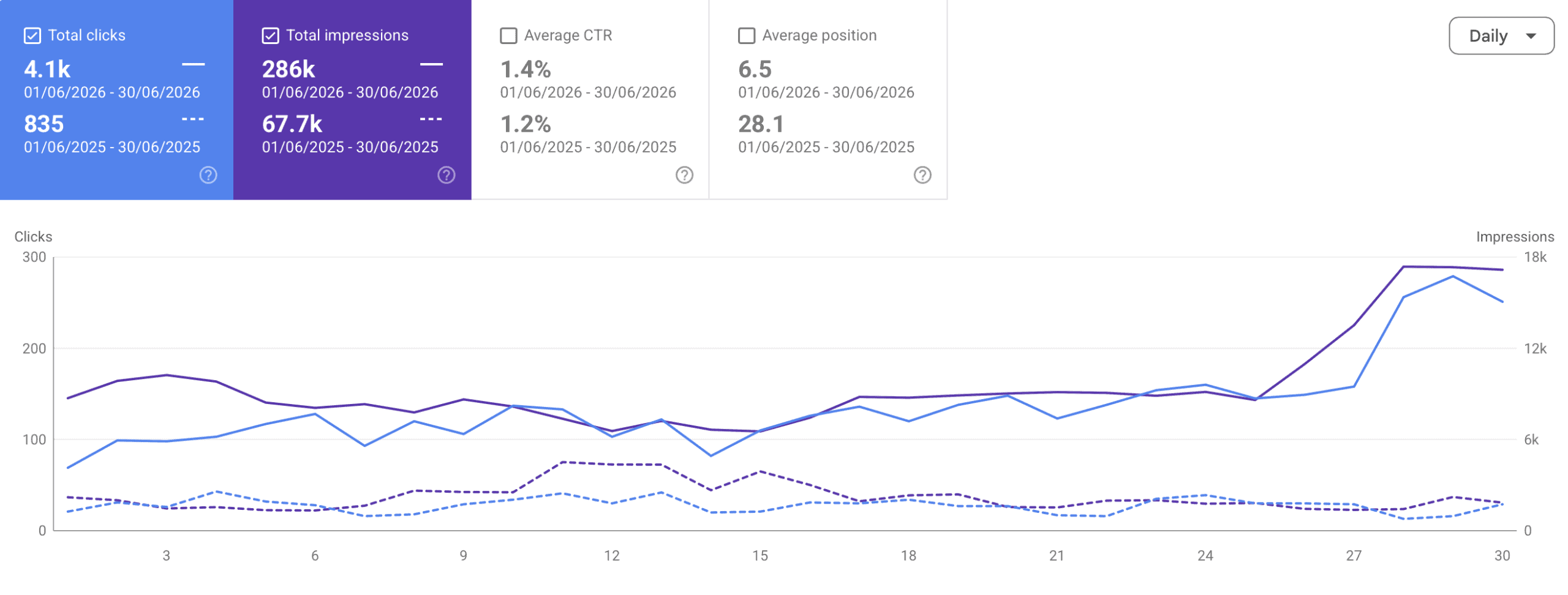
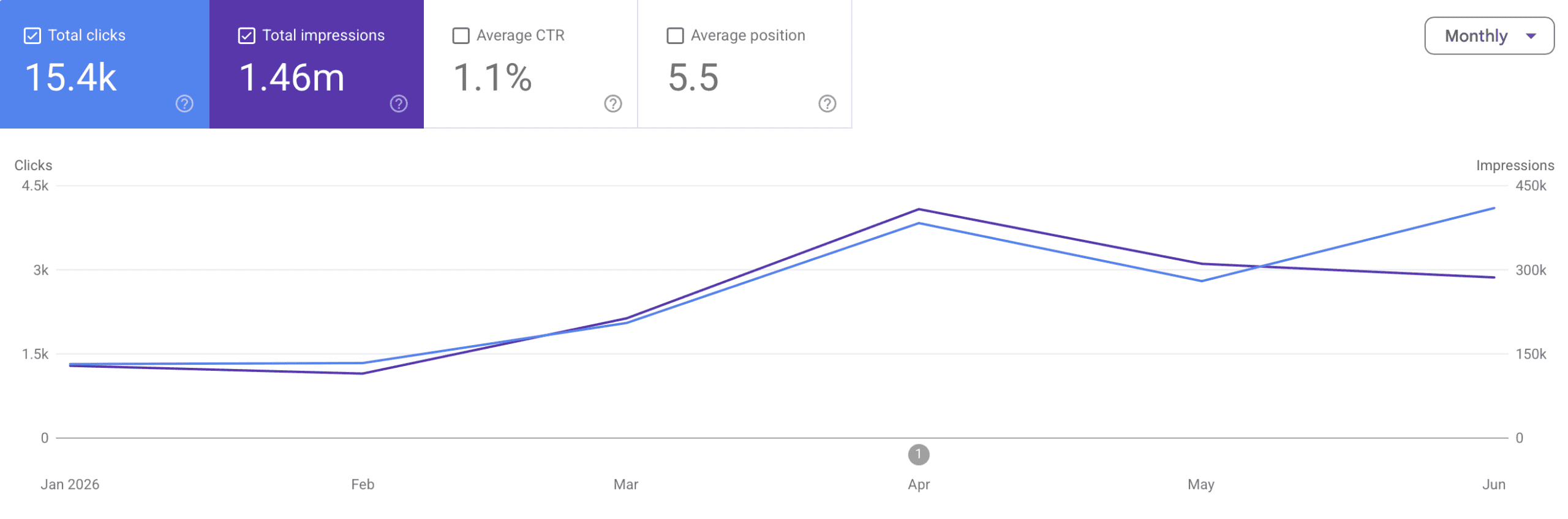
Measured from the start of the campaign, clicks and impressions have continually increased.
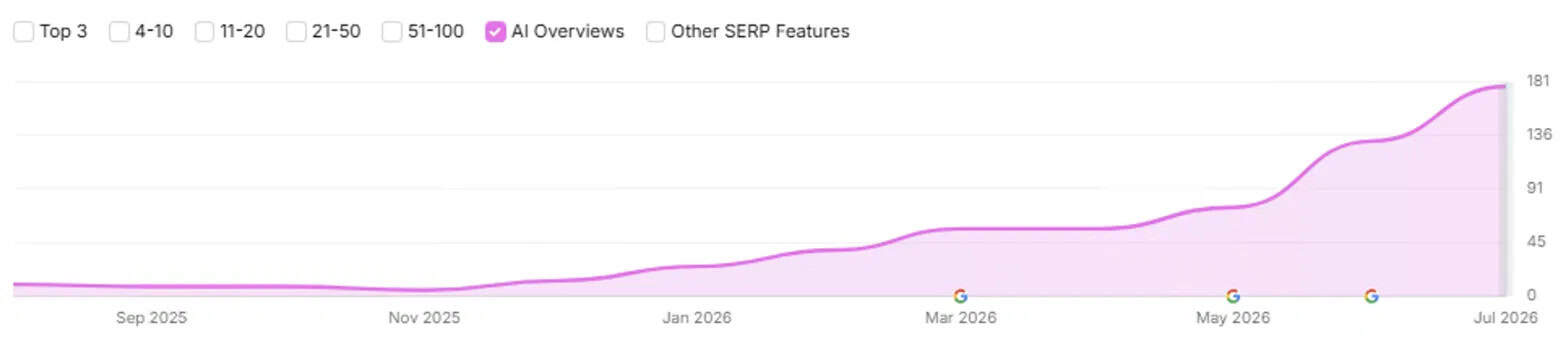
The site went from near-zero AI search visibility to appearing in 181 AI Overviews.
How did we achieve this?
- Independently checked the AI-built site before launch and fixed the SEO issues the AI workflow had missed, so the new site went live without losing traffic.
- Organised the content so AI tools can easily find, understand, and summarise the most important information.
- Strengthened the local signals to improve visibility in Google’s AI overviews.
Before we outline the strategy, let’s take a closer look at the client’s website and what was holding it back.
What Will I Learn?
A Closer Look At The Case Study
 Our client is a U.S.-based health clinic.
As a health provider, the client sits firmly in Google’s “Your Money or Your Life” (YMYL) category, where both search engines and AI systems apply extra scrutiny to Experience, Expertise, Authority, and Trust (E-E-A-T) before rewarding a site with visibility.
Before working with Search Logistics, the site was held back by a backlog of technical issues, and its expert content was barely showing up in AI-generated search results.
On top of this, the client was rebuilding the entire website using AI tools (Claude Design, Claude Code, and Claude Cowork), and wanted to launch it quickly, right as the site was hitting its highest-ever visibility.
Our goal was to fix the foundations and make the content far easier for AI systems to understand and surface, then get the new site live without losing a single ranking.
The Biggest Challenges We Had to Overcome
The most pressing challenges that we overcame during the course of this campaign were:
- Verifying an AI-built site before launch so it could go live at peak visibility without losing rankings or traffic.
- Restructuring authoritative content that had zero AI Overview visibility so AI systems could extract and cite it.
- Closing the local and near-me visibility gaps by optimising local search signals like Google Business Profile.
Create a Plan of Attack
The following is a practical guide to the three areas we focused on, starting with the migration.
If you’re facing similar challenges, you can apply the same approach to your own site.
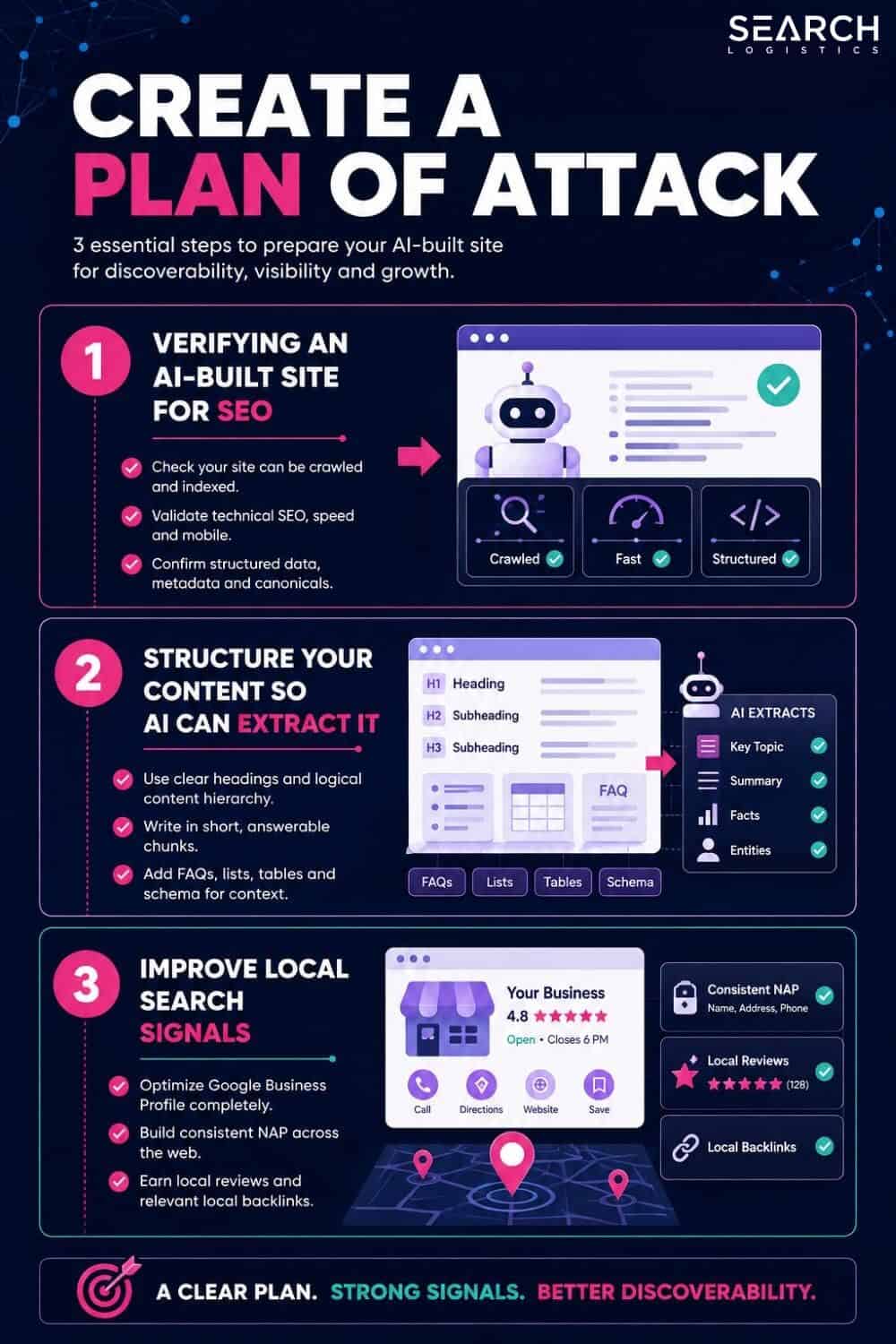
Step #1: Verifying an AI-Built Site for SEO
AI tools make it possible to design and build an entire website yourself, in a fraction of the time it used to take.
But a site that looks finished isn’t the same as a site that’s ready to launch.
Why Does an AI-Built Site Need Verifying?
AI optimises for how your site looks and works.
It doesn’t optimise for how it’s found.
Think of it like a house built without a surveyor.
Everything looks right from the outside, but nobody has checked whether the foundations will hold.
The SEO layer, redirects, canonicals, indexation rules, analytics tags, is invisible in the browser.
So it’s exactly the part an AI workflow is most likely to miss or get wrong, and the part you’re least likely to notice until your rankings start falling.
How to Launch an AI-Built Site Safely
✅ Agree A Staged Plan Before You Build Momentum:
Map out the sequence up front: analysis, redirects, testing, launch, then review.
Getting this agreed early is what lets you hold your launch date later without it becoming an argument, however keen you are to go live.
✅ Run Your Own Independent Crawl Of The Staging Site:
Don’t assume an AI-built site is clean just because it looks finished and does what you wanted it to do.
Crawl it yourself using an SEO tool like Screaming Frog before you give any go signal.

These are the issues AI build workflows most commonly miss, so check every one:
- Staging Isn’t Blocked From Crawlers:
Staging sites should carry a noindex rule or be disallowed in robots.txt so Google never sees them.
If that block is missing, your half-finished site can get indexed and start competing with your live pages.
What you want to see is a robots.txt that blocks everything:
User-agent: *
Disallow: /
or
<meta name="robots" content="noindex">
tag in the page head.
If neither is there, that’s the problem.
- Broken Pages Returning 404s:
AI builds often drop or rename pages without anyone realising.
A crawl will surface any URL that now returns a 404 (page not found), which is a page you’ll either need to restore or redirect before launch.
- Canonical Tags Looping To Old Or Incorrect URLs:
A canonical tag tells search engines which version of a page is the “real” one.

When these point at the wrong URL, you send confusing signals about which page to rank.
For example, a new services page should point to itself:
<link rel="canonical" href="https://yoursite.com/services/" />
but an AI build might leave it pointing at the old staging URL (https://staging.yoursite.com/services/), or at an entirely unrelated page.
Look for any canonical that doesn’t match its own live URL.
- Analytics Tags (GA4 & GTM) Firing On Staging And Contaminating Your Live Data:
If your GA4 or Google Tag Manager tags are live on the staging site, every internal click and test visit gets recorded into your real reporting, polluting your data with traffic that was never real.
Confirm the tags are either removed from staging or filtered out before launch.
- Pages Where Content Hasn’t Synced Across From The Live Site:
When a site is rebuilt page by page, it’s easy for the newest edits on your live site to never make it across.
Spot-check your priority pages so you don’t launch with an older version of your most important content.
- Redirect Chains Resolving In Two Or More Hops Instead Of One Clean Redirect:
A clean 301 redirect sends the old URL straight to the new one in a single step.
A chain sends it through two or more hops first, for example URL A redirects to URL B, which then redirects to URL C.

Each extra hop slows the page down and leaks a little ranking value, so aim to collapse every redirect to a single hop (A straight to C).
✅ Launch And Monitor Carefully:
The launch itself is where discipline pays off. Get the timing, the priorities, and the follow-up right, and the switch is a non-event.
- Hold Your Launch Date Until Every Item Is Closed:
This is the hardest one to stick to.
When you’ve built the site yourself and it’s sitting there ready, the temptation to launch early is enormous.
Keep the fix list open, get each item confirmed as done in writing, then re-crawl the staging site to verify the fixes actually took, rather than trusting that they did.
Only go live once you’ve recrawled the site and are confident that the issues have been resolved.
- Monitor Hard For The First Two Weeks:
Submit the new sitemap in Search Console and use the URL Inspection tool to request indexing on your priority pages.
Then watch daily: track clicks, impressions, and average position against your pre-migration baseline.
Keep an eye on the Pages (index coverage) report for new 404s or excluded pages, and check the Crawl Stats report for errors.
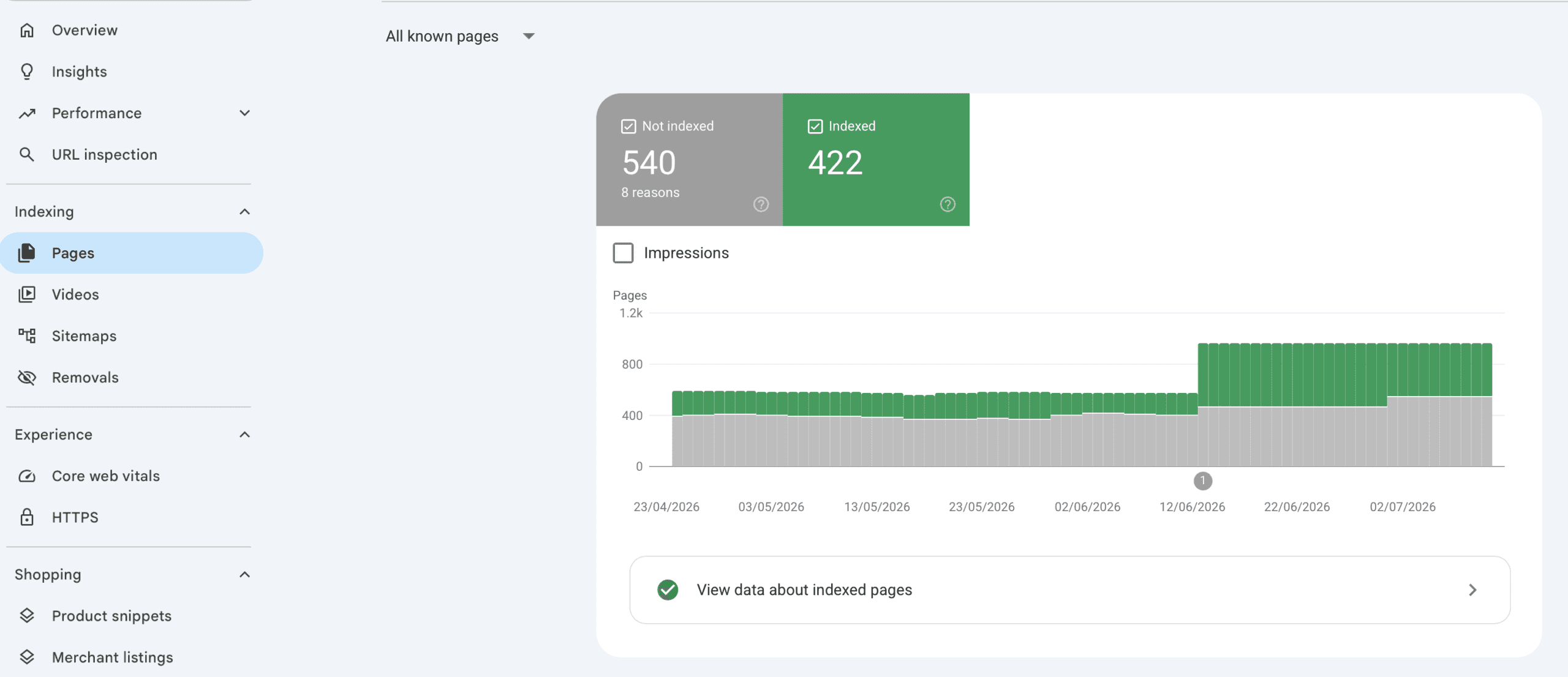
Handled this way, you can make sure that your migration becomes a controlled process rather than a gamble.
Step #2: Structure Your Content So AI Can Extract It
You don’t need to write more content to win AI Overviews. Most sites already have the expertise sitting on the page.
The problem is that it isn’t packaged in a way AI systems can lift and reuse.
Why Does Packaging Content for AI Matter?
AI models don’t read your page the way a person does.
They scan for the single passage that answers a question, then quote or summarise it in their response.
That means where you place your answer often matters as much as the answer itself. A fact buried in the eighth paragraph is far harder for an AI to isolate than the same fact stated cleanly at the top of the page.
Package it well and you make yourself the easiest source to cite.
How to Package Your Content for AI
Follow the techniques below to help improve AI’s readability and extractability of your content:
✅ Lead With the Answer:
Write a concise, accurate answer to the page’s main question in the first one or two sentences, so AI can pull it straight into its recommendation or answer.
For example, here’s the AI overview for:
“how often should you replace your toothbrush”.
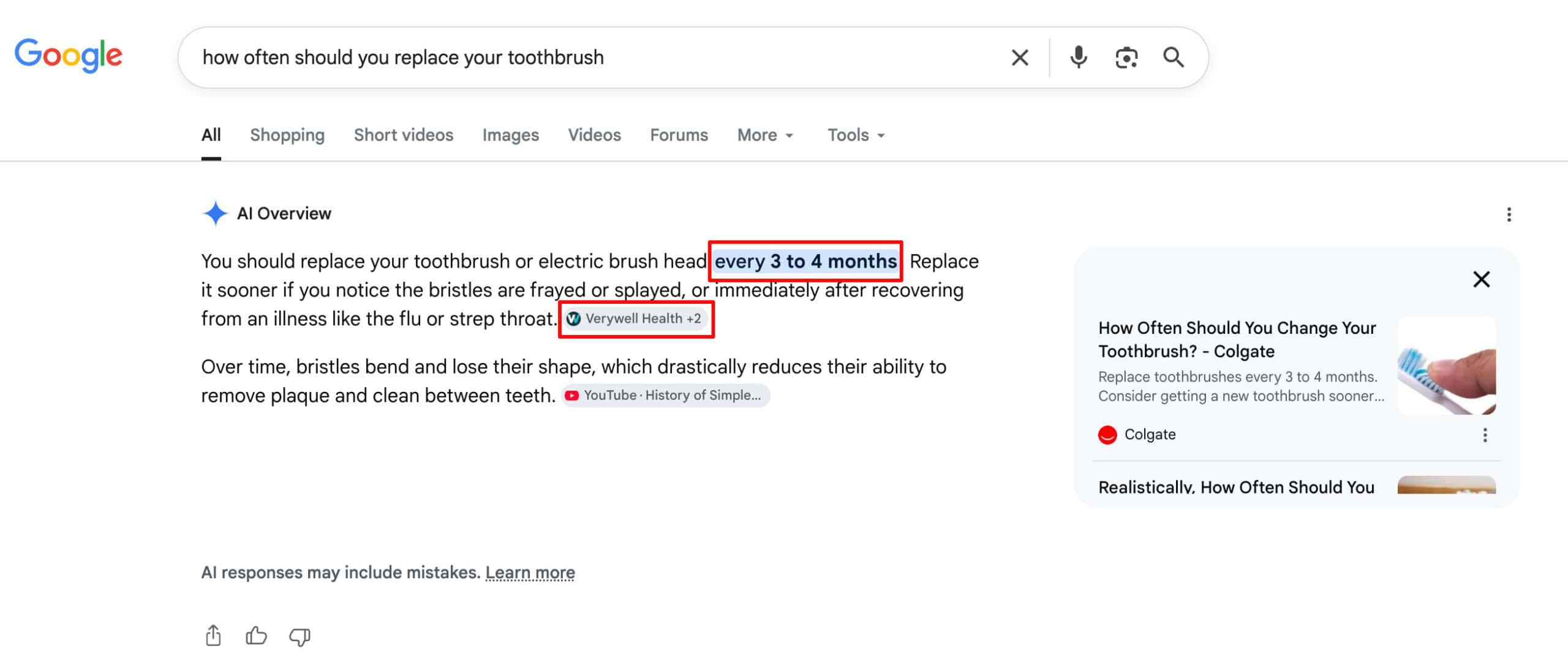
The page cited, has answered the question straight away in the first few sentences of the main content.
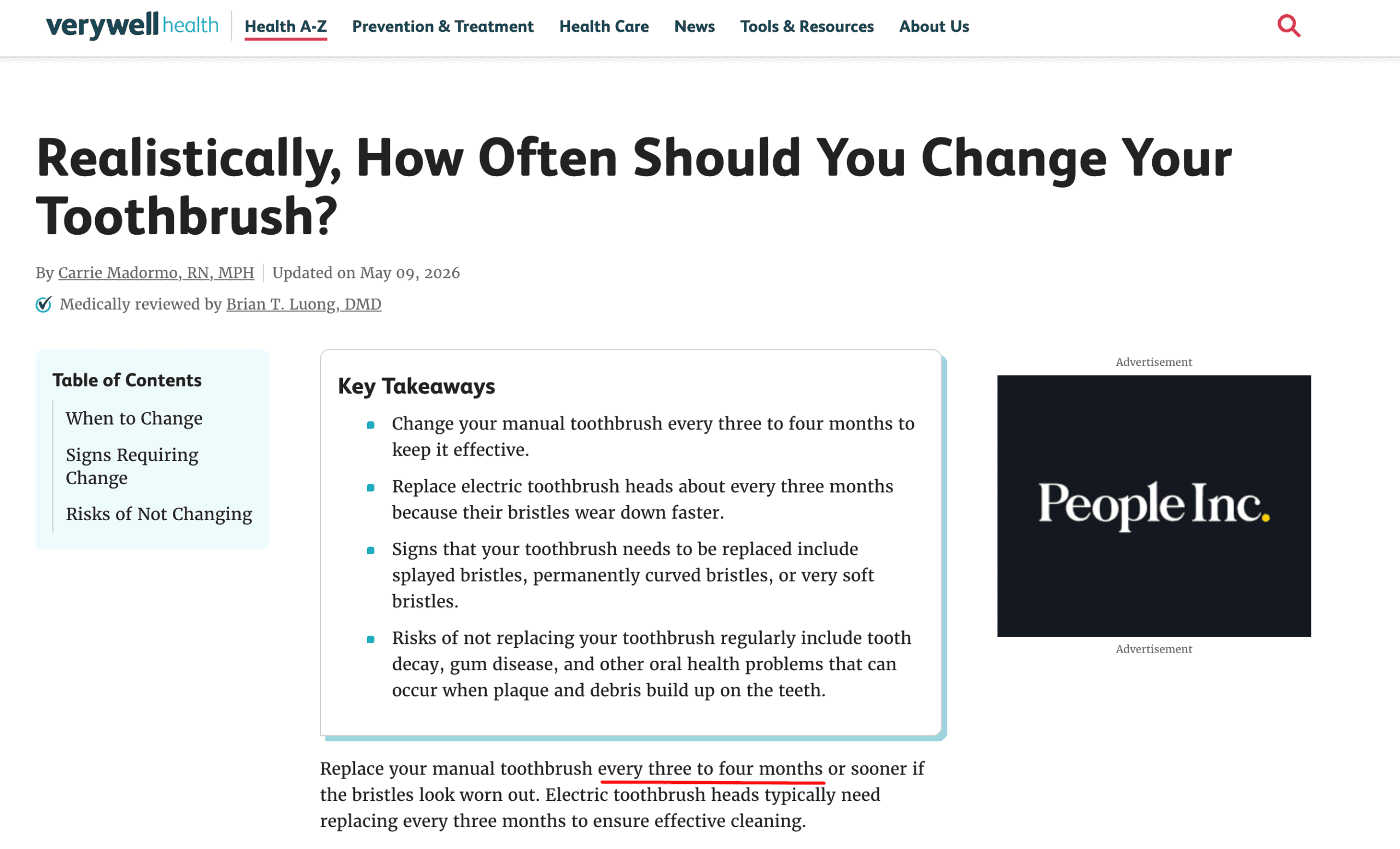
But don’t stop at the short answer.
You can then expand below with more information like types of toothbrushes (manual vs electric), when to swap it sooner (after a cold or the flu), and how electric brush heads differ.
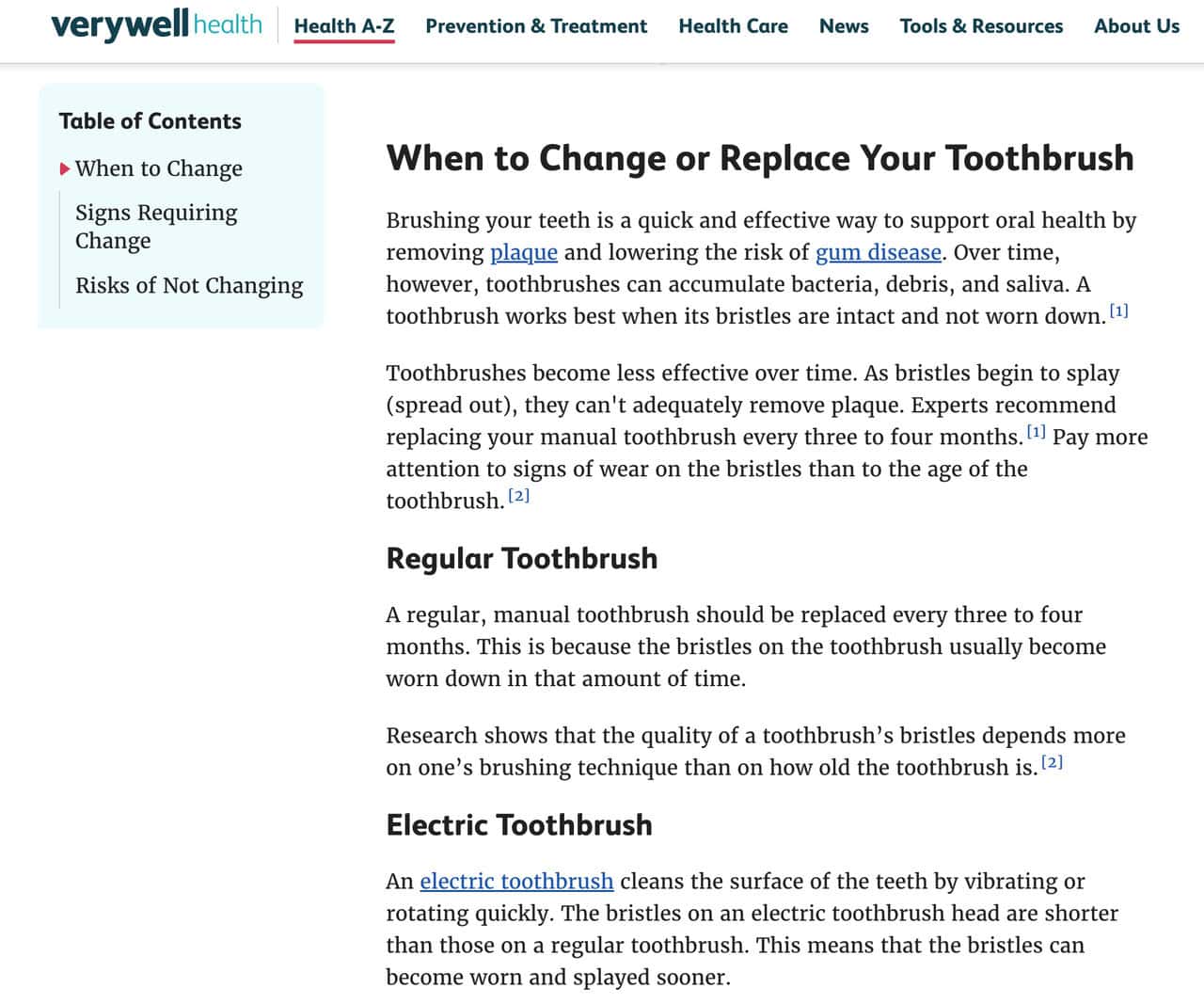
Google’s AI can cite your one-line answer, while the fuller page is what earns the click.
✅ Use Lists for Steps and Options:
When your answer is a sequence of steps or a set of options, format it as a numbered or bulleted list rather than burying it in a paragraph.
AI systems lift lists almost verbatim, so this is one of the easiest formats for them to reuse in a step-by-step or how-to answer.
Use numbered lists where the order matters and bullets where it doesn’t.
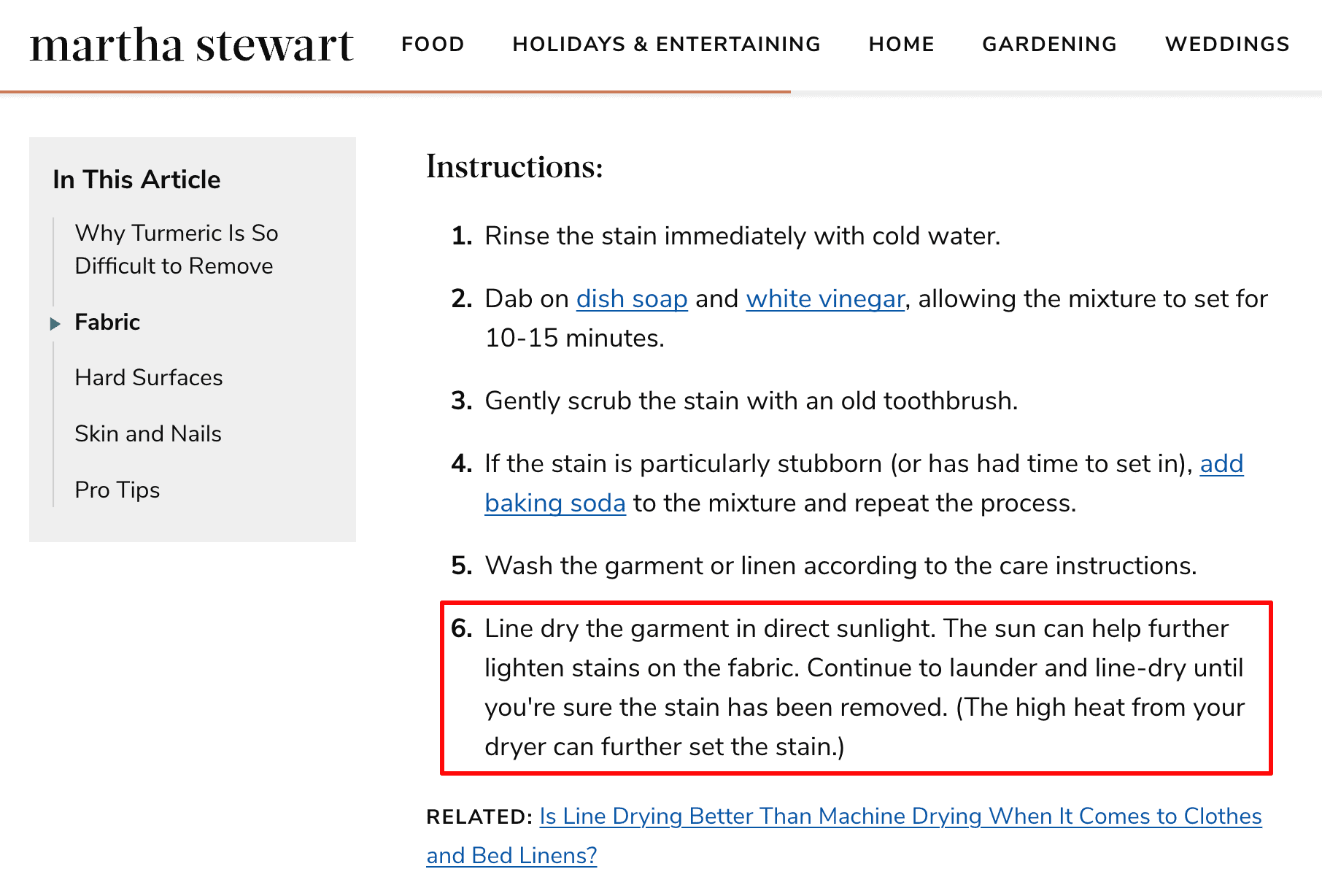
Here’s an example of a web page that has used a numbered list of instructions on how to remove turmeric stains from clothes:
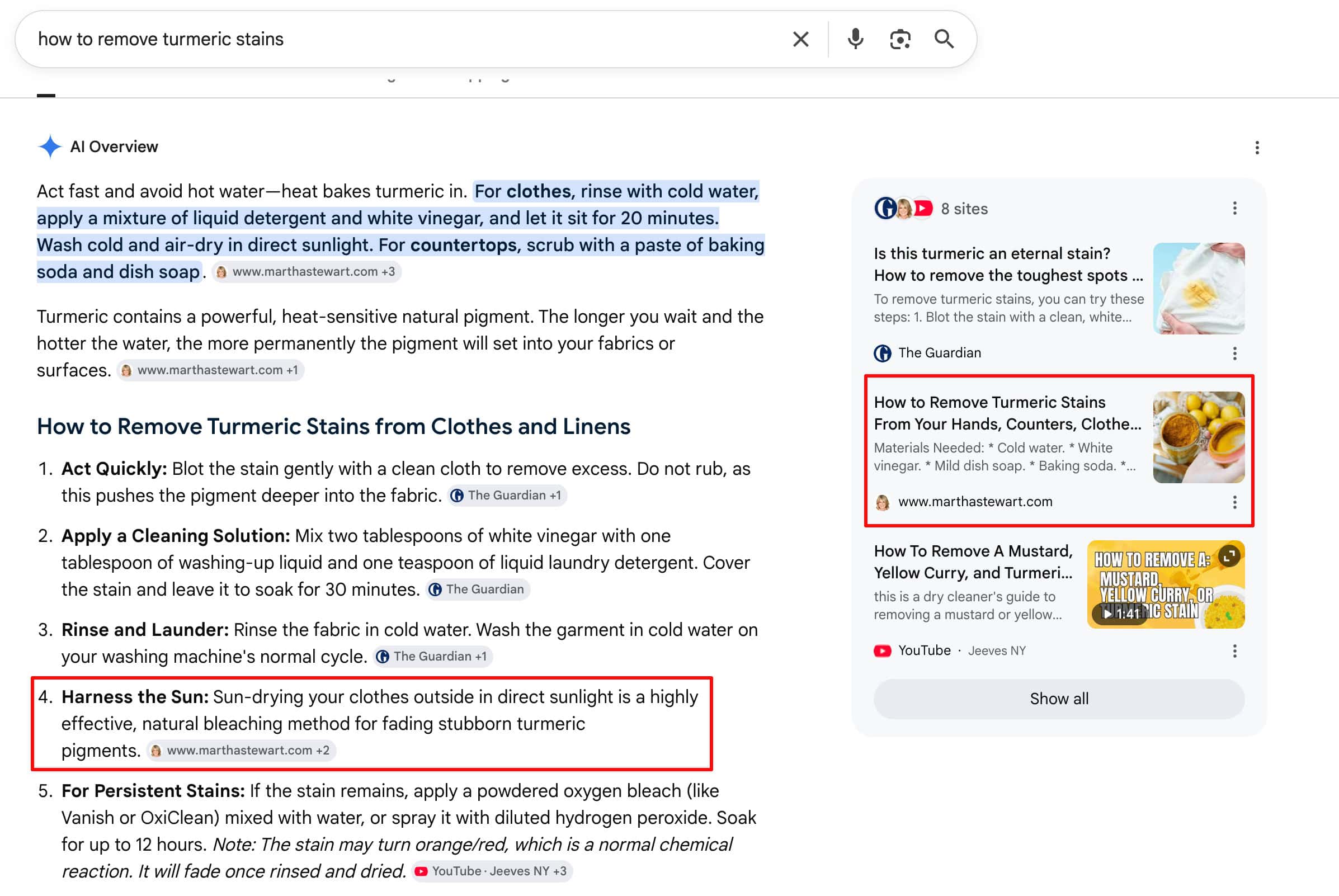
And here’s the AI overview for that question:
✅ Use Clear, Structured Formatting:
AI relies on the structure of your content to better understand and extract the right information.
This also has the added benefit of making it easier for your audience to quickly scan the page to find what they’re looking for.
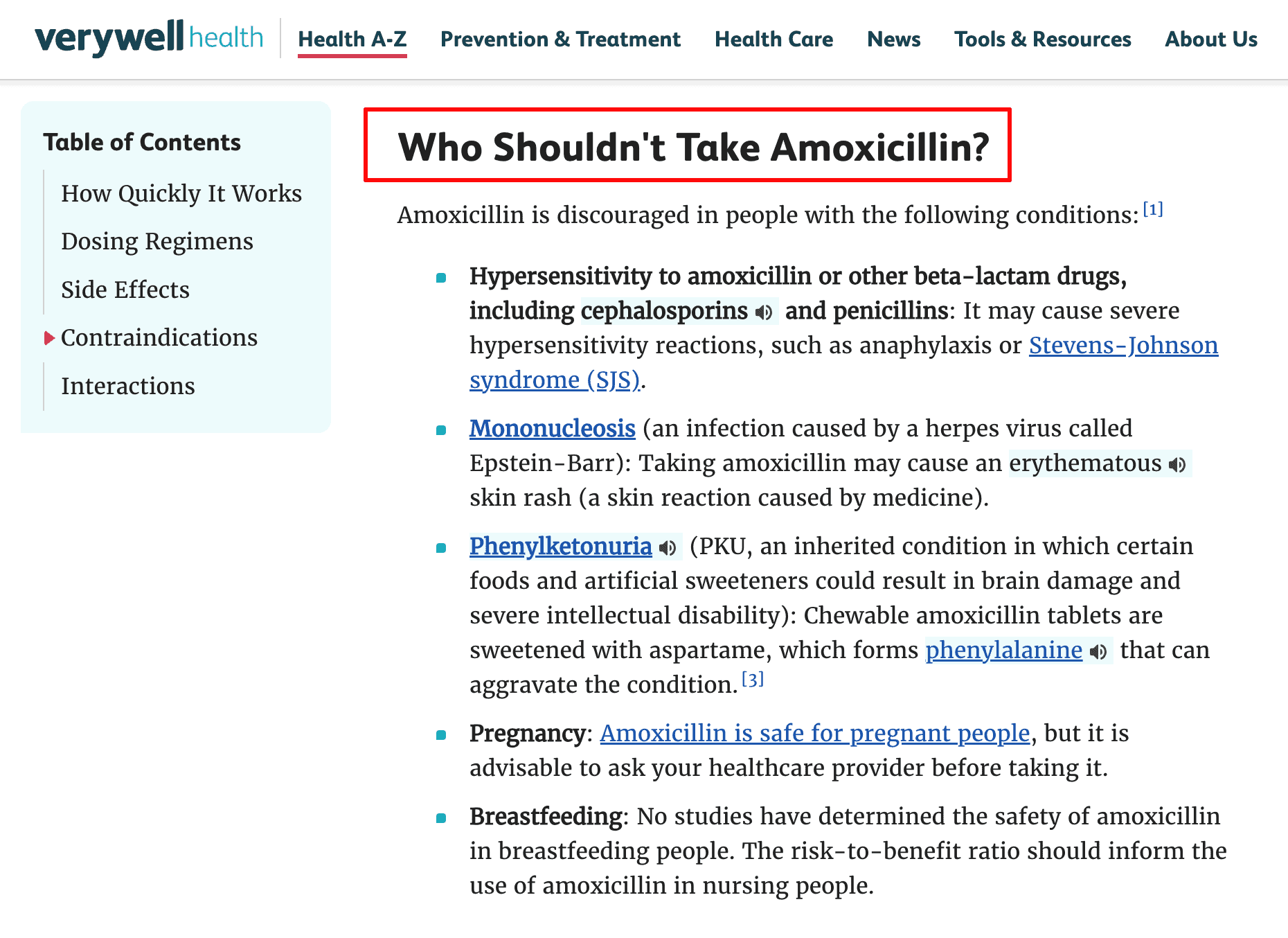
Write your subheadings in a way that matches or closely reflects the question a user might ask.
Here’s an example of a page where this is followed:
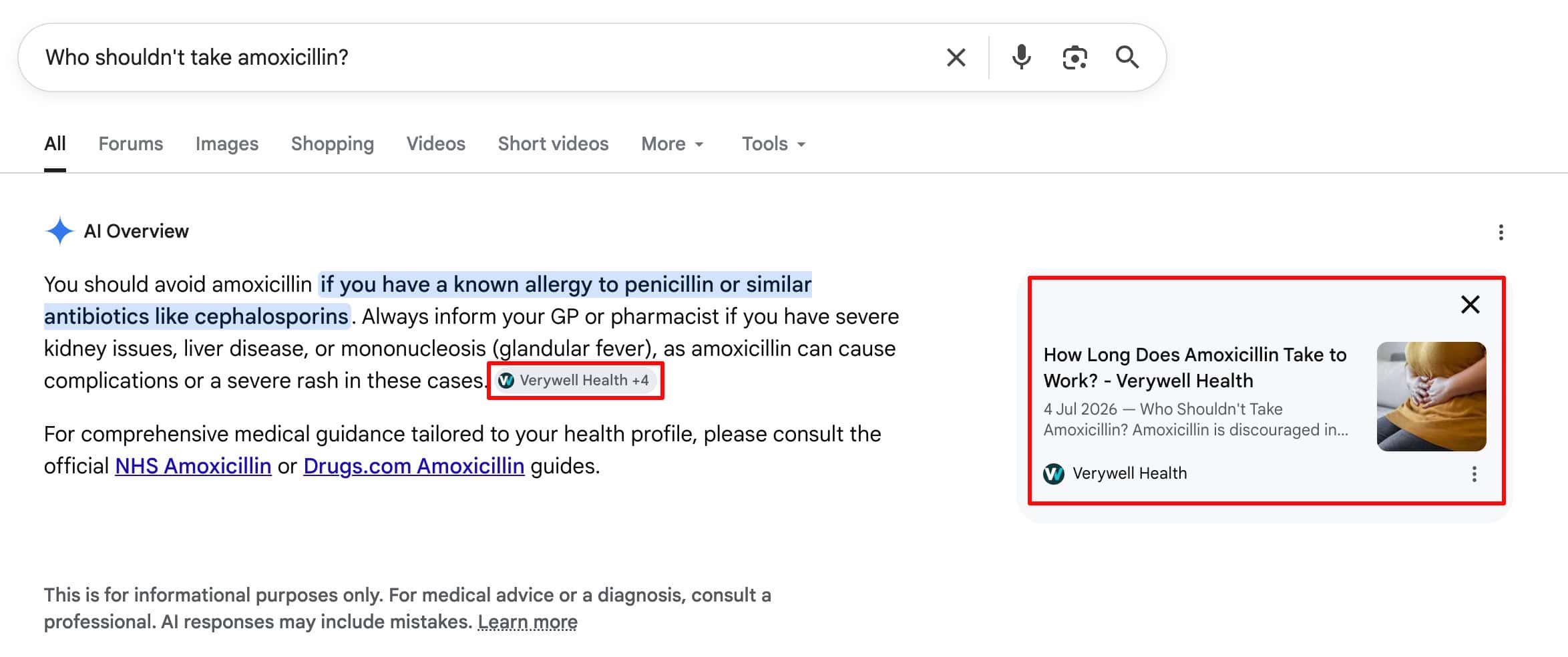
Making it much easier for AI to extract the relevant information for its answer.
Following these simple tips will help make sure that your content is easy for AI to extract and cite.
Step #3: Improve Local Search Signals
For any business with physical locations, the local searches are the ones that convert. This is where commercial value is won or lost.
Why Does Your Google Business Profile Matter for AI Search?
Someone searching for a service near them is much further along than someone reading a guide, so these are the highest-intent searches you can rank for.
What’s changed is where those searches get answered.
It isn’t just the local pack anymore.
Ask ChatGPT or Perplexity to recommend a provider in a particular city and you’ll get a shortlist, and Google’s AI Overviews increasingly appear above the map results for local queries too.
Your Google Business Profile is central to whether you make those shortlists.
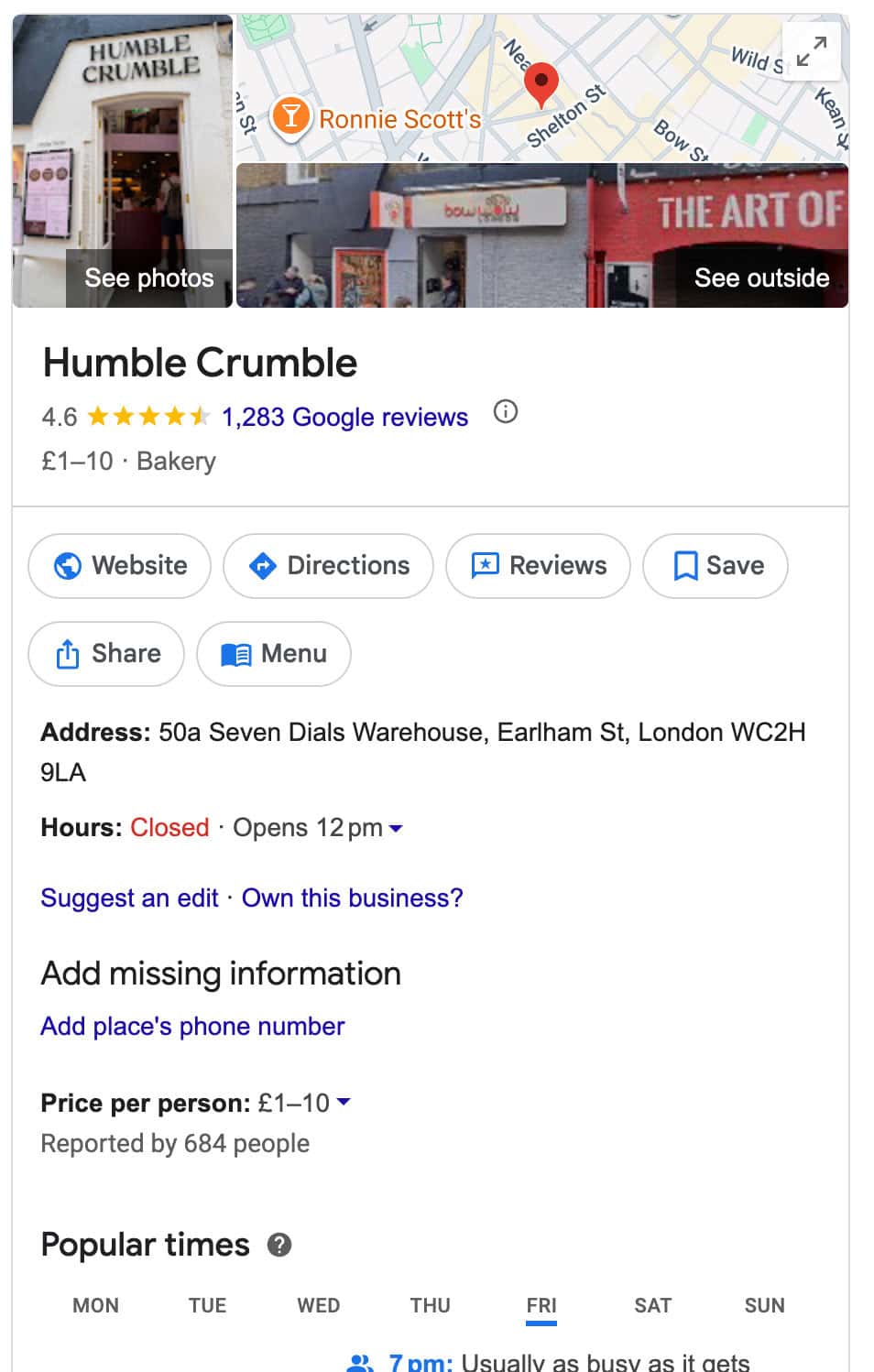
Google’s own guidance on its AI features tells site owners to keep their Business Profile information up to date, which tells you plainly that this data feeds the AI answers.
How to Optimise Your Google Business Profile
Work through every field.
AI systems can only reference what you’ve actually told them.
✅ Claim and Verify Every Location:
If you operate from more than one site, each needs its own claimed, verified profile.
Unverified listings carry far less weight, and unclaimed duplicates split your reviews and signals across two entries, so merge or remove any you find.
✅ Get Your Business Name and Categories Exactly Right:
Use your real-world business name with no added keywords, since keyword stuffing here risks suspension.
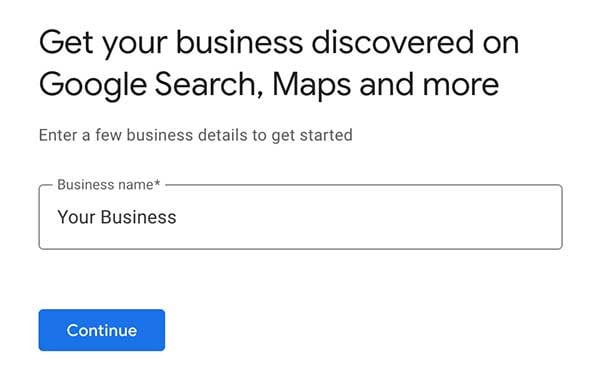
Then choose the most accurate primary category and add secondary categories for your other services.
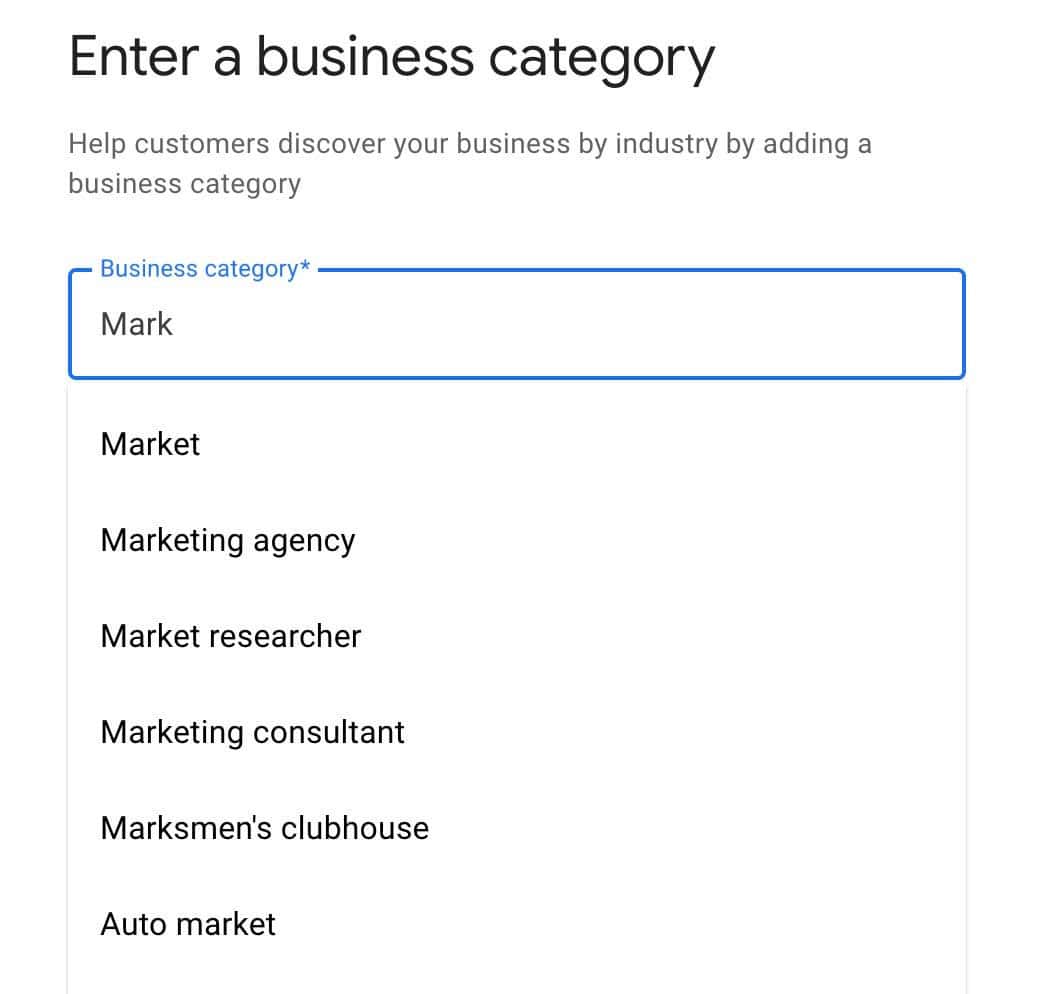
Your primary category has an outsized influence on which searches you’re matched to, so it’s worth getting right rather than settling for the closest obvious option.
✅ List Your Services Individually:
Don’t rely on one broad category to communicate everything you offer.
Add each service as its own entry with a short description, using the words your customers actually use.
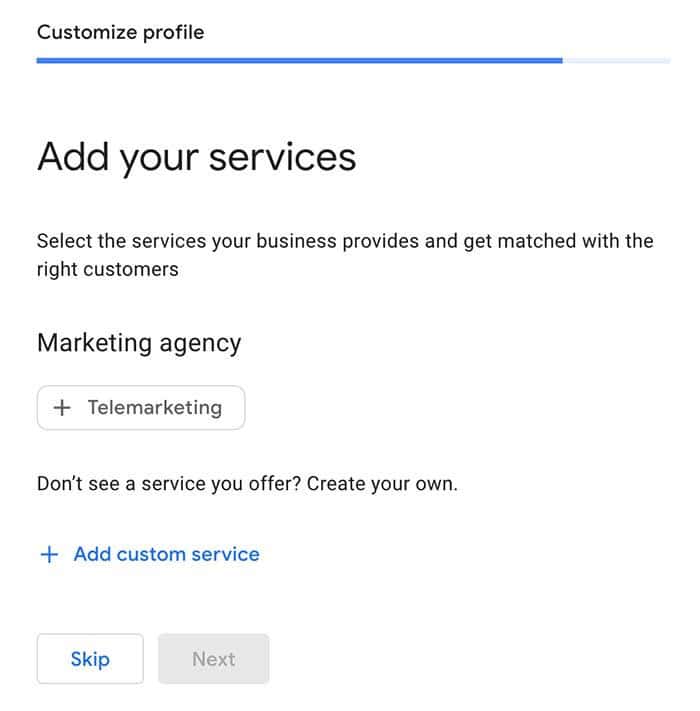
This gives AI explicit confirmation that you provide a specific service, rather than leaving it to infer.
✅ Write A Description That Answers Who, What, and Where:
You have 750 characters, and the first 250 matter most since that’s what usually gets displayed.
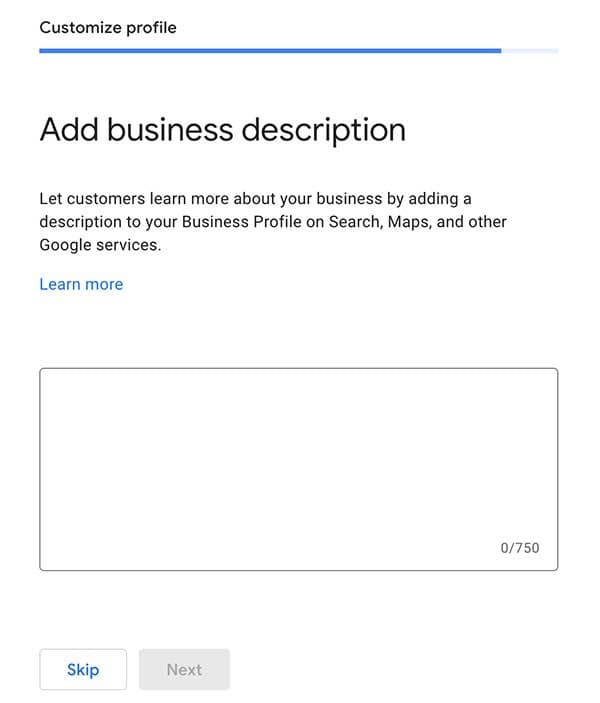
Cover what you do, who you serve, and where you operate, in natural language.
A vague description like:
“We provide quality care to our patients”
…tells an AI nothing it can match a query against.
Something like:
“A family-run dental practice in Birmingham offering routine check-ups, emergency appointments, and cosmetic treatments for patients across the West Midlands”
…gives it the service, the location, and the audience in one pass.
✅ Complete Your Hours, Contact Details, and Location:
Keep your standard hours accurate and use the special hours feature for holidays and one-off closures, since outdated information is a signal that the whole profile may be stale.
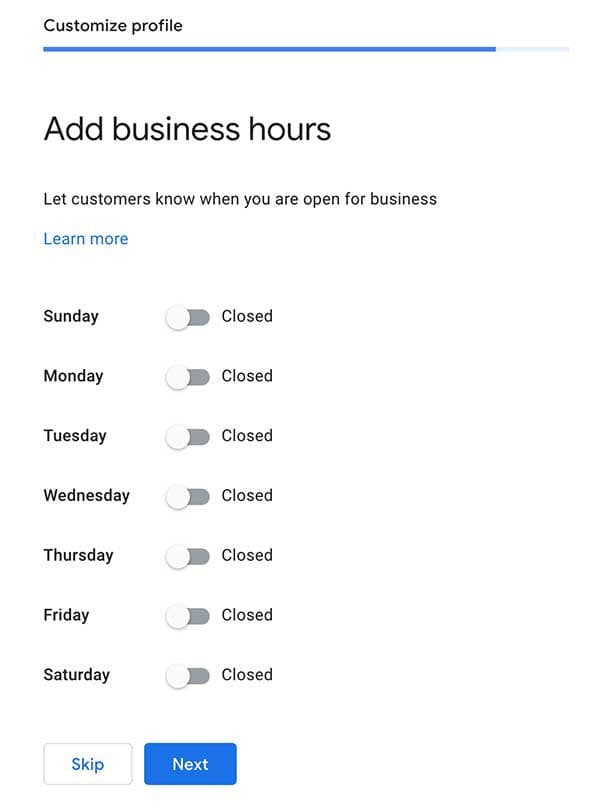
Add a primary phone number, your website, and drop the map pin precisely on your entrance rather than roughly on the building.
✅ Upload Real Photos and Keep Adding Them:
A profile with genuine, current photos of your premises, team, and work looks active and verifiable.
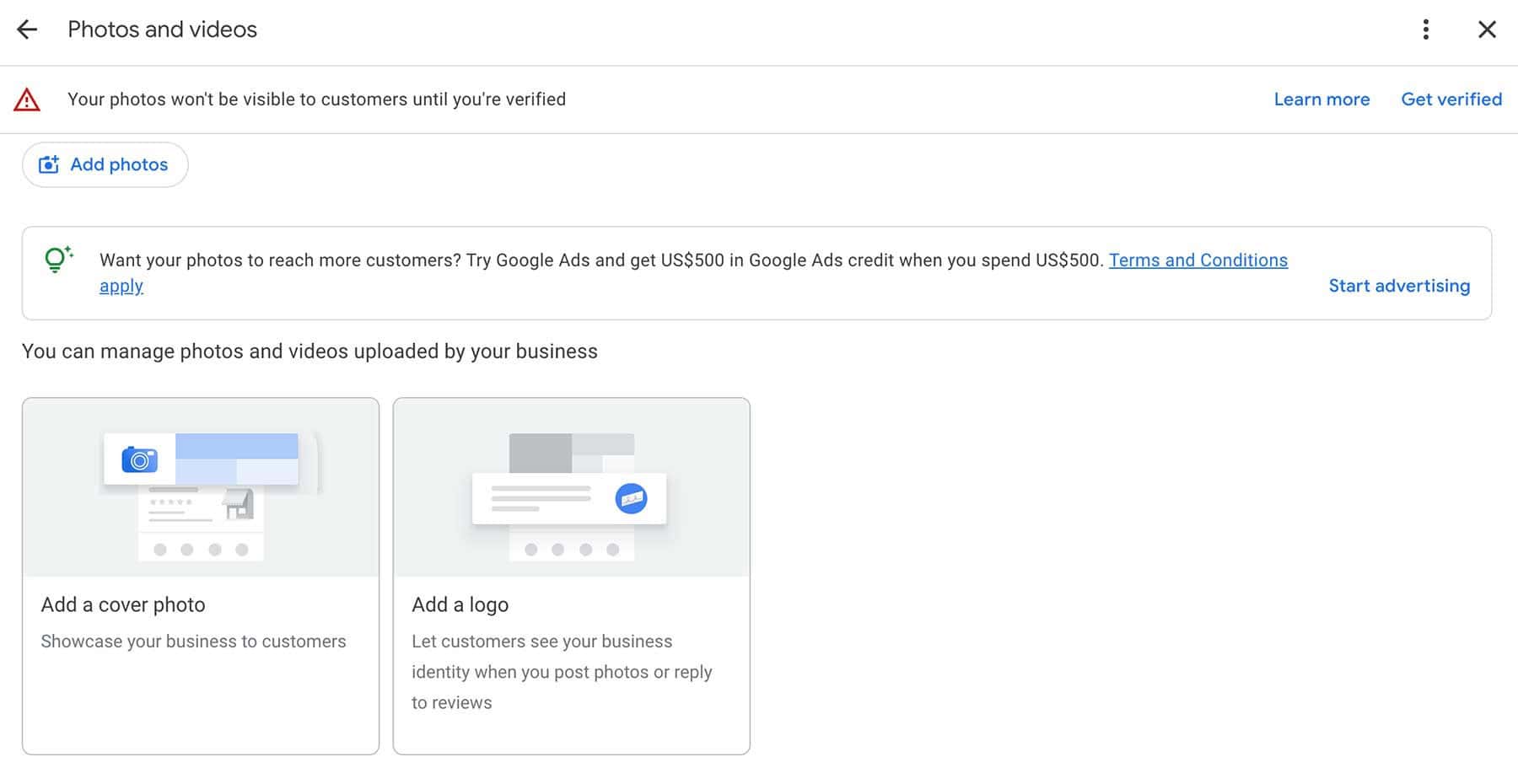
Cover the essentials:
A logo, a recognisable exterior shot so people can find you, interior photos so they know what to expect, and photos of your team.
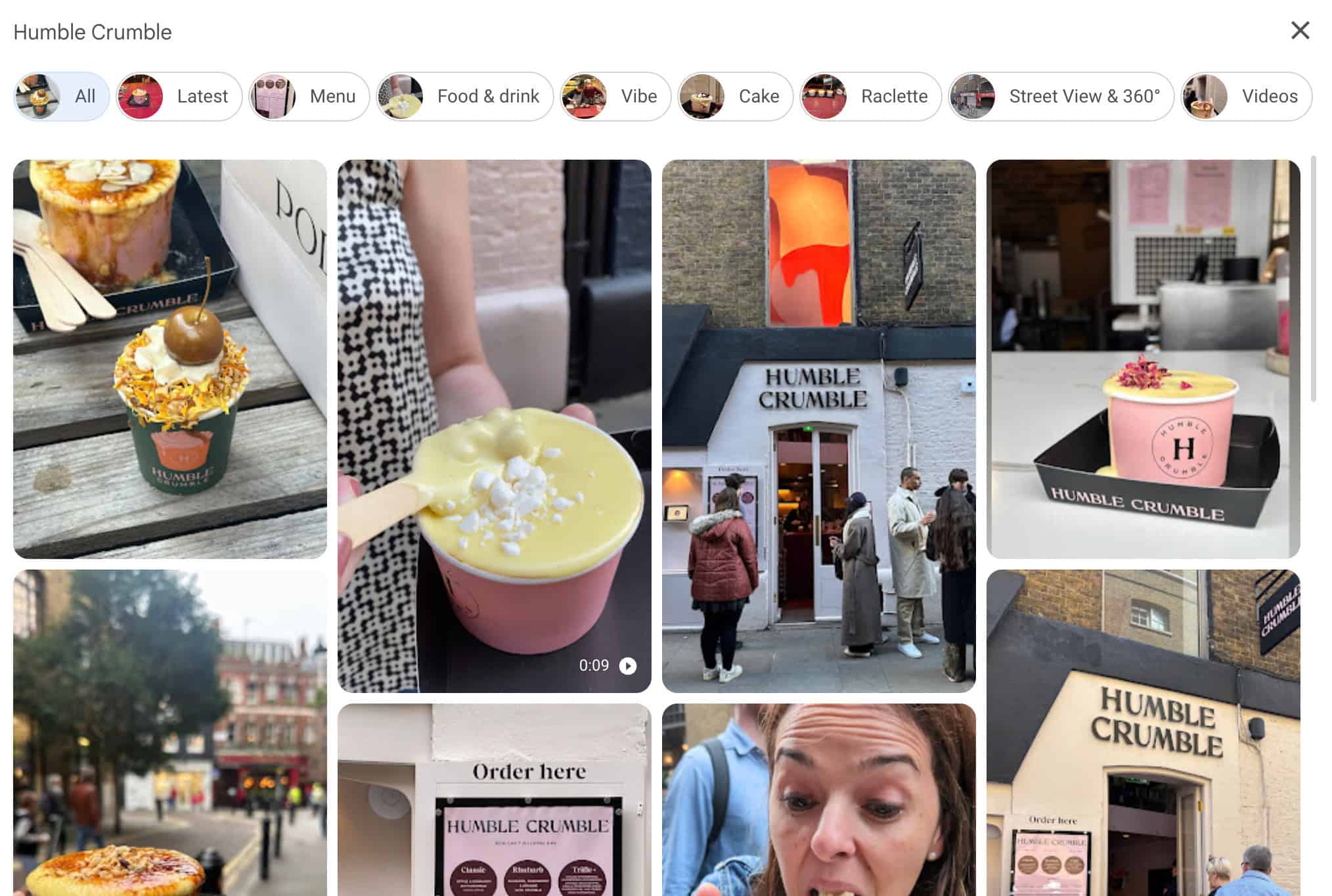
Fresh uploads also signal that the business is still operating, which matters when an AI is deciding whether to recommend you.
✅ Build and Respond To Reviews:
Reviews are one of the strongest signals AI systems use to decide who to recommend, and volume genuinely matters.
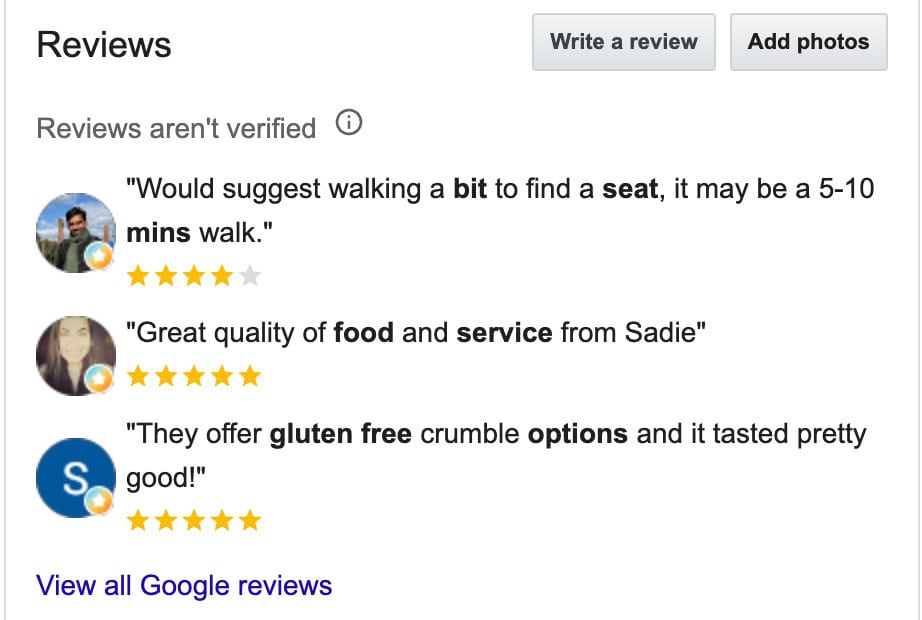
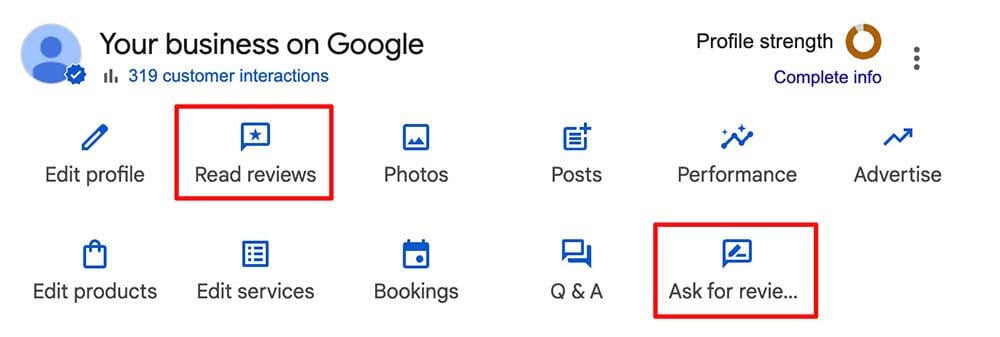
Ask for reviews using Google’s built-in “Ask for Reviews” button in your profile and never offer an incentive, since that breaches Google’s policies and can get your profile penalised.
Then reply to every review, positive or negative.
Your replies add context an AI can read, and handling criticism well is visible to both future customers and the systems summarising your reputation.
Optimising your Google Business Profile with the above helps you show up for searches like this in Google’s AI overview…
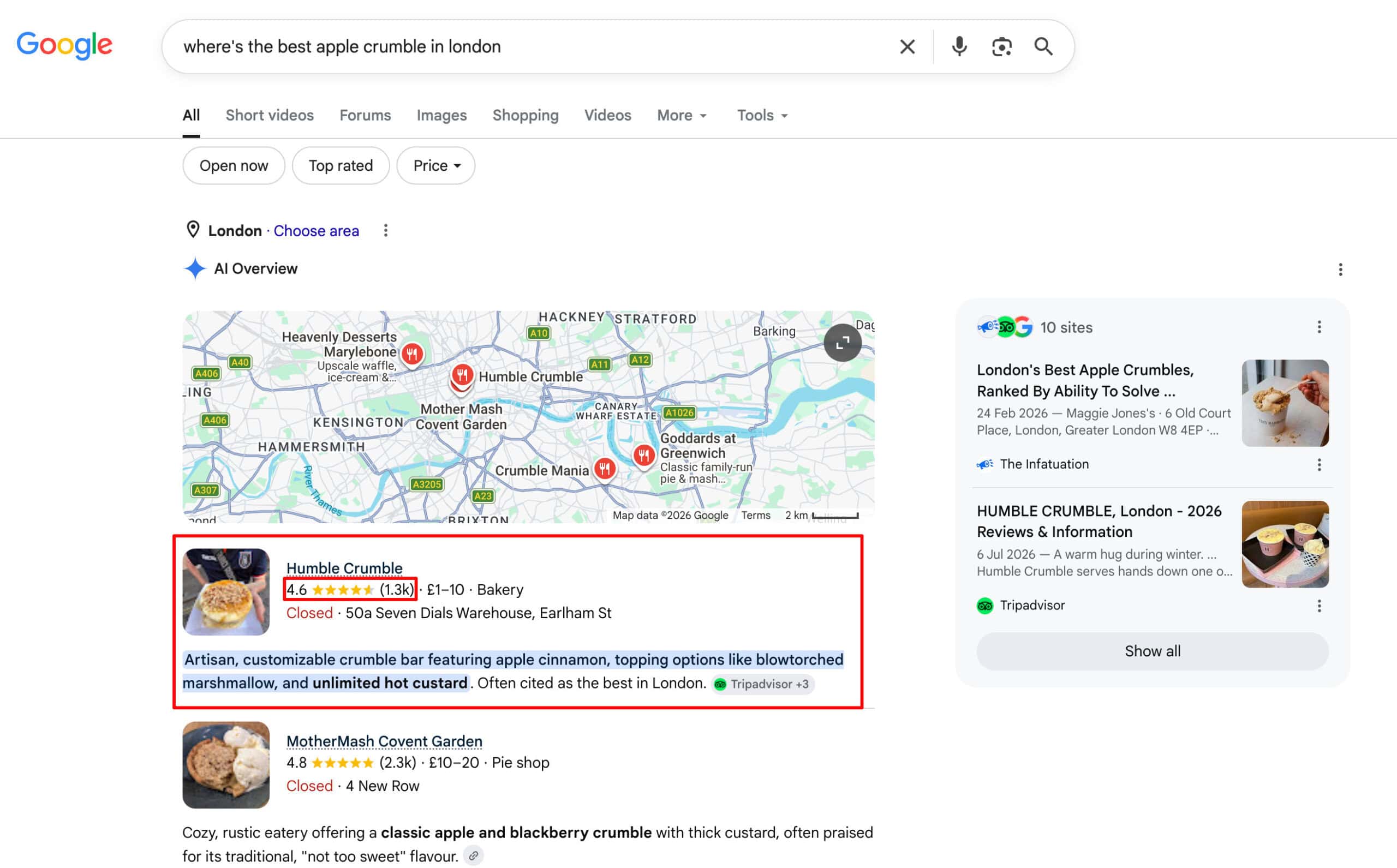
Get Your Details Consistent Everywhere Else
Your profile doesn’t work in isolation.
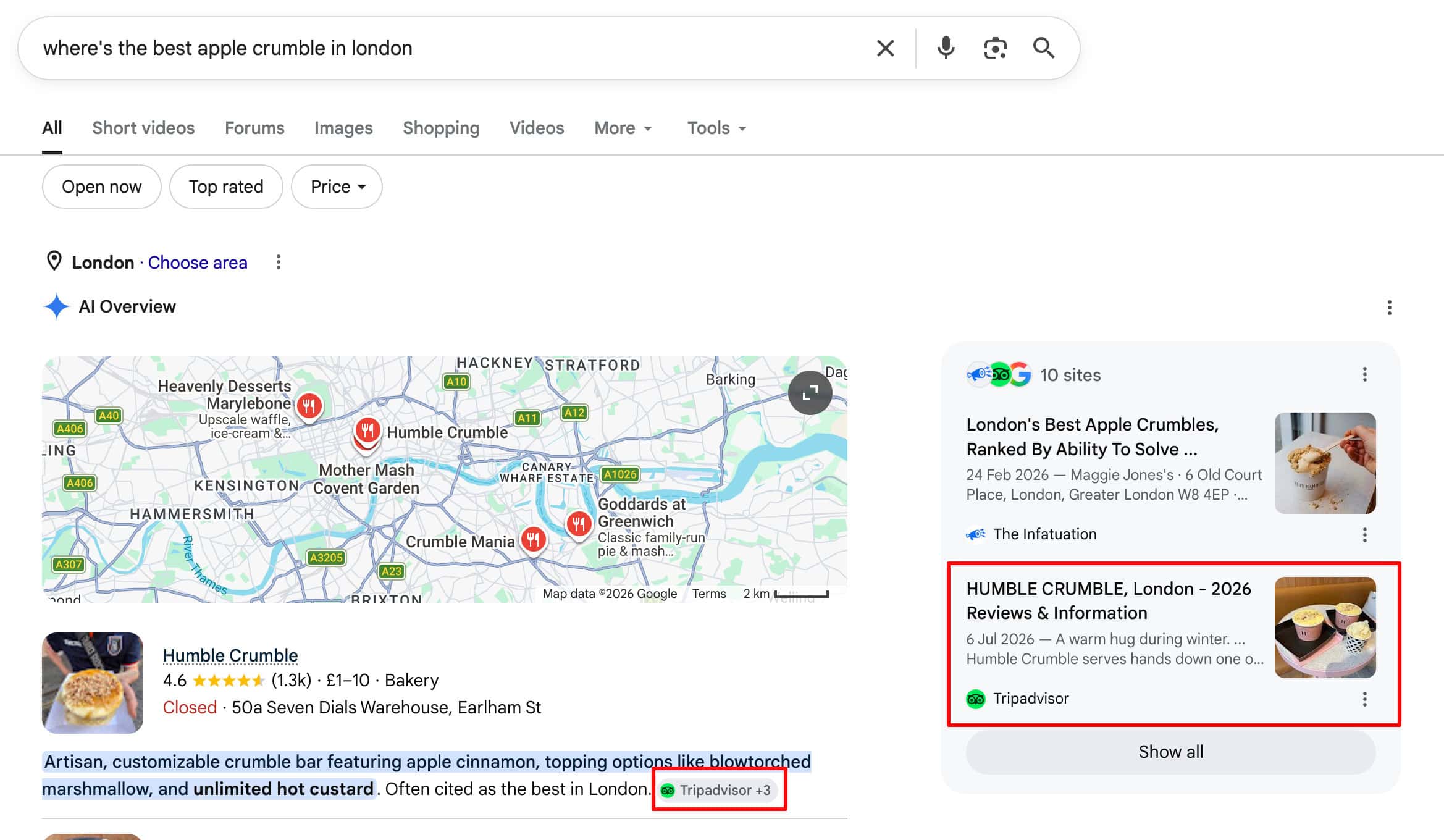
AI systems cross-check what they find across multiple sources and favour the businesses whose details agree everywhere.
In the same example as above, you can see that Google’s AI Overview also pulled from Humble Crumble’s Trustpilot page.
Here are some tips on what you need to do to further strengthen your local search signals:
✅ Run a NAP Consistency Audit:
Your Name, Address, and Phone number need to match everywhere they appear online.
Even small differences can cause doubt.
If your contact page says “123 King Street, Suite 200” but a directory shows “123 King St #200”, AI can’t be certain it’s the same business.
Pick one canonical version, right down to the abbreviations, and use it everywhere.
✅ Get Listed On The Platforms That Matter In Your Industry:
Alongside the general directories like TrustPilot, Tripadvisor, Yelp etc, prioritise the ones specific to your sector, since these carry the most weight when an AI is verifying a specialist provider.
For example:
For SaaS or tech companies, platforms like G2 and Capterra are great, whereas for Restaurants, you’ll likely want a page on Eater, OpenTable or Zomato.
Complete each listing properly.
A half-filled profile gives AI systems less to work with, and every empty field is a question about your business they can’t answer:
- Description:
Explain what you do and where in the language your customers use, rather than internal or industry jargon.
- Categories and Tags:
Map your actual services onto whatever categories the platform offers, and select every one that genuinely applies.
- Website and Social Links:
Link back to your site and profiles so systems can connect the listing to the rest of your presence.
- Photos and Video:
Upload clear, current, properly cropped images of your premises, team, and work.
- Alt Text and Captions:
Where the platform allows it, describe what’s in each image so its content is readable rather than invisible.
The goal here is to give AI and search engines as much consistent and up to date information about your brand or business as possible, so that it can confidently recommend and cite you within its answers.
Results
Year-on-year (June 2025 vs June 2026):
- Organic clicks grew by nearly 5x from 835 to 4,100 per month
- Impressions grew more than 4x from 67.7k to 286k
- Average position improved from 28.1 to 6.5.
Measured from the start of the campaign, clicks and impressions have continually increased.
The site went from near-zero AI search visibility to appearing in 181 AI Overviews.
Keywords in the top 3 positions and top 10 positions of Google are at an all time high.
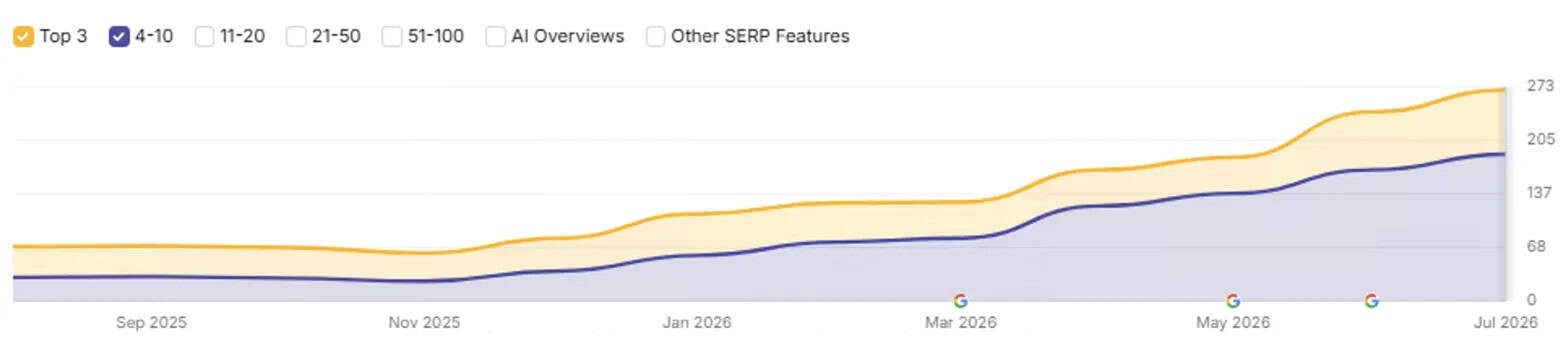
As seen above, the new site launched with zero ranking or traffic loss, at the site’s highest-ever visibility.


What Are Your Thoughts?
One Response
From 0 To 181 AI Overviews Citations
Campaign Challenges:
- Verifying an AI-built site before launch.
- Restructuring authoritative content that had zero AI Overview visibility.
- Strengthening local search signals.
Campaign Results:
181
AI Overviews Mentions
5x
Organic Search Traffic
Case Studies
In this case study, we show how making content more trustworthy, improving AI extractability, and adding structured data helped our client drive more qualified referral traffic from ChatGPT and Perplexity.
CAMPAIGN RESULTS:-
 157
157
AI Overviews Mentions
-
+700%
AI Referral Traffic Growth
In this case study, we’ll break down exactly how we increased our client’s search traffic by 30% using LLMs to reclaim visibility.
CAMPAIGN RESULTS:-
+30%
Monthly Organic Traffic
-
#1
Position For A High Ranking Keyword
In this case study, we show how combining genuinely helpful content with structured data and a proven link building strategy led to measurable gains in traffic for our client.
CAMPAIGN RESULTS:-
8,305
Monthly Sessions
-
234
Top 3 Ranking Keywords

In this case study, I’ll show you how we increased our client’s monthly organic traffic by 58.72% by building authority and improving user experience.
CAMPAIGN RESULTS:-
+58.72%
Organic Traffic
-
1,179
Top 10 Ranking Keywords

This SaaS SEO case study uncovers how to transform blog visitors into customers by optimising for conversions.
CAMPAIGN RESULTS:-
+391%
Monthly Sessions
-
2,193
Top 10 Ranking Keywords

Learn how we increased our clients’ new leads by 50%, overhauling their service pages, optimizing their Google Business Profile, and growing their domain authority.
CAMPAIGN RESULTS:-
+50%
New Client Leads
-
+21.33%
Monthly Sessions
 +50%
+50%

In this case study, you’ll learn how we helped our client grow by 2,550% by fixing on page SEO issues with content and indexation.
CAMPAIGN RESULTS:-
+2,550%
Organic Traffic
-
339
Top 10 Positions

In this case study, you’ll see how we grew our client’s monthly organic revenue by 493% after optimizing key pages.
CAMPAIGN RESULTS:-
+493%
Monthly Revenue
-
+316%
Organic Traffic

Learn how we grew search traffic by 44% in just 12 months without building any new links to the site!
CAMPAIGN RESULTS:-
+44%
Organic Traffic
-
6,694
Top 10 Results

In this case study, you’ll see how we grew our client’s organic traffic by 288% after implementing a complete site migration.
CAMPAIGN RESULTS:-
+223%
Organic Traffic
-
411
Top 10 Rankings

In this case study, you’ll see how we more than doubled our gambling client’s monthly sessions from 52k visits to over 77k in just 12 months.
CAMPAIGN RESULTS:-
+180%
Conversions
-
735
Top 10 Rankings

In this case study, you’ll see the exact strategy we used to grow our gambling client’s organic traffic by over 800%.
CAMPAIGN RESULTS:-
+889.91%
Organic Traffic
-
1,063
Top 10 Rankings

These are the 4 steps we followed to drive our clients websites to 1.4M visitors in just six months without building any links!
CAMPAIGN RESULTS:-
1.4M
Organic Visitors
-
93,914
Top 10 Rankings

This SEO case study shows you how we beat the May 2022 core update to increase search traffic by 111% and revenue by 51% per month.
CAMPAIGN RESULTS:-
+111.63%
Organic Traffic
-
+51.18%
Organic Revenue

We’ll show you how we recovered our client’s coupon websites search traffic after it was destroyed by Google’s May 2020 core algorithm update.
CAMPAIGN RESULTS:-
+201.94%
Organic Traffic
-
+158.46%
Organic Revenue

We’ll show you the SEO strategy we used to increase revenue by 438% for an ecommerce health brand, whilst facing heavy competition.
CAMPAIGN RESULTS:-
+240.33%
Organic Traffic
-
+438.02%
Organic Revenue

In this SEO case study, see the 6 technical SEO problems we fixed to increase search traffic by 78% and revenue by 28%.
CAMPAIGN RESULTS:-
+73.00%
Organic Traffic
-
+28.43%
Organic Revenue

Core updates have the potential to destroy your SEO. We’ll show you how we recovered our client’s website from a huge Google core algorithm update.
CAMPAIGN RESULTS:-
+90.60
Organic Traffic
-
+53.23%
Organic Revenue

Discover how we 3x a client’s revenue from organic search in just 90 days by focussing on fixing big SEO issues that were holding the site back.
CAMPAIGN RESULTS:-
+142.86%
Organic Traffic
-
+204.32%
Organic Revenue

See how we increased our client’s search traffic by 1,367%, including the big challenges we faced & the strategies we used to overcome them.
CAMPAIGN RESULTS:-
+1,367%
Organic Traffic
-
+12,583
Monthly Visitors
 +12,583

Discover how our team increased monthly sales to £109,377 for our client during COVID & lockdowns despite the fact they’re in the sports niche.
CAMPAIGN RESULTS:-
+185.53%
Organic Traffic
-
+192.05%
Organic Revenue

Learn how we increased monthly search traffic from 5,156 to 30,347 in the highly competitive gambling niche by taking a different approach to SEO.
CAMPAIGN RESULTS:-
+488.57%
Organic Traffic
-
+3,100
Daily Visitors

Learn how we won 656 top 3 rankings with 1,951 keywords listed on the first page with our SEO case study. The result was 498% traffic growth.
CAMPAIGN RESULTS:-
+498.03%
Organic Traffic
-
+656
Top 3 Rankings

See exactly how we took search traffic from 2,732 visitors per month to 38,420 in just 8x months in this detailed SEO case study.
CAMPAIGN RESULTS:-
+1,306%
Organic Traffic
-
+637
Top 3 Rankings

Learn the link building & SEO strategy behind 53,000 visitors per month in one of the most competitive niches.
CAMPAIGN RESULTS:-
+4237%
Organic Traffic
-
+76,000
Organic Visitors

This client runs an ecommerce store that sells pet products and were not ranking for any kind of commercial terms to begin with.
CAMPAIGN RESULTS:-
2x
Organic Traffic
-
43
Top 5 Rankings

This client works in the highly competitive world of real estate and was spending a small fortune every month.
CAMPAIGN RESULTS:-
+93.01%
Organic Traffic
-
3x
Organic Revenue

The site was already established but it had a range of issues and was losing traffic and revenue for over a year before we started working on it.
CAMPAIGN RESULTS:-
594
Top 5 Rankings
-
997
Top 10 Rankings

This site was hit with a manual penalty from Google so we had to act fast. We cleaned up the site and had our reconsideration request accepted first time.
CAMPAIGN RESULTS:-
114
Number 1 Rankings
-
980
Top 10 Rankings

Learn how we beat big brand competitors to increase this furniture stores e-commerce revenue by 369%.
CAMPAIGN RESULTS:-
+122.27%
Organic Traffic
-
+369.43%
Organic Revenue

Learn how we managed to overcome the Penguin penalty and bring this sites search traffic to record levels.
CAMPAIGN RESULTS:-
+500,000
Organic Traffic
-
+4,051
Top 10 Rankings
How Can We Help?
If you need help increasing your search & sales or recovering from a penalty please fill out\ the form below and one of our search specialists will review your site-


The point that AI build tools optimise for how a site looks rather than how it’s found really matches what I’ve seen. Going from 835 to 4,100 monthly clicks without losing rankings during a migration is impressive, and the 181 AI Overview appearances stood out to me. I’d be curious which pre-launch checks caught the most issues on the AI-built version.