

































Quick Summary: How to test whether your site is ready for AI agents, and how to fix what fails.
The Full Story (Less than 30 seconds):
- Google now says to treat AI agents as a type of website visitor, not another crawler.
- Audit your site free in about 2 minutes using Lighthouse’s Agentic Browsing category (needs Chrome 150 or higher).
- Fix your accessibility tree first. If an agent can’t navigate your site, it moves to a competitor.
- Then fix Cumulative Layout Shift. Target 0.1 or less, because agents misclick on unstable layouts.
- Add an llms.txt file. About 20 minutes of work and highly recommended by Google.
- Treat WebMCP as optional. It only matters for sites with real transactional elements.
The key takeaway here? Agent-readiness isn’t a ranking factor. It’s positioning for the moment agents outnumber humans on your site.
Watch out: A 3/3 score doesn’t mean you passed. Checks like WebMCP report as “Not Applicable” rather than failing, so they never count against you.
Did you see what Google’s John Mueller said about llms.txt?
He said that they don’t use them nor does he know of any other crawler that does:
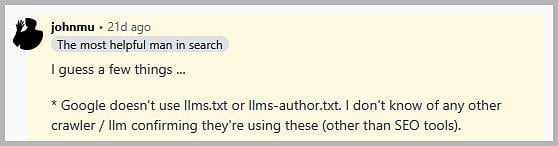
But here’s the bit that got my attention…
…he says that Google doesn’t use llms.txt. But the latest version of Google Chrome Lighthouse literally checks for a valid llms.txt?
It checks for three things to make sure your site is ready for agentic browsing:
- Your accessibility tree
- Your layout stability
- AND whether you have an llms.txt file sitting at your root.
It takes about 2 minutes to run.
Guess we can add that to the list of Google myths right?

What Will I Learn?
Why Make Your Site AI Agent Ready
To make your site AI agent-ready, optimise it for discovery, understanding and machine use.
Here’s why this is different from traditional SEO bots:
For the last 25 years, a crawler like Googlebot or Bingbot has come to your website, crawled it and left. They extracted your site information and added it to their index.
But this is all about to change…
ChatGPT, Perplexity, and even Google AI Overviews are no longer just reading your content.
They are sending autonomous agents to your site.
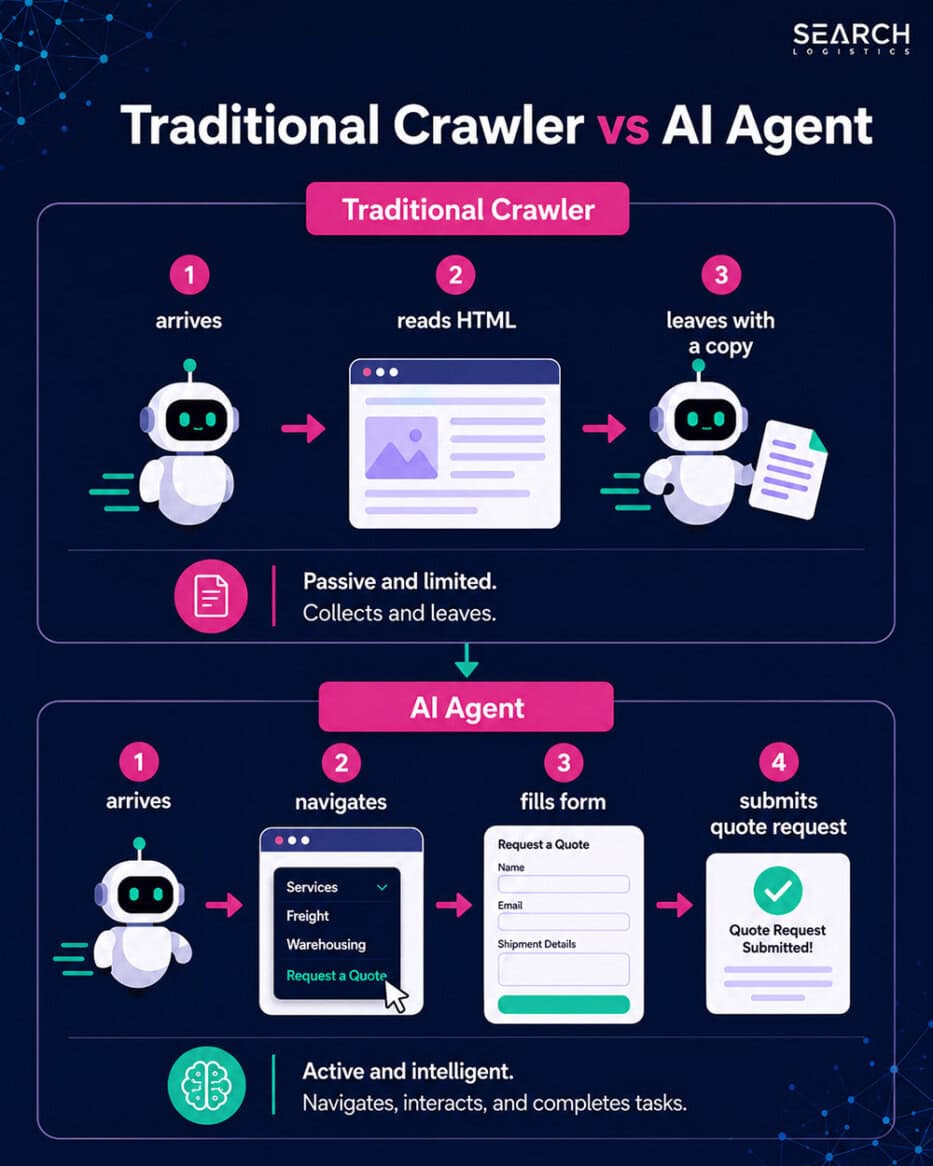
These agents are built to do things like:
- Compare your business directly to competitors
- Request quotes and book appointments
- Order products and make payments
And more! We are quickly moving into a world where more AI agents will visit your website than humans.
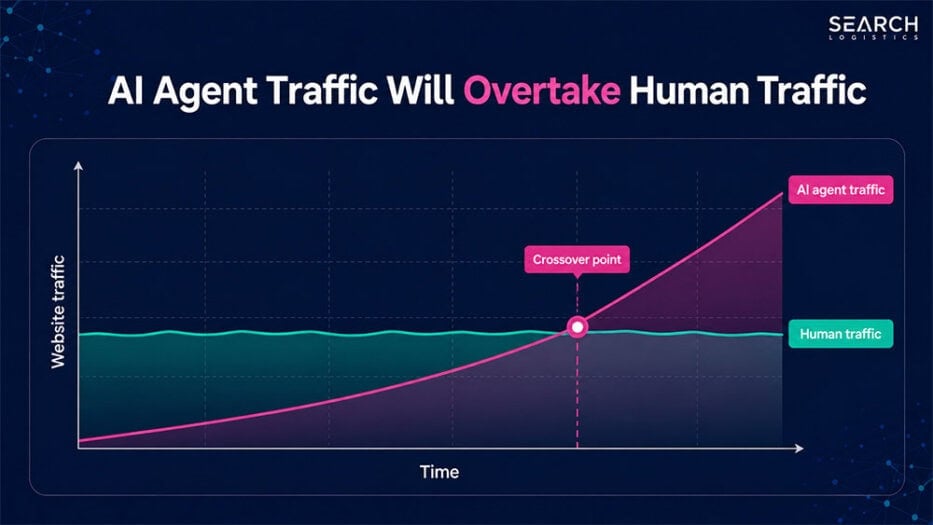
Here’s the problem:
Almost every website online is designed with humans in mind. But decisions about where to buy products and services are no longer being made by humans alone.
If your website isn’t AI agent-ready, you will get left behind.
The good news?
You can test and audit your site for agentic readiness right now. And that’s exactly what I will show you in this guide.

What Does Google Say About AI Agent-Ready Websites?
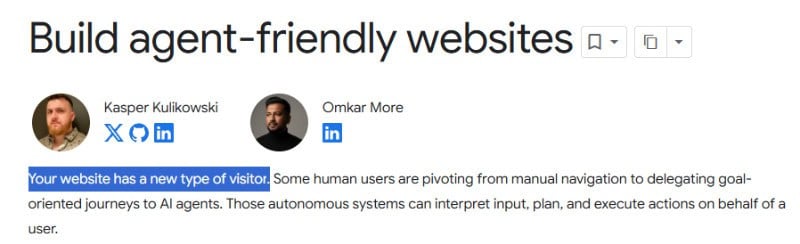
Google is already advising website owners to keep AI agents in mind.
They specifically recommend treating agents as a type of website visitor, not just another crawler.
What does this really mean?
Google splits the agentic web into two stages:
- Agents searching the web
- Agents using the web
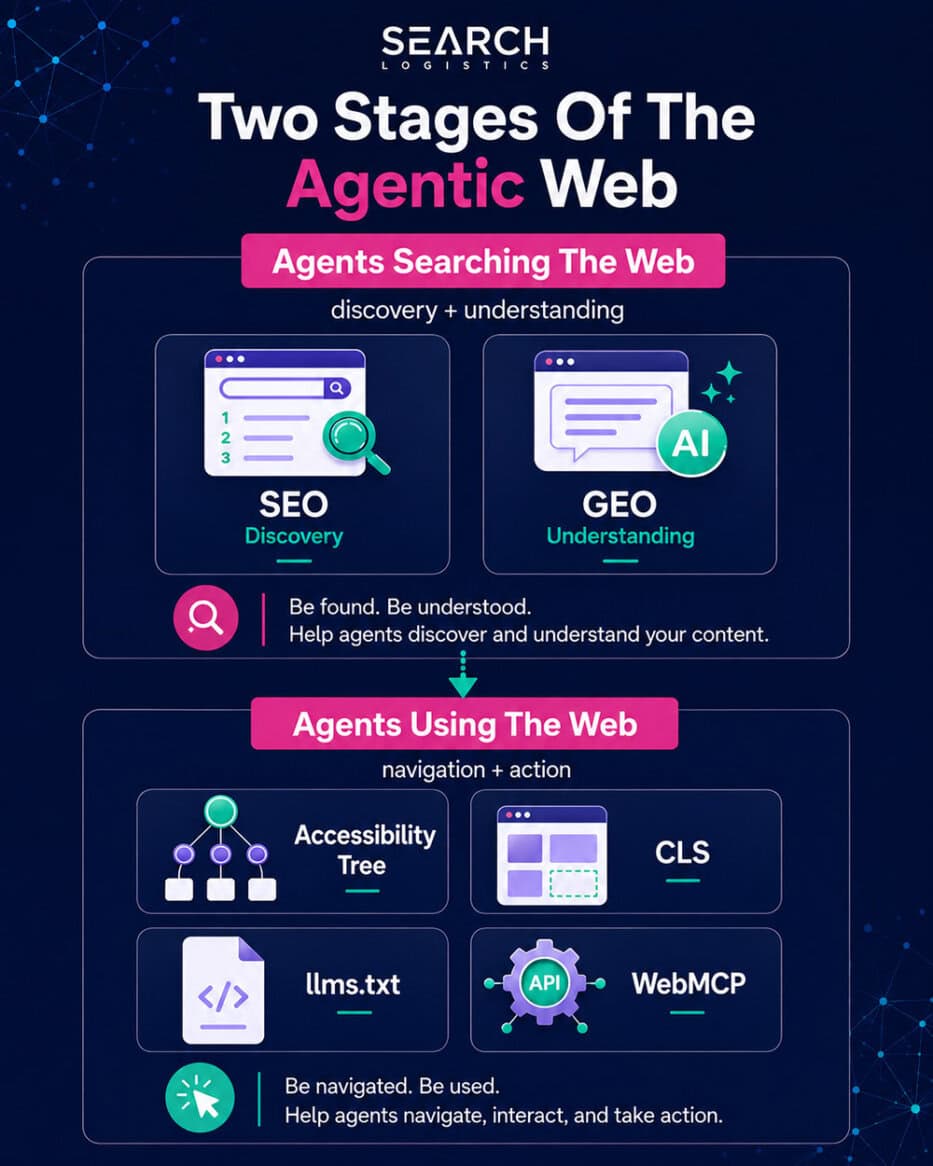
SEO and GEO strategies take care of helping agents discover and understand your site.
But what about using your site?
This is where website owners, SEOs, and developers should be focusing their attention right now.Let me explain:
AI search tools like ChatGPT and Gemini are quickly creating a future where AI agents don’t just give you information. They complete tasks for you.
Here’s a real-world example:
You need to get a new HVAC for your house. You simply go to an AI tool, explain what you need and click go.
The AI tool deploys multiple agents that:
- Research solutions based on your specific situation, budget and needs
- Compare businesses in your area against price, reviews and service quality
- Get multiple quotes from local suppliers without you lifting a finger
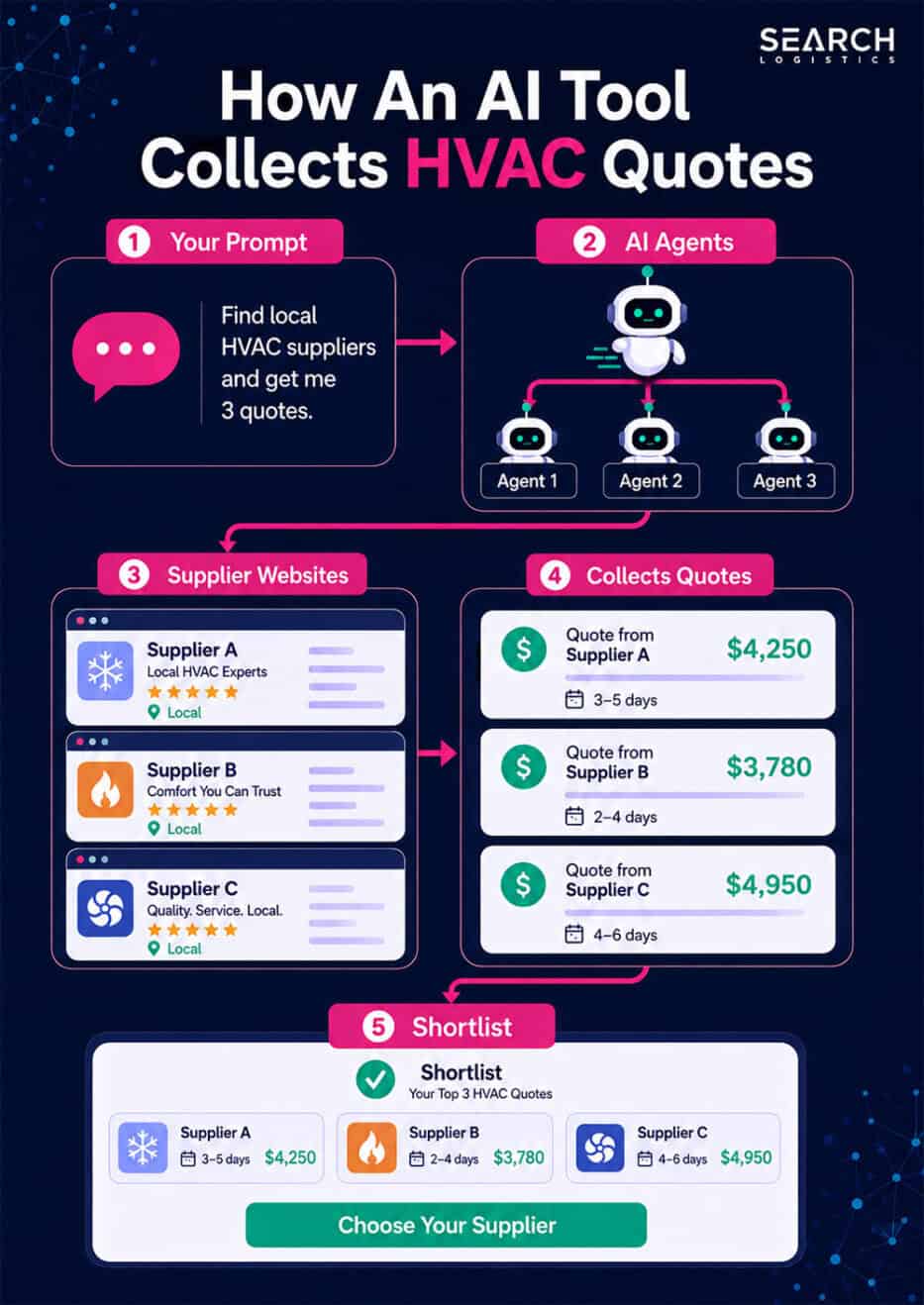
Before you even get involved in the process, the AI agent has narrowed down your choices. All you do is wait for the quotes and make a final decision on which to move forward with.
You’ll probably use AI to help make that final decision too.
See the big shift?
AI does most of the decision-making without you.
As a business owner, it has never been more important to make sure you’re one of the businesses that AI contacts for that quote.
This applies to every single business on the planet.
And that’s what real AI agent-readiness is.
The good news is that you can already start preparing your site now so you’re positioned to take advantage of this shift.
How To Run An Agent-Readiness Audit
Auditing your site to see if it is agent-ready is completely free and takes about 2 minutes.
Here’s how to do it:
Step 1. Check Your Chrome Browser Version
The first thing you need to do is check to ensure that your Chrome browser is up to date:
- Click the three dots in the upper-right corner
- Mouseover Help
- Select About Google Chrome
- Confirm that the version is 150 or higher

Above 150?
Move on to the next step. If it’s not, simply quit Chrome and reopen it.
That should automatically update it to the latest version.
Step 2. Open Your Page And Launch Lighthouse
Navigate to the webpage that you want to audit for agent-readiness.
Open Chrome Developer Tools:
- Right-click anywhere on the page and select Inspect
- Click the Lighthouse tab
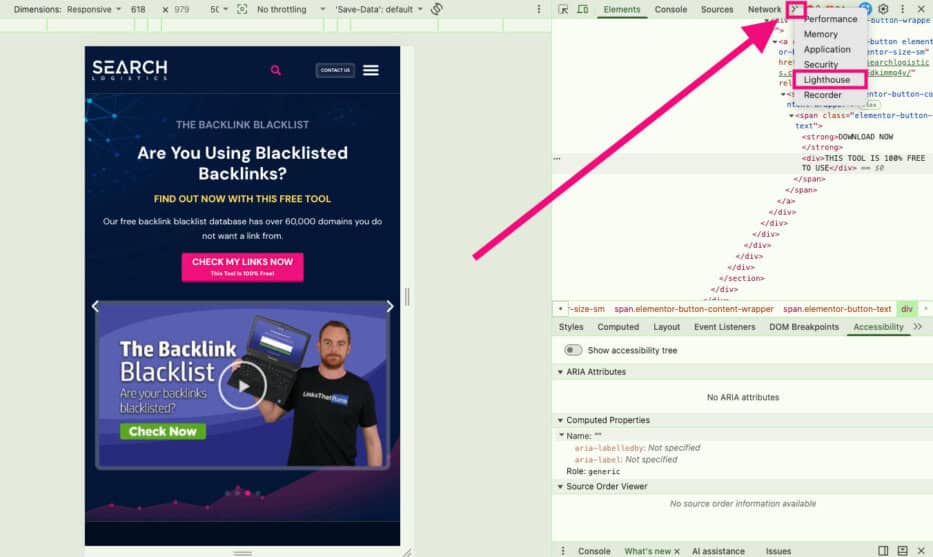
NOT SHOWING? If you do not see the Lighthouse tab, click the double-arrow icon. You should see Lighthouse in the dropdown.
Step 3. Configure Your Settings And Run The Audit
Use these settings:
- Mode: Navigation
- Device: Mobile
- Category: Agentic Browsing only
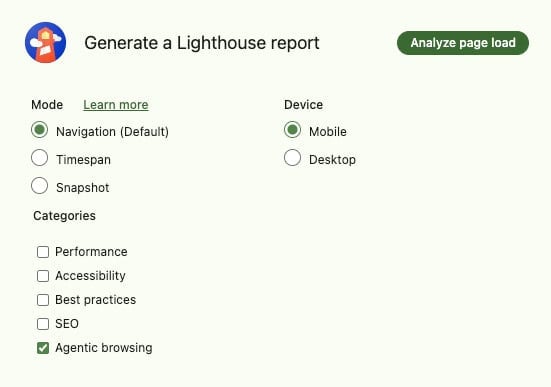
Now click “Analyze page load” to start the audit.
Step 4. Review The Results
It typically takes 1-2 minutes for the full audit to take place.
When the audit finishes, review the results.
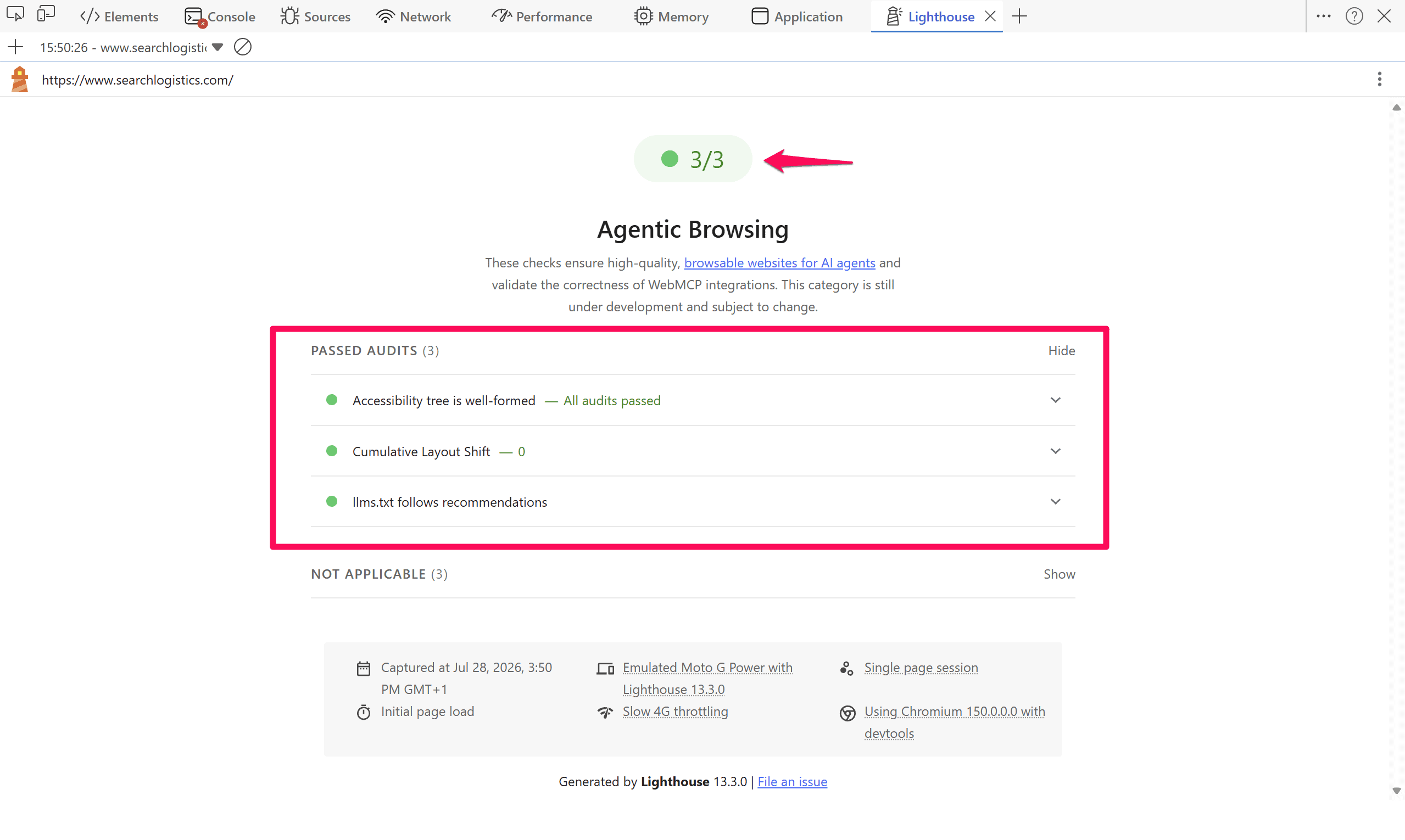
For most sites, the score is out of 3:
- Accessibility tree
- Cumulative Layout Shift
- llms.txt file
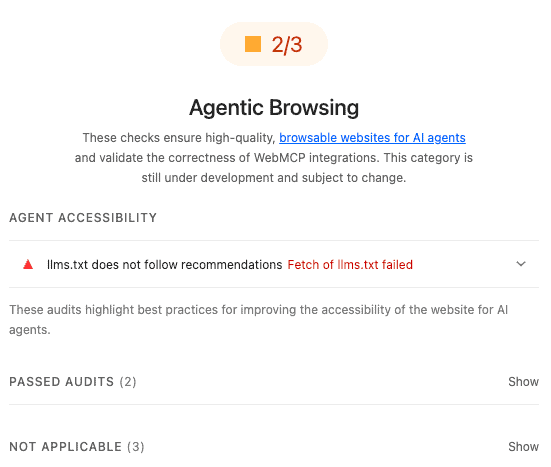
Open any failed checks to see what they are. That’s what we will be fixing next.
Pro Tip: A 3/3 report does not always mean you passed. Some of the elements, such as WebMCP, will come up in the audit as “Not Applicable”. WebMCP is fairly new and may not be worth adding right now for your site, but it’s something to consider in the future.
Fix Anything The Audit Finds In Order
The audit will tell you what is broken.
But it doesn’t necessarily tell you what you should prioritise first. Here’s how I recommend working through each issue that you find.
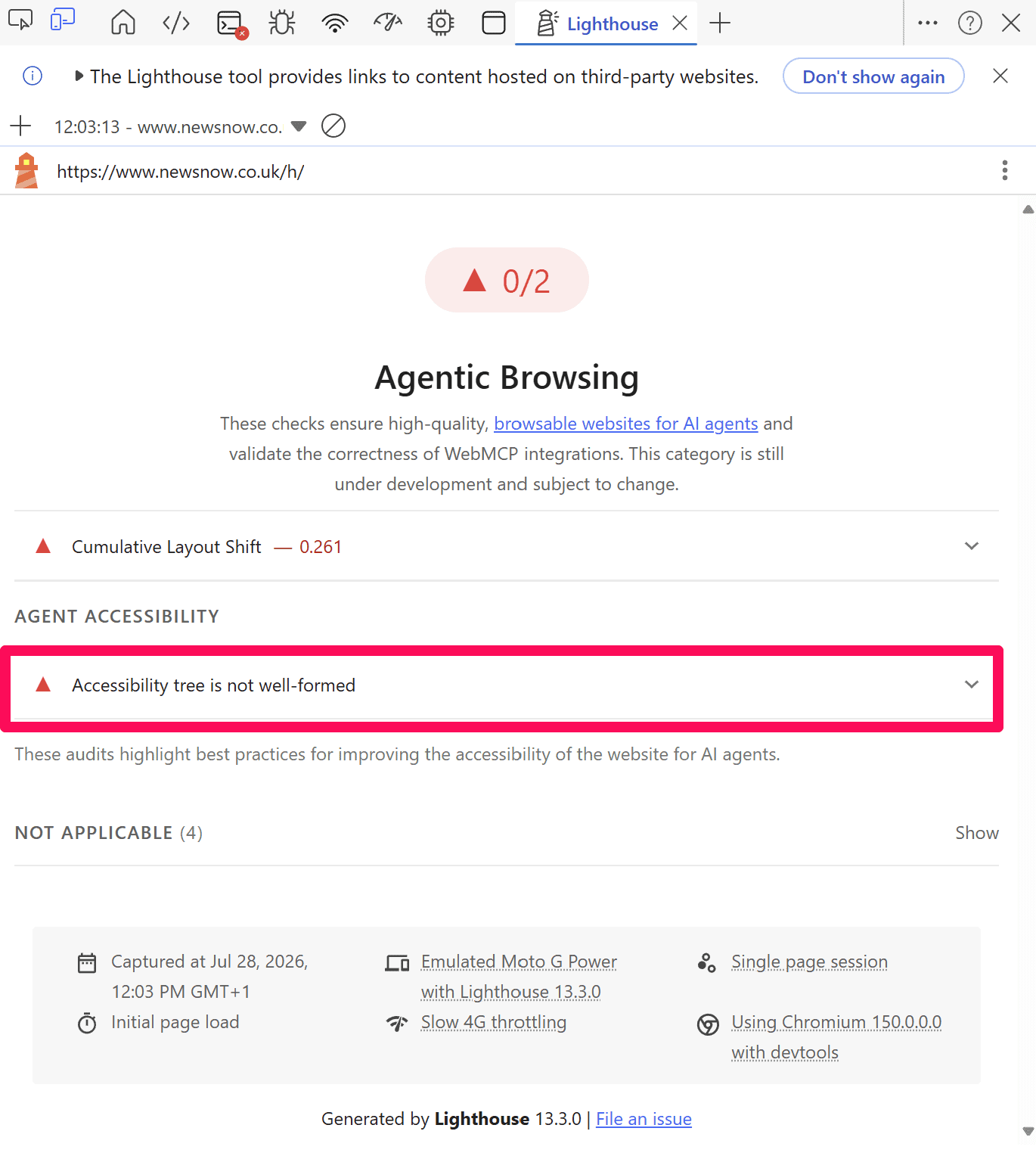
1. Fix Your Accessibility Tree
Fix any issues relating to your accessibility tree first.
Why?
Because everything that an AI agent can do on your site depends specifically on the accessibility tree.Let me explain:
Think of the accessibility tree like a bare-bones map to your website. It strips all of the styles, colours, and unnecessary code from your page.
That leaves the page with just the essential elements that AI agents need to navigate your site.
It allows agents to understand important elements to navigate your site quickly, like buttons and links.
If an agent can’t navigate your site, it gets stuck.
It simply won’t be able to use your site and will ultimately move on to a competitor’s site.
That’s why you should prioritise your accessibility tree.
The good news is that the Lighthouse report should highlight specific elements on the page that fail.
Fixing them is straightforward…
Right-click on the element that was highlighted in the Lighthouse report:
- Select Inspect
- Click the Accessibility tab (it may be behind the double-arrow icon if you don’t see it)
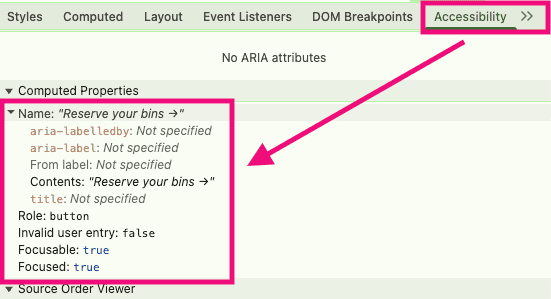
Here’s what matters most:
- Name: The description of the element that agents read (think of it almost like alt text)
- Role: What type of element is it, like a button, link or checkbox
- Focusable: Should be “true” for anything an agent needs to click or interact with
The main problems that people have are fake buttons or specific fields that aren’t properly labelled.
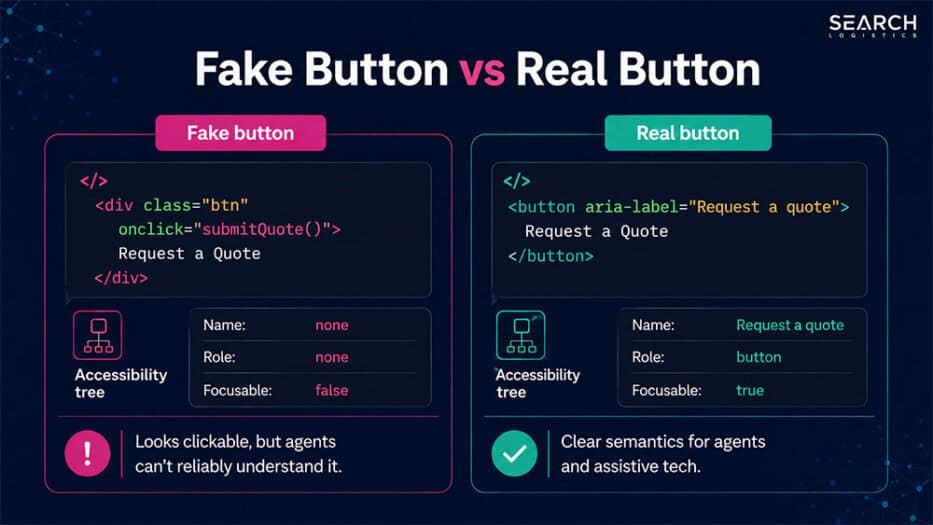
I also often come across buttons that don’t go anywhere, such as social media icons that were added when the site was built but aren’t linked up.
After you’ve applied each fix, run the Lighthouse audit again. I recommend that you start with your most important pages first and move on from there.
2. Improve Cumulative Layout Shift
A good Cumulative Layout Shift (CLS) score is 0.1 or less.
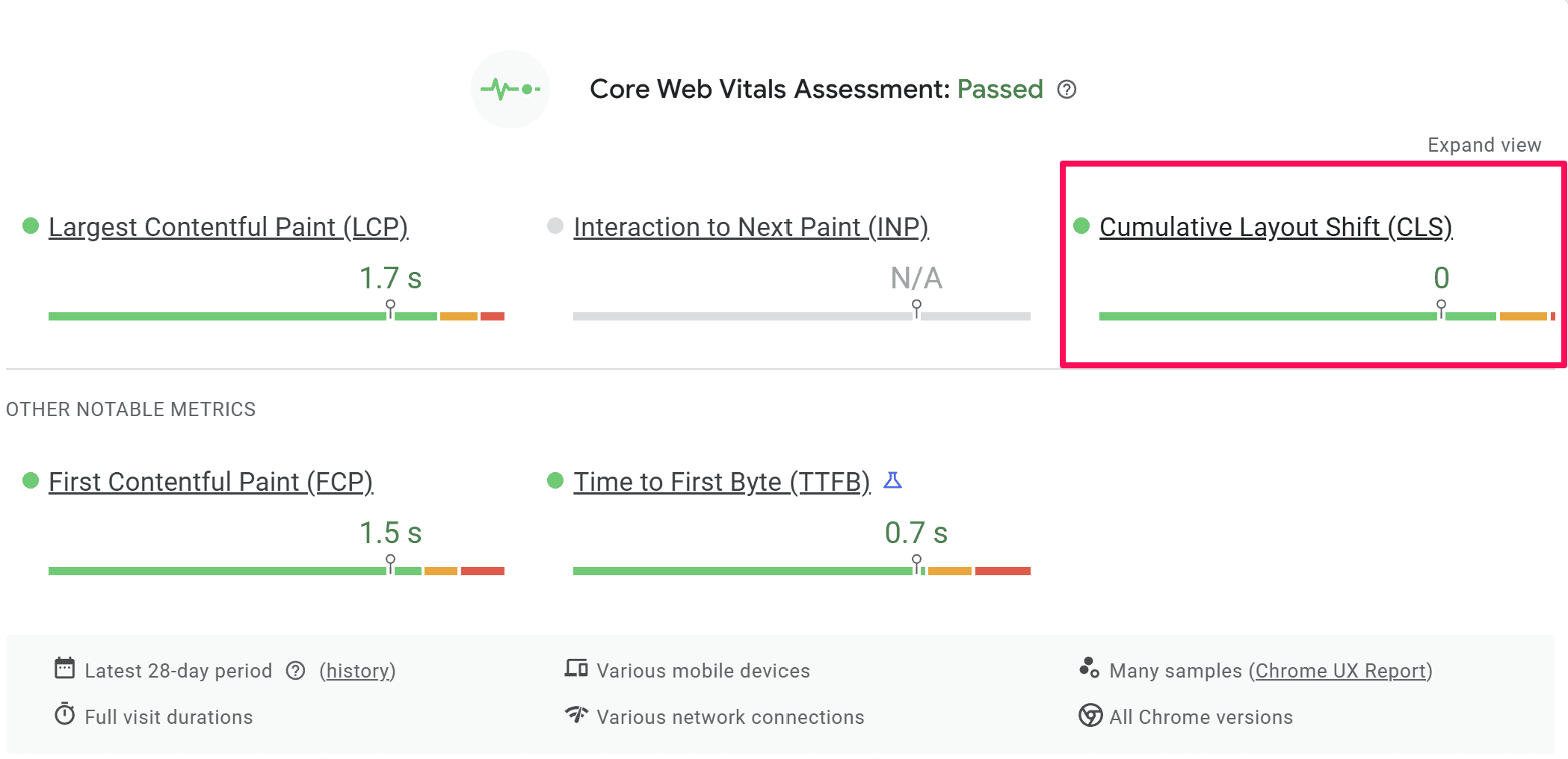
It measures how much the elements on your page unexpectedly move around as the page loads.
CLS is typically considered a technical SEO fix. But it can have an effect on agents visiting your site.
Here’s what I mean:
When an AI agent visits your site, it moves through your website much faster than a human. If your elements aren’t stable enough when it loads, the elements could move before the agent “clicks”, leading to a misclick.
At that point, the agent thinks there’s an error and moves on. No second chances.The most common issues with CLS are from:
- Images and videos with no set dimensions
- Custom web fonts
- Banners and pop-ups
- Dynamic content that’s injected
- Late-loading ads and iframes
If the Lighthouse report flags an issue with CLS, you need to investigate it further.
Analyse the webpage in Google PageSpeed Insights and scroll down to the CLS section.
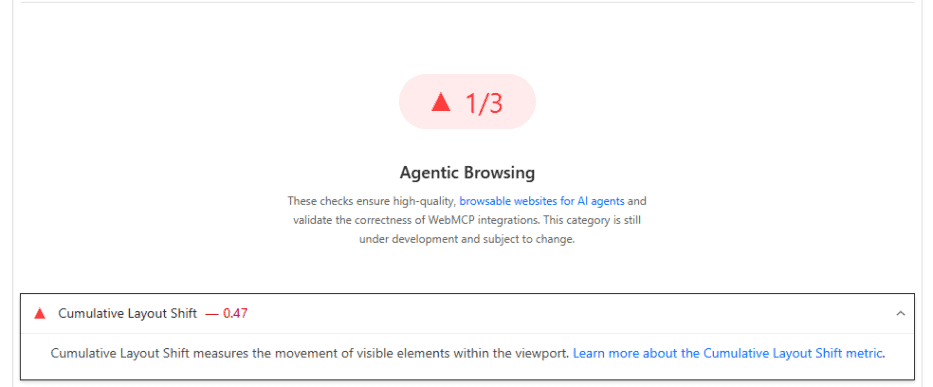
This should help you pinpoint the issues quickly.
Pro Tip: Keep in mind that Lighthouse sometimes flags elements that moved, not necessarily the element that caused the move. For example, if a banner ad drops in above the header and moves the header, the CLS report will flag the header, not the banner, even though it caused the issue.

3. Add An llms.txt File
An llms.txt file is a simple markdown file that sits at the top of your root directory.
It functions similarly to an XML sitemap but is written in markdown so that LLMs and AI agents can understand it quickly.
The truth is, the value of the llms.txt file has been oversold.
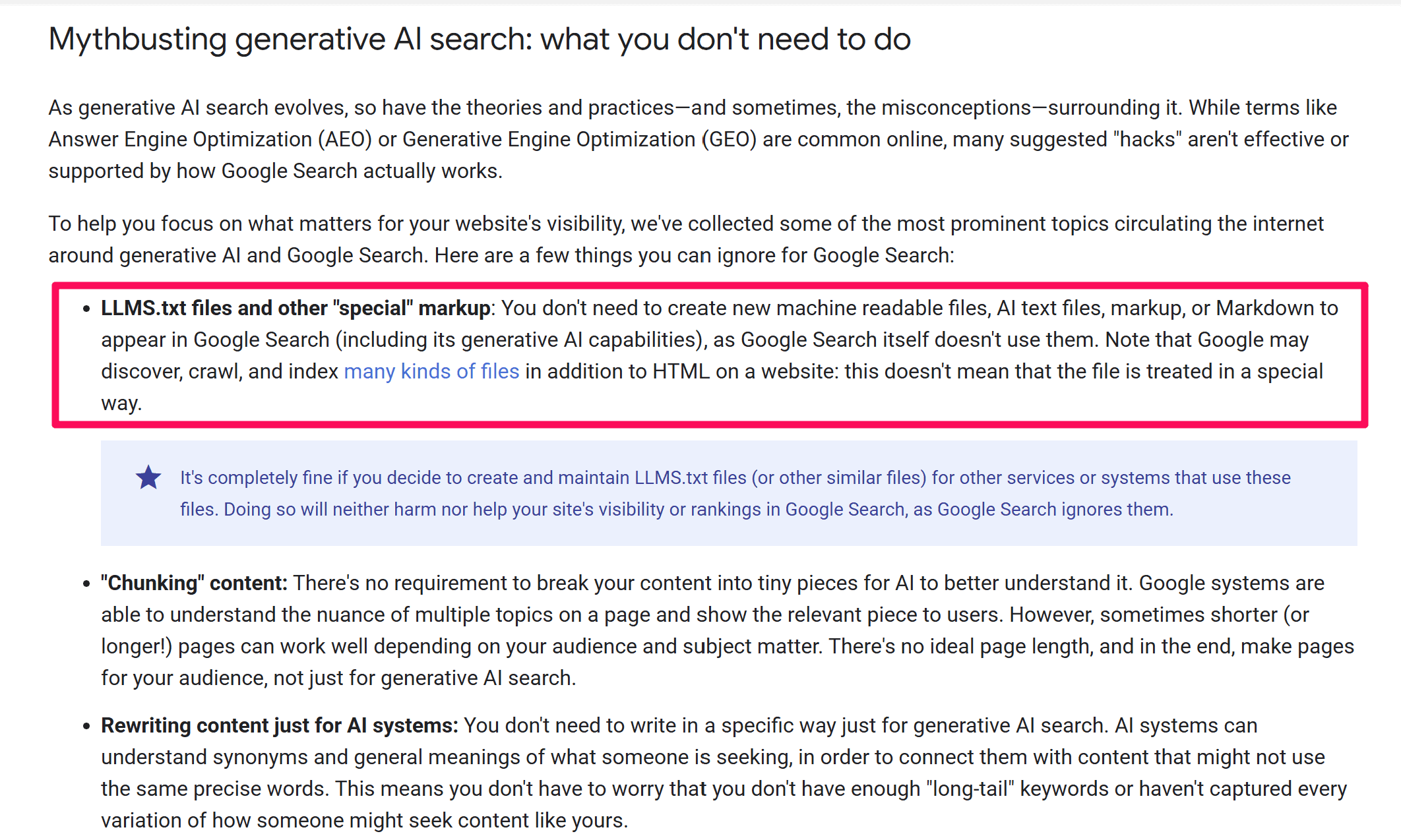
There isn’t really any solid proof that it has any direct impact on your SEO or GEO.
But it is still an essential part of an AI agent-ready site and is highly recommended by Google.
The good news is that it’s super easy to create an llms.txt file.
Use this prompt in Claude or ChatGPT to have AI create one for you:
Create a complete, production-ready `llms.txt` file for my website. First, ask me all necessary questions about my business, website, key pages, content priorities, documentation, and anything else needed. Once you have enough information, generate the final file using current `llms.txt` best practices and output only the finished file.
Then all you have to do is place it at your root domain. Host the file at yourdomain.com/llms.txt. It’s very similar to how robots.txt and sitemap.xml work.

This is the exact location that AI agents expect to find the llms.txt file.
Have a WordPress site?
Simply use the RankMath plugin to generate the llms.txt file automatically.
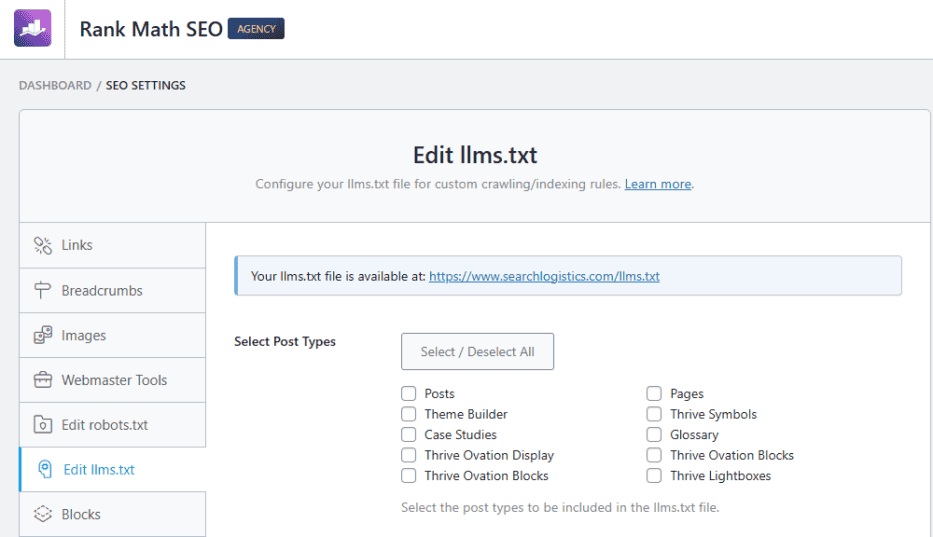
It doesn’t get much easier than that, right?
4. Add WebMCP (Optional)
WebMCP is a new protocol that lets your website tell AI agents exactly what actions they can take on your site.
This goes beyond just reading and extracting information.
It allows agents to:
- Submit forms
- Request quotes
- Order products
Think of it as a protocol that spells out exactly how your site works and how to take specific actions on it.
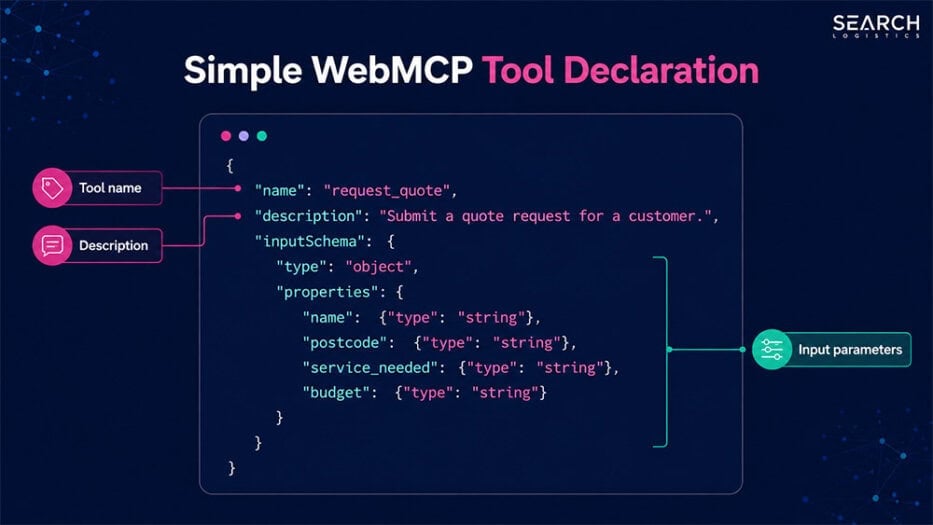
But here’s the important part…
WebMCP is still experimental right now. And very few sites have WebMCP integrated in any meaningful way.
So if you see your site failing this agent-ready category, that’s completely normal. The Google Lighthouse audit marks WebMCP as “not applicable” for most sites anyway.
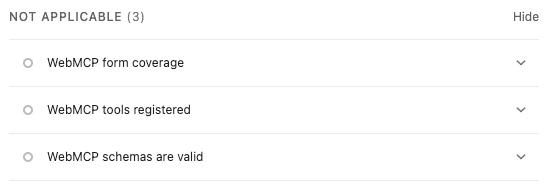
But that may not be the case in the future.
So the big question is, should you set up WebMCP right now?
Here’s my answer: It depends on you and your business.
Let me explain:
If you run a content website like a blog or media site, WebMCP will likely have no major impact on your business now or in the near future.
WebMCP matters more for sites with transactional elements:
- Ecommerce stores
- Booking reservations
- Requesting quotes
- Booking forms
Any site where an agent needs to complete a task, rather than just read a page, might benefit from WebMCP.
If you’re someone who has a site with those elements and has the technical capabilities to set it up, then it might be worth it.
At the very least, it will position you ahead of the curve and give you insights into how AI agents will interact with your business.
Important: Keep in mind that WebMCP is experimental. And the biggest risk is security. If you are not 100% confident that you can keep your customers’ information secure, don’t set it up.
For most site owners, I would treat WebMCP as something to watch for the future. If it’s established as a standard protocol that AI agents are using regularly, you can always integrate it later.
How Long Does It Take To Fix Each Agent-Ready Issue?
Fixing the accessibility tree and improving the Cumulative Layout Shift is the same work that most SEOs and website owners have been doing for years.
And a lot of modern websites already have them sorted, whether you’ve realised it or not.
But if you haven’t…
Here’s a breakdown of how long it takes to fix each agent-ready issue:
| Fix | Time Needed | Who Should Prioritise It |
|---|---|---|
| Accessibility tree | Hours to days | Everyone. It helps agents, screen reader users, and your SEO all in one pass. |
| Cumulative Layout Shift | Hours | Everyone. This is a standard technical SEO issue that affects site performance. |
| llms.txt | About 20 minutes | Everyone. It doesn’t take long to do and sets your site up for the future. |
| WebMCP | Hours to days | Only websites with real transactional elements and technical expertise. |
Start with your accessibility tree and then focus on Cumulative Layout Shift.
Those two will have the biggest impact on making your site agent-ready. Then, after tackling those, get your llms.txt file done.
That sets you up for the future of AI agent users.
If you have the technical expertise, you can then start looking into whether WebMCP makes sense for your business.
What “Passing” The Agent-Ready Audit Really Means
Passing the Google Lighthouse agent-ready test means your site is structurally ready for AI agents.
But it doesn’t mean your website will rank better in Google or AI search tools like ChatGPT and Perplexity.
Here’s why:
Being agent-ready hasn’t been confirmed as a ranking factor, and there are no studies that show it helps with GEO either.
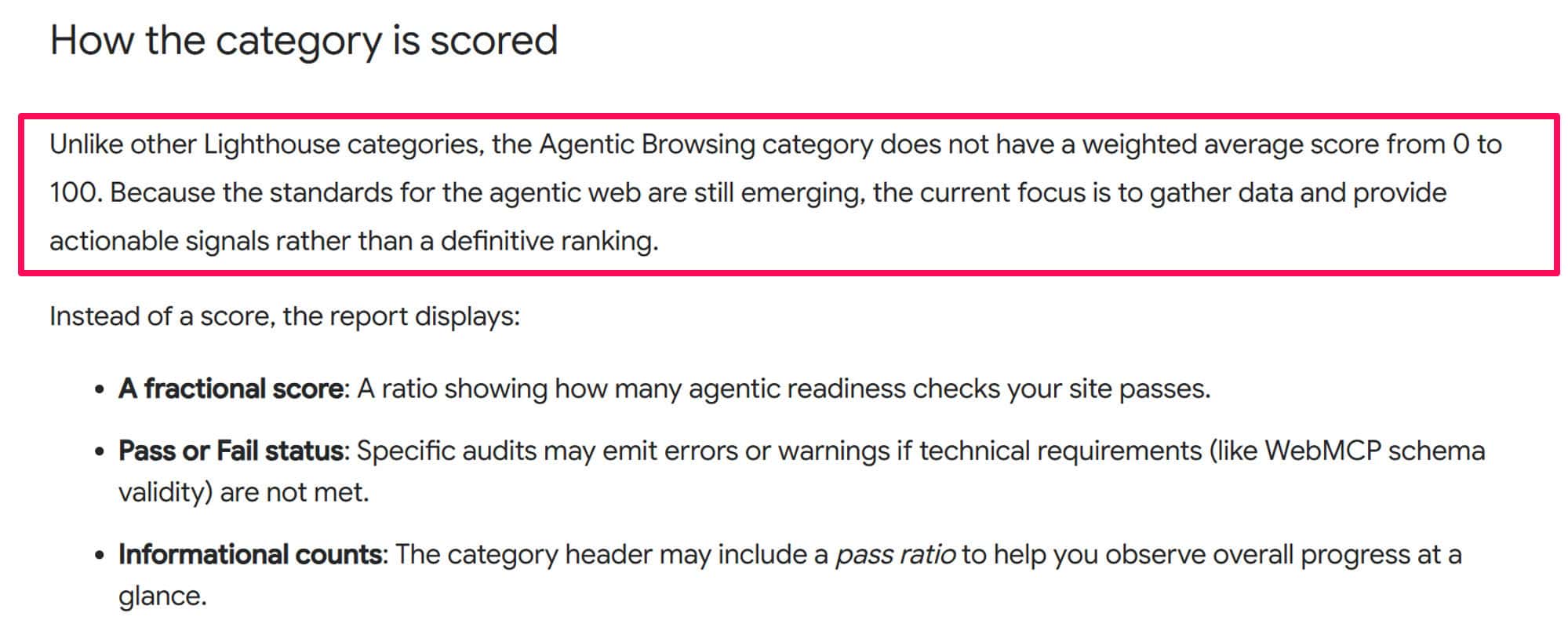
Elements like llms.txt haven’t been fully adopted as a must-have the way XML sitemaps have. And WebMCP is still very experimental.
Does that mean being agent-ready doesn’t matter?
Short answer: no.
Being agent-ready is about positioning your website for what’s coming next.
AI technology moves fast, and we’re already seeing more agents visiting websites and taking actions on them.
Now is the time to prepare.Get your site sorted today, and when agents become regular visitors, you’ll already be ahead of competitors scrambling to catch up.

Wrapping It Up
AI agents are already visiting your site.
And it won’t be long before there are more agents visiting your site than humans. The only question you need to answer…
Is your site agent-ready?
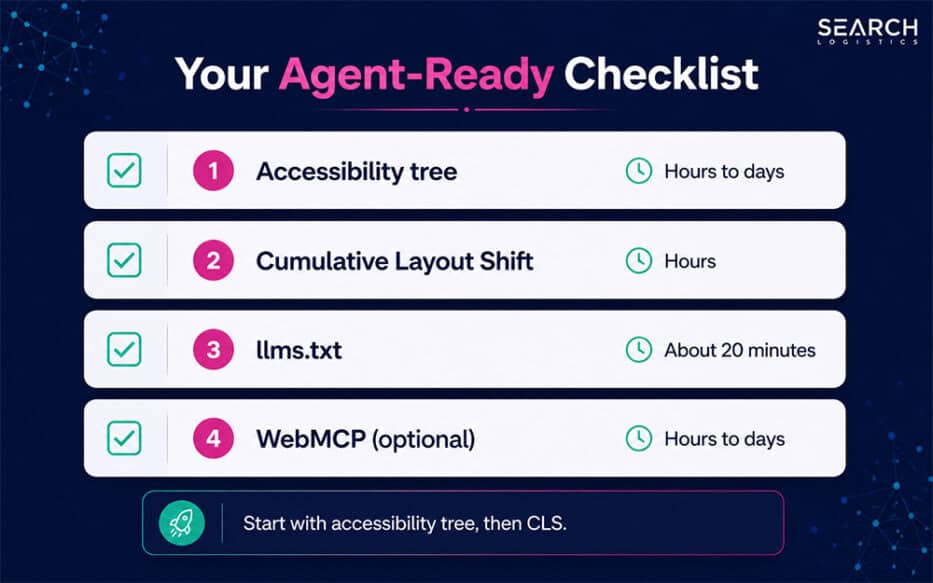
Use the Google Lighthouse tool to audit your website agent-readiness. Fix any issues with your accessibility tree first, and then focus on tackling any Cumulative Layout Shift issues.
After you knock out those two things, create an llms.txt file for your site and then you can consider investigating WebMCP.
Remember:
Treat AI agents like a type of website visitor.
That means you’re optimising a specific path for them through your website. But don’t do it at the expense of your human user experience.
Your website needs to cater to both.That’s what it really means to be agent-ready.

Frequently Asked Questions
You Might Also Like


What Are Your Thoughts?
One Response

 Subscribe to my YouTube
 Join My Facebook Group
 Connect on Linkedin
 Free SEO Tutorials
 SEO Case Studies
 Links That Rank





Great insights on making websites AI-agent-ready. Focusing on accessibility, layout stability, and clear site structure is a smart way to prepare for how users may interact with websites through AI agents in the future.