


































Tracking AI citations for free typically involves using multiple analytics tools and manually prompting AI search tools like ChatGPT and Perplexity.
It’s a time-consuming process that often leads to inconsistent results.
But that’s all about to change.
Every business owner and SEO is asking the same question right now…
“Is AI actually citing my website in their answers?”
The reality is that 57% of business owners and SEOs have a general idea of whether their brand appears in AI searches. But only 14% actively track it on a regular basis.
Why?
Tracking citations on AI platforms like ChatGPT, Google AI Overviews, and Perplexity is expensive.
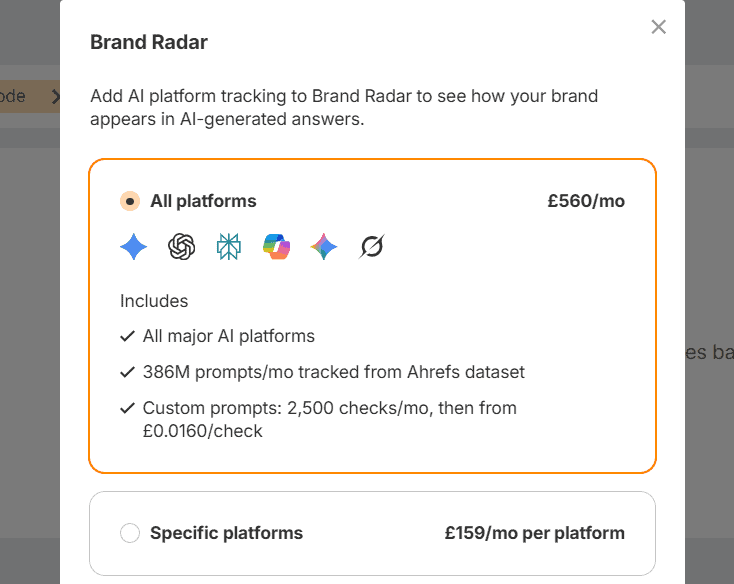
Tools cost anywhere from $29 to $700+ per month. And the cheaper plans usually only allow you to track just a handful of prompts. Most people just stay in the dark and hope for the best.
That was until now.
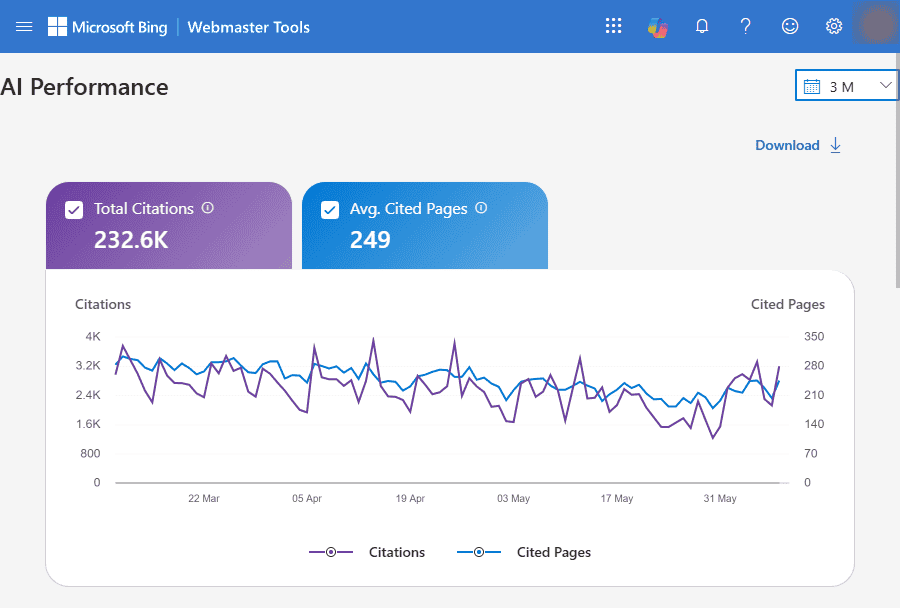
There’s a free report buried inside Bing Webmaster Tools that shows you exactly which pages AI is citing and what prompts are triggering those citations.
This is the first time a major AI search platform has handed this kind of data to website owners.
In this guide, I’ll walk you through how to set up this new tool (plus a few others) to track your AI citations for free. And I’ll show you exactly how to use this data to increase your AI citations.

What Will I Learn?
What Does Free AI Tracking Actually Get You?
The Bing AI Performance report gives you first-party AI citation data that’s completely free.
That same data with premium dedicated tracking tools costs between $29 and $400+ per month.
But before you set everything up, you need to understand the limitations of what “free” actually gets you.
Here’s how the Bing AI Performance report stacks up against the most popular AI tracking tools right now:
| Tool | Cost | Platforms Covered | Competitor Tracking | Data Source |
|---|---|---|---|---|
| Bing AI Performance | Free | Copilot (Bing AI) | No | First-Party |
| Otterly.ai | From $29/mo | ChatGPT, Perplexity, Google AI Overviews, Copilot | Yes | Sampled Prompts |
| Peec AI | From $95/mo | ChatGPT, Perplexity, Google AI Overviews, Copilot | Yes | Sampled Prompts |
| Profound | From $99/mo | Up to 10+ engines, including Meta AI, DeepSeek, Grok, ChatGPT, Perplexity, Google AI Overviews, Copilot | Yes | Sampled Prompts |
The big difference here is the number of platforms covered and competitor tracking.
Bing AI Performance tracks the AI models that Microsoft owns, which have now been integrated into one platform – Copilot.
All of the competing paid tools track multiple platforms, with Profound tracking up to 10. That is a clear limitation.
But Copilot is now one of the biggest AI platforms in the world. And Microsoft is only going to push it more.
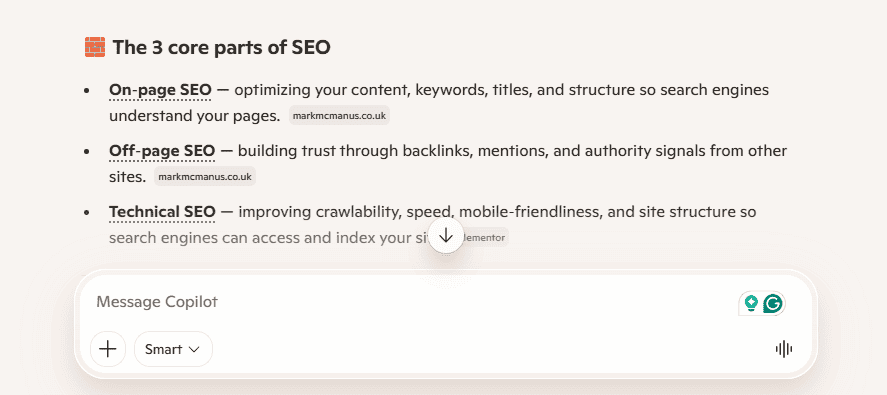
Copilot alone has over 420 million active monthly users. Bing itself now has over 1 billion monthly active users.
The key point here is that Bing now has a lot of users across its search engine and AI tools. That means you are getting a lot of reliable data for free.
And that’s not all…
Bing and OpenAI partnered together in 2023. That means that Bing and ChatGPT essentially share the same “AI brain”.
In other words…
If you’re being cited in Copilot, there’s a good chance that you’re also earning citations in ChatGPT.
While it’s not the same as directly tracking prompts and citations in ChatGPT, it’s a strong indicator of your website performance on the platform.
And I’ve got a few tricks later on to cover those other platforms.

Why Does AI Visibility Matter?
Tracking AI visibility matters because millions of people are now using AI search tools like ChatGPT, Google AI Overviews and Perplexity every day.

People’s habits have shifted and will continue to shift.
37% of people now use AI to start their search rather than going to a traditional search engine like Google. Google AI Overviews appear in 55% of all Google searches.
And that’s only going to increase as more and more people adopt AI as a search tool.
Here’s what that really means for you:
AI is already shaping-
- What people find
- Who they trust
- Which brands they click on
- Where they buy
This isn’t just another update to search.
It’s the biggest shift in SEO since search engines were invented.
And I don’t say that lightly.
I estimate that there will be more AI agents visiting your website than humans by early 2027.
What matters most is that AI is becoming the primary interface between people and information online. Businesses that get cited in AI answers will have a significant advantage over those that don’t.
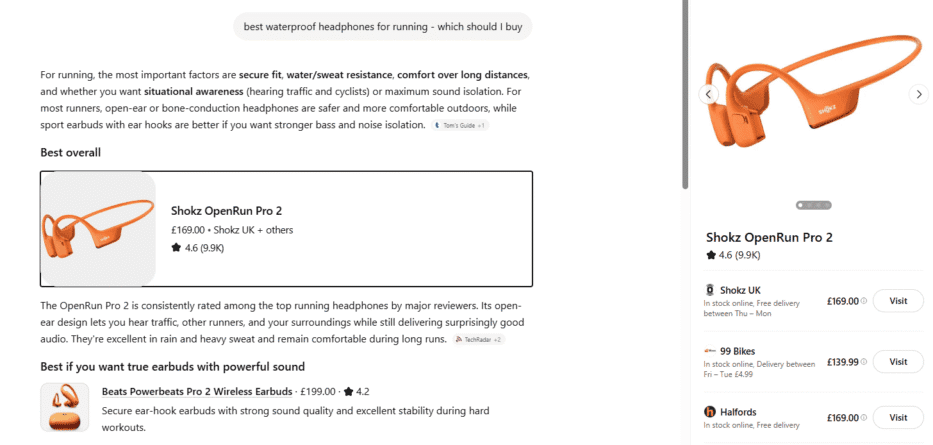
Think about it like this:
In the next 3-5 years, AI agents will likely do most of the work when it comes to researching products and services online. But they won’t just do the research…
They will also make the buying decisions.
Let me explain:
Let’s say you need to buy a new air conditioner for your home. You will tell an AI platform exactly what you need.
It will then go out, do the research, narrow down the right businesses for the job and ultimately get quotes from those businesses. That’s where “agentic search” is heading right now.
The businesses that win are going to be the ones that AI already:
- Knows
- Trusts
- Recommends
All of the primary buying decisions will be made BEFORE a human even gets involved.
At the moment, AI search tools send about 1% of all web traffic. To give you context, Google search accounts for 48% of all web traffic.
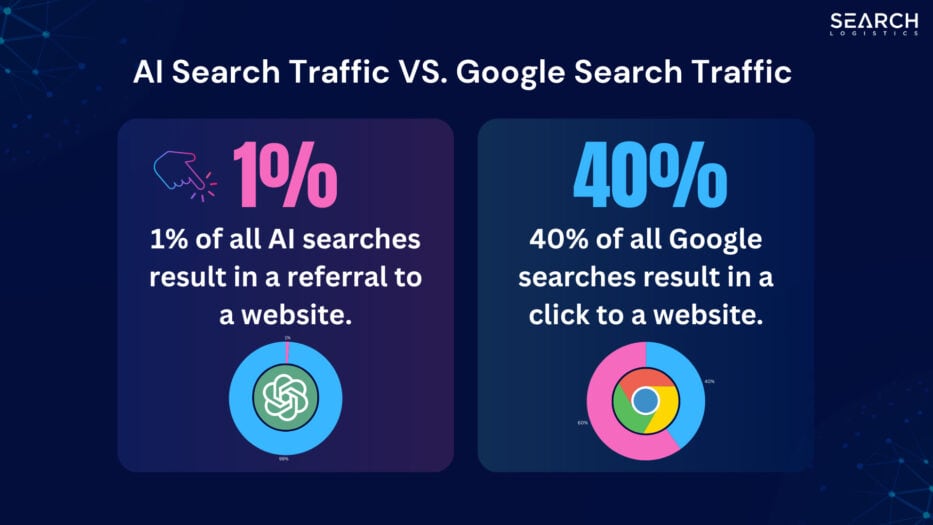
That’s a big difference, and it’s why you should also continue to focus on rankings and organic traffic for the time being.
But AI referral traffic converts 4.4x better than traditional organic search traffic. And it’s growing faster than any other channel that’s come before it.
The businesses that get cited today are quietly building an advantage that will be hard to compete with.
That’s why it’s essential to track AI visibility now.
It gives you the information you need to adapt to the new era of SEO and start taking advantage of AI search for your business.

What You Need To Track AI Citations For Free
Tracking AI citations accurately for free is possible using just four tools that you probably already have access to.
Bing Webmaster Tools – Copilot Citation Data
Bing Webmaster Tools gives you first-party citation data directly from Microsoft.
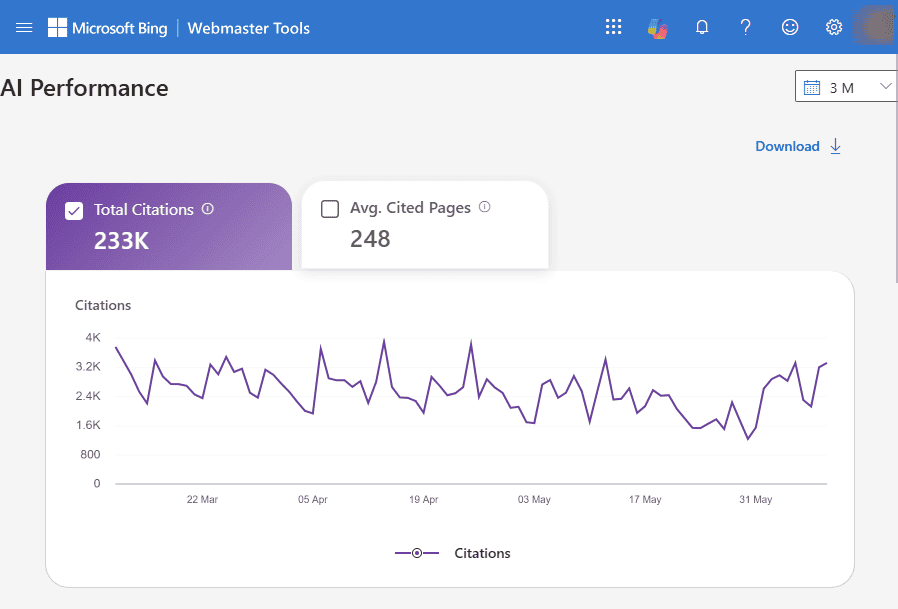
It doesn’t get much more accurate than that.
You can see the exact pages being cited in Copilot answers and the prompt queries that are triggering those citations. No other free tool comes close to this level of data.
Google Search Console – AI Overview/AI Mode Citation Data
Google Search Console shows you when pages are getting impressions and clicks inside AI Overviews.
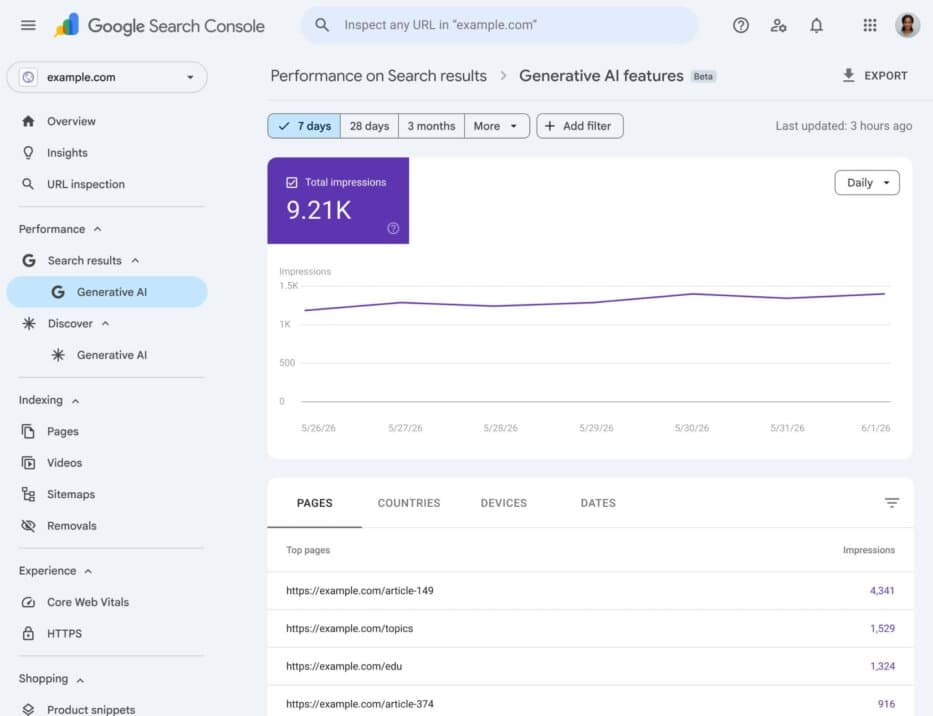
For most people, this data is already sitting inside your account. You just need to know how to use and extract it.
Google Analytics 4 – ChatGPT and Perplexity Referral Traffic
Google Analytics 4 is the best way to track referral traffic from AI search tools like ChatGPT and Perplexity.
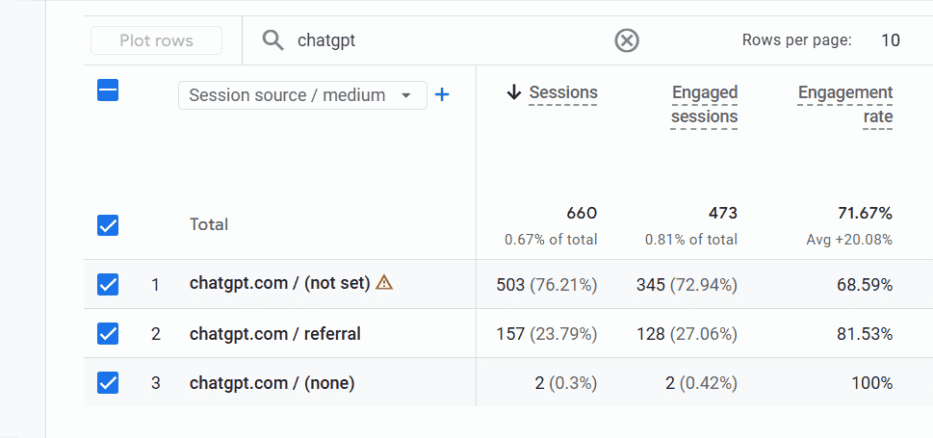
Like with GSC, the data is likely already sitting in your account. All you have to do is build a report and save it so you can refer back anytime.
Google Sheets – Manually Tracking Valuable Prompts
Use Google Sheets to manually track prompts and log citation data.
Think of it like your ultimate dashboard. You can combine all of your data in one place to get a strong overview of how your website performs in AI search.
It also helps you calculate your AI visibility score.
But today we are going to stay focused on…

Bing Webmaster Tools AI Performance
Microsoft launched the AI Performance Report in Bing Webmaster Tools in February 2026.
It’s the first time that any of the major AI platforms has handed website owners first-party data on AI search queries.
Most paid AI tracking tools work from the outside in.
They-
- Run the prompts you’re tracking
- Record what comes back
- Build a picture based on those samples
This is useful data because it gives you a directional overview of your AI search visibility across multiple AI platforms. But the limitation is that it only tracks the prompts you provide.
The Bing AI Performance Report works from the inside out.
Bing-
- Logs your page every time it’s cited in Copilot
- Records the grounded query used to retrieve your content
- You see what pages are being cited in Copilot
That means you’re not limited to the prompts you thought of. You’re seeing all the queries that each page on your website is being cited for.
Even if you’re using other paid AI tools, you should take advantage of Bing Webmaster Tools to track your top pages and help you grow your citations.
There’s one important caveat to be aware of…
Bing isn’t showing you the exact prompt data users are typing in. What it actually shows you is the search phrases AI uses when it goes looking for content to form its answer for the user.
These are called “grounding queries”. And it’s the most actionable data the report gives you to grow the number of citations you have.
What Does The Bing AI Performance Report Show?
The Bing AI Performance report shows five things:
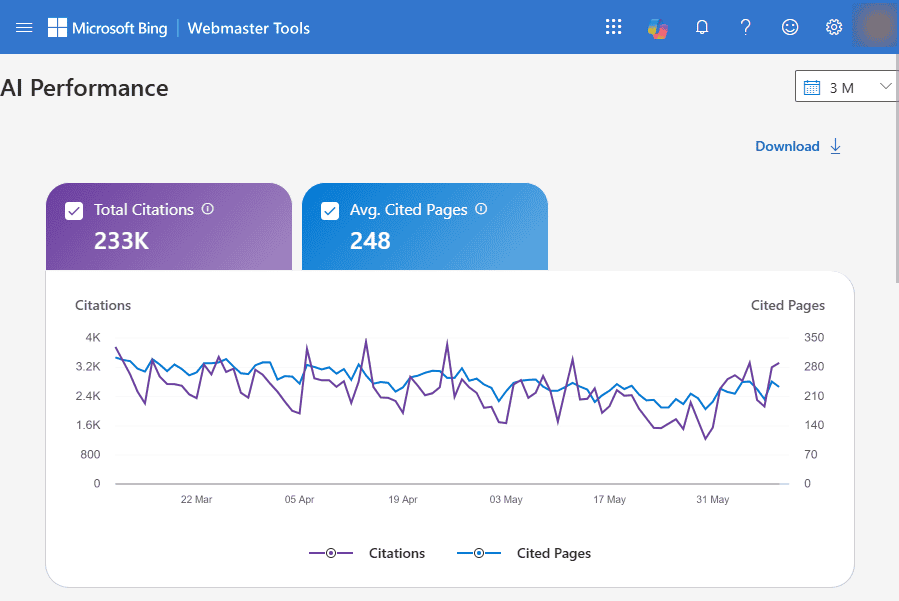
- Total Citations – How many times your pages were cited in Copilot answers
- Average Cited Pages – The average number of unique cited pages per day
- Grounding Queries – The internal search queries Copilot used to find and retrieve your content
- Page-Level Citations – Which specific URLs are being cited and how often
- Visibility Trend – A graph that shows your citation trends over time
The default view for all of this data is 30 days. But you have the option to choose whatever dates you would like to view, as far back as November 1, 2025.
That’s when Bing started accurately collecting AI data on individual sites.
The report I am spending the most time on right now is looking at the grounding queries of individual pages.
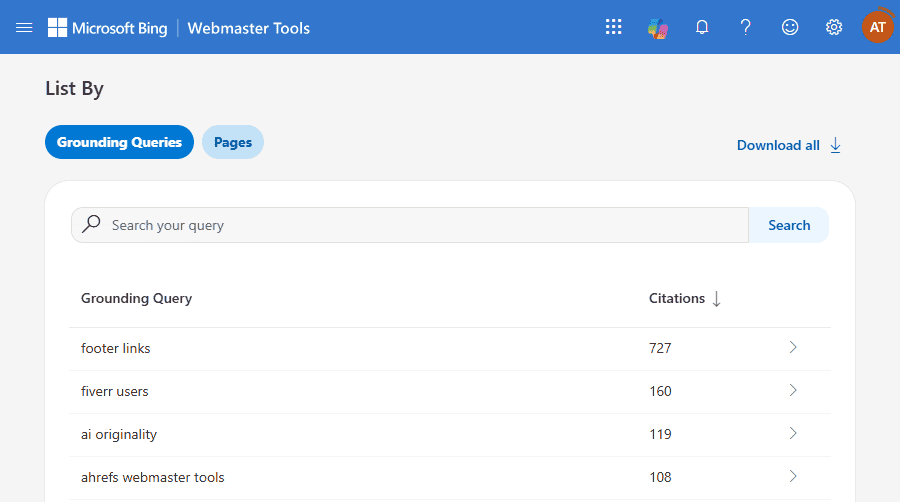
This is very granular data.
You can literally see what search terms (grounding queries) AI is using to surface your content as a source. That allows you to go back to your content, re-optimise and build more contextually relevant backlinks.
Pro Tip: Focus on the pages that make you the most money for your business. Build more links and continue to improve the content. Track the total number of citations to those pages over time and the grounding queries used by Copilot to surface that content.
How To Access The Bing AI Performance Report
To access the Bing AI Performance report, you’ll need a Bing Webmaster Tools account.
If you don’t have one already, the setup process takes about 10 minutes. Here’s how to set it up step by step.
1. Go to bing.com/webmasters
Click “Get started” and sign in or sign up with one of the following account options:
- Microsoft
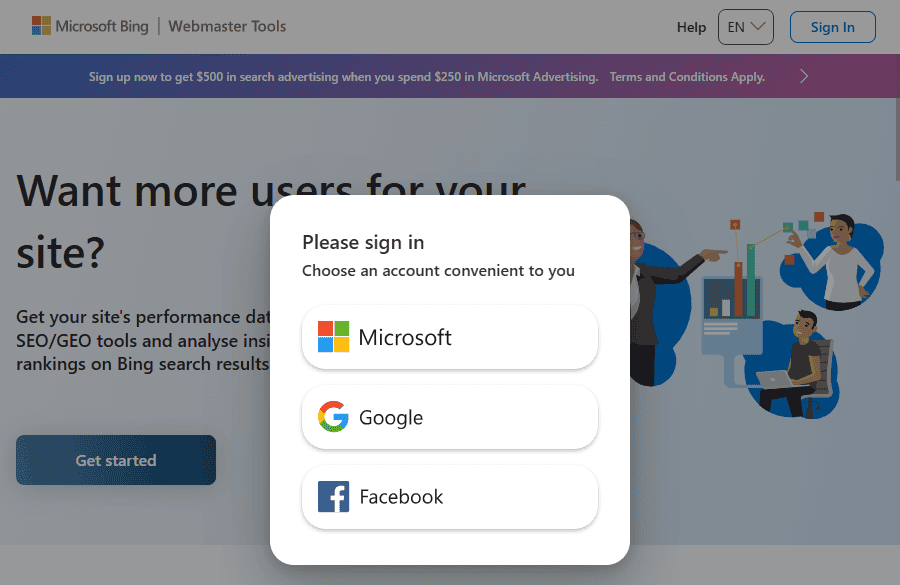
If you already have a Google Search Console account, I recommend using the same Google account. This will save you time on the next step.
2. Add your site
There are two options to add your site:
- Import from Google Search Console – This is the fastest and easiest way to get started. All you have to do is authorise your GSC account and import your website information.
- Add Manually – Manually type in your website URL and follow the authorisation process.
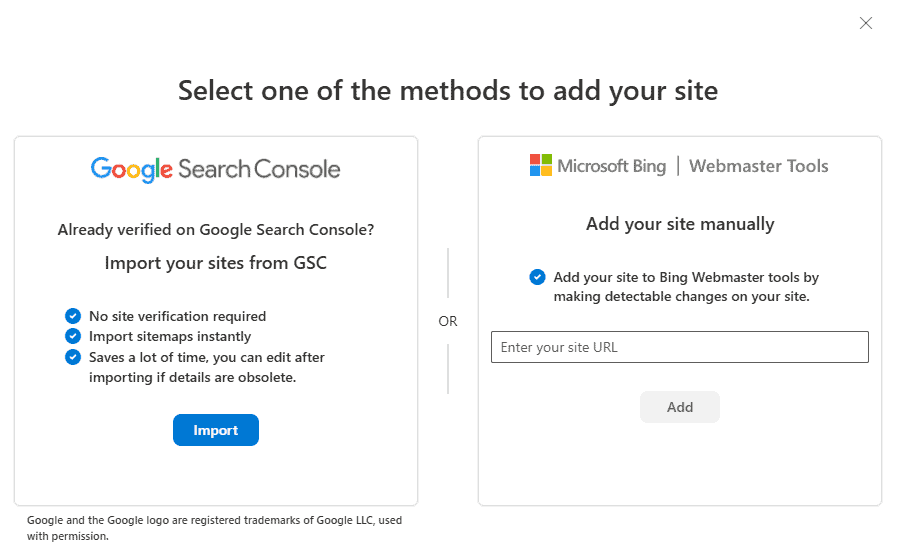
If you’re already set up on Google Search Console, the entire import takes less than 2 minutes. You can also bulk import multiple sites, which will save you a ton of time.
3. Submit your sitemap
Click on “Sitemaps” on the left:
- Click the “Submit sitemap” button in the top left
- Copy and paste your sitemap URL
- Click Submit
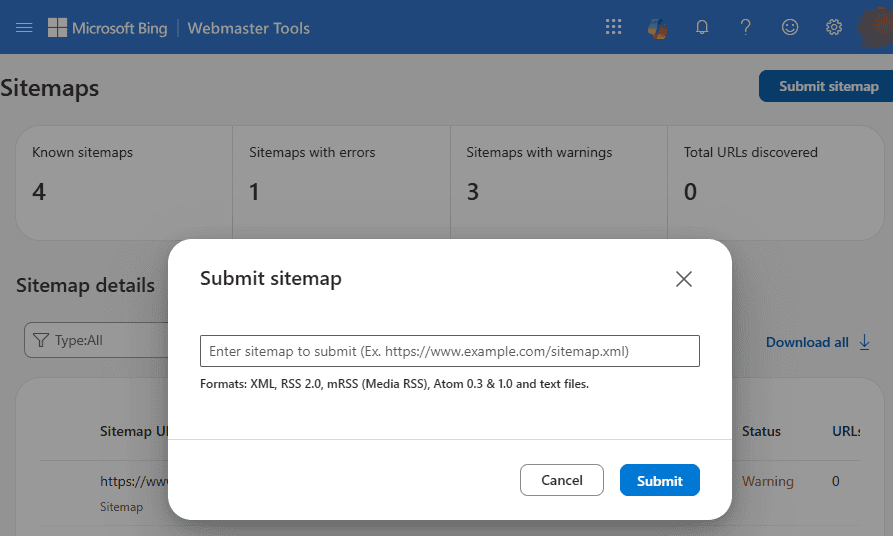
Bing will crawl your sitemap and immediately know which pages exist. It will also help Bing show your citation data more quickly.
Pro Tip: If your site is on WordPress, use the Bing URL Submission Plugin. It automatically notifies Bing every time you add or update a page. That increases how quickly Bing indexes your content and how fast you start earning citations in Copilot.
4. Find the AI Performance report
Click on the AI Performance report in the left sidebar.
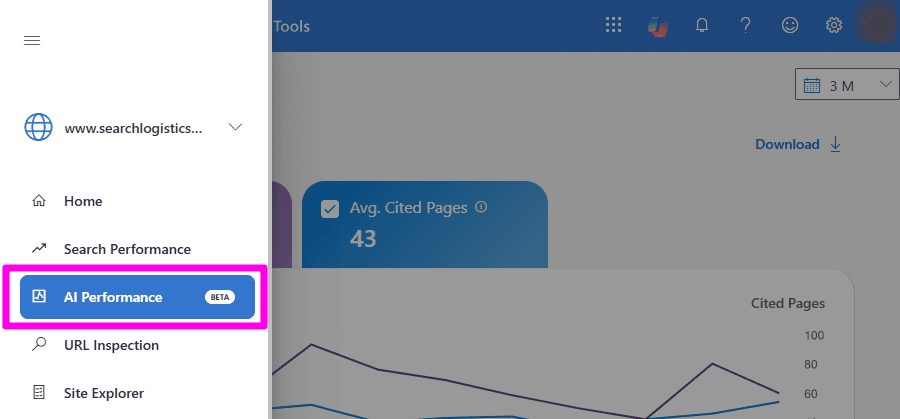
If your content has been cited in Copilot answers since November 2025, the data will be waiting for you to explore.
5. Choose your date range and explore the report
Spend a few minutes familiarising yourself with the AI Performance report. Check your most cited pages and the search queries AI is using to surface that content.
You can change the date range at the top with:
- 7 Days
- 30 Days
- 3 Months
- Custom selection
Toggle between the Grounding Queries and Pages. This report (and Bing Webmaster Tools in general) has a very similar feeling to how Google Search Console works.
Important: If you’re blocking LLMs from accessing your site, you won’t see any data because Copilot hasn’t accessed your site. Make sure you check your robots.txt file to ensure you’re not blocking AI crawlers.
How To Turn Grounding Queries Into More Citations
To turn grounding queries into more citations, you need to structure your content to match AI retrieval systems directly.
Grounding queries are the most actionable information that the Bing AI Performance report offers.
Follow these steps.
Step 1: Export Queries And Cluster By Intent
Export the last 90 days of grounding queries for your site.
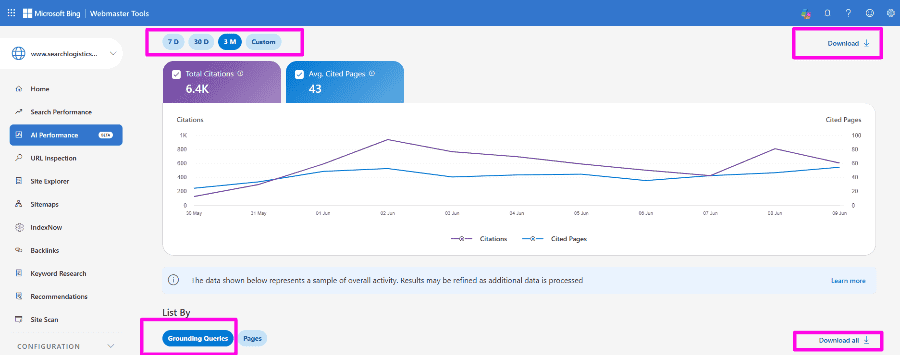
Cluster each query by intent:
- Cost questions
- Comparisons
- How-tos
- Definitions
- Local queries
- Best/recommendation
- Troubleshooting queries
- Timeframe queries
This can be very time-consuming, so get AI to help you out.
Upload your CSV export to ChatGPT and use this prompt:
“I want you to group these grounding queries by search intent. Use these categories as a guide: direct answers, cost questions, comparisons, how-tos, definitions, best/recommendation queries, local queries, timeframe queries, and troubleshooting queries. If a query doesn’t fit neatly into one category, create a new one that makes sense. Return the results as a table with three columns: Query, Intent, and Citations. Then add a summary table showing total queries and total citations per intent cluster.”
Here’s the answer:
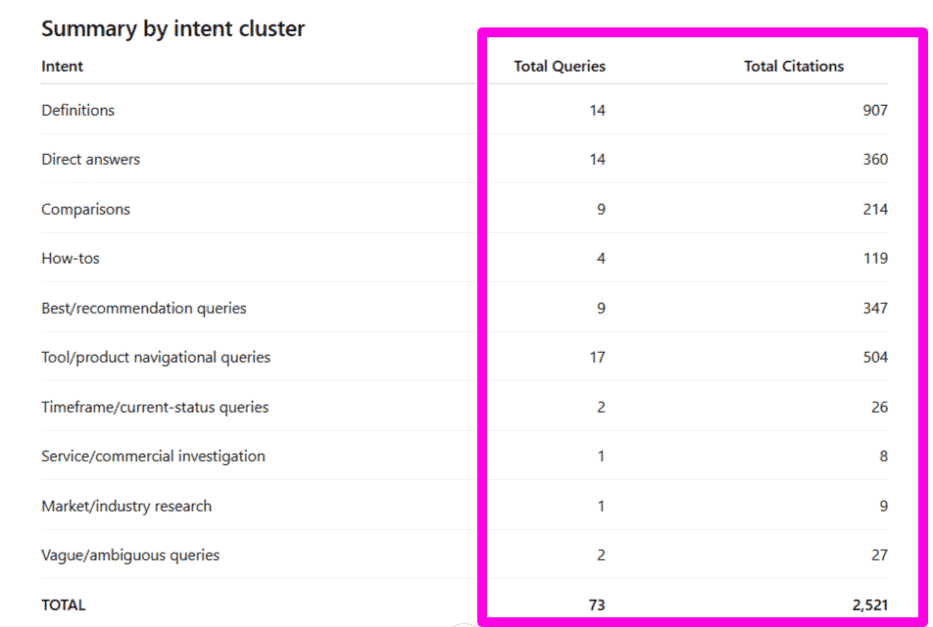
Cool, right?
The clusters give you a clear picture of what types of content intents are generating your website citations. And more importantly, which aren’t.
Watch out for clusters that have a lot of grounding queries but very few actual citations.
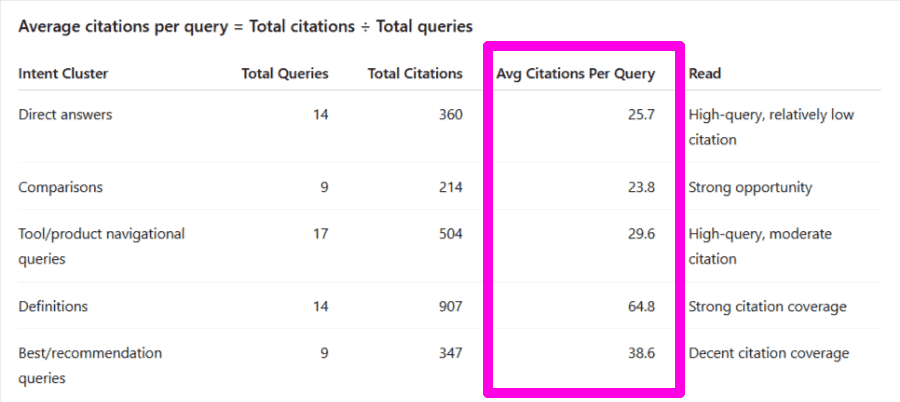
Why?
Copilot essentially finds your content when it searches for that intent. But your content does not give a clean or clear enough answer to cite regularly.
That means most of those citations are going to competitors whose pages give a cleaner answer.
All you need to do is optimise your content, and you’ll usually start winning more citations.
Step 2: Benchmark Your Content In Copilot
Take the top 3 queries from the first underperforming cluster and search them in Copilot.
Use an incognito window and run each query two or three times.
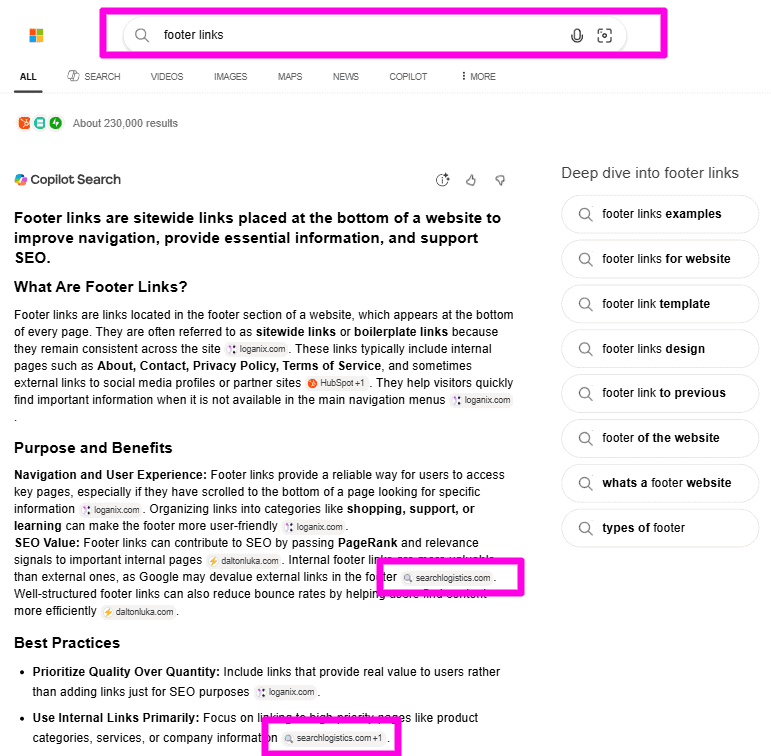
Copilot’s answers can vary between sessions, and you only want to benchmark against the sources it cites consistently.
Look at exactly what pages Copilot is citing regularly over yours.
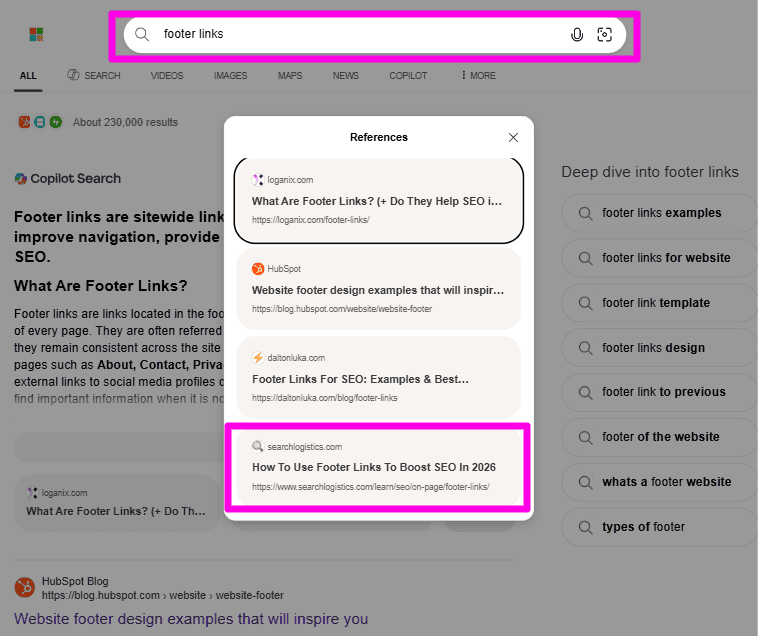
Click through to each reference. Your goal is to understand why they were cited in the AI answer.
Is it a:
- Direct answer at the top of the page?
- Comparison table?
- Specific statistic?
- Concise definition?
Our team has found that within the same intent cluster, Copilot consistently pulled the same type of content for its answer.
Here’s what I mean:
Let’s say you run a pool cleaning company. The cluster that you’re investigating is based on cost questions.
The three queries are:
- How much does pool resurfacing cost
- How much does it cost to resurface a pool
- Average pool resurfacing cost
You notice that each page that Copilot is referencing has the price range in the first 2-3 sentences of the page. That’s what I mean by a pattern.
It makes it easy to know what needs to be improved on your own page.
Record this information for each query that you search in Copilot. I recommend creating a spreadsheet with each page and the relevant query.
This will make it easy to know what you need to improve when you update your content next.
Step 3: Update Your Content To Win New Citations
Now you know exactly what type of content is winning citations.
The next step is to update your own content.
Open your underperforming pages and make three changes:
Place Direct Answers High
Restructure your page so that the information Copilot is referencing is in the first 1-3 sections of the page.
This is simply ensuring that the most important information that Copilot wants to cite is not buried deep in your content.
Use Clear Headings
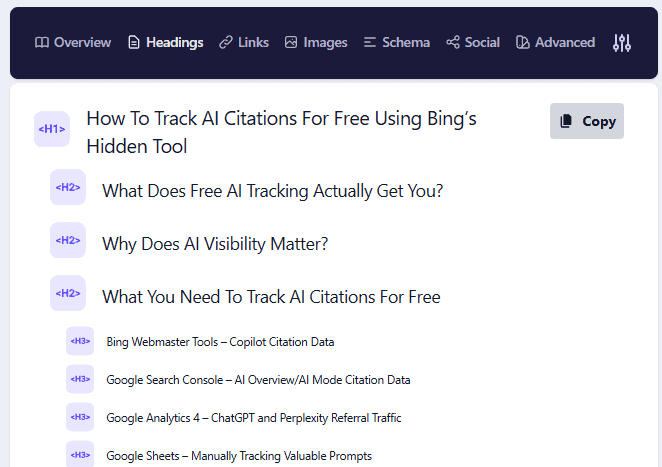
Match your headings to the grounding queries, as it makes sense for you.
The closer that you make your heading to the query, the easier it is for AI to identify the answer. Then all you have to do is write a direct answer underneath the heading.
In some cases, it can even be better to rewrite the heading as a question. AI is trained to look for queries and answers within content for easier retrieval.
Format For Extraction
AI extracts structured content far more reliably than dense paragraphs.
Look at the pages that are being cited by Copilot and match their content type. For example, if they use bullet points, you also need bullet points. If they use a table, you also need to add a table.
Simple as that.
Pro Tip: Record the date that you updated this page in your spreadsheet. Check the Bing AI Performance report in 4-8 weeks to see how your new changes are performing.
Step 4: Keep Your Top Pages Fresh
Pages updated in the last 2 months earn 28% more citations than pages that haven’t been updated recently.
Does that mean you need to constantly update every page on your site?
No. Instead, create a shortlist of your top 10-20 pages that make you money and currently earn citations.
Every 2-3 months, go through and update each page.
The update doesn’t need to be huge either:
- Double-check for outdated information
- Optimise any sections for AI search
- Update a page FAQ
- Rewrite the introduction
In most cases, these updates should take less than 15 minutes to do. The goal is to ensure that you always keep your most important pages fresh and updated.
The Limits Of Bing’s AI Performance Data
Bing’s data is highly valuable for improving your AI search visibility.
But there are some clear limitations you need to understand.
Bing’s Data Covers Copilot Only
The data that you’re seeing inside the AI Performance report is grounding queries for Copilot, not any other AI search tool.
You’re only seeing data from users on Copilot. While Copilot is a major platform in the AI search industry, it has about 11.5% market share overall.
The Data Is Sampled
The grounding query data is a sample of activity and not a complete count.
Microsoft is very transparent about this. Essentially, the queries that are shown in the AI Performance report are a representation of grounding queries, not the complete list.
Think of this like a receipt that shows the big transactions, not every single purchase.
In other words, the grounding queries in the report are the most significant ones for your site. But there will be queries triggering citations for your site that don’t get included in the report.
The main takeaway here is not to react to every little change.
Look at data and patterns from a 60-90 day perspective, not a week-by-week basis.
There’s No Click Or Conversion Data
The Bing AI Performance report shows you how many times pages on your website were cited.
It doesn’t show you if those citations led to conversions or clicks. The primary goal for any website when it comes to AI search is to be cited right now.
For a completely free tool, that’s still a huge amount of data that you should be taking advantage of. The limitation is that it’s harder to see what citations are leading to business growth.
Results Don’t Necessarily Translate To Other Platforms
Each AI model has a slightly different approach to how it searches and extracts information for answers.
The results you get with Copilot may not directly translate to other platforms like ChatGPT, Perplexity or Google.
It was just like that in the early days of search engines too. And that’s not necessarily a bad thing. But it does mean you need to pay attention to each AI search platform to get the full picture.
That’s what I am going to show you next.
Use Paid AI Tracking Tools When Free Isn’t Enough
Manually checking your AI visibility on each platform is time-consuming.
If you’re serious about AI SEO, it makes sense to use a paid premium AI tracking tool to do all the calculations for you.
These are the tools that we use and recommend:
- Ahrefs Brand Radar – Track brand mentions and citations across 6 AI platforms with their massive database of 200M+ prompts, included in all Ahrefs plans.
- Semrush AI Visibility – Track brand visibility, sentiment, and citations across ChatGPT, Perplexity, Google AI Overviews, and AI Mode.
- Peec AI – A dedicated AI visibility platform covering ChatGPT, Perplexity, and Google AI Overviews with competitor benchmarking built in.
- Otterly AI – Automate prompt tracking across ChatGPT, Perplexity, Google AI Overviews, and Copilot with daily updates.
- Profound – Enterprise-grade AI visibility tracking across 10+ platforms designed for large teams with deep reporting needs.
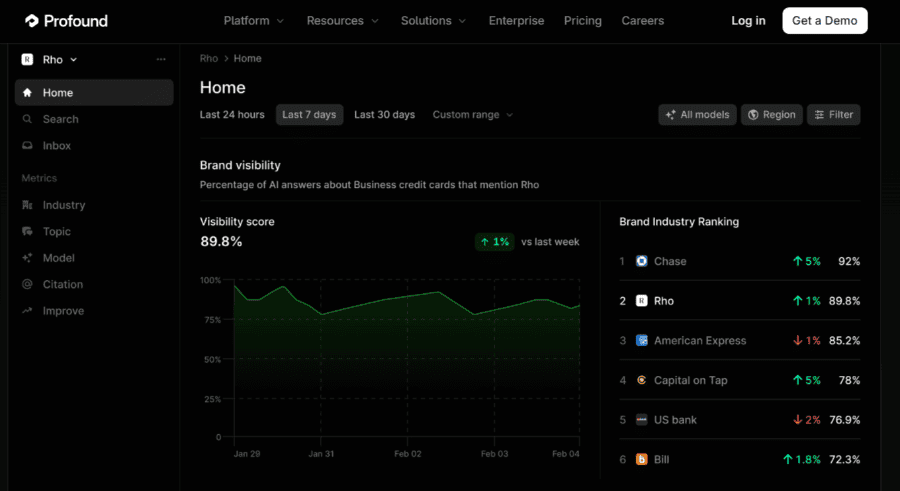
If you’re already using Ahrefs or Semrush and just need basic AI insights, this is a good place to start.
Peec AI and Otterly AI are best if you’re on a budget and want to track individual prompts across multiple platforms accurately. Profound is best for enterprise-level AI search tracking.
My recommendation is to use the free trial that comes with each tool and see what works best for your business.
Wrapping It Up
Tracking AI citations doesn’t have to cost you anything.
There are lots of free tools you can now use to better understand your AI visibility. And that’s only going to continue in the future.
Start with the Bing AI Performance report. It gives you the most in-depth first-party citation data that you can use to improve your AI search visibility right now.
The businesses that are winning in AI search right now aren’t the ones with the biggest budgets.
They’re simply the ones paying attention.
AI search is only going to grow. The brands that are tracking their AI visibility right now are creating a gap between themselves and their competitors.
And that gap is only going to grow.

You Might Also Like





What Are Your Thoughts?

 Subscribe to my YouTube
 Join My Facebook Group
 Connect on Linkedin
 Free SEO Tutorials
 SEO Case Studies
 Links That Rank





