



























































Whether you are just starting your blogging journey or you are a seasoned pro, it’s important that you arm yourself with the right blogging tools to fast track your success.
The blogging world is often noisy with over 2 million blog posts being published every day, it’s often hard to stand out from the crowd but as a multi-award-winning 6 figure blogger…
(Check out my monthly income reports to get more insights).
I have a few tricks up my sleeve.
So I’ve compiled my personal list of essential blogging tools for you that will not only help you stand out from the competition, but also accelerate your blogging success.
These blogging tools will show you not only how to make a difference in your niche, but also how to capture and create an audience that makes you money.
All while boosting traffic effectively.
Here goes…
FREE TOOLFree AI Google Quality Rater: audit your content in seconds.Try it free →What Will I Learn?
#1 – WordPress
WordPress is the gold standard in Blogging platforms.
While other platforms let you create a blog and share content with the world, WordPress focuses on letting you build a business (or an empire) from it.

WordPress.org gives you ownership of your blog, like other publications don’t.
But it also allows you to turn your blog into whatever you want. Whether that’s a sales tool for your affiliate products or as a fully fledged business on its own.
For example, this blog you’re reading right now is run from WordPress – you can learn precisely how I used Wordpress to build a 6 figure blog.
And, some of the world’s most reputable publications, like The New Yorker and Harvard Business Review, all host their content with a Wordpress installation.
Just follow my how to start a blog tutorial to get started with Wordpress.
#2 – WordPress Theme Detector
Once you have WordPress it’s time to make it all singing all dancing with the Wordpress Theme Detector.
Instead of buying a theme blind – or from just looking at the previews – look for blogs you like and find what theme they’re using, and then steal it.
For example, my blog is running this theme.
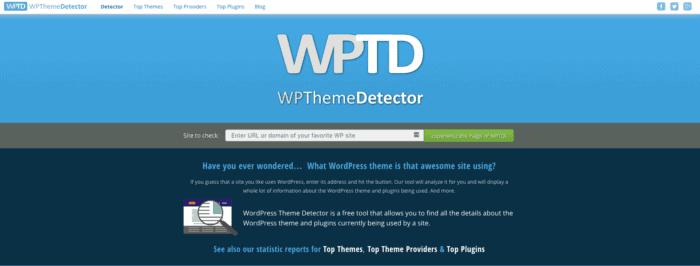
Search your competitors URL and it’ll show you the theme they use and where to buy it:

And, the fun doesn’t stop there.
You can even find the top plugins that they’re using to run their site too.
That way you can even the playing field if they’re a competitor.

Not bad for looking around the internet and searching a domain right?
#3 – Authority Theme
One of the biggest mistakes many new bloggers make is not having a solid Wordpress theme to build upon.
As a 6 figure blogger that has had more than his fair share of theme problems over the years, this is a mistake I also made myself which is why I use this custom theme.

There are lots of different Wordpress themes available for you to choose from, so just remember when looking for a theme you should make sure that it-
- Has a clean & simple design
- Is fully mobile & tablet responsive
- Is optimised for speed & fast loading times
- Has built in rich snippets & schema markup (check out the quality of your schema with a schema tester)
- Is optimised for SEO
As long as the theme you choose ticks all of those boxes – you are good to go but be sure to read over my full checklist!
#4 – Aweber
Growing your email list should be the #1 goal of your blog.
To do that you need Aweber. I have used Aweber for all of my email marketing for several years and it is what I use to power this blog.

But why do you need email marketing software like Aweber?
Well – first of all it helps you stay in touch with all of your readers. Imagine being able to reach thousands of people at the click of a button.
That means that not only can you use it to drive huge repeating waves of traffic like this-

But it also helps you to automate relationship building, increase revenue & so much more.
Take a look at my detailed Aweber review to learn more about why I love it so much.
#5 – BDOW!
BDOW! formerly Sumo has become part of the backbone of my blogging life.
It’s a suite of blogging tools that gives you the apps and data you need to maximise your blogging game.

Inside the tool you can:
- Create welcome mat’s
- Add share buttons to your posts
- Create pop-ups to capture email addresses
- Build an email list scroll box
- Get free traffic through discover
- Use heat maps to track where people click
- Integrate your Google Analytics
For example, I’ve created some awesome Welcome Mat’s to capture email addresses-
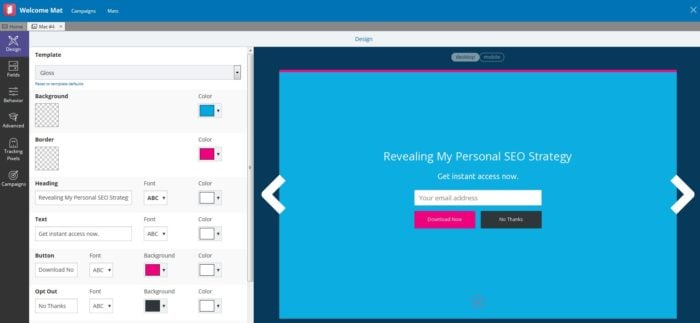
And that’s before you even look at the A/B testing and Marketing Insights they offer you:

This is all easily integrated with any email marketing software as well so no matter who you use (but you do use Aweber right?) you can get signs ups the right way.
You can use the free version to get access to a lot of these tools or buy pro from $20 per month. Either way, I highly recommend using it.
#6 – Canva
Canva is a free design tool that helps you create beautiful visual content for your blog with even the most basic design skills.
All you have to do is sign up for the tool, log in and get to work on creating masterpieces.

There are templates and designs for any type of visual content you could possibly need. And, you can purchase premium stock images for just $1.

If you really don’t have any design skills at all – or if you’re in denial about your own, like me – check out their design school blog to get to grips with design concepts.
Or check out my Napkin AI review to learn how to transform plain text into eye-catching visuals in seconds. No design experience needed.
#7 – Meme Generator
Staying on the visual theme, here’s one we can all understand, Meme’s.
Memes aren’t for every niche, but they are a good way to inject some personality into your blog posts. And, visual content can make those page scrollers stop in their tracks.

You can just screenshot them off the page and there is no fuss at all.
Note: You would be amazed how many complaints I get about the meme above, which is dripping in irony.
#8 – Click To Tweet
Click To Tweet’s are a neat little idea to get people to share more of your content.
Simply create a quote, or find a quotable phrase and add a click to tweet link around it so people can share directly from your content.

For example, some wonderful, incredibly attractive and well-mannered person has chosen to quote me in an article:

And if you click the [Click To Tweet] text at the bottom…
You can tweet the message to the entire world:

This drives traffic back to your site and also means you can contact influencers and mention them in your tweets.
Stuart Walker has been using these on Nichehacks for the last few years and they’ve formed a huge part of his editorial guidelines and his site’s success.
#9 – Social Locker
Social Locker allows you to swap valuable content for social interactions.
You can lock content like: PDF’s, images, steps of an article or bonus content behind their wall.
Only to be unlocked when you receive a share or a like or a tweet in return.

The WordPress plugin integrates with your social accounts in one click and then you’re set and ready to use it.
I use this blogging tool to great effect in many of my posts. Take a look at one of my posts about The Ultimate Guide To Freelance Writing.
In it, I gave a copy and paste pitch template that anyone could use.

In order to access the content you have to share the content on: Twitter, Facebook or LinkedIn. It’s a nice marketing tactic where you both win.
You get more traffic, they get extra content. No brainer.
#10 – Uptime Robot
Your blog is only useful when it is online and Uptime Robot is a great free blogging tool to monitor your blog.
You can monitor upto 50 websites every 5 minutes without spending a penny!

If your blog goes offline for any reason, an instant notification will arrive in your email inbox to let you know it’s down.
You can choose to get SMS alerts sent directly to your phone for as little as $0.20 each!

Although the free email alerts will be suitable for most people!
Bonus Tip: Set it up to send email alerts directly to your web host so they can get it fixed up asap!
#11 – CloudFlare
The free CloudFlare CDN will not only improve the security of your blog, but it will also help to improve load time.
This is how it works-

If that doesn’t make any sense to you, then don’t worry.
Just sign up to the free plan & follow the simple instructions to get it up & running.
#12 – SEMRush
SEMRush is one of the most diverse tools on the planet for spying on other bloggers.
You can use it to find out exactly where your competitors traffic is coming from along with exactly which keywords they are targeting-

With that kind of information in hand you can fast track your blogging success by focusing your time & energy on content that you know will deliver results.
In fact it is so useful, my SEMRush review shows you 68 different ways you can use it to your advantage!
And don’t forget to take advantage of this exclusive 14 day 100% free trial worth $74.95!
#13 – Thrive Visual Editor
Creating content that stands out from the crowd is vital to your blogging success & Thrive Content Builder will help you to do exactly that.
It’s a drag & drop visual editor for Wordpress that makes designing awesome pages a breeze – in fact, I built the page you are reading now with it!

Not only is it super simple to use, but it also comes packed with content templates for you to use on your blog.

What Are The Best Blogging Tools?
Out of that list here are the very best blogging tools I’d recommend for creating a quality blog, with unlimited potential…
- WordPress
- Aweber
- BDOW! (Sumo)
- SEMRush
- Comment Redirect Plugin
Let’s take a closer look at why these tools are the best.
Choice #1: WordPress
Even if you disregard all of the other apps on this list, the WordPress blogging platforms leaves you with the best chance of becoming a blogging success.
From the thousands of plugins through to the easily customisable designs of the sites. For now, WordPress puts you at the cutting edge of blogging technology.
Easy to use and a joy to start a blog with.
Choice #2: Aweber
The number 1 goal of any blogger should be to build their email list, but to do that – you need an email list!
I have used Aweber with great success for several years across all of my projects and if you only invest in one tool – it should be this one.
Once you have it setup, it will continue to deliver huge value to your blog in terms of traffic and money.
Choice #3: BDOW!
The BDOW! collection of essential blogging tools is so simple and easy, and they’ve proven time and time again that they can deliver results from their products.
The mix and match options for tools, or the free versions themselves, can propel your blog (and your blog’s income) forward like no other I can find.
Choice #4: SEMRush
SEMRush can be a bit pricey if you are just starting out, however it will save you lots of time & headache by showing you the quickest path to success by spying on your competitors.
Honestly, this blogging tool is so useful it is hard to summarise in this little block of text, but if you are serious about growing your blog – SEMRush is the missing steroid.
I suggest you read my SEMRush review & then take advantage of the 14 day free trial to take your blog to the next level.
Choice #5: Comment Redirect Plugin
I love the comment redirect plugin because it costs nothing, takes less than 10 minutes to setup and will continue to deliver new email subscribers all day, every day on auto pilot.
That ticks all of the right boxes for me personally and I love things that offer huge long term value for minimum investments in time & money.
Other Tools You Might Like…
- My Personal Tools – The full list of tools and services I use and a behind the scenes tour of my video studio.
- SEO Tools – Increase organic search traffic today with my essential list of SEO tools.
- Free SEO Tools – Save your money & increase traffic with this list of free SEO tools.
- Marketing Tools – These are the best digital marketing tools according to the experts.
- Social Media Tools – Send waves of traffic to your site with these social media tools.
- Content Creation Tools – Take the hard work out of creating content with these content creation tools.
- Email Marketing Tools – Automate traffic, engagement & sales with these email marketing tools.
- Virtual Assistant Tools – Take your business to the next level with these virtual assistant tools.
- Productivity Tools – Spend more time having fun & less time working with these productivity tools.
- Link Building Tools – Build high-quality links to boost your search traffic with my list of the best link building (free & paid) tools.

You Might Also Like






What Are Your Thoughts?
50 Responses

 Subscribe to my YouTube
 Join My Facebook Group
 Connect on Linkedin
 Free SEO Tutorials
 SEO Case Studies
 Links That Rank









Wow. Very informative. The way you explained these blogging tools was really impressive. I’m glad I stumbled upon your website. Great work. Keep it up. 🙂
Hopefully you’ll stumble back again soon 🙂
Another excellent piece of content. Thanks for the heads up with Social Locker and Uptime Robot
No worries Justin
This is incredibly informative, detailed and easily understandable content right there. Lot of people tend to get incredibly confused when it comes to which blogging tools to use. We spend way too much time searching and weighing the positives and negatives of multiple tools only to get flustered all over again. But your blog has some great insights and its incredibly informative and detailed. Great work
I’m glad I could make things a little clearer 🙂
Honestly speaking, I love this your blog post as it explained in detail and with facts all the tools I need to improve my blogging career this year.Thanks!
Good luck!
This is the awesome blog for the blogging tools I read this blog thanks for sharing this awesome blog.
You’re welcome – hope you found some handy tools
Thanks for sharing this amazing blog.It is really an informative post.
You are very welcome 🙂
Great article… useful information for all…
Thanks very much
Hi Matthew,Thank you for sharing this informative article. I learned new things from you. It helped me a lot and I hope that it will also help others. I appreciate your efforts. Have a good day ahead.
Great news, I’m glad you could use these tools to your advantage.
Great, those are really fantastic blogging tools for new to blogging world. You have managed to included the most recommended tools. These tools are really very helpful for blogger out there! Keep up the great blog.
Thanks Bobby, are there any others out there you would recommend?
Hi Matt,Just want to ask about “Comment Redirect Plugin” as it has not been updated for 4 years. Is it safe to use it without any issues?Thanks for the help and detailed, beautiful articles.
Hey Ahmer, the plugin works fine and is currently active on the blog.
wonderful posts Matthew, love your contentEven posts from Neil patel seem cryptic and unactionable, but your simple actionable posts have been really wonderfulAs I am writing this, I’ve decided that I will be for sure starting a blog tomorrow
Awesome news, have a look at this post https://searchlogistics.com/blogging/how-to-start-a-blog/ It will help you with your new blog 🙂
With examples, the blogs are understood very nicely. Keep it up.
Thanks 🙂
Great. Explanations to each of them is wonderful.
Awesome glad you liked it Aayush
Awesome collection. Some of these I am already using. Rest , will take over this time. you write really well.Thank you.
Cheers Andy
I stumbled across your blog while I was searching for some tutorials to start up my own blog…GLAD I DID!!I really appreciate your work! Your writings are incredible and really informative. Thanks for sharing your knowledge!
No problem Abhinand
Hi Matthew, I can’t stop reading your blog:) I am now testing the Social locker and Thrive Visual Editor but I am not able to make it work. If I use standard Wordpress editor the short code [sociallocker id=”506″] [/sociallocker] works but not with the Visual editor. Is there any trick? Thank you anyone for help.
Use wordpress code in Thrive
Hi Mathew,Awesome post and great to see examples if how you have used the tools.Do you use and caching plugins to help with site load times?
Yes of course and a CDN
This is a massive useful list of blogging tools. Got it bookmarked and shared to my twitter. Thank you very much
No problem Rahul!
Hi Matthew,I am a blogger and I was looking for above mentioned tools. Now I can save lots of time by using the above tools. Can you please tell me, which plugin is best for WordPress for sending mails to subscribers?Waiting for your reply.
I am currently migrating to Drip
Awesome list and resources! You pretty much have the whole industry covered in this one 🙂
I hope so 🙂
Hi Matthew, thanks for this. I’ve spent far too much time weighing up the pros and cons of too many services. Now I’m going to trust you and go with your advice, and get on with writing content.Can I ask, what do you use to automatically schedule posts to social media?
Well when it comes to creating content, there is no substitute for hard work :)You could just use the free version of Buffer
HI Matthewi already send you an e-mail about roundup post. Please check your e-mail 🙂
Ok thanks I will do 🙂
Very informative like always. thanks matthew i mentioned your blog as a best learning source on SEOLovers. I would like to introduce you to my audience is it possible ?
That is very kind of you, please drop me a mail 🙂
Hi Mathew,This is a very informative article you published about Thrive tools too, I will sign up using your affiliate link right away Sir.Thank You very much.
That’s very kind of you thanks!
Amazing piece Matthew, very informative and helpful, was going to signup for Thrive last week but I didn’t, I guess I’m gonna use your affiliate link above to signup.Thank you
No problem Rachid and thank you for your support 🙂