














































How To 14x Search Traffic In 8x months
Campaign Challenges:
- The weight loss supplement niche is very competitive
- Most search results are dominated by huge household brands
- The site had huge issues with thin content and zero structure
Campaign Results:
 +1,306%
Organic Traffic
 +637
+637
Top 3 Rankings


I’ve said it before and I’ll say it again:
SEO doesn’t have to be complicated.
One of the things I notice as a popular SEO blog owner is that people are always looking for the “secret ingredient”
But truth be told:
If you want to increase your search traffic it is as simple as-
- Conducting an SEO audit
- Creating content
- Building links
That is the exact approach we used to 14x organic search traffic in today’s case study!
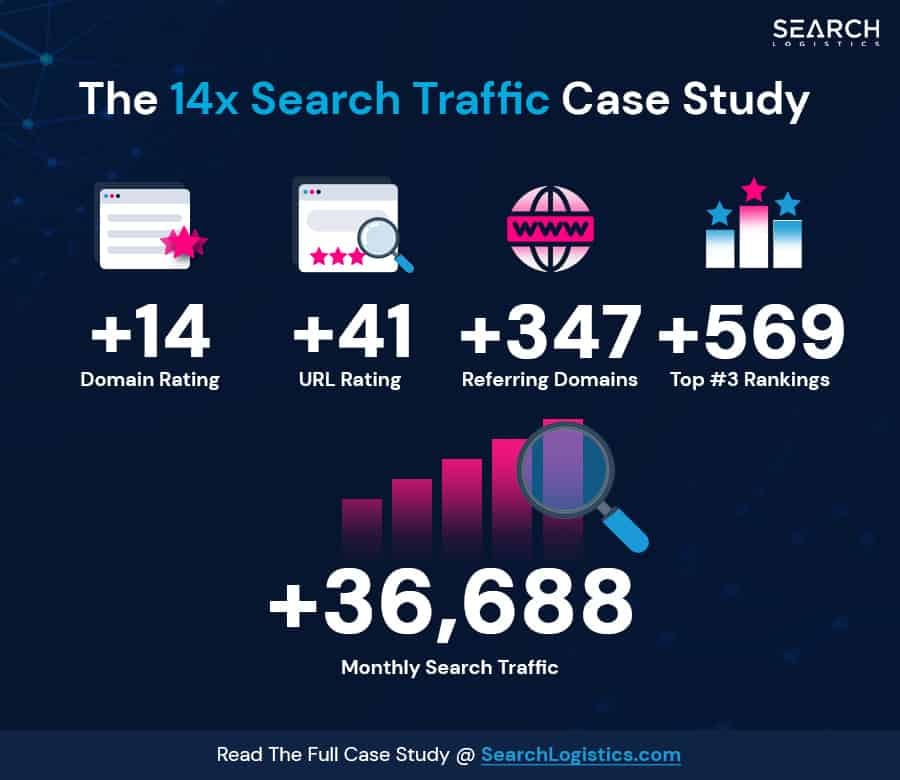
We took traffic from 2,732 visitors per month to 38,420 in just 8x months-
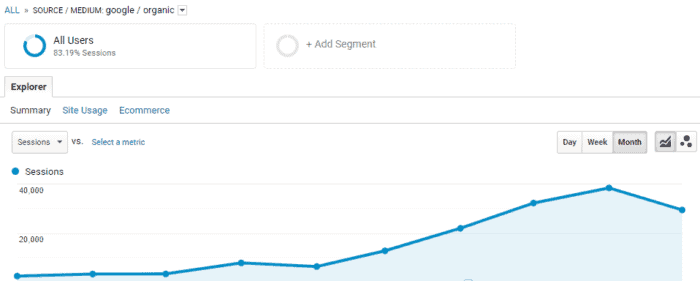
How did we do it?
Well it was simple really…

What Will I Learn?
A Closer Look At The Case Study Site
 This is an affiliate focused website that reviews weight loss supplements targeting the USA & United Kingdom.
Our client’s website provides a platform for users to access trustworthy, specialist reviews and decide which diet supplement is best suited for them.
The main focuses of the campaign were to-
- Build the website’s authority
- Push rankings to the first page for high-volume terms
It sounds simple when you write it out like that, right?
That’s because it is!
Except one tiny detail…

The Biggest Challenge We Had To Overcome
The weight loss supplements niche is one of the most competitive niches in SEO (to say the least!)
Most search results are dominated by huge brands like Holland & Barrett-

Or massive content-based sites like HealthLine-
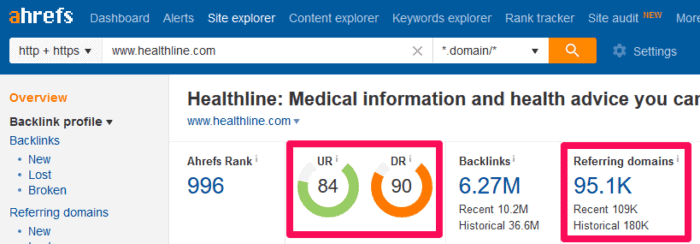
Those are some pretty terrifying metrics.
I mean:
Just take a look at some of the top results for one of our target keywords-

If you click on the image above you’ll also see that we are up against-
- Sponsored product results
- 4x Google Adwords results
- 1x Featured snippet
- 1x People Also Ask box
And those kind of results are common across this niche.
But if you pay close attention to the green boxes in the image above…
Because many of the top 10 results are ranking purely out of domain authority rather than individual page level metrics.
That means we have a solid chance of competing with the big boys.
And I am sure you have seen results just like that in your niche right?
Remember: Any health-related content/website is part of the YMYL category, which means that they need to be treated as such and respect the YMYL guidelines.
Creating A Plan Of Attack
When forming your SEO strategy, there is one thing to keep in mind.
People tend to over complicate SEO.
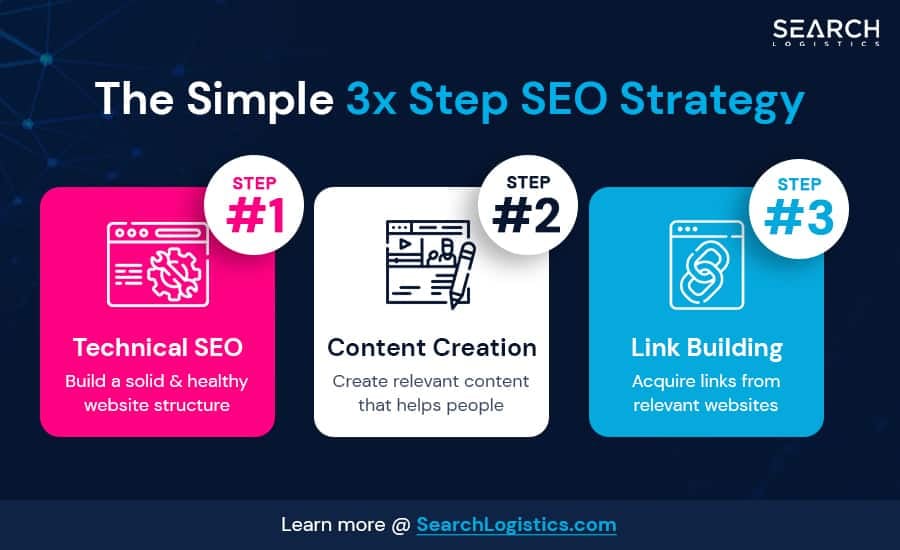
Our strategy was broken down into 3x stages-
- Technical SEO – Build a solid & healthy website structure
- Content – Create relevant content that helps people
- Link Building – Acquire links from relevant websites
But of all of that is easier said than done, right?
So let me show you how that translates into the real world…
What Did We Actually Do?
To help you understand our process:
I am going to step you through the core SEO strategy and precisely what we did.
The strategy was broken down into a number of pieces-
- Keyword Research
- Competitor Analysis
- Content Strategy
- Onsite SEO Audit
- Site Structure
- Link Building
And it is the combination of these pieces that were responsible for 14x traffic in 8 months.
Often when clients come to us:
They are completely obsessed with link building.
They say things like-
“Yeah but how many links will you build per month?”
But link building is just 1x component of a complete SEO strategy.
Let me ask you this:
Just 76.
76x links to take this sites traffic from 2,732 visitors per month to 38,420–
How?
By addressing all of the moving parts of SEO rather than only focusing on the number of links we build.
(I’ll share the link-building strategy with you later)
But first:
You have to get the basics right-
Step #1 – Keyword Research
The first thing we do with any new client is conduct detailed keyword research.
First, we asked our client for a list of seed keywords that are important to them.
Then used the KeywordShitter tool to expand on them-

Once we pulled all the keywords from there…
…we expanded on them further with AnswerThePublic:
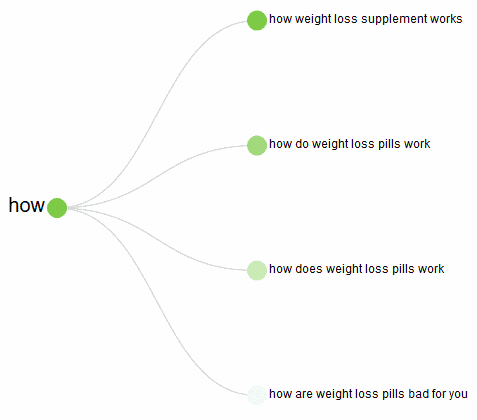
Once we had a large list of keywords we started to filter them down-
- First we removed duplicate/similar terms
- Then we mapped out topic clusters of keywords with similar topics
- And thought about the “type” of keywords to focus on
These were the types of keyword we were looking for-
- Money keywords that drive traffic to key affiliate pages: [brand] review(s)
- Generic keywords related to different forms of the products: best [product] / best [product] [supplement|brand|pills], most effective [XYZ], weight loss [XYZ]
- Questions: does [XYZ] work, how to use [XYZ]
- Strictly informational keywords: [XYZ] information, [XYZ] pros and cons, [XYZ] side effects.
We also paid close attention to search intent when selecting our final keywords.
It’s important to avoid keywords that return different user intent than the site can satisfy.
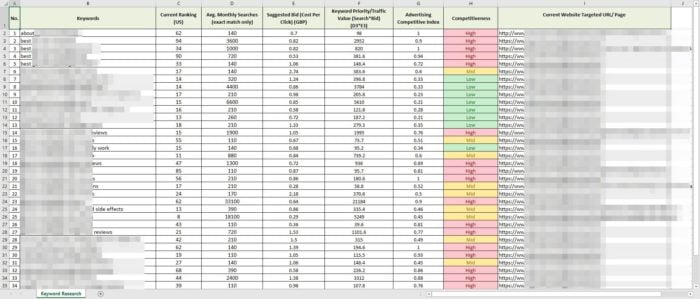
The final spreadsheet included additional data pulled from Google Keyword Planner and our rank tracker-
But:
Whilst you’re doing keyword research, make sure to take a look at the SERPS for each one.
Pay attention to the sites that popup and make a list of common competitors.
We will be using that list to our advantage later in the case study!
Pro Tip: Quick & Easy Keyword Research
If your site has any level of existing search traffic…
…I have a great keyword research tip for you.
With this tip you’ll be able to find all of the low hanging easy to rank keywords in a couple of clicks with Ahrefs.
Just head over to Ahrefs Keyword Explorer and paste in your domain and head to the Organic Keywords report-
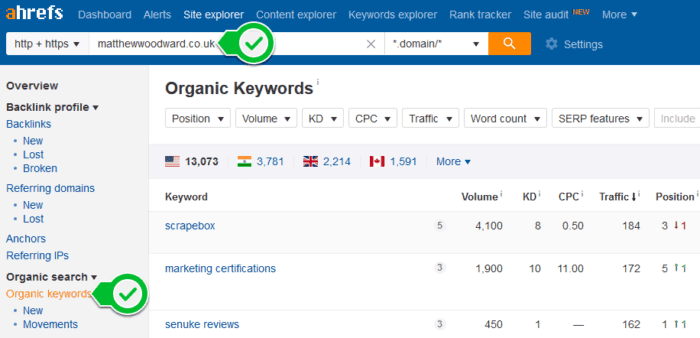
Then use the filters to show the keywords currently ranking in positions 11-30-

This just returns a list of keywords that you already rank on page 2 & 3 for…
…which are super easy to bump to the top 10-

Targeting these keywords are a great starting point for any SEO strategy.
Step #2 – Competitor Analysis
I can not stress how important this stage is!
At the moment we have a good list of keywords that are-
- Topically relevant
- Match the sites user intent
Now we need to take a closer look at who our SERP competitors are.
Do some searches and pay close attention to the first page of results.
You want to look at things like-
- Content length
- Page purpose and intent
- What types of pages are ranking (inner vs homepage or product vs category)
- How strong the domains are (is it Amazon or just an average Joe)
- Page layout (e.g. CTA and banner placements)
- Monetisation
Just by looking at the results, you can get a good idea of the type of SEO elements, structure, intent and content you need to create.
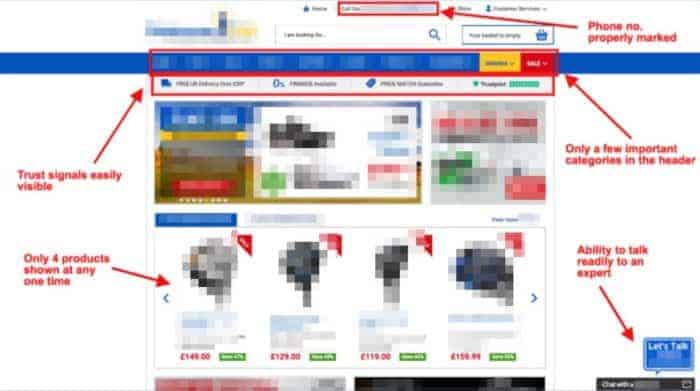
Here’s an example of a competitor site’s review my agency sends to clients:
It’s not everything:
But you can see what kind of signals we’re looking at.
Why is this important?
Because Google have been using machine learning algorithms since 2015.
And by looking at the search results we can see what the machine learning algorithm is expecting to see.
You might not realize this:
But every time you search this is what is happening behind the scenes-
- You enter your query into Google
- Google chops the query into individual words
- Google applies natural language processing to figure out meaning
- Then it analyses the intent of the query (eg informational or commercial)
- This generates a list of relevant results
- Additional filters are applied (eg Pagespeed)
- The final search results are displayed
Here’s a shot from Rad Paluszak’s Chiang Mai 2018 presentation to help visualize that-

But what is most important here is the final step of the process…
Because this is the machine learning part that is automatically analyzing the efficiency of the results and tweaking the algorithm.
What’s that got to do with competitors?
Well:
We just have to look for those things…
Pro Tip: Spot Check Your Competitors
Do a search for your target keyword and look at the top 5 results.
First look for commonalities in the results such as-
- Content length
- Page intent
- Use of images/videos
- Page layout
- Ad placement
- Trust signals
Then make a note of what you like and don’t like about each result.
This will become the outline for each new piece of content.
Step #3 – Technical SEO & Content Audit
Now we know where we want to go with the SEO campaign…
..It’s time to figure out where we are starting from.
To do that we conducted a comprehensive onsite audit that typically spans about 30 pages.
The goal of this is to identify any issues that might hold it back from performing at its full potential.
It includes things like-
- Site Structure – Are we using the best site structure to maximize link juice?
- PageSpeed – Does your site load quickly for Google and visitors?
- Index Management – Do you have unnecessary index bloat?
- Duplicate Content – Caused by improper use of tags/categories
- Internal Redirects – Wasting crawl budget is bad for your site!
- Internal Linking – Very powerful but underused tool.
- Trust Signals – Are you sending the right signals to Google?
This site had a range of problems that we needed to address.
Here’s how we fixed some of them-
Issue #1 – Page Speed
One of the main problems with the site was that it had almost no page speed optimisation.
The site was loading very slowly in our tests.
We use 2 plugins to fix that-
- WP Rocket – to optimise pretty much everything, BUT images.
- ShortPixel – to optimise images.
This is the best way to setup WPRocket-
Step #1 – Caching

Step #2 – File Optimisation


Step #3 – Media

Step #4 – Preloading


Or you can checkout my full WP Rocket review which takes a deep dive into how to get the most out of it.
Issue #2 – Wordpress Taxonomies vs Duplicate Content
Wordpress is a great platform to build a website.
But:
It can also make Google index a lot of rubbish.
All this indexed bloat decreases the overall SEO value of the site-
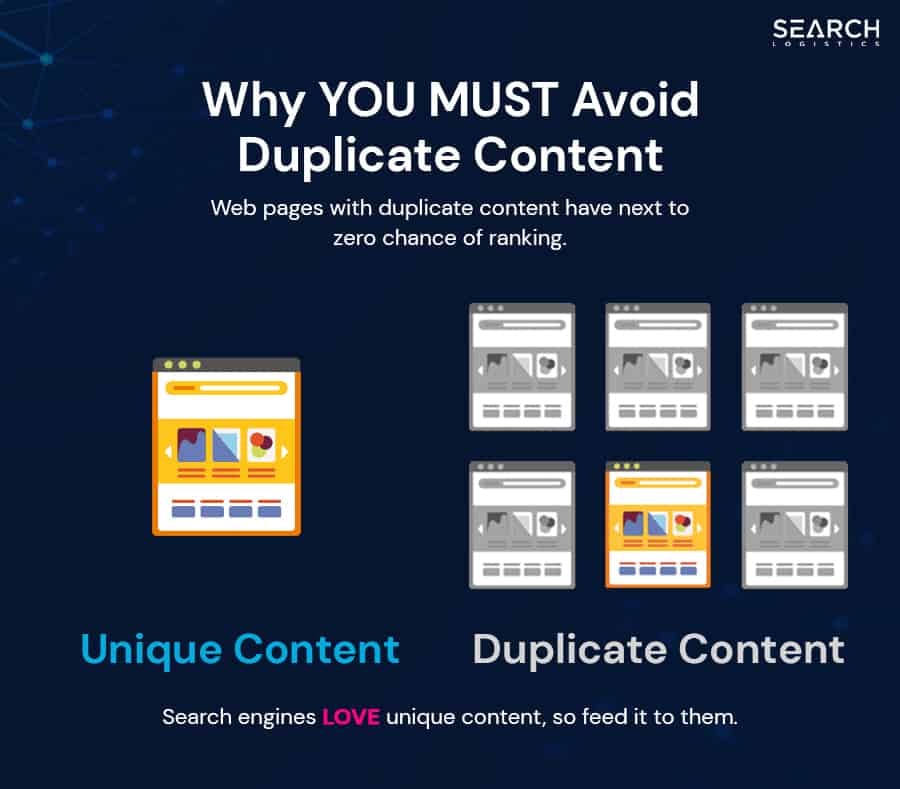
Not only do you risk duplicate content problems but you also waste valuable crawl budget…
To put it simply:
If you have 50 pages indexed, but only 5 that Google should pay attention to…
…you should consider pruning the site.
If the remaining 45 pages are not useful for your users, get rid of them.
Below are Yoast SEO settings I always use for taxonomies in a few simple steps.
Step #1 – Yoast SEO -> Search Appearance

Step #2 – Yoast SEO -> Search Appearance -> Content Types
Be careful if you’re using custom post types in your WP, as you will have more than just the ones listed below!
Posts

Pages

Custom Post Types (Portfolio)

Step #3 – Yoast SEO -> Search Appearance -> Media
This feature had a few issues last year.

Step #4 – Yoast SEO -> Search Appearance -> Taxonomies
Categories (category)
You might want to choose “No” if you don’t use Post categories at all.

Tags (post_tag)

Format (post_format)

Custom Categories (portfolio-category)

Step #5 – Yoast SEO -> Search Appearance -> Archives
Author archives settings

Date archives settings

Issue #3 – Internal Redirects
When we conducted the technical SEO audit, we spotted a few problems with internal redirects.
This was caused by a variety of things-
- The site had recently migrated from HTTP to HTTPS (poorly)
- A lot of the internal links were pointing to old HTTP urls
- Some pages were renamed or deleted and redirected
- The theme had some hardcoded redirect loops
All of this was wasting significant crawl budget.
But luckily:
It’s all pretty simple to fix!
With HTTP -> HTTPS URLs, we just tracked all of them down and changed all http:// to https:// manually.
And to fix the redirect problems we just fired up Screaming Frog SEO Spider–

- Crawl the site
- Go to Response Codes at the top
- Select “Redirection (3xx)” Filter
- Type your domain – this will ensure you are looking at your internal links only.
- Click on the URL you’d like to review
- This is what the URL is currently.
- This is what it should be.
In our case study site for example:
We could fix a lot of the errors by updating hardcoded links in the menus and sidebars.
But every site is different!
Issue #4 – Thin Content
Whilst conudcting the audit, we found a BIG issue with thin content.
Over 50% of the website pages had under 500 words.
Every niche is different!
But after looking at search results and competitor sites…
…It was clear this is a content heavy niche.
Don’t forget:
Google rewards fresh, long form content that addresses user intent. So we adjusted our content strategy to support the main campaign goal.

With that in mind:
We increased the length of the homepage from 1,500 words to 10,911 words by answering over 20 of the most popular questions around the main affiliate product.
Following the same strategy:
We increased the average word count per page from ~500 words to 2,216 words per page.
In addition to expanding the website’s copy, we also reviewed and optimised-
- Page titles
- Meta descriptions
- Headings
All of which worked in harmony with each other to pull the sites pages up the search rankings.
Step #4 – Building A Healthy Site Structure
It’s important to create a healthy website architecture.
Why?
Because-
- It helps user finds what they need
- It helps Google understand the site
- It helps to priortise the most important content
- It helps distribute link equity throughout the site
The website should follow a logical structure (flat structure or silo structure) with a clear with your core pages located within 3x clicks from the homepage.
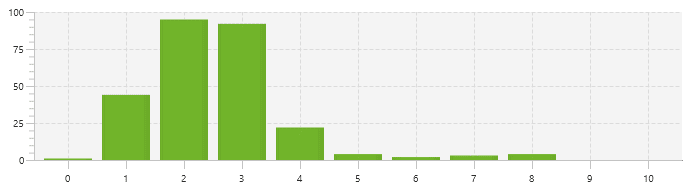
We can check this easily in Screaming Frog using the Crawl Depth report.
Here is an example of bad crawl depth–

And here is what it should look like-
If you wanted to dig deeper…
…You can also use Screaming Frogs Visualization tools-

But what are we looking for here?
Well this is an example of a bad site structure–
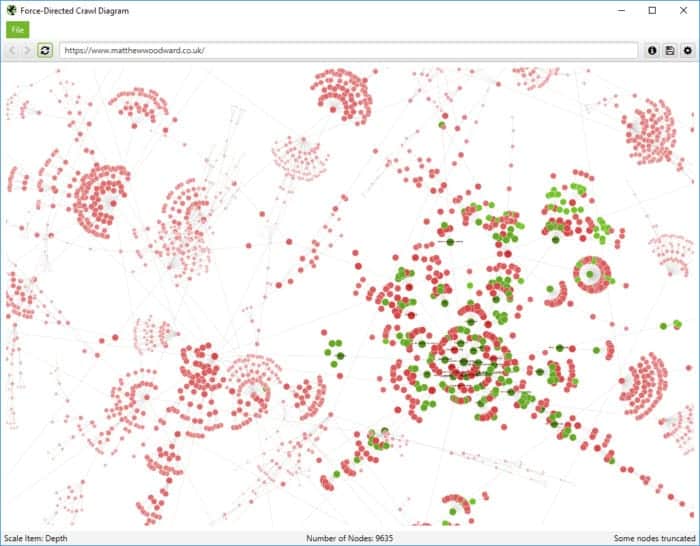
And when you do things right…
…it looks like this-

So with the case study site in mind, we overhauled the site structure so everything was within 3x clicks of the homepage.
We did this by-
- Building out category pages
- Linking to those category pages from menus
- Internal linking between content (I’ll talk more about this later)
A lot of people don’t pay attention to site structure.
But trust me:
Step #5 – Content Strategy
As soon as you have a keyword strategy and healthy site foundation to build on…
…It’s time to get your hands dirty with content!
You should start crafting the content as soon as possible because this is often a bottleneck for many businesses.
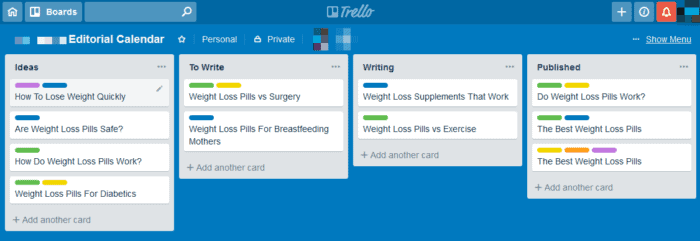
This is how we approached it-
- First we selected our primary target keywords
- Then we reviewed our competitors in Google for each keyword
- That allowed us to create a “content specification”
- Which was then sent to our writing team
Based on what we had learned about the thin content issues during the SEO audit…
…we made sure that all new pieces of content were at least 2,500 words.
We continued to produce 2x new pieces of content per month throughout the campaign.
Step #6 – Internal Linking
Once we developed our killer content and restructure strategy…
We needed to help Google navigate the website easier to discover all the pages we updated/created.
The goal of our internal link building strategy was to distribute link value throughout the site, from pages with authority to others with less authority.
We used a balanced combination of targeted, branded and generic anchors to help Google determine the relationship between them-

Along with links we placed manually, we also installed and tested a number of plugins to help place internal links-
The one we ended up using is Yuzo Related Posts:
We chose this because it helped us customise the display on the front end of the site-

This meant we could cross-link key pages across the site structure automatically.
Very handy!
Need help fixing your SEO issues? Check out my 45+ steps SEO checklist to get rid of your most important SEO issues.
Step #7 – Link Building
There is no doubt about it:

But that is amplified 10x when you have built a good site structure backed with solid content.
With all of that in place we started to build the overall domain authority using links from relevant websites in the fitness, health and lifestyle niche.
We took the backlink profile from 27x referring domains to 374x referring domains–

How did we do that?
By keeping things simple!
First we scraped a huge list of relevant websites with SEO value, traffic & authority.
Then we published high quality content targeted at their audience to secure a backlink where possible.
We didn’t do anything beyond that.
This is the exact link building strategy and schedule we used to meet the clients budget-
Month 1
- 12x PBN Links
- 1x Outreach
Month 2
- 10x PBN Links
- 3x Outreach Links
- 15x Quora Links
Month 3
- 12x PBN Links
- 3x Outreach
Month 4
- 10x PBN Links
- 3x Outreach
Month 5
- 4x Outreach Links
Month 6
- 3x Outreach Links
The strategy was simple-
- First build authority and topical relevancy as quickly as possible with PBN links
- Once established (month 4), we switched to outreach only
- In month 5+ the site starts ranking & picking up links naturally to fuel growth
And that’s all we did.
In month 7+ we didn’t build any additional links to the site.
Once the site started to rank it was picking up links naturally and rankings have continued to improve.
Do You Struggle With Link Building?
Take a look at some of these free resources to help you build awesome links-
- LinksThatRank: The only link building service you need.
- Link Building Strategies: A collection of my favourite link building strategies.

The Results Speak For Themselves
The site has had 8x months of amazing growth.
Traffic has grown from 2,732 visitors per month to 38,420.
Let me put that in different words…
If we take a closer look at things…
…we managed to increase-
Metrics – Start of the Campaign

Metrics – End of the Campaign

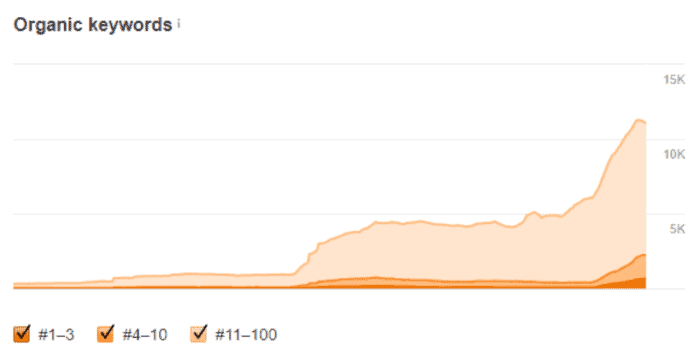
That increased domain authority also increased keyword visibility.
At the start of the campaign there were-
- 68x top 3 rankings
- 345x top 10 rankings
But at the end of the campaign…
There are now 637x keywords in the top 3 positions!
And 2,221 keywords in the top 10-
Although throughout the campaign we were only monitoring 48x core keywords…
..they had a net increase of 894x positions in Google–

And a number of those keywords…
…had high search volumes and were dropping into the #1 positions-
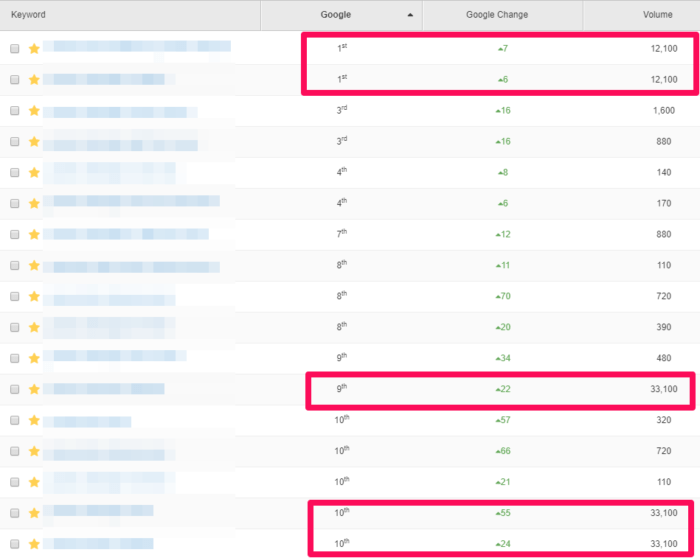
With a number of other high volume search keywords breaking into the top 10.
All of which made for some really pretty Google Search Console data-
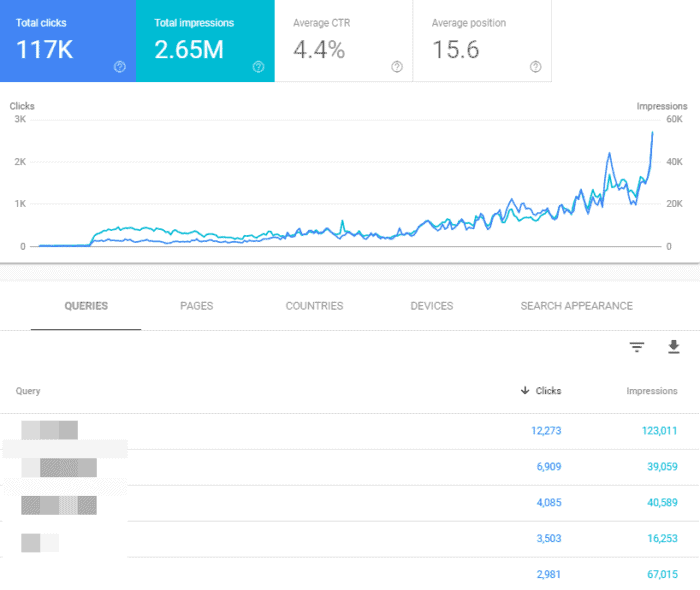
Not bad right?
Especially in such a competitive niche (more on that soon).
If you want help ranking your website…

Wrapping It Up
So there you have it:
It really isn’t that difficult to do – you just need to follow the 3x stages of SEO-
- Technical SEO – Build a solid & healthy website structure
- Content – Create relevant content that helps people
- Link Building – Acquire links from relevant websites
And the best is that you can use free seo tools to help you out!
Or if you want to do it the easy way:
Click here to have my team do all the hard work for you.
If you have any questions about the case study, please ask below!


What Are Your Thoughts?
346 Responses
How To 14x Search Traffic In 8x months
Campaign Challenges:
- The weight loss supplement niche is very competitive
- Most search results are dominated by huge household brands
- The site had huge issues with thin content and zero structure
Campaign Results:
+1,306%
Organic Traffic
+637
Top 3 Rankings
Case Studies
In this case study, we show how verifying an AI-built site before launch, structuring content for AI search, and strengthening local search signals helped our client grow organic clicks by nearly 5x.
CAMPAIGN RESULTS:-
181
AI Overviews Mentions
-
5x
Organic Search Traffic
In this case study, we show how making content more trustworthy, improving AI extractability, and adding structured data helped our client drive more qualified referral traffic from ChatGPT and Perplexity.
CAMPAIGN RESULTS:-
157
AI Overviews Mentions
-
+700%
AI Referral Traffic Growth

In this case study, we’ll break down exactly how we increased our client’s search traffic by 30% using LLMs to reclaim visibility.
CAMPAIGN RESULTS:-
+30%
Monthly Organic Traffic
-
#1
Position For A High Ranking Keyword
In this case study, we show how combining genuinely helpful content with structured data and a proven link building strategy led to measurable gains in traffic for our client.
CAMPAIGN RESULTS:-
8,305
Monthly Sessions
-
234
Top 3 Ranking Keywords

In this case study, I’ll show you how we increased our client’s monthly organic traffic by 58.72% by building authority and improving user experience.
CAMPAIGN RESULTS:-
+58.72%
Organic Traffic
-
1,179
Top 10 Ranking Keywords

This SaaS SEO case study uncovers how to transform blog visitors into customers by optimising for conversions.
CAMPAIGN RESULTS:-
+391%
Monthly Sessions
-
2,193
Top 10 Ranking Keywords

Learn how we increased our clients’ new leads by 50%, overhauling their service pages, optimizing their Google Business Profile, and growing their domain authority.
CAMPAIGN RESULTS:-
 +50%
+50%
New Client Leads
-
+21.33%
Monthly Sessions

In this case study, you’ll learn how we helped our client grow by 2,550% by fixing on page SEO issues with content and indexation.
CAMPAIGN RESULTS:-
+2,550%
Organic Traffic
-
339
Top 10 Positions

In this case study, you’ll see how we grew our client’s monthly organic revenue by 493% after optimizing key pages.
CAMPAIGN RESULTS:-
+493%
Monthly Revenue
-
+316%
Organic Traffic

Learn how we grew search traffic by 44% in just 12 months without building any new links to the site!
CAMPAIGN RESULTS:-
+44%
Organic Traffic
-
6,694
Top 10 Results

In this case study, you’ll see how we grew our client’s organic traffic by 288% after implementing a complete site migration.
CAMPAIGN RESULTS:-
+223%
Organic Traffic
-
411
Top 10 Rankings

In this case study, you’ll see how we more than doubled our gambling client’s monthly sessions from 52k visits to over 77k in just 12 months.
CAMPAIGN RESULTS:-
+180%
Conversions
-
735
Top 10 Rankings

In this case study, you’ll see the exact strategy we used to grow our gambling client’s organic traffic by over 800%.
CAMPAIGN RESULTS:-
+889.91%
Organic Traffic
-
1,063
Top 10 Rankings

These are the 4 steps we followed to drive our clients websites to 1.4M visitors in just six months without building any links!
CAMPAIGN RESULTS:-
1.4M
Organic Visitors
-
93,914
Top 10 Rankings

This SEO case study shows you how we beat the May 2022 core update to increase search traffic by 111% and revenue by 51% per month.
CAMPAIGN RESULTS:-
+111.63%
Organic Traffic
-
+51.18%
Organic Revenue

We’ll show you how we recovered our client’s coupon websites search traffic after it was destroyed by Google’s May 2020 core algorithm update.
CAMPAIGN RESULTS:-
+201.94%
Organic Traffic
-
+158.46%
Organic Revenue

We’ll show you the SEO strategy we used to increase revenue by 438% for an ecommerce health brand, whilst facing heavy competition.
CAMPAIGN RESULTS:-
+240.33%
Organic Traffic
-
+438.02%
Organic Revenue

In this SEO case study, see the 6 technical SEO problems we fixed to increase search traffic by 78% and revenue by 28%.
CAMPAIGN RESULTS:-
+73.00%
Organic Traffic
-
+28.43%
Organic Revenue

Core updates have the potential to destroy your SEO. We’ll show you how we recovered our client’s website from a huge Google core algorithm update.
CAMPAIGN RESULTS:-
+90.60
Organic Traffic
-
+53.23%
Organic Revenue

Discover how we 3x a client’s revenue from organic search in just 90 days by focussing on fixing big SEO issues that were holding the site back.
CAMPAIGN RESULTS:-
+142.86%
Organic Traffic
-
+204.32%
Organic Revenue

See how we increased our client’s search traffic by 1,367%, including the big challenges we faced & the strategies we used to overcome them.
CAMPAIGN RESULTS:-
+1,367%
Organic Traffic
-
 +12,583
Monthly Visitors

Discover how our team increased monthly sales to £109,377 for our client during COVID & lockdowns despite the fact they’re in the sports niche.
CAMPAIGN RESULTS:-
+185.53%
Organic Traffic
-
+192.05%
Organic Revenue

Learn how we increased monthly search traffic from 5,156 to 30,347 in the highly competitive gambling niche by taking a different approach to SEO.
CAMPAIGN RESULTS:-
+488.57%
Organic Traffic
-
+3,100
Daily Visitors

Learn how we won 656 top 3 rankings with 1,951 keywords listed on the first page with our SEO case study. The result was 498% traffic growth.
CAMPAIGN RESULTS:-
+498.03%
Organic Traffic
-
+656
Top 3 Rankings

Learn the link building & SEO strategy behind 53,000 visitors per month in one of the most competitive niches.
CAMPAIGN RESULTS:-
+4237%
Organic Traffic
-
+76,000
Organic Visitors

This client runs an ecommerce store that sells pet products and were not ranking for any kind of commercial terms to begin with.
CAMPAIGN RESULTS:-
2x
Organic Traffic
-
43
Top 5 Rankings

This client works in the highly competitive world of real estate and was spending a small fortune every month.
CAMPAIGN RESULTS:-
+93.01%
Organic Traffic
-
3x
Organic Revenue

The site was already established but it had a range of issues and was losing traffic and revenue for over a year before we started working on it.
CAMPAIGN RESULTS:-
594
Top 5 Rankings
-
997
Top 10 Rankings

This site was hit with a manual penalty from Google so we had to act fast. We cleaned up the site and had our reconsideration request accepted first time.
CAMPAIGN RESULTS:-
114
Number 1 Rankings
-
980
Top 10 Rankings

Learn how we beat big brand competitors to increase this furniture stores e-commerce revenue by 369%.
CAMPAIGN RESULTS:-
+122.27%
Organic Traffic
-
+369.43%
Organic Revenue

Learn how we managed to overcome the Penguin penalty and bring this sites search traffic to record levels.
CAMPAIGN RESULTS:-
+500,000
Organic Traffic
-
+4,051
Top 10 Rankings
How Can We Help?
If you need help increasing your search & sales or recovering from a penalty please fill out\ the form below and one of our search specialists will review your site-


Great case study. To build domain authority, did you send links to the homepage only or did you send links to inner pages too?
The homepage was the primary ranking page
Thank you for sharing a great blog for reader
No problem! Hope there were some valuable tactics you can action on your site.
Hi Matthew, Great post! I’ve already gone through and deleted some thin content pages from my own blog as well as purchased WP Rocket. Can’t believe how much faster my site is! Can you tell us what ratio you used for homeage vs. internal pages when building the PBN links? Thanks.
Glad you enjoyed it!All homepage baby!
it’s interesting how many time PBN showed up in your Link Building Strategy for your client.that is very different from what other people are saying about PBN’s.Great post.
If executed correctly PBN’s can be extremely powerful!
it is really nice article I love it
Thanks!
THANKS FOR SHARING THE ARTICLES AND AWESOME ARTICLES ON INTERNET.
No problem, happy to help 🙂
Very Good Case Study. it’s very useful for me and I am working on it, Thanks
Great news! Keep hustling
Hi Matthew,quick question (and valuable for others as well). Have you noticed that leaving comments open benefits SEO for that particular post/site?I have noticed my competitors doing ranking much better (no obvious reason) and the only difference I notice is they they all have WordPress comments enabled and I don’t. Isn’t a new comment the same as updating the content each time? (In the eyes of Google)Thanks!
Why wouldnt you have comments enabled?
Nice Article
Hope it helps build your traffic 🙂
Great list of SEO tactics to use and double your traffic in a quick period. SEO will have huge changes in 2019 and these are very effective
Thanks, we certainly find these tactics helpful, as shown 🙂
How much of that traffic comes from the homepage vs internal pages?If it’s ranking for 11,200 keywords. Wouldn’t the bulk of the website traffic be coming from this single page?
That is correct, the homepage was the driving force – great observation 😉
GOOD INFORMATION THANK FOR SHARING A WONDERFUL INFORMATION
No worries Harimanti. Hope this article helps improve your search traffic.
Amazing case study for search traffic.Really appreciate the way you have written and explained.I am really gonna apply this for the future. Worth reading it.Thanks for sharing it with us.Good work..!!
Hey Lisa, thanks! I hope you have a lot of future success with this article for reference.
Search Engine Optimization is an major tool for Digital Marketing , in this great article says about SEO , that type of things are very helpful for me and thanks for sharing.
Happy to help!
Great bump in DR. How did you make that happen? I’ve been stuck in the DR mid-40s for a couple of years.Not obsessed with DR but it’s a fun numbers game.What were the DRs or URs of the links from your PBNs to your site?What were the URs of the guest posts you secured?Do they all point to the homepage, internal pages or a mix?Gratsi!
Off the top of my head I don’t know but we drove all the links to the homepage as this was the primary ranking target, and it was also the page that picked up a ton of natural links once we were ranking
Hi dear sir. Sir i know many Seo tools but i do not have experience in SEO. What should i do?
Learn the basics then get stuck in.
The content of this blog is really useful and very much informatic.Thanks for sharing this content with us . Carry on posting such blogs which will be helpful to the public.
I certainly will do, as they say… watch this space.
nice article it’s a very usefull article
Thanks a lot!
great case study Matt. I put in a request for you to check out my site and tell me the cost to rank. But as usual you provided awesome information about the case study.
Thanks Steve my team will get back to you asap!
Hello, Matthew. With regard to adding text to the homepage and pages, is there a plugin to do this to make it look aesthetically good and not sloppy? In categories is it also recommended to add text to help SEO? Congratulations on this brilliant article.
Every site is different but you could use WPShortcode plugin to add collapisble texts easily
Thanks! Great case study, got all answers from creating a good site structure to link building strategy. Will implement
Fantastic news – glad you were able to get the info you needed Deepak!
Wow this is very good helpful post about seo.I get more knowledge to read this.can i get more updates from you about seo
Thanks Namira, I’ve got lots more in the pipeline so check back in soon 🙂
Thanks for this great post i love post ,
Awesome, glad to hear it Dave 🙂
Great article Matthew, A few questions regarding keyword selection and site structure. How do you determine what theme and category keywords to use when it comes to site structure? The article didn’t really make that clear.I tend to find it particularly difficult to finalise the categories for a new site especially if the market i’m targeting is broad,
Thats a manual process but if you have Ahrefs you can look at the “Parent Topic” of a keyword to help group them
You are doing Great Work. I like the way you write and always follow your valuable tips in my daily life.
Thanks very much – keep hustling 🙂
Very Very Nice Article
Hope you have picked up some good SEO tips to implement.
So when you update content, do you just add content (update) or you change its publish date also.One SEO suggest to change publish date to current date if I am changing / updating more than 50% content of that page.You recommend this?
Please see https://i.imgur.com/4Ib1hGr.jpg from the Facbook group
Hi Matt and great post as always.Just a quick one about Screaming Frog.I never used it before and tried the visualisations tab which is a handy feature.In your screenshot you highlighted “Crawl Tree Graph” and it looks like the screenshots below are from “Force Directed Crawl Diagram” if I am not mistaken?Thanks for all your good (free) work, we all really appreciate your efforts
Oooops my bad! Good spot!
Wow Matt, I’m blow away by this post. There is so much actionable content here. 1.) I took a leap of faith on your WP Rocket recommendation and can’t believe how much faster my site loads. So worth it!! (I was previously using one of the popular free cache plugins and my site was always so slow and I could never figure out why.) 2.) Then I went through and deleted a bunch of thin content. Now I’m going to check out the free version of screaming frog. 4.) My internal linking, site structure, and seo settings are pretty good but I’ll definitely look over them again for little tweeks (thanks for the Yoast setting post too!). Can’t believe you got those results with so few backlinks. That gives me some hope for my little blog! 😉
Hey Lisa,You are making all of the right moves, please keep me updated on how you progress!
Was easy reading for 1 AM, cheers Matt.When it comes to redirects, How would you approach a product page where the product is sold out and the business has no intent on replenishing stocks?
Hahah thans!With no intent of replenishing stock, if the page has traffic/backlinks – redirect to a relevant category page.If zero traffic/backlinks – 404
Superb case study! Thanks Matt. Think you could dig a little deeper on the link building portion? There’s a couple of points that could have been clarified a little better. 1. Of the links you built, how many went to your money page, and how many went to supporting pages / blog posts?2. Did you reserve the big gunz (pbns) for your target page using variations of money keywords, or did you also use them going to your inner pages?- I’d assume it wiser to use pbn’s to move the needle for your money page with some keyword anchors rather than waste that power on inner pages.Still learning the ropes here, so this would be a great help :)Thanks,Sean
Hi,1) All efforts were focused on the hompage2) See above 😛
Matt, any chance you can link to the spreadsheet from the keyword tracking section? Seems proprietary but thought I’d ask anyway incredible piece. Going to try this myself!
Which one? I’m not sure which your referring to
Impressive case study matthew: Can you tell us how to do best outreach to make sure we get publish our contemt on the sites. Cheap way to do this.?
Outreach is just a numbers game backed up by a great script. Use a tool like NinjaOutreach and make sure you script was written by a native skilled (not cheap) copywriter
What would the results have looked like without the PBN links do you figure? Same results but longer time to get there or no way to get that traffic increase?
In the niche we are competing in, there are 2x types of competitor.1) Big huge established brands2) Smaller sites powered by PBN’sWith that said:If we hadn’t have used PBN’s in this instance, we would be eating dust.What we could have done is to use guest posts instead of PBN’s – but given that 90% of guest posting is now paid for (and more expensive) there isn’t any difference between a PBN link and a guest post any more.
Excellent case study. Question: the new content that was created was what kind of content? Was it reviews? supporting content to the affiliate offers?Thanks
Question based content relevant to the main keyword we were trying to rank for
Amazing case study! It also proves that PBN really works if done right.
Hey Bryan. Yes they sure do 🙂
Wow!! moving the page length from 1500 to over 10,000 words for the homepage actually did the trick but I believe it’s the question and answer method that was applied that ranked the homepage for more traffic. There were obviously search intent keywords that were put out to play here and the first few hundred visitors clicking on the link from the search results were spending more time reading through the content than longer than the time that were spent on the pages that ranked above for those keywords they were ranking for previous to the homepage update.People are hung on backlinks because most of the top ranking sites show just that – a galore of backlinks besides that’s what they’re sold on average by the high priced SEO “specialists” hungry to take their money as this is the only hard evidence that they can show their clients…
Yes this helps a lot and I’ve seen similar results on the blog where I have added Q&A style content.Perhaps where we could have improved is to embed to the new Q&A structured markup data but perhaps we will do that in the future as I’m yet to experiment with it personally.
HI Matthew. Love your work.In regards to the PBN links, what was the spread ie Links to money pages, links to root domain?
Root domain was our focus
I see there are a lot of SEO pros here can you give me in depth input on which keywords to use on this site valuecarepharmacy.net specializing in providing free prescriptions to personal injury clients. It is a unique situation since we are not attorneys but looking for the same clientele. Thank you in advance.
Find your top 3 competitors and bang them into Ahrefs
Impressive case study! Matt. But I would like to ask. Are your sure that PBN Links won’t hurt the ranking of the site in future?
The site is gaining natural links rapidly now which far outweighs any risk of the PBN (which there is none because we built the PBN right)
Awesome case study Matt! I like how it’s laid out and explained, start to finish, it’s a great for a starter blueprint process to follow.
No problem Brad glad you enjoyed it!
This case study is amazing, I see so many search engine experts overlook the basics, proper on-page SEO and structure can dramatically improve any link building stratehy. Haven’t tried ahrefs yet, think i will be checking this out
Yes you have to get the basics right before jumping into content production and link building
Awesome blog thanks for sharing your case study. I read also 12x link building way. I want to ask a question What PBN technique is good for SEO? how to create? Plz let me know And share continues with me.
Take a look @ https://marketerseal.com/
Great post, most seo professional start with link building , amazing and thanks for sharing.
No problem, glad to help 🙂
Another Great Case Study from Matthew. How even you can manage to write this quality of Case Study..TEACH ME PLEASE
I don’t know, first you need the results – then just sit and write 🙂
Really good strategy, I use one which is really similar Matthew 😉
Sure you do 😛
WOW! Thanks for the amazing case study matt. I will definitely apply this to my SEO strategy. By the way, how does the keyword shitter work? I can’t seem to understand it.Thanks.
No problem!Just enter a seed keyword and hit go!
The first thing I suspect you had here was client commitment. Which is vital.But 8 months work and at what cost to the client for the service you delivered? And much did their turnover go up by if you are able to share that..
I can’t give exact numbers sorry as every niche and SEO strategy is different based on competition and individual business goals
Great insight articles. I agreed with your all points you mentioned in article. I definitely try this and audit again all website.
Please let me know how you get on!
Lovely case study, Matt! More and more we’re turning to Ahrefs above other options for their Top Pages by % data and organic keywords data for initial pitches and strategy – just makes sense! Lots of other gems here also. Cheers!
Thanks Joe!Yes their data is second to none right now!