



















































Trying to increase website traffic is a marathon, not a sprint.
But sometimes you just need a quick traffic boost right?That little bit of growth that’s going to take you from this level, to the next which is really helpful when you are figuring out how to start a blog.
So I’m going to teach you 10 quick-hit methods that will increase website traffic in 30 minutes or less.

What Will I Learn?
What You Will Learn
- 10 simple strategies to increase website traffic
- How to get 3x more traffic from Twitter in under 10 minutes
- A simple way to get more Reddit traffic in 5 minutes a day
- The real limit of how often you can share your content
- Why you should repurpose all your content, right now
And many, many more…

#1: Contact 10 People To Guest Blog For You
As a Freelance Blogger, I get emails like this all the time:

Because clever Bloggers know that having guest authors is great for traffic.
Why?
Well here’s just a few of the benefits:
- You save time: Because you don’t have to write the content.
- You can change your focus: To outreach, distribution or writing evergreen content.
- You connect with a new tribe: Guest posters share their work. That means more eyes on your site. That means more people in your funnel. That means a better result for you.
- More authority: Your brand grows, because bad sites don’t have guest authors. (Or, so they believe).
Nichehacks managed to grow their traffic month on month by hiring guest posters.
In fact, Stuart rarely creates any content for himself anymore. It’s usually written by talented Guest writes (or his awesome writing team).
So, how do you get these guest bloggers on your site?
Step 1 – Finding Guest Bloggers To Contact
The best place to look for this is on your competitor’s sites.
Take a look at the top sites in your niche and scroll through their content.
Click on the articles that appeal to you and take a look to see who wrote them.
Be careful skim reading the blog page for author names though. Because some site owners will display their name as the post author:

But inside you’ll find it’s a guest post:

So be sure to click the content and do your research into who actually wrote it.
Once you come across a guest blogger, add their name and contact details to an excel Spreadsheet.
In reality, this should take you no more than 15 minutes max. Because you don’t have to read their content.
Also look at the impact it’s had:
- Social Shares
- Comments
- Backlinks
And make your decision from that data.
Then spend the next 15 minutes getting in touch with them.
Step 2 – Contacting A Blogger (And Cheat E-mail)
Getting a blogger to write for you (especially for free) is all about how you frame it.
Tell them you’re doing it to get traffic for yourself and they’ll pass.
Frame it as an opportunity to grow their own site. Their client base. Or, their portfolio.
But instead of telling you how to do that, I’m going to do it for you. Because I’m just a swell guy.
Here’s a customizable email template you can copy and paste to any Blogger:
Hey [NAME],
I’m [YOUR NAME] from [YOUR SITE]. I saw your guest post on [SITE] and completely fell in love with it! They way you [INSERT SOMETHING AWESOME THEY DID] was incredible.
I was wondering if you’re open to creating a guest post like that over on my site?
I’ve got [INSERT SITE STATS] which will let you [INSERT BENEFITS].
If you’d like to bounce some ideas around, let me know!
Look forward to hearing back from you.
Thanks for your time,
[YOUR NAME].
Now all you have to do is sit back and wait for the responses! Then, that lovely spike in traffic when you get them online.

#2: Set A Schedule To Tweet Your Post Six Times
Most bloggers take this view of sharing their own content:
Share it on the day it’s posted. Share it again a few days later. Leave it at that.
And be honest, you’re guilty of it. Because it feels like if you do any more, you’re over sharing your content.
But the research says that’s wrong.
Wisemetrics looked at how frequency affects the impact of a tweet:

Your second tweet has 86% of the performance your first tweet does. And, even on your sixth tweet of the same content, it still has 67%.
That’s because less than 14% of your followers will ever actually see it twice.
Your tweet only has a half-life of 24 minutes max. So unless someone is glued to Twitter, it’s rare they’ll see it again.
Which means it’s time for you to cash in on that knowledge and boost your traffic.With tools like CoSchedule and Hootsuite, you don’t have to do this the manual way either.
Bulk upload your tweets, and set them to release at specific times throughout the day or week. Add a striking image for best results.
#3: Increase Website Traffic With A Long Tail Clean Up
It’s every blog owners dream to be able to rank for keywords like:
- Credit cards
- Car parts
- Home insurance
Or whatever the shortest keywords in your niche are. But, these are the most competitive keywords to fight for. And it’s not a battle you’re going to win.
Why not spend 30 minutes tweaking a few of your blog posts to rank for long tail keywords instead?
Neil Patel wrote about how 90% of QuickSprout’s traffic comes from long tail keywords.
And most of yours will do to.
Hit some long-tail research in Keyword Planner. Then see what best fits the content you’ve already got.

If you need any help with this you can watch Matthew’s mini video series to uncover every easy to rank for keyword in your niche easily.
Once you’ve done that, update your content to feature these less competitive, more accessible keywords.
Do this a couple of times to a couple of different pages, you’ll start to see a noticeable spike in your traffic.

#4: Spend 5 Minutes Boosting Your Reddit Karma
Using Reddit is one of my favorite growth hacking techniques.
But Redditor’s are a real pain.
And, they hate spam.
Well, more to the point, they don’t like people coming onto their patch, promoting their own work. If you’ve ever posted to Reddit you already knew that.
What you didn’t know is that getting Redditor’s on your side isn’t hard at all.
You just need to become one of them.And that’s easy to do, in less than 5 minutes a day, once you know how.
What The Hell Is Karma?
Karma is what you get when you post useful links, or comments, that add value to the subreddit.
And it shows up on your profile, like right here:

The more Karma you have, the more people will trust your links.
The more people who trust your links, the more people will click them.
Simple.The Quick Guide To Building Karma
Now I’m going to be super honest here. I didn’t create this method.
I learned it from Ryan Stewarts guest post here and on Robbie Richards blog. Ryan was able to get 1691 visits in less than a month.
Now I’m not going to go into painstaking detail here, because you’re after quick traffic. So I’m going to give you a quick answer.
So here’s how to do it in a few steps:
- Step #1 – Create A New Account: Unless you already have a good rep with your Reddit account, create a new one.
- Step #2 – Find Your Subreddits: Find a few popular Subreddits you’re interested in and bookmark them.
- Step #3 – Find Valuable Links: This could be image links from Imgur, or content that’s not yours. But they should all add value to an end reader. (Also, the newer the link, the better).
- Step #4 – Share Them With Redditors: Use attractive, but honest, titles to attract attention. This isn’t the place for click-bait.
- Step #5 – Wash, Rinse and Repeat: If you do this for five minutes a day for six days you’ll have maxed out your 30 minutes & have a couple of hundred Karma points to show for it.
Do this every week for the next month and watch your Karma grow.
In fact, it’ll be so high, you’ll never have to worry about being well received again.
#5: Add Images To Your Blog Posts
Visual content is fast becoming the most powerful tool you can use.
Not only is it processed 60,000x quicker than written information. Your reader also remembers 80% more of it.But on a traffic level, it’s an essential tool for you to use.
Even if your images don’t mean anything they can give you a huge boost in shares and page views. That is, as long as they’re relevant to your content.
Research from BuzzSumo found that blog posts with:
- An image every 75-100 words had double the twitter shares of posts with less images
- At least 30 more than those with more images

Take advantage of this in posts you already have, or make a commit to adding them to your upcoming posts. It’ll never take you more than 30 minutes to do.
This tip is so powerful that in February this year Matthew created 237 brand new featured images for every post on the blog
But if you’re not a graphic designer, where do you start with images?
My best recommendation would be Weekly Snaps.
Sign up for free, and you get 20 royalty free images into your inbox every week. That means you don’t need to give credit for them, and you can edit them in any way you choose.
And they’re super-high quality:

You can then take those images and load them into the 100% free editing tool Canva to make some great graphics for your blog.
It’s the same tool that Matthew uses!
#6: Repurpose An Old Piece Of Content
Buffer recently ran an experiment where they posted no new content for a month.
All they did was repurpose and share their old content.
They added new graphics. Spruced things up here and there. And carried on like nothing had changed.
All they lost was 4% traffic.
In a month. Where everything was repeats and reruns.
Not a bad result, huh?
But you’re not looking to lose any percentage of traffic. You’re looking to grow it. So, what’s my point?
It’s this:
Your audience doesn’t care as long as they feel they’re getting quality content.
It doesn’t matter if it’s brand new or a rehashed old piece of content. If they feel they’re getting value, they’re going to be happy.
So why not try repurposing a piece of your old content and sharing it with them in a new light? Perhaps you can use my awesome website content or listicle tips for some serious upgrades.
Your audience is bigger and more engaged than when you first wrote it. Chances are its reach will be further.
You could:
- Record it as a 20 minute podcast episode and reach a new audience
- Create a short SlideShare of the key points
- Make a juicy-list post of all your evergreen content and it’s key points
- Update an entire post and explain your new findings
- Turn it into a quick, five minute video
The possibilities are endless.
The more unique you make it, the more traffic it’s going to drive.
You could even go as far to ask your audience new ways they’d like to see your content, and then repurpose it that way.
Or you could take the lazy option like Matthew has on SlideShare by syndicating PDF versions of his posts-
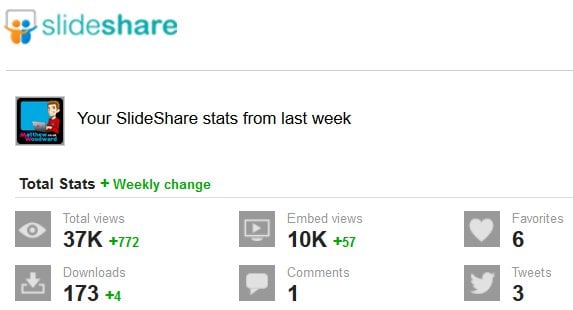
It’s not really the best method, but the proof is in the pudding.
#7: Add Large Twitter Card Code To Your Blog Posts For 3x More Engagement
Here’s a little known fact:
You can change the type of card you share with on Twitter.
And when you do the results are awesome. Because, as BuzzSumo’s research also showed, Large Twitter cards get three times more engagement.

That’s a lot of engagement.
If you’re not sure what a large Twitter card is, it’s one of those tweets that looks like this:
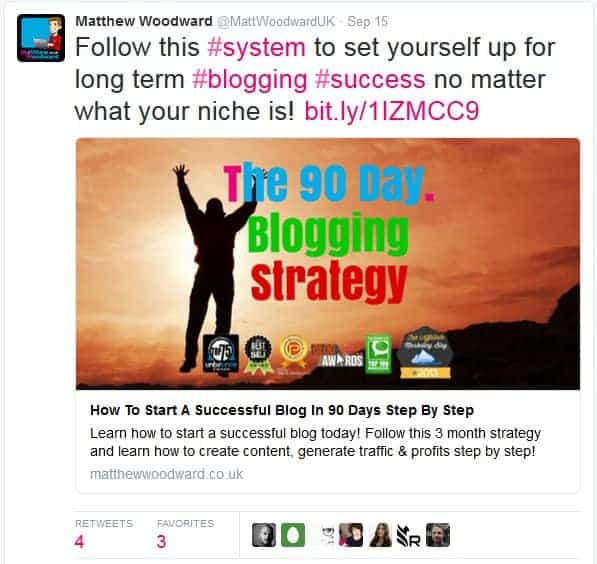
And all it takes is a little bit of change to the coding of your blog post. And, trust me, it’s easy. If I can do it, so could a well-trained chimp.
Matthew actually uses Social SEO Pro to achieve this and much more by improving his social performance on every network, not just Twitter.
But if you don’t want to use a premium plugin you can do it for free with Yoast SEO.
Step #1 – Adding The Meta Data
If you already have the Yoast SEO plugin for WordPress installed just go to:
SEO > Social > Twitter
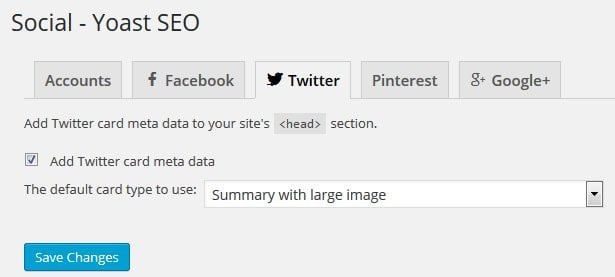
Just copy the settings from the screenshot above and hit Save Changes.
That is all there is to it!
Now just take any link to any blog post and manually put it in to Twitter. Share it and watch the traffic come rolling in.
#8: Tweet 20 Influencers About Your Latest Article
I don’t believe you should beg for traffic.
I’ve also never seen asking Influencers to read or share your article to be begging.
If you think your content is valuable enough to help people you should be telling everyone about it. After all, it’s important to fight for your ideas.
This is a nice, quick way to get a boost of traffic. Because it works in two ways:
- Sharing: Influencer sees your post. Reads it. Likes it. Shares it with their audience.
- Accidental exposure: People follow Hashtags, or an influencer, and they see the post anyway. Either through ‘discover’, or TweetDeck or wherever they’re looking.
So it pays to get your post out there to influencers. Because that’s partly the way posts go viral. If you’re looking for great backlinks this is a great way to start a relationship too.
You can definitely send your post to 20 influences in half an hour.
Get out there, say “Hi!”, tell them about your content, leave. It’s that simple!
#9: Speed Up Your Page
Website speed is an important factor in Google’s algorithms, your conversion rate and how much money you make.
If your site is slow, you’re going to rank lower. That’s just a fact nowadays.
Plus, if your site is slow to load, readers are going to bounce. And if they’re not reading your content or enjoying your site, they aren’t talking about you.
And if they’re not talking about you…you lose.
This is one of the simplest ways to boost your traffic with zero marketing. If you have your SEO in place, and some solid content behind you, you can’t lose now.
So how do you speed your site up?
That’s down to your site, I’m afraid. I can’t be specific. But if you’re running Wordpress checkout my WP Rocket review which did wonders for my sites speed and is what is powering the blog.
Otherwise you can look at Google Page Speed Insights.
Search your site:

It’ll tell you exactly where you’re going wrong on desktop and mobile. And, what you can do to fix it:
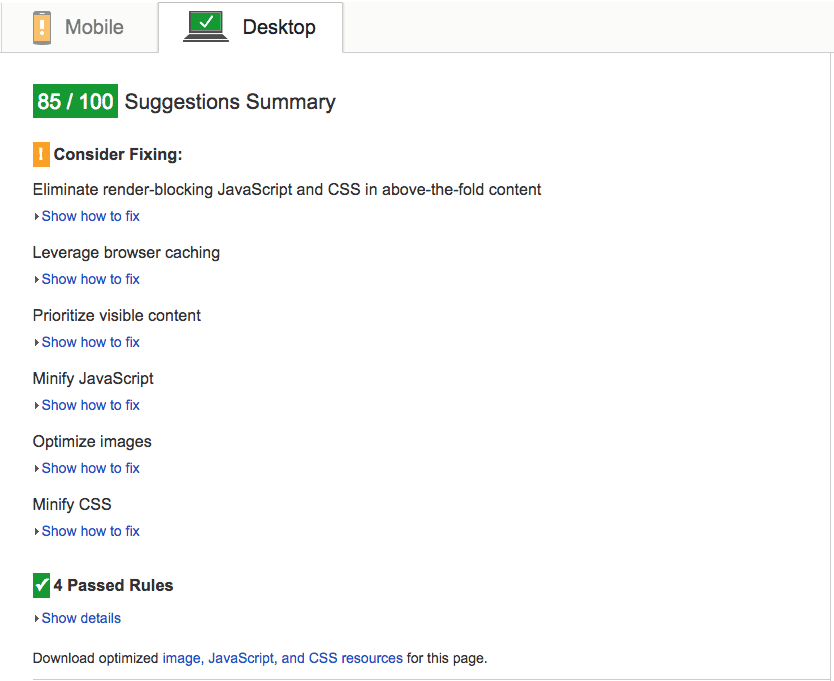
As a rule of thumb, you want to be anywhere above 85/100, because there are some factors you can’t control. At least not in 30 minutes.
Even if you just fix one of these in 30 minutes a week, in a month your site will be flying – and ranking higher.
If you have a Shopify store, take a look at my Shopify speed optimization tips to increase your e-commerce site speed.
#10: Write A New Headline For An Old Post
Canva’s design school has a solid content strategy.
They know their users inside out, and they create great content for them. And, they get a lot of social shares.
But what I want to talk about is their first viral hit. Or, more to the point, how it happened.
The first time they ran this post on walking it flopped. The headline read, “Why Steve Jobs Took Long Walks, And Why You Should Too”. Nobody shared it.
Fast forward a few weeks and they launched it again with a new headline.
“Why Everyone From Beethoven, Goethe, Dickens, Darwin To Steve Jobs Took Long Walks and Why You Should Too”.
The post took off.
In fact, at the time of writing, it’s got over 85,000 shares.
Not a bad result for changing a few words of copy, eh?
They’re not the only people to do this either. Take a scroll through some of your favourite Facebook Pages or Twitter Timelines. You’ll see for yourself.
People update and share the same posts, under new headlines, to attract different people.
Now I know you have a few posts on your blog that you think, “Man, these should have done so much better” about.
Take them and retitle them. Give them a new, sexy, wonderful headline that’s going to grab lots of attention.
Even give it two or three and share it on different platforms.
This little test wont just get you more traffic now, either. It’ll carry on well into the future. Because you’ll get a better idea of the types of headline your audience likes to click as well.
Matthew uses this free plugin to split test titles on every single post on the blog-

As you can see this makes quite a difference, especially when you consider he is split testing every single post title across the blog – it all adds up.

Wrapping It Up
Cool, so you’ve got your 10 strategies to increase website traffic in 30 minutes or less.
Let’s do a quick recap, you can:
- Contact 10 people about Guest Blogging for you
- Create a social media schedule to post your articles up to six times
- Edit and Update your SEO with long tail keywords
- Spend 5 minutes boosting your Reddit Karma
- Add images to your old (and upcoming) blog posts
- Repurpose an old piece of content
- Add large twitter card code to your next post
- Tweet 20 influencers about your latest article
- Speed up your page
- Write (and share) a new headline for an old post
The only question that remains is…
Which one are you going to choose to increase website traffic first?Let me know your results in the comments…

You Might Also Like






What Are Your Thoughts?
245 Responses

 Subscribe to my YouTube
 Join My Facebook Group
 Connect on Linkedin
 Free SEO Tutorials
 SEO Case Studies
 Links That Rank





Nice article
Thanks very much!
Wonderful substance as dependably man. The best thing about your blog is that it is logical! That is the reason individuals like me who are a huge number of miles away can gain from you and rank for catchphrases like anything man. Truly welcome the exertion man and may your blog turn into the best in the business. I have put without hesitation two or three your procedures and I am receiving the rewards inside a month. Stores of thanks ! No misrepresentation ! I am at present onto http://www.gbojom.com.ng. Expectation it has exactly the intended effect as well. A debt of gratitude is in order for everything and continue posting stuff that way.
Glad to hear your site is going well!
Great Article Mathew !!!looks really super awesome and now its time to implememnt them all. Thanks again as your article proves really helpful to me and others.
Let me know how you get on!
That’s a very nicely written and detailed post. It is surely going to be helpful to any blogger who is new and wants to get traffic. Thanks for sharing
Hey Jacky! I certainly hope so! Thanks for commenting 🙂
Thank you Mathew, for sharing this grea information.I will implement every tips onward.
Great news, I hope you’ll have many success’
Great strategies that aren’t always highlighted in this type of article. Great work.
Thanks Alexa, I like to be thorough 🙂
Thank you very much for blog
Thank you for visiting my blog 🙂
Thank you very much for this blog
You’re very welcome.
Hi Matt,This is my first comment on your blog. You will get more comments in the coming days. Your guides are so amazing. I should learn a lot from here. I have been reading all of your blog posts. I have a doubt about hiring guest bloggers. Even if we get a guest blogger, how it will help to get traffic to our blog?
Because it will free your time to work on traffic generating strategies instead of content writing.
I always follow these five ways to drive traffic to my site.1. Content is king and the backlink is queen2. On-Page SEO3. Use Social Media with Hashtags4. Start Email Marketing5. Guest BlogHappy reading. thanks for the wonderful post.
Hey Chandana, thanks very much for your input. Great tips
Thanks for sharing your stragies to increase the website traffic
No problem Ankit!
Fantastic information, extremely informative and highly valuable for individuals looking to achieve website traffic. Therefore, as per my experience, I can confidently say that email marketing is very effective and also it drives a good amount of traffic.Thanks.
Thanks Jonny! Great to have you here 🙂
These are really some awesome some Tips to increase Traffic.I was struggling with the Traffic on my Blog.I ‘ll surely apply these Strategies.Thanks for sharing with us 🙂
Yes please do, let me know how you get on.
i hope that these strategies will help me to derive good amount of traffic to my website
If implemented correctly then they will 🙂
Thanks for this stunning article, i hope it will help to increase our website traffic – but the web is very competitive. I hope this will work also with keywords like images, buy, sell and so on :-),
You are welcome. Only one way to find out…
Thank you very much for this blog. Its really easy to understand language you have used here. Lot of information for the beginners. This will help me a lot to increase the traffic on my website.Keep on writing and share your knowledge for the beginners.
Thanks Raj, will do! Let me know how you get on with them 🙂
Matt, your tips on developing a website are invaluable. Thanks for blogging and sharing your wisdom.
Thanks very much 🙂 I hope I have been able to help
Thanks to you for sharing this importent information.I hope it will be very helpfull for me.
I’m sure it will be 😉
Really great tutorial. One of the best I’ve seen going this in depth in a short post.
Thanks Jennifer 🙂
Thanks for sharing your stragies to increase the website traffic i hope that these strategies will help me to derive good amount of traffic to my website
Well there’s only one way to find out
Great post thanks for share helpful article
No problem, come back soon 🙂
Really informative.You have explained each and everything related to driving traffic in depth with these 10 ways.Thanks for this wonderful post.
No problem, I hope they work well for you
Methods that I should use for my blog. Thank you for such as good tutorial
No problem, yes you should put them into action straight away, best of luck
Thanks again
No problem, hope these strategies help
Awesome details… you put every basic information in just one post that is beyond appreciation. Thanks alot for such valuable knowledge.
No worries, hope you put it to good use
James, Do you still think that guest blogging can increase traffic especially in chemical industry?
thanks for sharing these useful strategies for increasing the web traffic.
Hi Anshika, no problem. Let me know if they work for you
Good to focus on progressing businesses better results with marketing and advertising for getting even more web traffic visitors.
Thanks Dwight
Will do, thanks Ajay
Great post and thanks for sharing! awesome tips.
No problem
Interesting article greatjob
Thanks Gary
Thanks man! Glad I come across this content it’s a real deal
It certainly is, thanks David
Very informative, keep posting such smart articles, it extraordinarily helps to understand relating to things.
Thanks Albert!
When someone writes an article he/she retains the image of a user in his/hermind that how a user can understand it. Therefore that’s why this piece of writing isperfect. Thanks!
Thanks Ravi
Hi, Realy very informative article..I will really workout on your method and will revert back you after few month.Thanks for sharing…
I look forward to hearing from you
Thanks for sharing such a great content.It’s really timeworthy to read
No problem, thanks for taking the time
i love you article thanks for sharing
Thanks for reading
Hey Matthew,Nice post on creative ideas to build website traffic especially the Twitter hack and the title split test WordPress plugin.I highly recommend Facebook to build massive website traffic.Thanks for your tips and keep up the awesome work!!!
Hope you put the tips to good use
These are the best methods need to be followed to increase more traffic for the website.
You know it!
Hello,Very useful Information keep it up thanks for sharing
Thanks for reading
One of the great article. It really helpful.
Thanks, glad it helped
Nice strategi ang gret article thanks alot
Thanks for reading
Great list! Increasing website traffic without SEO sounds great. But most of the time, Google is the only source that can send you more traffic that is worth having.
Thanks Leon
Hi Great Article !! Thanks for sharing useful information.ThanksAjay
Cheers Ajay
Great post as always Matthew. I just wanted to add something that works for me. I added a post on Twitter that says ‘I accept guest posts on a design and marketing blog’ then I pinned this to the top. Next I follow related people (200 a day). I get a regular amount of guest post requests.
GREAT extra tip!
The article is very interesting and truly informative. Thanks for sharing the information on the post..
No problem Harshali 🙂
WoW!. Very nice and comprehensive Post. Good job.
Thanks!
Very important information Thank you
No problem
Hi Matt,Thank you for your article. Really awesome. The best part of your content is “Reddit” part. But, from the very beginning of my online marketing, I can’t clearly understand “subreddit”. If you don’t mind would you please explain “subreddit” with an example?It will be very helpful for me.
It’s just a category, eg SEO or Fitness or Yoga or Computers or Triathlon
Thank you for sharing your article. This is very informative article to increase the website traffic strategies.Keep it up.
No worrys 🙂