




















































I wanted to test a hidden ranking signal that not many people talk about.
So last year I built a series of sites to see if embedding hidden image exif data into images affects rankings…
…and I’ve been able to answer that question with quite some success
Below I’ll explain the video in more detail.
Lets get started…

What Will I Learn?
Are You Deleting This Data Accidentally?
If you’ve been following traditional image SEO advice like like Google’s page speed insights that tell you to compress your images…

…it’s likely you’ve installed a plugin like WP Smush, Shortpixel or Imagify.
The problem with that, is these plugins often strip this valuable hidden exif data when optimizing images to reduce image size-
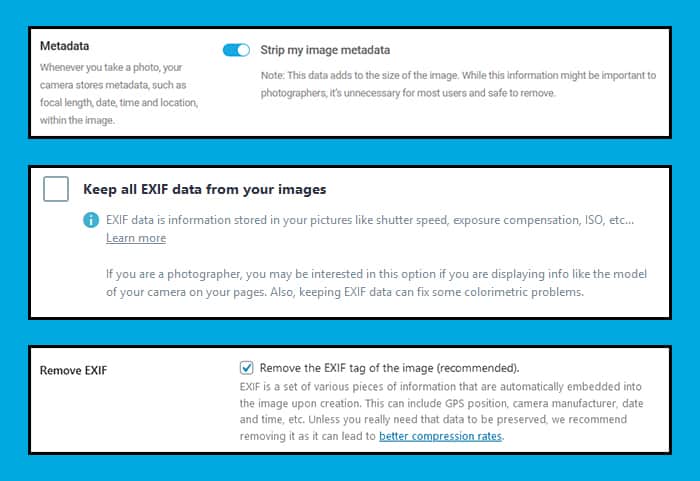
So if you have been following traditional image SEO (alt text etc) & site speed advice.
You might want to take a closer look to make sure you’re not stripping out this hidden image SEO benefit accidentally.

How To Add Exif Data To Your Images
Luckily for us adding exif data to images is both quick and free!
All you have to do is go to thexifer.net and upload an image-

Then click on the little blue “Exif.me” button.
That will open a popup that allows you to edit all of the image exif data to your heart’s content-

I like to play around with the following fields-
- Artist
- OwnerName
- Copyright
- ImageDescription
- UserComment
- By-line
- By-lineTitle
- CopyrightNotice
- Writer-Editor
- Keywords
- ObjectName
- Headline
- Caption-Abstract
- Creator
- Rights
- Title
- Description
- Rating
- Label
- Headline
Once you are done:
You can just click the blue Go.eXifing button here-

It will take a little moment to process the image…
…then you should see a green message like this one at the top of the page-

Now just close the editor…
…and download the final image-

Then upload it to your site and insert it into a piece of content.
BUT!
You should also double-check that the hidden image exif data you just added isn’t getting stripped out automatically.

How To Check For Hidden Image Exif Data
If you are following this process for the first time, I highly recommend you double-check everything.
First, get the current public-facing live URL of your image and save a copy of it.
(or save this sample image)
Then head over to metadata2go.com and upload the image.
This will reveal all of the embedded exif data-
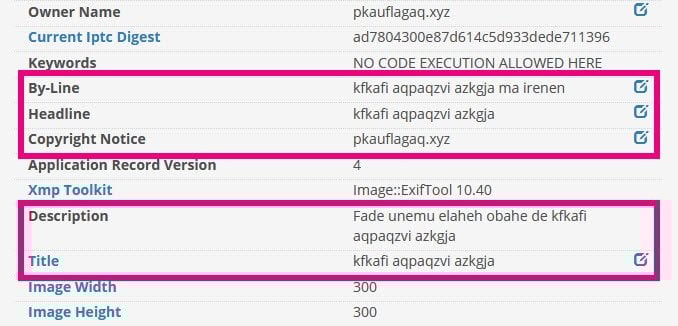
If you do not see the data you added here, then it’s likely the data is being stripped out.
Double-check the settings of plugins like Shortpixel, Imagify or WPSmush and even some CDN’s like CloudFlare Polish will strip this data out.
Fix whatever the problem is then re-upload the image again and repeat the test.

Wrapping It Up
So, does embedding image exif data influence rankings?
Yeah, it seems so!
But if you’ve been following most traditional SEO advice, it’s likely you are stripping out this hidden image SEO advantage unknowingly.

So make sure you are paying close attention!
What do you think about using hidden image exif data as a ranking factor?

You Might Also Like






What Are Your Thoughts?
143 Responses

 Subscribe to my YouTube
 Join My Facebook Group
 Connect on Linkedin
 Free SEO Tutorials
 SEO Case Studies
 Links That Rank





Good list of SEO factors, I like all of your blogs, Matthew sir I’m a learner and I request you to have a complete detailed guide on Local SEO, how to optimize and rank Local listing for atleast 5 keywords. I’m confused and seek help from you to get smart SEO tips.
Hey Abhijit, this might help you: https://searchlogistics.com/seo/ecommerce/#Local_SEO_for_E-commerce
This information is very useful.
Thanks! Cheers!
SEO is one of the most important parts of your blog thanks for this information
No problem!
I really like the way you put content, simplified, straight and conextual. Thank you Matthew sir!
Glad to hear that, thank you!
Thank you for sharing this advance SEO tips.
No problem!
very nice blog and i want to tell you thanks
No worries, Josephine!
Thanks for the great content. Please share some tips on increasing traffic to an affiliate blog.
Hey Mike! The success of a blog/ecommerce/affiliate site is based on: Having a good SEO foundation: https://www.youtube.com/watch?v=VCHOCzd5roo – Picking the right keywords: https://searchlogistics.com/seo/keywords/research/ – Writing unique and optimize content based on your keywords: https://searchlogistics.com/seo/on-page/website-content/ – Building links: https://searchlogistics.com/seo/link-building/strategies/ – So now, you have everything you need!
Thank you for share your wonderful thoughts.
No problem, Sam! Always happy to help
Much thanks to you to such an extent! I just took a gander at my pictures and understood a ton of this data isn’t there. I don’t have the foggiest idea why I didn’t think about this since I do it for my mp3’s in my webcast.
No problem! It’s an easy fix anyway 🙂
thanks for this info
Cheers!
Hi,Thanks for sharing such an informative and helpful content, I learnt something new and unique.
Glad to hear that! Keep it up!
If you were to do this would be it sufficient to just do the cover image on a blog page or should you do this for every image?
If you really want to see results you should apply this to every image on your blog.
it is very good blog.
Thanks for sharing this blog, very informative.
No problem, Maulik 🙂
Thank you so much for this valuable information, it helps me a lot. I will keep all these points now.
That seems to be a good idea 😉 Let me know how it goes for you!
great post Matthew, it would more help me to optimize my post image…hope get good ranking
Thanks – Hope it helps, Jiwan!
Hey MatthewThanks for sharing this valuable stuff. Hats off.
No problem Sanu – Hope it helps!
Nice article good information keep it up
Thanks!
This is quite helpful to me, Matthew. Thanks for sharing this for free, it means a lot. Let ne get on working then.
No problem! Good luck!
article is grateful and very beneficial to listen
I am glad it helped!
Awesome write-up, thanks for sharing this info with us. This info is very helpful for me to rank my Sunrise Hospitals.
I love this article its great
Thank you!
Thanks Mathew for sharing such a wonderful article. It had solve my purpose. Keep updating such valuable post.
Thank you, Loreal! Don’t worry, I will!
It seems that the site no longer works, any alternatives?
Hey Josh – Which sie?
Thank you for this wonderful post.Interesting article.It is really important useful of this content.
Thanks
The pleasant idea of data about computerized advertising on the web (or) disconnected both. I might want the think about in subtleties of web-based promoting focuses. A debt of gratitude is in order for data.
This is cool!
Brilliant! Thank you for this information. Great post. Keep up the good work.
Thank you, Cristian! Glad you found it useful!
What about of image seo when you are listing eCommerce product?
Hey Janet – You can apply the same “tips” for an eCommerce website. Plus, I wrote a guide about eCommerce that might help you: https://searchlogistics.com/seo/ecommerce/ Check it out!
This post just gave me an insight into what i have been taking for granted since i started my blog. Does this really affect automotive site since some articles might not really require images. Is image optimization a must-have for a site to rank well?
Well, if your posts/articles don’t need images, then don’t force it. It doesn’t worth it. But, if you do have to insert an image, then you should consider ‘exif data’. It’ll give you a little push to rank.
Interesting post. As a photographer, it’s become norm to strip this stuff out, to reduce file sizes, as we have a lot of images on each page often. Looks like I might have to change that way of working. Thx.
Hey Paul,Underestimated “exif data” is a very common mistake, don’t worry. Just give it a try and see if you get any positive results! Let us know!
This is the first time I happened to read that “image exif data” is important. I used to be just content with Image file name and ALT. I am definitely going to implement your inputs.
Great! Try it and tell me if you get any positive results! Would love to hear your feedback!
Surely you can just right click the image on your pc and add exif data – apply – save.That’s what I do. Surely its the same?
There are different methods to do it. It doesn’t really matter how you do it, the only thing is to put the right info in the right place!
Hey Matt. Awesome should be your middle name. Thanks for this I am definitely implementing it. But I am a bit confused about where in the image details to place the keywords I intend to rank for. Please shed some light on that, thanks
Hey Michael. It’s all written in the article, you just have to follow the process and you’ll see. But, to answer you, it should be in the “IPTC Tags Tab”. Good luck!
Hey I don’t know how you do it @Matthew Yet another brilliant and informative guide. Always love your content. Thanks for sharing keep writing these type of articles and help people to get more knowledge.
Hey Mariam! I’m glad you like my content! I really enjoy sharing my experience and knowledge with my readers!
Nice concept of information about digital marketing online (or) offline both. I would like the know about in details of online marketing points. Thanks for information
Hey Emilia. I think you should read this article about my digital marketing strategy: https://searchlogistics.com/tools-of-the-trade/ – It also includes a list of tools that I’ve been using to build it!
Hey, thanks a lot for this hidden ranking factor! I will start to implement this still from my next blog post!
Happy to help!
Hi. thanks a lot for the helpful tips. you make it sound ‘doable’ so i’ll go right ahead and try them out!
Let me know how it works out 🙂
Awesome information. Thank you for sharing.
No problem 🙂
Thanks, Matthew,I’m going to drop my appreciation, you are really doing a great job. Each time I got an email notification from your site, I learn something new and unique.
Great news! There’s plenty more on its way.
Thank you for bringing this to my attention.I checked in Photoshop what’s hidden in the images… It ranged from nothing when saving with tinypng to EVERYTHING… including the layers/folders to where I had saved the file previously thus exposing my name… gotta love Photoshop…
No problem Carl
All of my sites are missing this data and probably missing out on important SEO points.Thank you for always sharing relevant SEO content.I always follow your posts, read everything and apply when possible, improving my results.Thanks for everything
Glad you found this post then Paulo! Hope it proves helpful.
I’ve Been following image optimization for most of my sites and this one is not definitely on my list. Thanks for the amazing video and write up 😀
Make sure you add it to the list 🙂
Very valuable information
Thanks 🙂
Thank you so much for sharing these methods. I will definitely use these methods.
Glad to hear it. Let me know how you get on Thomas.
Wow, this is cool! Really refreshing to learn since most blogs are regurgitating the same thing
Cheers Ken! Keep an eye out for more tips like this 🙂
Awesome video Matthew.We are building a new website for my photography business. Timing is perfectThank you
Brill, thanks Scott and good luck!
OMG! How come i didn’t think about this befor! That the expression when I read this article. I will obviously try this valuable tips for my articles and blog. Thank you for the great article!
Haha, let me know how you get on with it Dino!
This is a great post. I have been using thexifer.net for GMB image optimisation but hadn’t thought it made a difference in organic results. Thanks for an excellent post.
No problem Tess 🙂
Splendid….thanks for this info
No problem Arinze! Hope it helps 🙂
Thank you so much! I just looked at my images and realized a lot of this info isn’t there. I don’t know why I didn’t think of this because I do it for my mp3’s in my podcast.
No problem!