




































 Subscribe to my YouTube
 Join My Facebook Group
 Connect on Linkedin
 Free SEO Tutorials
 SEO Case Studies
 Links That Rank


Got a website penalty? Click here to get help right now…
…Or follow my step by step Google penalty recovery process.
It’s an awful feeling, isn’t it?
One day you close your laptop safe in the knowledge that your site is getting healthy amounts of search traffic.
Then, the next morning, you find out your site has been hit with a Google Penalty.
What was once a solid stream of targeted traffic is now nothing more than a trickle of slightly interested people.
But you can come back from this.
- The first step is to know which Google Penalty has stung you and why you’ve been penalised.
- The second step is to know how to monitor for future algorithm changes to make sure it doesn’t happen to you again.
In this article I’m going to share with you seven Google penalty checker tools.
These tools will allow you to see exactly which update is to blame, and how you can future-proof yourself against future penalties.
In fact:
We ran these exact tests (to get case studies) on this site before we boosted search traffic 14x!

What Will I Learn?
Identify The Penalty Before You Make Any Changes
A lot of Webmasters start trying to change parts of their site before they’ve found out what’s caused the problem.
Not only is this a dumb move, it can also go on to make problems worse in the long run.
Instead of making an emotional decision you should take a step back, analyse the problem, and build a rehabilitation strategy that’s going to work for you site.
Accurately diagnosing which penalty is at play is essential to recovering your site, and it can be done in less than five minutes using one of the SEO tools on this list.
What Is A Google Penalty Checker Tool?
A Google penalty checker tool will help you to identify if your search traffic has been impacted by an algorithm update or manual actions.
It will also help you to find the source of problem and give you insights on how to fix the problem as well.
If you’ve done any link building recently, I highly suggest you run them through this link building checklist to identify any hidden problems.

7 Google Penalty Checker Tools That Make Life Easy
This list isn’t ranked in any order from best to worst, however it is a little bit split.
Tools number one to four will allow you to see the penalty that hit your site.
And tools number five to seven will help you keep an eye on Google activity and protect your site against possibly upcoming algorithm changes & Google updates.
A change in the Google algorithm can have a negative impact on your site’s performance on Google search results that’s why it is crucial to get tools that help to take manual actions.
#1 – Moz Change History
Moz maintains a very helpful page that lists all of the major algorithm updates (such as Google Panda & Google Penguin), the date they happened and additional information about the update.

You can also use this page to get further reading to help you understand how this problem might affect your site, or what could be coming in the future.
This page is updated immediately after a major change is reported so if you’ve seen a big drop-off in your results, there’s a good chance that it’s been featured here.
If you ever suspect you’ve been hit with a Google Penalty, I’d suggest you start with this tool.
#2 – Panguin Google Penalty Check Tool
The Panguin Tool from Barracuda has been around for a long time.
It’s simple, easy to use, and provides a lot of quick information for you with great user experience.
All you have to do is sign in with your Google Analytics accounts and you’ll be able to instantly see a map of your traffic data and the exact moment a Google Update went live:
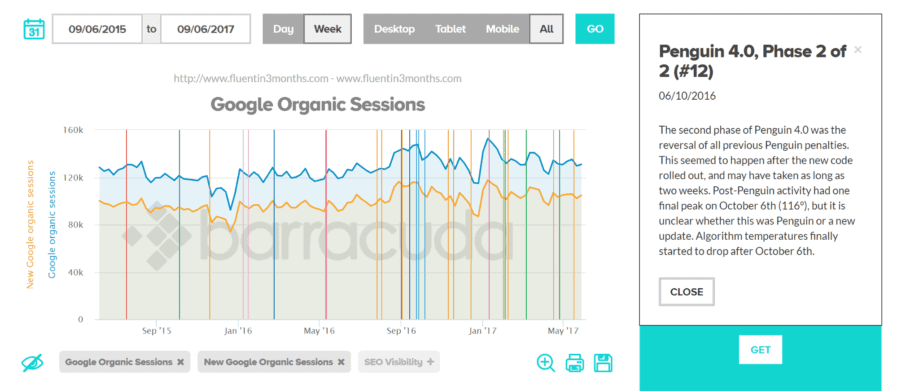
The vertical lines on the graph represent the different major algorithm updates to show you the impact they could have had on your traffic.
If you click on any of the lines it’ll give you a description of the update, why it happened and what it could mean for your site.
What I also like here is that it comes with this little dashboard of icons:

This allows you to switch on and off all of the different possible causes for your drop in traffic and see through a lot of the more confusing data.
In my opinion the Panguin Tool is the best Google penalty checker on the planet.#3 – Rank Ranger
Rank Ranger combines elements of Moz’s Change History tool and their MozCast tool to bring you all the information on one screen.
It offers a deeper level of information for you about each individual update:

It’s also a little more black and white about what it considers to be an important change.
If the chart is in the green range you’re okay, once it’s red you’re in danger, and when it’s blue you don’t need to worry about anything at all.
It simplifies the information a little, while giving you a deeper insight into what might be happening.
A really cool alternative.
#4 – Fruition’s Google Penalty Checker Tool
Fruition’s Google Penalty Checker is a little known, but powerful tool for pinpointing exactly what made a difference to your site.
In order to use it you’ll need a free account set up. But once you’re in you can get a wealth of data. The first data you’ll see is a plot graph of updates how they’ve impacted your site:

It really comes into it’s own when you scroll below the fold and look at the written data.
In the chart it will show you every recent Google algorithm update, and calculate the probability that it will have changed traffic to your site:

You’re even able to see the changes in traffic that it could bring you through different devices.
And, if you’d like, you can learn more about each of the changes in further detail.
#5 – SEMRush Sensor
SEMRush Sensor is by far the most comprehensive tool on this whole list.
While Panguin is still arguably my favourite, this comes in a close second.
Taking a slightly more ‘medical’ approach it shows you a pretty precise monitor of what Google has been doing the last few days:
But you can also look at the activity within individual niches too. Which is a truly extraordinary set of results to be giving away for free.
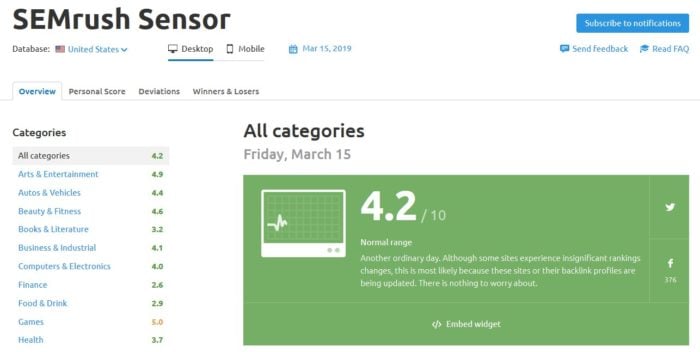
Drilling down into the tool further you can add your own site for analysis.
Then SEMRush Sensor will look at every page and keyword you rank for and spit back a bunch of data about your personal SERP volatility-

There are a bunch of other awesome features as well and this is a tool I’d highly recommend you keep an eye on going forward.
Check out my SEMRush review to get more detailed informations about this amazing tool.
#6 – Accuranker’s Google ‘Grump’ Rating
This is one of my favourite tools for monitoring what’s going on with Google’s Algorithms.
The Grump Rating shows you how active the Google Algorithms have been updating lately, and how likely a change is going to come today – or in the next few days – that will impact your SERP rankings.

You can check this out across a range of devices and locations around the world. Giving you location specific insights for wherever you’re located.
The tool grades current Google activity at one of the following four levels:
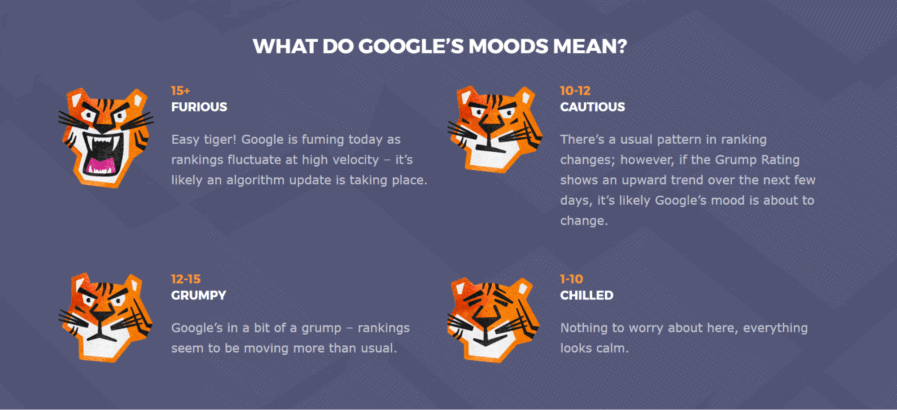
It’s rare to see Google down at the chilled level, but I have known it drop to cautious from time to time.
You’re also able to go back and see what the activity has been like over the past few days, weeks, months or years and look for patterns in Google’s movements.
Or find where you site might have been slightly penalised in the past.

I’d recommend you check in with this tool at least once a week to keep yourself up to date with the current state of affairs and feel free to take a look at my full Accuranker review.
#7 – MozCast
If you prefer your data delivered to you in a more bite sized chunk, a good alternative to Accuranker is MozCast.
MozCast displays the current state of Google’s activity like a weather forecast, showing a daily weather report-

If the forecast is getting warmer and stormier you could be heading towards an algorithm update. And if it’s cool and clear skies, rankings will be staying where they are.
You don’t have the same level of flexibility you do with the Accurank tool, but it’s nice if you want a morning rankings report to see what’s happening on a general level.
Note: Getting a penalty can happen to anyone, even big companies with crazy budget can make mistakes. Just check out these SEO fails to see how to avoid making the same errors.

What To Do Once You’ve Identified Your Penalty
Once you have isolated the problem with a Google penalty checker tool, you can start to analyse the cause of the issue.
Remember that correlation of your search traffic dropping with an algorithm update doesn’t necessarily mean it is the update at fault!

For example your site may have been hacked and hosting malware.
If you notice that your traffic drop does correlate with an algorithm change, then that should point you in the right direction of what to look at first as a cause.
Usually, issues fall into 2 or 3 categories-
- Backlink Based – If you have a backlink based penalty that means that you’re having link building issue. To fix it you need to perform a backlink analysis thanks to a backlink audit. Link Building is for many considered as black hat SEO technic – even though, I believe that black hat/white hat SEO are stupid labels – you must be careful about how you build your backlinks to stay out of trouble.You must avoid excessive link schemes & spam links on your web page.
- Content Based – If you have a content penalty, follow this guide or this guide to perform a content audit. You can get a penalty if the algorithm detects low quality, duplicate content, keyword stuffing, anchor text or thin content.
- On Site Penalty – If you have an on site penalty that is not caused by thin content issues then use a tool like URLProfiler (see my full URL Profiler review) or Screaming Frog SEO Spider to analyse your site.
Many webmasters set off in the wrong direction from the get go, so make sure you take time to understand why the site dropped on the search results with the Google penalty checker tools before taking any action.
Once you identified the root cause and fixed the issue, submit a ‘reconsideration request’ to let Google knows.
And remember, penalties can be avoided if you follow Google good practices and follow my 45+ steps SEO checklist.
Pro tip: If you’re not penalised but simply stuck in the Google Sandbox, check this guide to learn how to get out of the Google Sandbox as quickly as possible.
Remember the Google Sandbox is a testing ground for new websites. It’s unlikely that a penalty checker tool will be able to identify if your website is in the sandbox or not.

Google Penalty Recovery Services
The easiest way to fix a Google penalty is to have someone else fix it for you.My agency has a 100% recovery success rate like this site that went from penalty to 114 number 1 rankings.
If you want my personal SEO team to take care of your Google penalty, then use our Google penalty recovery service!
We’ll also make sure that your website respects Google’s Webmaster Guidelines – with a clean link profile and high-quality content – so you don’t get other penalties.
Feeling brave? You can try to remove your penalty by yourself following my Google penalty recovery guide.

Frequently Asked Questions
- Use Penalty Checker Tools to find out why you have been given the penalty.
- Once you understand why you got penalised, start working on fixing your website to adhere to Google's guidelines.
- Submit a reconsideration request to Google.
- Put a plan in place to ensure that they do not reoccur.
You Might Also Like






What Are Your Thoughts?
284 Responses



Great tool Penguin. I have a site that is about 5-6 years old and used scraped content plus original work.
Great post Matthew. Not sure how I missed this first time round.Thanks again for sharing
No problem 🙂
I never used yet on co.uk but I buy expired domains all the times, but just expired on in auction, and I check it all the time, if doent show up for domain com, net etc with space, is penalized. I dont buy them.Try buy one put on the google webmaster tool, 99% of the time will tell you that is penalized
Great tips, I have another one that I learned, a while ago, not sure if you write about, if you search your domain.com in google, should be first, if you search domain com without the . you should be in the first 3 pages of google, if you are not, add the site to webmaster tool, and 99.99% of the time, you will see that you have some kind of penalty.I use everyday on 100 of domains that I get submitted, look simple but work.
Sounds like a strange tip haha – how would you do it for a .co.uk domain?
Great tool Panguin. I have a site that is about 5-6 years old and used scraped content plus original work. It dipped in the rankings initially so I left it alone and got on with other projects. Using the Panguin tool I can see that over the last 2 years it has been getting more visits after each update. I’m impressed. Maybe I should do a bit of housework on it and liven things up a bit.Cheers
I love it when old sites spring back to life =D
Thanks Matthew, your article just helped me discovered how and when some of my clients lost trafiic. Thanks again for sharing such awesome stuff.
No problem glad to be of service 🙂
Wonderful post Matthew, i use each day panguin tool and it save me a lot of time.
Awesome tool 🙂
Am confused, please send me a direct link to check my website status for these updates or penalities by Google.Last week when i checked my site domain authority and page authority on moz, that shown me DA 18, and PA 24 with www, and wothout www DA 18, PA 31.Spam score without www is Zero. But with www it secured 4/17 .So please kindly suggest me and guide me if you have time.RegardsSuresh Kumar
Or instead of me doing all of the work, you could read the post and do it yourself?
Just got a couple of clients with penalties so wanted to say thank you for this article as it’s going to prove to be very useful!
No problem, if you need any further help please see https://www.searchlogistics.com/services/penalty-removal/
The Chrome plugin seems to have disappeared from the Chrome Web Store. The link in the article shows an error.Anyone have any alternatives to Chartelligence? Sounded like a good tool.
Just use Panguin instead 🙂
Hi Matt! My site was penalised just recently (Panda 4.1).Let’s say if I fixed everything, how long should I wait for my recovery?Does Panda/Penguin “refresh” quickly? Thanks in advance.
Chartelligence link is broken Matthew. :(Anyways I had days when traffic was going down and I was worried maybe I was doing something wrong and the recent update cause this but I continued to work on my site and traffic from search engines is up again.
Yeah they canned it I think =/Thats great to hear you managed to push through and build traffic – keep up the good fight!
Thanks for the handy info Matt. The Panguin tool opened my eyes a bit with my traffic stats.FYI Chartelligence is no more.
Glad to be of service =D
Hi Matthew, You shared an really useful information for checking website penalty stats. This resource will be the very effective piece for checking my site appearance. Many thanks for sharing this post with us.
No worrys hope it has helped you out!
My post are indexed by google but visitors on my site has decreased from 800 to 50.What can be problem with site and my site is 20 day old.
Have you identified the drop in traffic from Google?
Haha – burn 😉
I wouldn’t use them in my main tiers
Thank you Matt :)Ahrefs and BacklinkWatch works well .Do links from forum profiles still helps in gettting better ranks ?
Hii Matt thanks for the great Info .Is there any free tool through which we can get list of all the backlinks of site ?I have tried moz open site explorer, seo spy glass tool and alexa pro account but not getting full backlinks list . Even all are showing different backlinks 🙁
Try some of the ones here – https://searchlogistics.com/seo/link-building/backlink-analysis/
Well, nice post for sure helping people to make sure if their websites have assigned with a penalty.
Thanks!
Hello, thanks for sharing such an awesome post please tell me a tool which detect the cause of the google update .
There is no such thing. Use this post to find possible leads to investigate and take it from there.
I didn’t know about the Panguin tool by Moz! As for the backlink analysis article referred to in this post, it would be nice if you could add update the post with how you can track multiple keywords rather than just one. I know I was able to figure it out and used your template as the basis for a larger backlink monitoring dashboard for a client, but I doubt all SEOs are Excel savvy.
Hi,It’s not made by Moz?Yeah you can use https://searchlogistics.com/seo/tools/backlink-checkers/ which is what I use instead of spreadsheets now
Just picked this article up from an email you sent me… perfect timing as well. Nice information, well laid out, I’ll be referring some of my SEO clients to it for future reference so thanks.
No worrys 🙂
You definitely read the article then.
You must check this tool : http://www.barracuda-digital.co.uk/panguin-tool/This is another effective way for checking the Google Algorithm update..P.S. This is not a spam link 😛
Really good stuff to grab; that too free. Thanks for sharing.
No worrys 🙂
Hi,I would resolve onsite problems first as this is often the most pain in the arse task.Once resolved I would start working through the backlink profile and making a spreadsheet to track to all/work through it removing links where possible.Do you have any penalty messages in WMT?
Looks like one of my sites got hit by Panda and Penguin. Oddly enough, I saw a recovery that coincided with Hummingbird – but the latest Penguin update in October erased my gains.The site is going on seven years old and needs a significant facelift I admit. The content is original and I didn’t aggressively backlink at all…Where would you start when hit with Panda and Penguin? Panda because it’s more on site and thus within my control to fix?Thanks!
Hi MattAnother good tool for checking the impact of Penguin, Panda etc updates is http://www.sistrix.co.uk/google-updates/CheersAaron
Thats pretty sweeeeet!
too bad it’s in German
Really nice article. I’v just been hit by a penalty and used some of this info to investigate. When it came to researching my link profile I didn’t want to have to pay for a subscription to all the link services but a couple of fiverr gigs came in handy.. e.g. http://fiverr.com/tirondigital/create-full-ahrefs-majesticseo-and-moz-seo-report
Nice resource 🙂
Very nice post Matt. However, not useful for me. I never got penalised with any of my sites and I developed over 500 websites in 10 years.
Then your missing a huge part of an important skillset!
Hey Matthew,Thanks for recommending this. I was searching for a piece of software that would do just that for quite some time now. I’ve just started with this entire Internet marketing thing and I’m getting my hands dirty.Well timed article!Jake
Kudos – getting your hands dirty is the best way to learn =D
It will be coming 🙂 Its hard to put together because of so many variables but is a topic that needs covering (after the mega series at the start of Oct)
I look forward to reading that when it comes out.And if it is out, not sure how I managed to miss it.
It would be great to have a full tutorial full of details of how to recover from Penguin , It would be a killer one.; )
https://searchlogistics.com/seo/link-building/backlink-analysis/ ^^
Great content Matthew, I’ve been using the ChartIntelligence extension for chrome, it definitely comes in handy. Thanks for the informative post!
Took me a while to figure out how to use it first tine round ^^
Nice plug in decreased my head ache a lot.
no worrys 🙂
Matt, loving your info bro!A quick question about architecting sites in a similar way since you mention Panda related to site structure in your last sentence.If I copy the files of a site and take its structure, and basically mimic its design on another domain, but provide 100% new and unique content, titles, meta desc., but keep all of the same pictures, is that a safe or unsafe method in your opinion?
Hi Cory,Cheers man :)Yeah that would be fine – heck you could even use the same content but that does introduce an element of risk.
Great post Matthew,I actually use both of those tools along with a rank tracking software called Serp Alert Pro. If any of my sites rise or drop more then 5 positions in the search rankings, I get a little pop up message in red or green in the bottom right hand corner of my screen. It runs on autopilot so I never have to actively check my rankings. If I do lose more than 5 positions, I then use Chartelligence and Panguin tool to confirm if it is Panda or Penguin related. All of these tools together help me to keep a very watchful eye on my rankings and the algorithm updates.Unfortunately, Serp Alert Pro is currently not available but the developers are supposed to be releasing it again sometime in the future. Keep your eye open for it. I think that you will really like it.
Hi Fred,Thanks for the heads up.I’m actually not that anal about rank checking and although I have daily checks in place I only ever look at them if there is a drop in traffic. I believe checking rankings is counterproductive and when drops (and increases) occur it is tempting to stray from your game plan so to speak.Sounds like you have a pretty good system in place!
Thanks for this post Matthew – perfect timing! Have just been doing some analysis on the back of this. I have a question which is related to Google’s updates – I have 2 sites ranking for virtually the same keywords in the same niche – site 1 has dropped a couple of places due to the updates which I have now rectified. Site 2 I don’t need any more and it has less links but a dmoz entry. Do you think a permanent 301 from site 2 to site 1 will help the ranking for site 1 or are 301 redirects no longer a good seo idea?Cheers Rob
Hi,Yes go ahead and do that you shouldn’t have any problem, and if you do – just remove the 301 and put it back to how it is now 🙂
Excellently done Matthew ! All of your shares are of true value . You are a true professional my friend ! Thank you.
Thanks Peter (=
Awesome post! I been wondering how to detect the cause of the Google update and it easily as doing these…Thanks Matt!
Hi Vic,Correlation doesn’t mean causation. These tools do not 100% confirm that is the issue, but it does give you a path to begin investigating properly.
Great info Matthew, thanks for the heads up on this.Nice to see such open sharing of tips, much appreciated.
No worrys – come back for more 🙂
Hi, Thanks for sharing such valuable information but could you please tell how to create & apply a list of Holidays in India?
Hi,Just create an account at Chartelligence and then you can create your own 'data layer' which you can share with others or keep private.Then add each holiday in India as a new 'event' on the 'data layer' you have created
AWEOSME post, amazing blog.Thanks for all of these great guides.
Glad you enjoyed it 🙂
Cool post man, thanks for share such useful info, best 🙂
Hope it helps you out mate!!
Cool stuff about how to recover and analyze Google algorithm update.
I'm going to be covering the actual recovery process in more detail soon 🙂
After searching thoroughly with daily traffic in panguin tool. Looks like site penalized by panda or parked domain bug. Penguin isn't the culprit , all I was doing was fixing spam links and anchors. What do you think about this report matt? Image http://i.imgur.com/JmmN5.png
You got hit with a Panda update, a slight hit with Penguin (keyword specific drops perhaps) and then again on the next revision of Panda.
Chartelligence doesn't seem to show old updates , its only showing updates after October. But this plugin is very useful while planing a link building strategy. The Panguin tool is truly amazing. I just realized one of my site is not hit by penguin or panda. What is this “Other” Mentioned in panguin tool? The description says a parked domain bug. WTH was that on April update? http://i.imgur.com/J67o0.png
You can create a custom layer with the old updates if you need to.I would have a search around for more data on the parked domain bug although I would expect that to totally wipe a site traffics if caught with it.
That's a cool extension, I hope they add support for Piwik. I stopped using Google Analytics on most of my projects as I don't want Google knowing everything about them, if you know what I mean! Thanks for another interesting article Matt anyway, superb stuff. 🙂
Drop them a mail – they have only just launched so should be open to adding new features!
They will be adding support for Piwik in the future, I sent them an email and got a swift reply.
yea I use statcounter.com its free web stats. starting to really hate how much control google has got on information flow