








































 Subscribe to my YouTube
 Join My Facebook Group
 Connect on Linkedin
 Free SEO Tutorials
 SEO Case Studies
 Links That Rank


Here are six proven fixes that will take you less than an hour to implement and can have a significant impact on your rankings in Google & ChatGPT.
I’ve done hundreds private SEO consultations at $2,497 per session, and I’ve noticed something interesting…
In fact, 90% of all the sites I audit have at least 4 out of these 6 issues.
✅ Download The FREE PDF Checklist , which gives you all 6 solutions to common SEO issues I find in my 1-to-1 consultancy service.
These aren’t complex technical problems that require years of experience to fix.
They are simple fixes that most website owners completely overlook – or are too lazy to fix. But here’s the crazy part…
Fixing these common issues can provide consistent growth and stability through algorithm updates.
They are the foundations that search engines need to index and rank your content.
This is also true for being sourced and recommended in AI search engines like Perplexity, ChatGPT and Google AI Overviews!
- Issue #1: Missing FAQ Schema (5 Minute Freshness Hack)
- Issue #2: Weak, Thin or Junky Content
- Issue #3: Mobile Core Web-Vitals
- Issue #4: E-E-A-T
- Issue #5: Schema
- Issue #6: Mobile Popups
Let’s jump into it! (or download the PDF checklist)
What Will I Learn?
🔖 Issue #1: Missing FAQ Schema (5 Minute Freshness Hack)
This might be the easiest win on the entire list.
Google and LLMs love fresh content, especially when the content is aged and continuously updated over time.
The real challenge is keeping your content updated. It’s time-consuming to do and expensive if you’re relying on writers.
Here’s the hack:
Simply adding an FAQ section to your page ticks the “freshness” box in Google’s eyes. All it takes is adding or updating one new question about every 6 months.
Easy, right?
Here’s my exact workflow for FAQs:
✅ Download The FREE PDF Checklist , which gives you all 6 solutions to common SEO issues I find in my 1-to-1 consultancy service.
1. Use ChatGPT And Google To Find FAQ Ideas
To start with, go to ChatGPT and get recommendations for FAQs that should be added to your page.
Here’s the prompt I use:
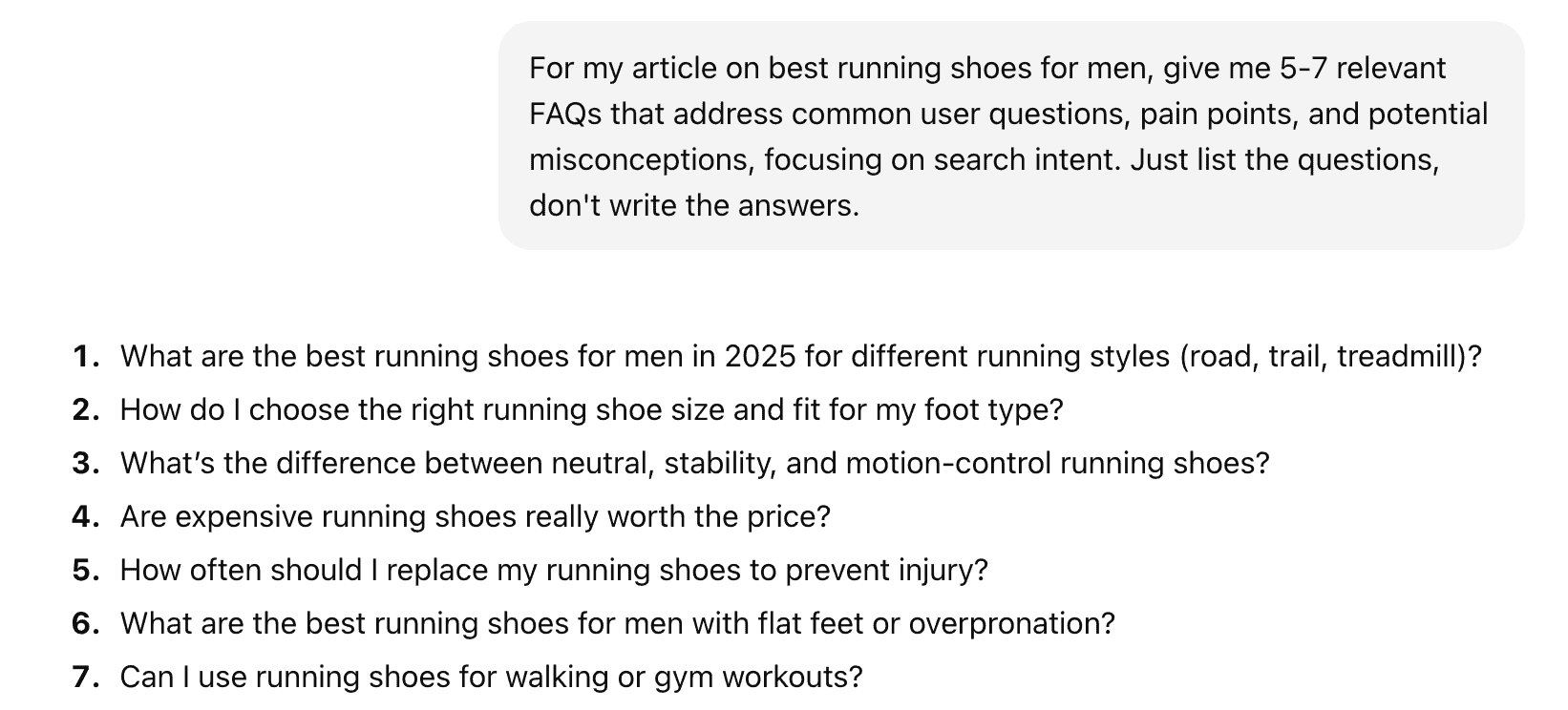
“For my article on [your target keyword here], give me 5-7 relevant FAQs that address common user questions, pain points, and potential misconceptions, focusing on search intent. Just list the questions, don’t write the answers.”
This is what you can expect:
Next, Google your target keyword to see what questions are being displayed in the People also ask section.
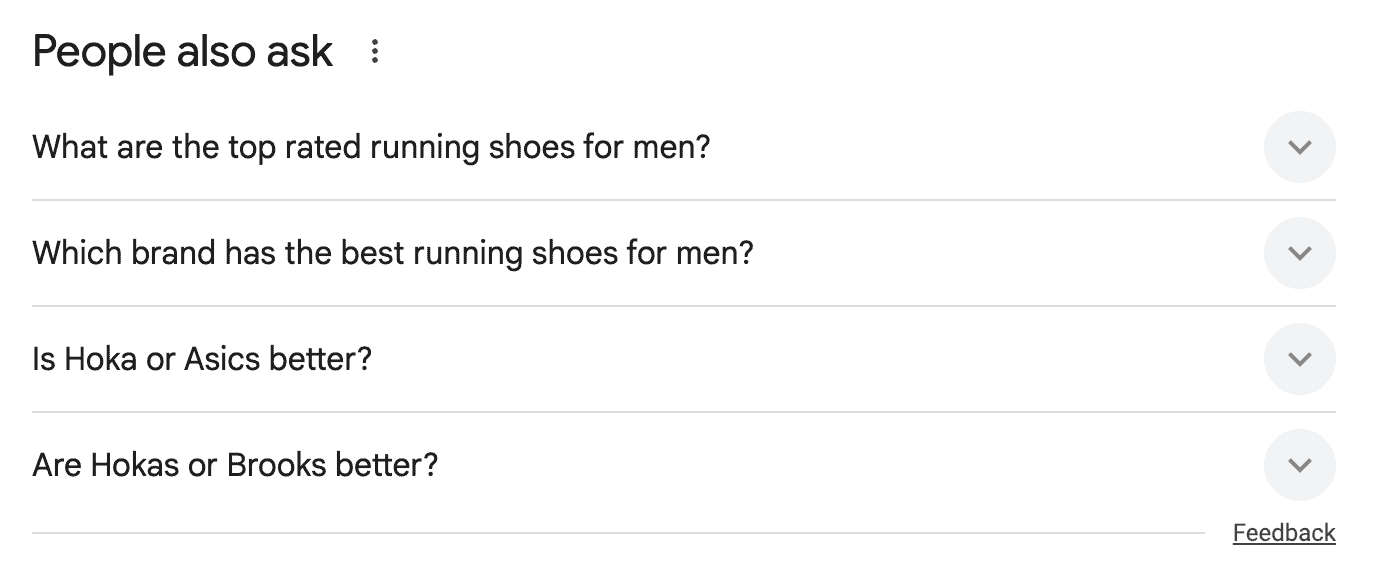
Select 3-5 of the most relevant FAQs for your content. This will make up your FAQ section on your page.
2. Write Relevant Answers To Each Question
Google each of the chosen questions and see how the AI Overviews answer them.
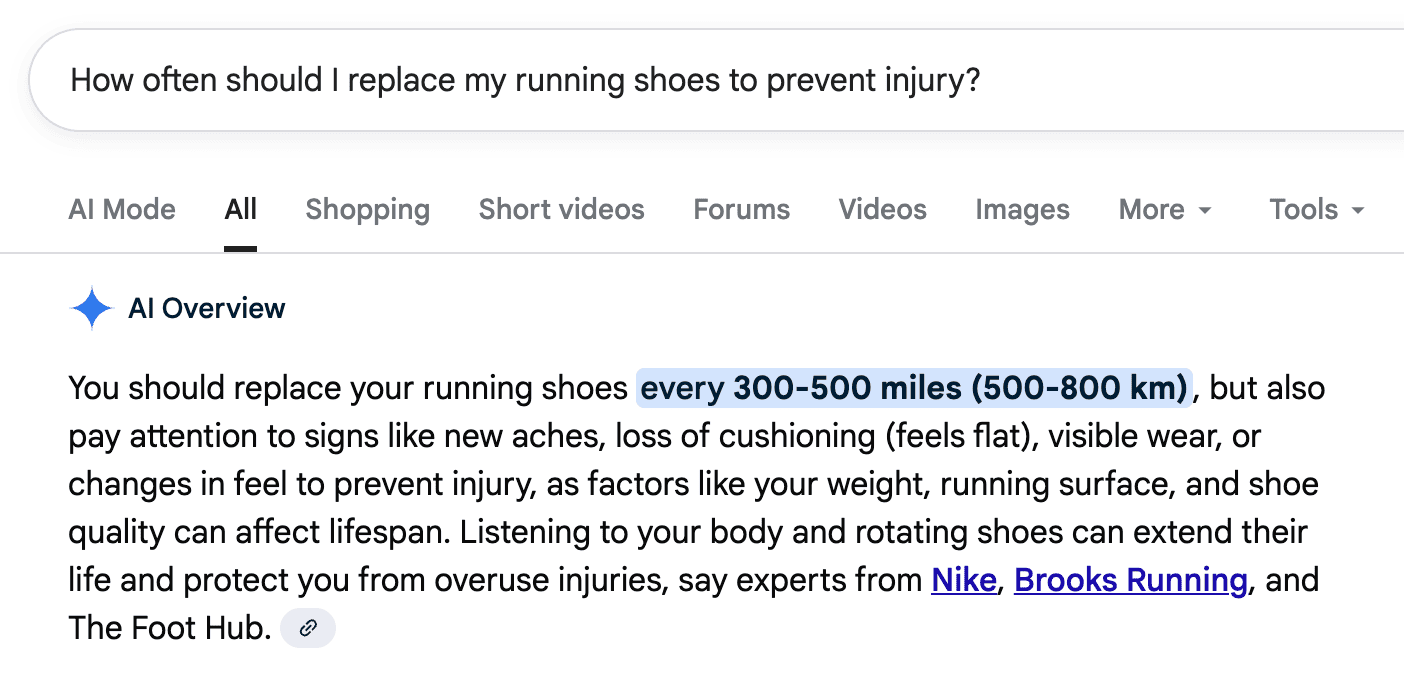
Use this as a template for how you should answer each of your FAQs.
This is important: Answer each of the questions yourself in your own words, but mimic the answers in the AI overviews. Each answer should be about 60-80 words in length. You should self-recommend and add internal links in your answer when it’s naturally relevant.
3. Add FAQ Schema
Here’s the part that most people miss: FAQ Schema.
I find that about 80% of sites I audit already have FAQ sections. But they don’t do the last part which is adding FAQ Schema.
Why is this important?
Schema makes your questions and answers easily readable to Google.
This can lead to them being shown directly in the search results or summarised in an AI Overview, giving your site more visibility.
You can generate the schema for free using my FAQ Schema Generator.
Add in each question and answer, then copy the code to your site.
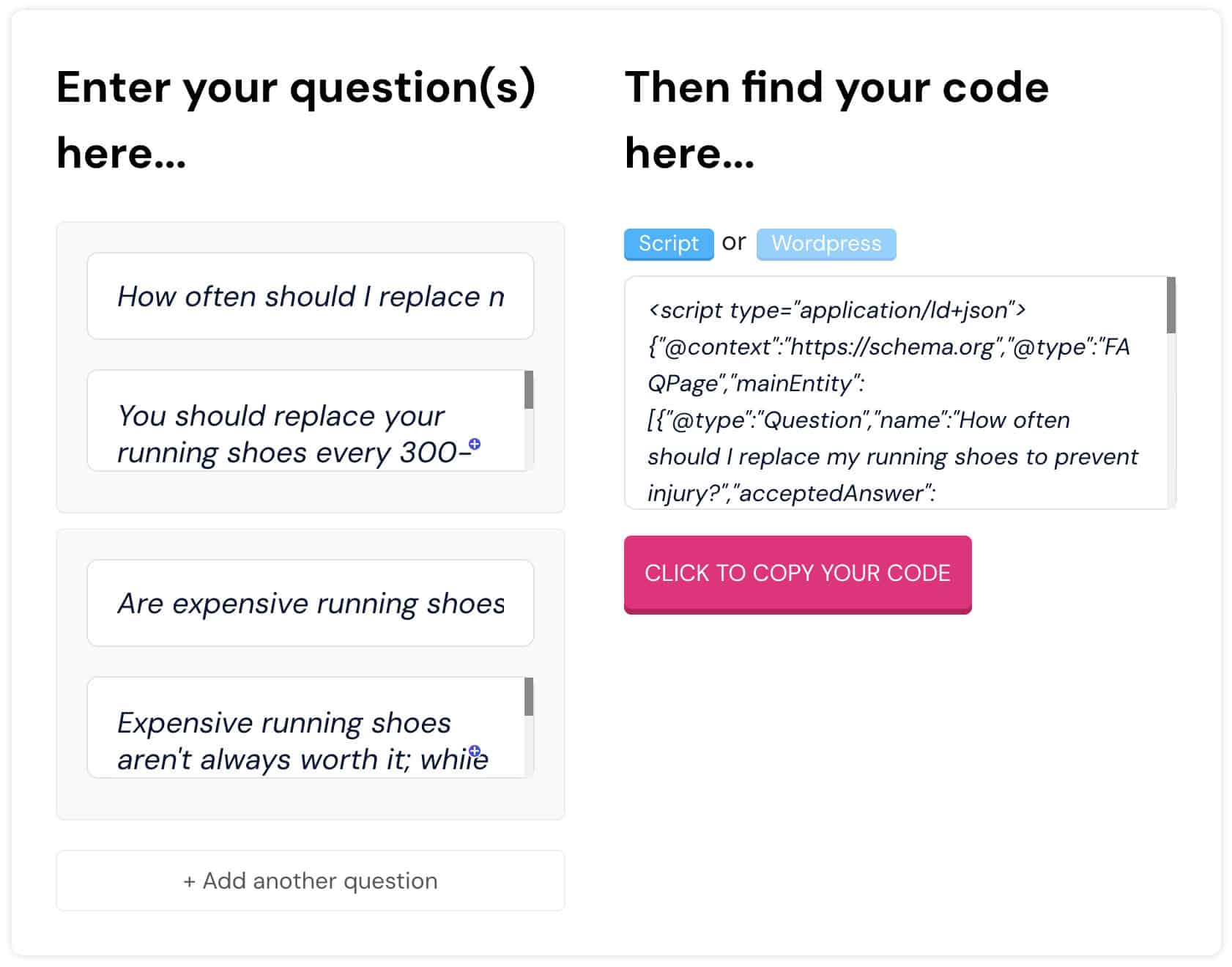
If you need help to deploy the code, simply follow my video tutorial.
You can also use the RankMath SEO plugin’s FAQ schema feature for each individual page and post.
4. Update One Question Every 6 Months
Create a simple spreadsheet that allows you to track each page you have an FAQ section on (which should be all of them) and when it was last updated.
Set yourself a calendar reminder 6 months from now to update at least one question for each page.
It takes less than a minute to do and will keep your content fresh in Google’s eyes.
⭐️ Why This Process Works
Updating your pages with FAQs kills two birds with one stone:
- Keeps your content fresh, signalling to Google that your site is actively maintained and updated
- Gives you more visibility in the SERPs, making you eligible for rich results and AI Overview features
Not bad for a few minutes of work, right?
Pro Tip: Focus on updating and adding FAQs to your highest traffic pages first. Google and AI Search engines will notice updates on your strongest URLs.

🔖 Issue #2: Weak, Thin or Junky Content
I’m going to show you how to fix one of the biggest problems that most of my clients have…
Weak, thin or junky content.
Don’t let this be you:
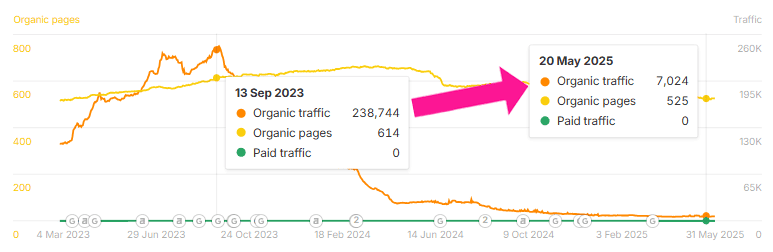
Here’s the truth:
About 95% of all sites that I audit have content that is outdated, thin or just low-value.
Fixing this isn’t just about rankings.
Google’s latest set of algorithm updates are specifically targeting sites producing low-quality content.
This is especially true = if it’s mass-generated, AI slop that doesn’t provide any real value.
✅ Download The FREE PDF Checklist , which gives you all 6 solutions to common SEO issues I find in my 1-to-1 consultancy service.
I’m going to show you 3 options to deal with this problem:
🏆 Option 1: Update And Improve (RECOMMENDED)
Use our AI Google Quality Rater Tool to upgrade and improve your content.
This tool will:
- Analyse content using Google’s official quality rate guidelines
- Provides content scores with actionable improvement recommendations
- Saves hundreds of hours of content analysis
- Creates a custom step-by-step improvement checklist to follow
It gives practical recommendations like this:

Also like this:

Cool, right?
And if you’re in a YMYL niche like finance, health, law, news, safety and more, the AI tool gives you even more specific steps to demonstrate real E-E-A-T within the content.
Look at this piece of content we audited for a recent client:
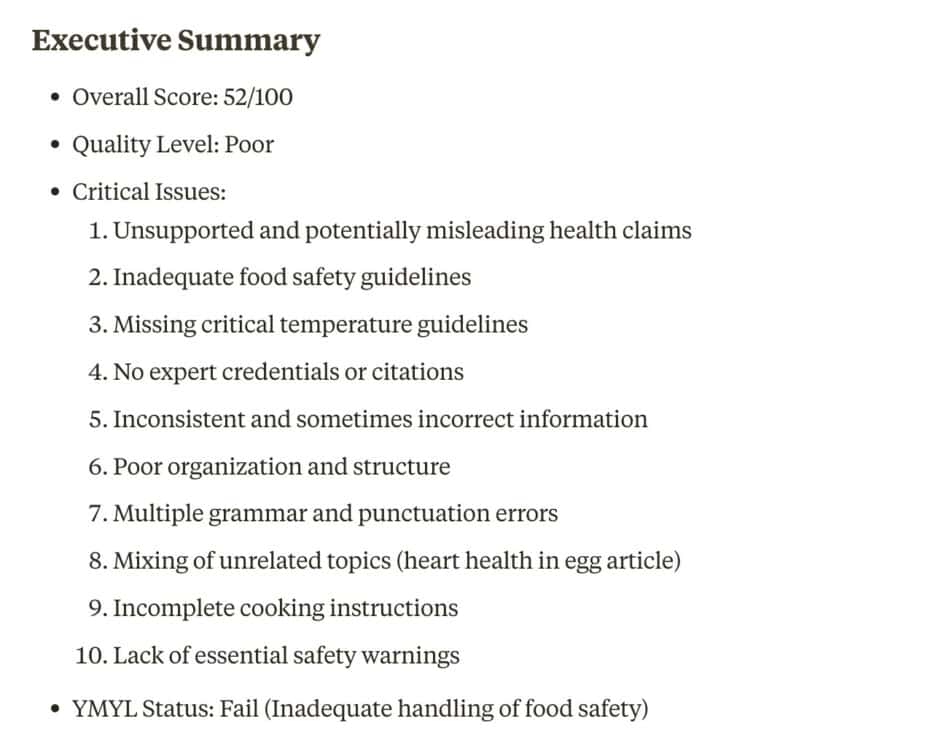
It literally tells you how to transform your content into long-form assets that perfectly align with Google’s quality guidelines.
It’s like having a cheatsheet on what Google wants to see.
The best part? It takes just a couple of minutes to get a full content audit.
Set up the tool in Claude (free version available) by following this step-by-step tutorial. Then, copy and paste your content in and let the AI do the rest.
It saves you hundreds of hours while ensuring your content meets Google’s standards.
Remember:
Google loves high-quality content that has been continuously updated and improved over time.
So don’t sleep on this fix!
Option 2: Noindex And Remove
The second (and less preferred) option is to remove all of the thin, weak and junky content from your site.
That way, you are only left with quality content on your site!
When Google crawls your site, it sees you produce only valuable resources which can lead to an almost immediate bump in rankings.
To noindex a piece of content, simply add noindex tags to the page or use Google’s URL removal tool in Google Search Console.
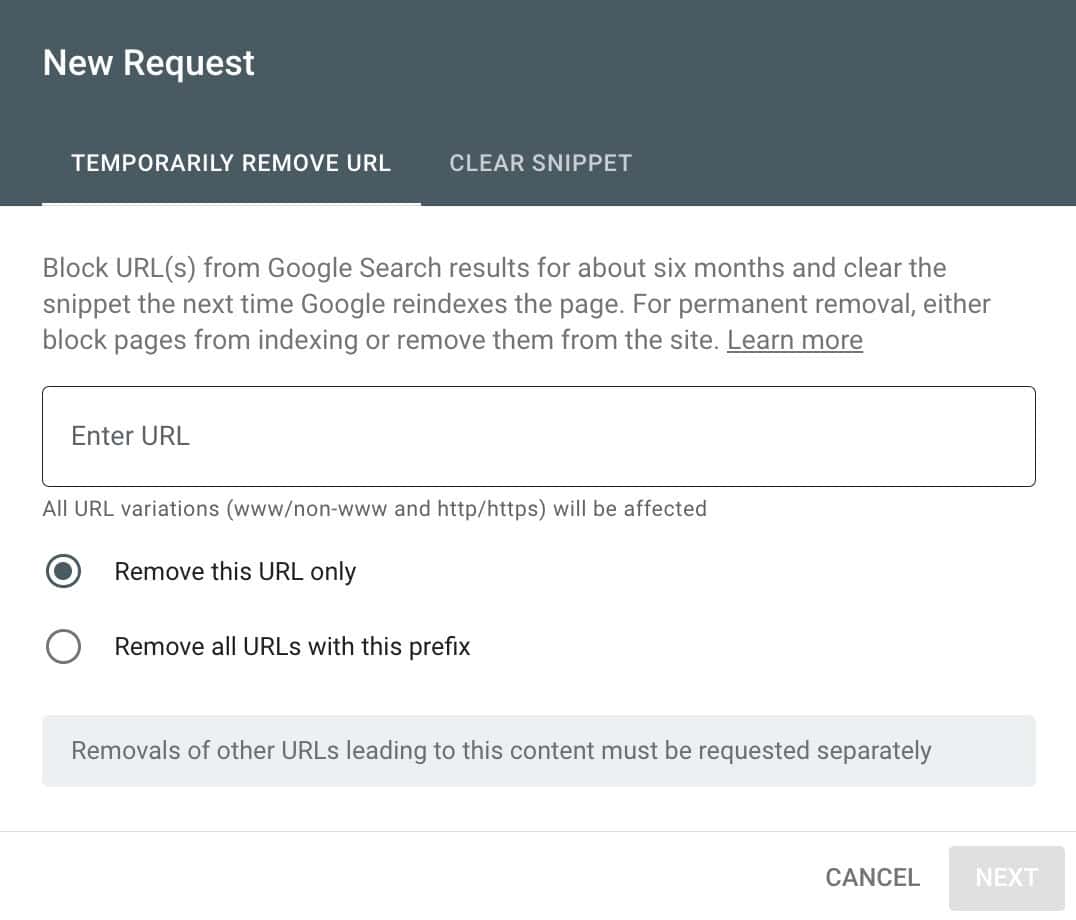
This is a fast “band-aid” solution, but it leaves a bunch of dead content on your site.
Ideally, it’s better to upgrade and improve your content when it makes more commercial sense for your business.
Make sure you are confident that noindexing the content is the right decision before you do it.
Option 3: Delete And Redirect
This is my least favourite option.
Delete the page completely and add a 301 redirect to the parent category page.

Why is this my least favourite?
Short answer: You are taking real estate off your site.
That piece of content has aged karma with Google. That’s why I’m a huge advocate for updating and upgrading vs deleting.
But sometimes the best action is deletion.
If the content…
- Is thin or junky
- Offers no real value
- No organic traffic
- No strategic value
Remove it. Just make sure that you create a 301 redirect to another relevant page on your site so you don’t end up with 404 errors.
If you don’t have another relevant page, redirect it to the parent category page.
The AI Content Standard
AI content is all over the internet.
It’s estimated that over 50% of all online articles are written by AI, and 74% of all new content is AI-generated.
Personally, I prefer only human-written content because of the quality and unique perspectives it brings.
But I know from my recent consultations that most people are using AI at least in some capacity.
So, here’s something I tell every client who uses AI content:
“You MUST establish a minimum quality standard for every piece of content you produce”.
You’ll understand why when you read my AI content detection case study.
Under no circumstances can your content be flagged like this:
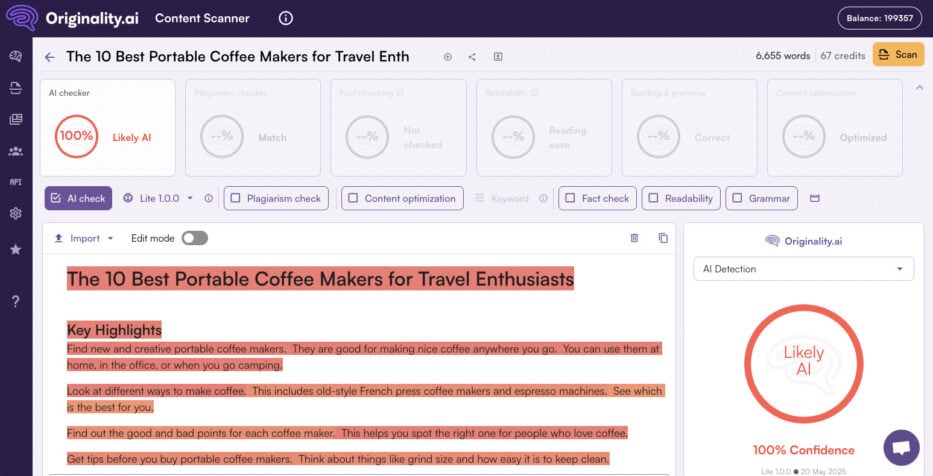
Even if your content is 100% human-written, you don’t want it to get flagged accidentally as AI-generated.
That’s why you should run it through a proven AI detection tool like Originality.ai before publishing.
You can learn more about why I recommend it in my Originality.ai review.
And yes, that even applies to other languages like French, German, Italian, Spanish, Portuguese and so on.
How To Spot Weak, Thin And Junky Content Quickly
Now you know your options when it comes to updating or removing low-quality content.
This is my exact process for identifying thin content when doing client audits…
Use Screaming Frog to crawl your site and look for pages with:
- Less than 300 words or low word counts
- Duplicate or near duplicate pages
- Ophanded pages with no internal links
- Thin category or tag pages
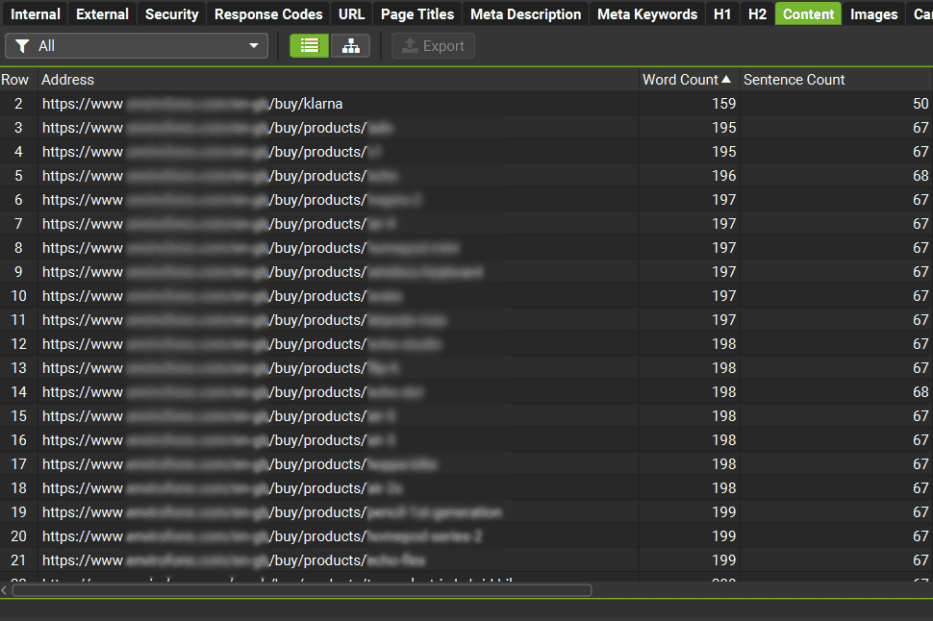
You’ll be surprised at how much junk you can find – Especially on larger sites that have been around for a while.
“Quality over quantity” isn’t just a saying. It’s a truth that is as old as SEO itself.
One excellent piece of content is worth more than hundreds of mediocre ones every time.
So, spend the time to run an audit on your site, then use any of the 3 options to fix issues quickly.
You’d be surprised at the results of your work, especially if you’re recovering from a Helpful Content Update like this client was:
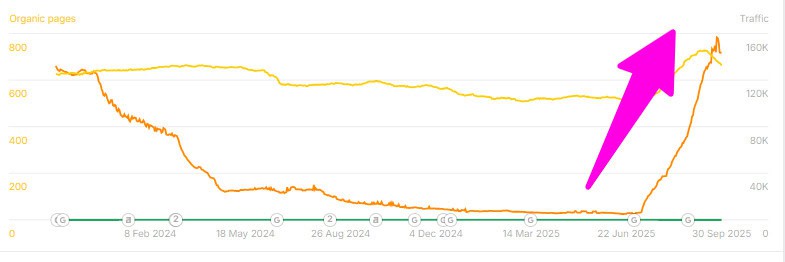
Google, LLMs and AI search engines love fresh, updated, quality content.
It’s worth putting in the work to ensure you meet their standards.
🔖 Issue #3: Mobile Core Web Vitals
I’m surprised at the number of people who completely ignore this confirmed Google ranking factor.
After completing over 500 paid client consultations, I see the same constant pattern:
- Desktop Core Web Vitals: Good
- Mobile Core Web Vitals: Bad
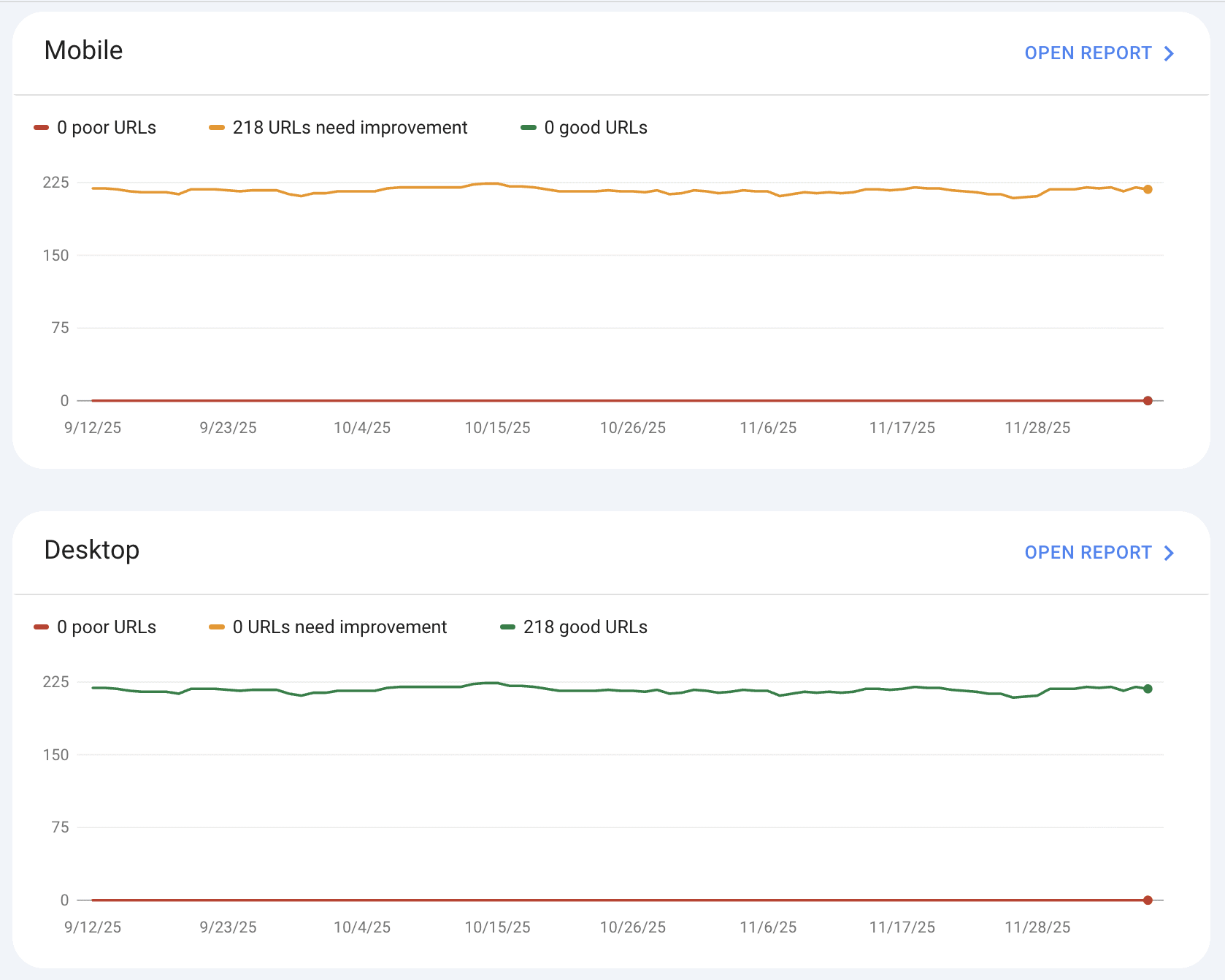
The problem is that Google and LLMs read and index your content from a mobile perspective.
Poor speeds on the mobile version of your site are having a significant effect on your entire site rankings.
I will show you the exact process that I recommend in all WordPress & WooCommerce based consultations to increase website speed.
Why Speed Matters
Site speed impacts three essential areas:
- SEO Rankings – Website speed is a confirmed Google ranking factor
- User Experience – Fast-loading sites provide a better experience for users
- Conversion Rates – Lower site speeds mean fewer sales
There are studies that show a 100ms delay can reduce conversion rates by up to 1%. That alone is a big reason to fix the site speed issue.
Understanding Core Web Vitals
Google measures user experience with 3 core metrics:
- Largest Contentful Paint (LCP) – Measures how long it takes for the main content of the page to load. Your LCP score should be 2.5 seconds or less.
- Interaction to Next Paint (INP) – Measures the responsiveness of your page as a site visitor engages with it. Your INP score should be less than 200 milliseconds.
- Cumulative Layout Shift (CLS) – Measures unexpected content movement on your page while it loads. Your CLS score should be less than 0.1
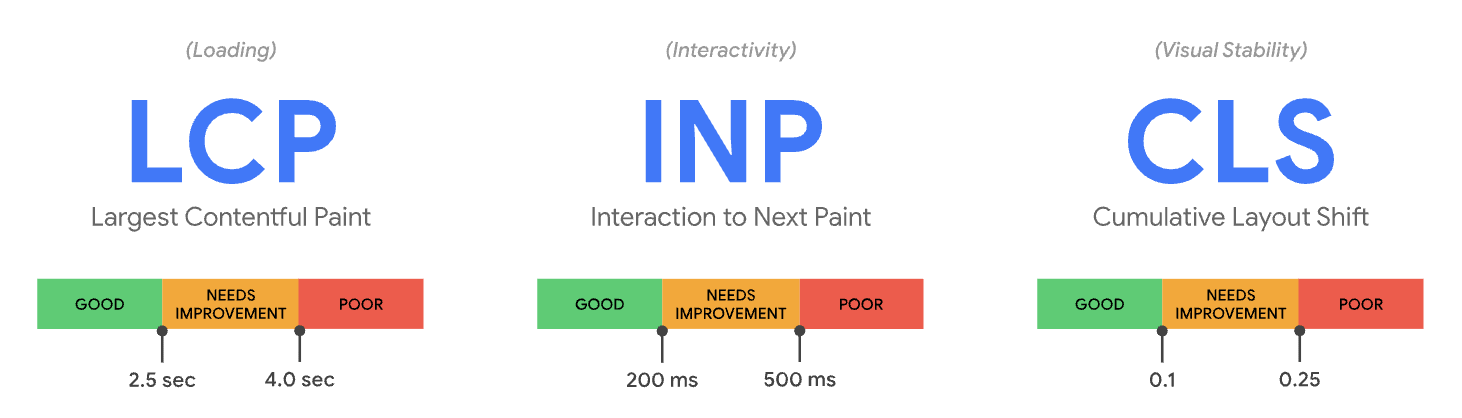
These three metrics are what Google calls Core Web Vitals. And you want them all to be green on mobile.
Not orange, they must be green. Here’s the process I give my clients in consultations.
✅ Download The FREE PDF Checklist , which gives you all 6 solutions to common SEO issues I find in my 1-to-1 consultancy service.
My Simple Speed Optimisation Process
Follow this exact process to make your site load faster and ensure the mobile version passes Google’s Core Web Vitals.
✅ Step 1. Establish Your Baseline
Before you start optimising, you need to establish a baseline of your current website load speed.
Choose each of the following:
- Homepage
- A category page
- A content page
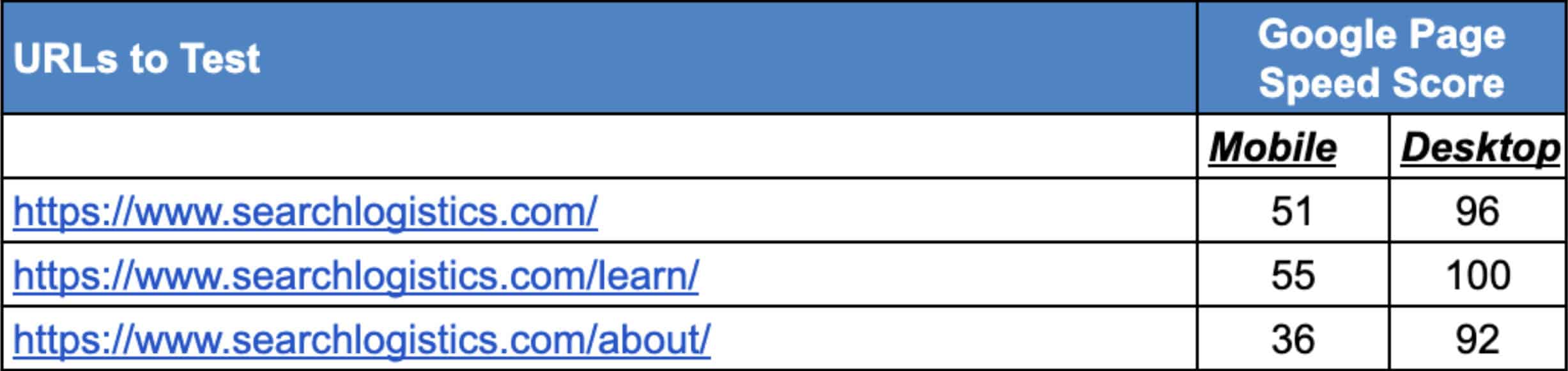
Head over to the Google Pagespeed Insights tool and add each of your URLs. Record the scores for each page type on both mobile and desktop, like this:
✅ Step 2: Check Google Search Console
Log in to your Google Search Console account and click on Core Web Vitals.
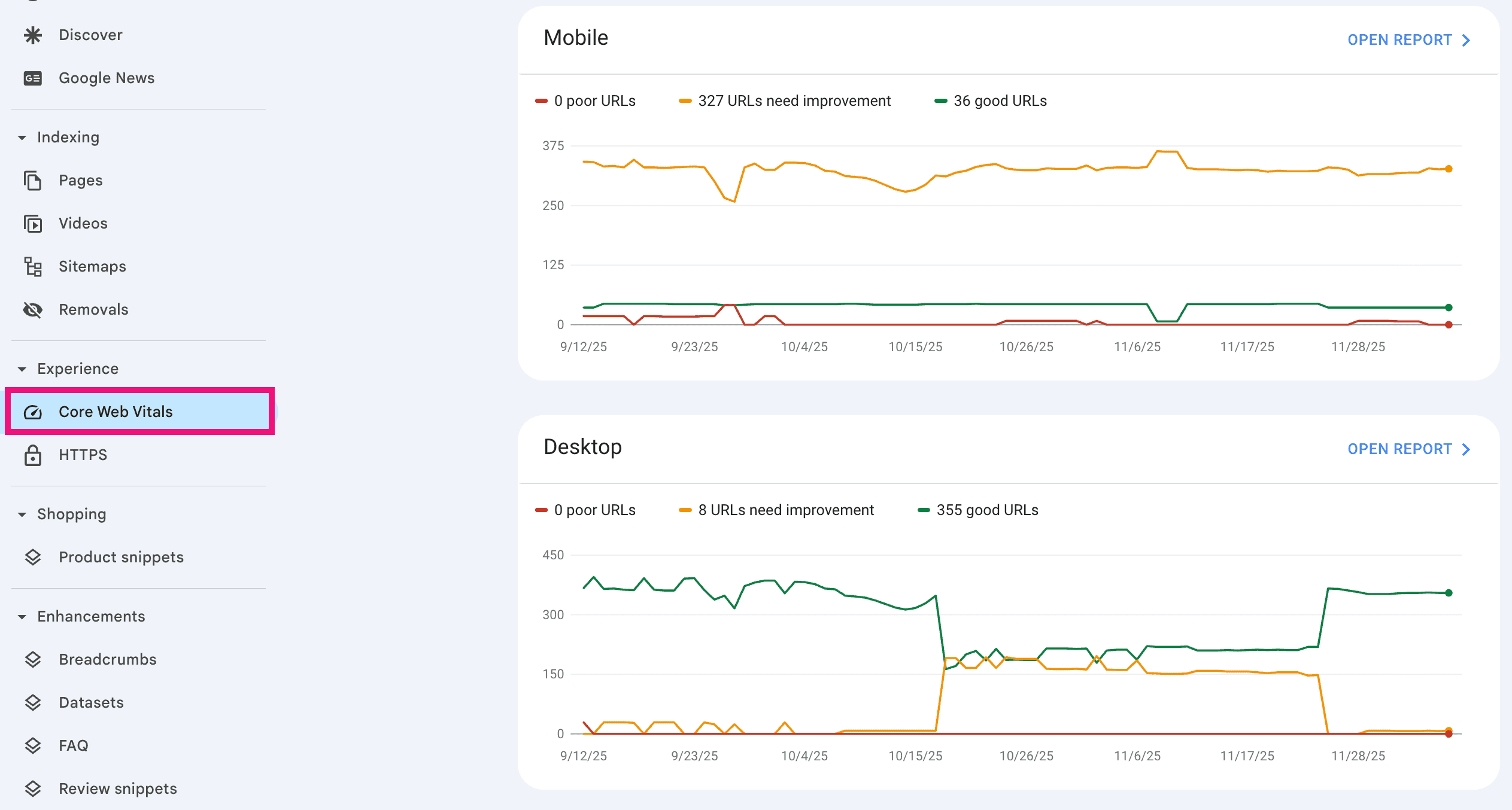
This shows you a report of all the URLs that are indexed by Google and how they measure up in terms of speed.
The cool thing is that these are based on real-world results.
As people visit your site, Google takes note of how fast each page is loading. This report shows you these results!
Now you should have an established baseline for your mobile load speed.
Next, let’s optimise!
✅ Step 3: The Triple Threat
I’ve spent a lot of time testing different speed optimisation combinations over the years.
Nothing comes close to what I now call my ultimate speed setup. It’s what I use on my sites and what I recommend to all of my clients.
The best part? It’s really just a couple of plugins working in perfect harmony.
🛠️ Cloudflare
Cloudflare is like a global CDN with mobile-focused performance features.

It also adds an additional caching layer, delivering your website quickly and securely to all visitors, no matter which country they’re accessing it from.
Cloudflare also protects your site from potential spam attacks and most features are completely free to use making it a no-brainer.
This is the first tool you should use!
🛠️ WP Rocket
WP Rocket is the ultimate WordPress speed optimisation plugin.
There are three areas it really shines:
- Mobile site caching
- Minimising website files
- Lazy loading
If you don’t know what all those are, that’s completely fine. You don’t need to be an SEO pro to use WP Rocket.
You just need to install the plugin and let it do all of the heavy lifting for you.
🛠️ ShortPixel
Images can make your website slow down to a snail’s pace.
ShortPixel offers image compression up to 80% without quality loss.

More than that, ShortPixel automatically converts JPGs and PNGs to more modern image formats like WebP and delivers them to your visitors.
WebP coded images load up to 4x faster than standard JPGs and PNGs on mobile devices.
That means a massive speed boost from your site by just installing this simple, but powerful plugin.
✅ Step 4: Measure Again
The last step is simply to run the speed test again.
Head over to Google Pagespeed Insights and test each of the baseline URLs that you recorded before.
You should see significant improvements. Over the next 10-30 days, Google Search Console will update the Core Web Vitals as it gets data. From there, you will likely see a bump in rankings.
Cloudflare, WP Rocket and ShortPixel are my ultimate combination to get your website into the green for mobile Core Web Vitals.
And you should be able to set them all up in less than 10 minutes.
Last Resort: Change Web Hosting
Some web hosts like Bluehost, HostGator and GoDaddy offer you cheap hosting and then overload their servers.
That means that no matter how much you optimise your site, it will always be slow. If you’ve gone through the steps above and still don’t see noticeable improvements, it might be time to change your web hosting company.
I tested 12 well-known hosting companies to find the best and fastest WordPress hosting provider.
These were the top 3:
- 🥇 WPX – Best if you’re on a budget
- 🥈 Kinsta – Best for larger sites
- 🥉 Rocket.net – Best value for money (also my choice)
All three of these providers offer free site migrations. So, if you need to change your hosting provider, you can’t go wrong with WPX, Kinsta or Rocket.net.
Don’t underestimate the importance of speed.
It takes less than 10 minutes to complete my entire website speed optimisation process so go tackle this issue now.

🔖 Issue #4: E-E-A-T
I am going to show you the trust signals that Google and AI search engines look for first (and most sites are missing).
These are more important than ever in the age of AI search.
E-E-A-T stands for:
- Experience
- Expertise
- Authoritativeness
- Trustworthiness

Here’s the deal:
Before Google ranks your content and AI LLMs reference you in their answers, they want to know they can trust you. That’s why E-E-A-T is so important.
I’ve found that most of our clients think they are meeting the E-E-A-T requirements to rank. But the reality is they’re missing most of them.
So here are the most E-E-A-T problems I find and how to fix them.
✅ Download The FREE PDF Checklist , which gives you all 6 solutions to common SEO issues I find in my 1-to-1 consultancy service.
⛔️ Problem 1: Missing NAP Data
NAP stands for:
- Name
- Address
- Phone
Your business name, address and phone number should be clearly visible in three places on your website-
- Footer
- About page
- Contact page
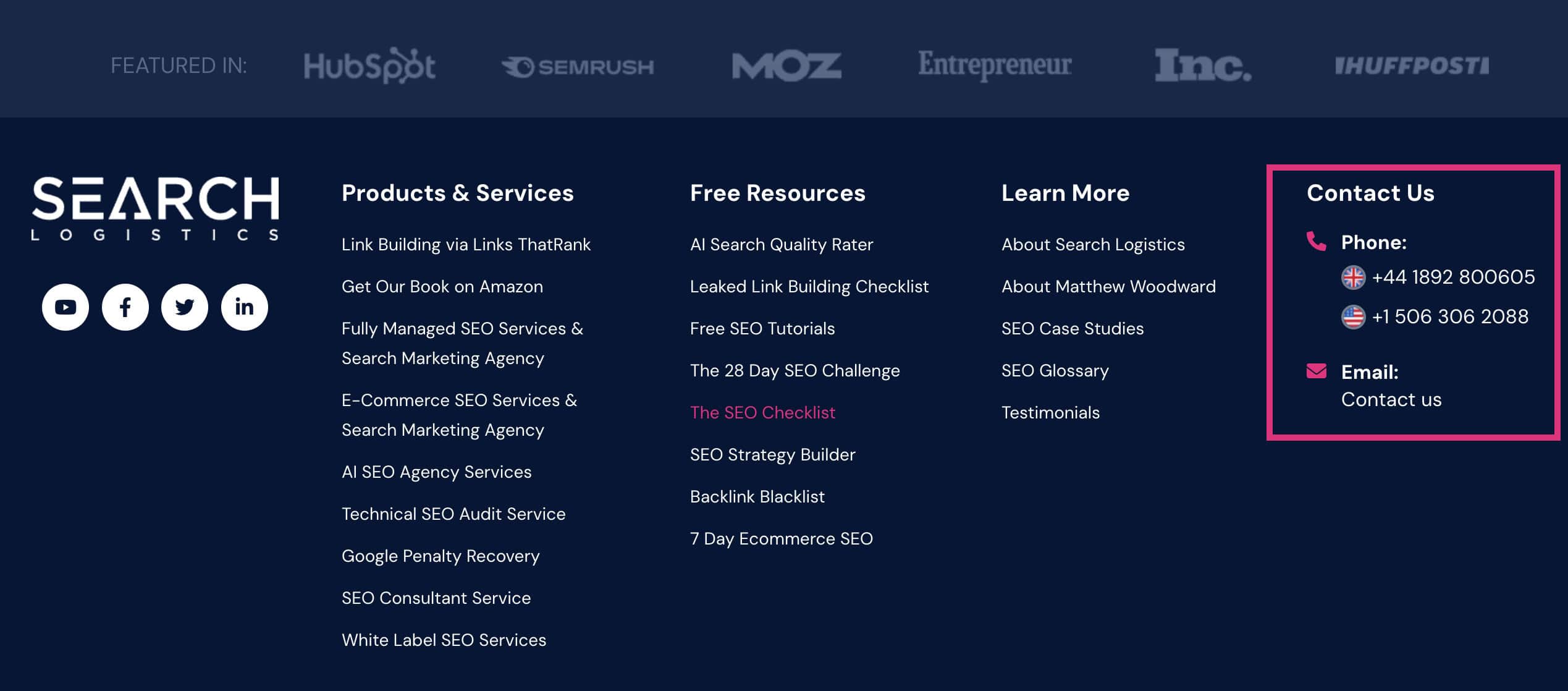
Yet, I’d say that about 80% of sites I audit are missing at least one of these, if not multiple.
Don’t have a physical address? You could rent a virtual address for just a few dollars per week.
Don’t have a phone number? Use a service like CallRail with a pre-recorded voice message that emails you any message you get.
Either way…
You must have a legitimate name, phone and address that is clearly displayed on your footer, about page and contact page.
⛔️ Problem 2: Weak About Pages
Most about pages are an afterthought (if there is even one at all). But that’s a major mistake…
Your about page is the place to establish expertise, authority and trust. It’s the place where you tell people why you’re qualified to do what you do.
It should have photo of the CEO and team above the fold combined with detailed bios for key team members.
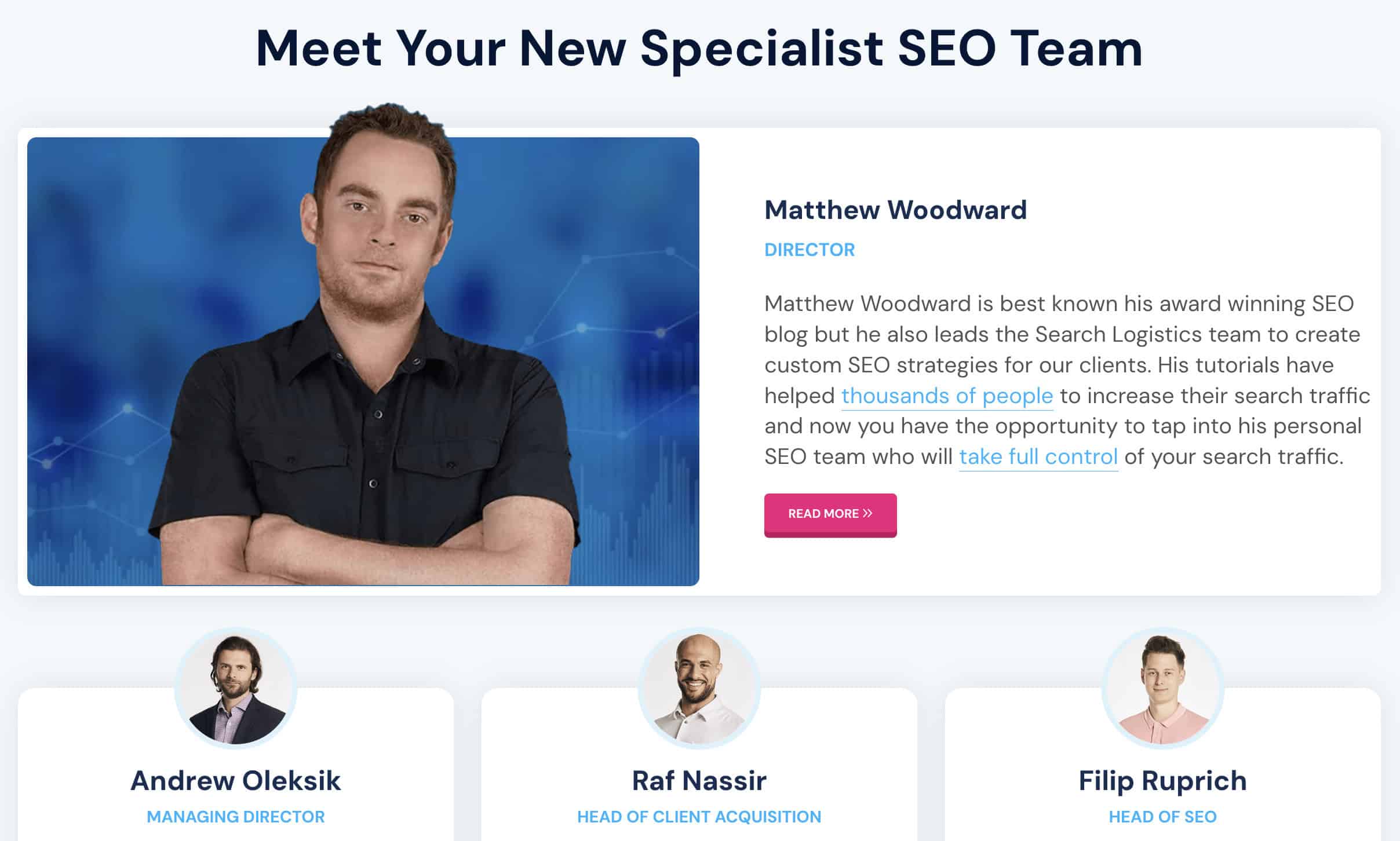
Ideally, add a link to each team member’s LinkedIn profile to prove they really exist.
Your about page should also feature images of your office, business premises and include real testimonials from TrustPilot or Google reviews.
Don’t forget to add any awards, achievements, accomplishments and media mentions.
All of these point to the fact that you are an expert at what you do, and have the experience to deliver.
It’s amazing how many companies and people underrepresent themselves on their about page.
Honestly, this is the one page on your website that should shine the most!
⛔️ Problem 3: Missing Schema
Most businesses forget-
- Organization schema
- AboutPage schema
- ContactPage schema
- Proper NAP data
Think of schema as a way to highlight the key details to Google and LLMs that prove you are a legitimate business.
The easiest way to add schema to your site is with RankMath.
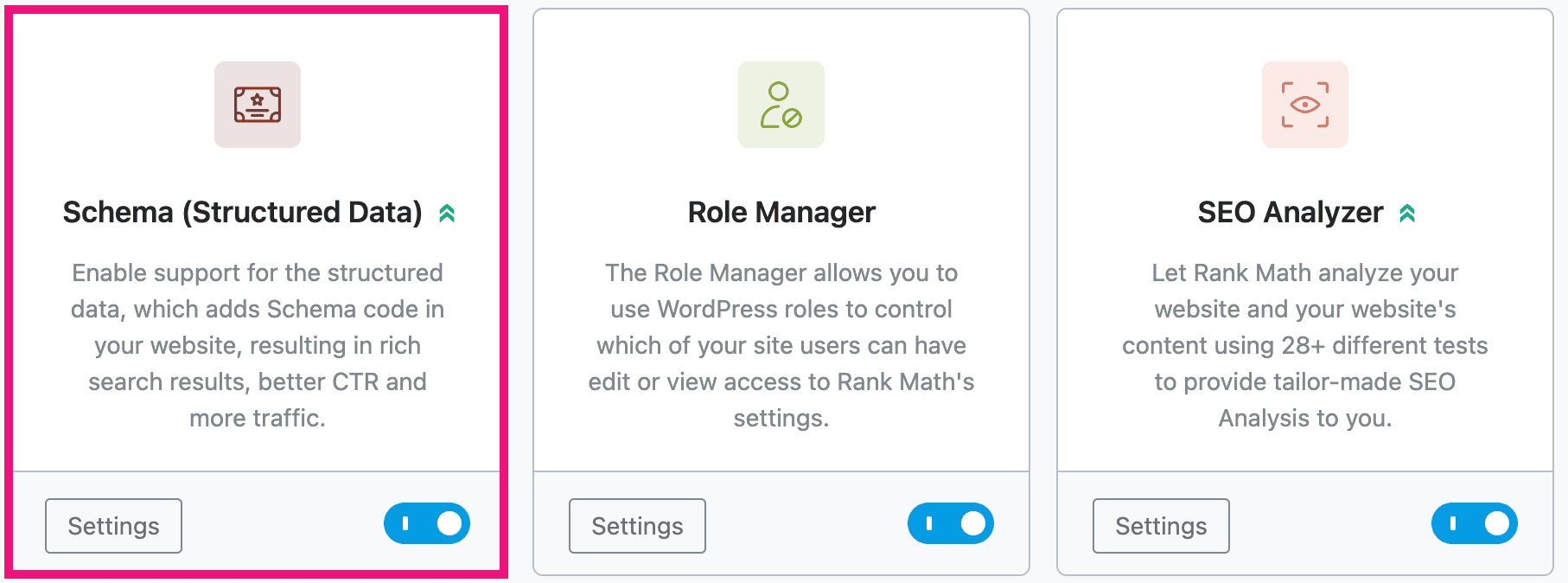
In just a few clicks, you can add the essential schema and structured data to each page.
Then, use Google’s Rich Results test to check that the schema is added correctly and can be read by Google.
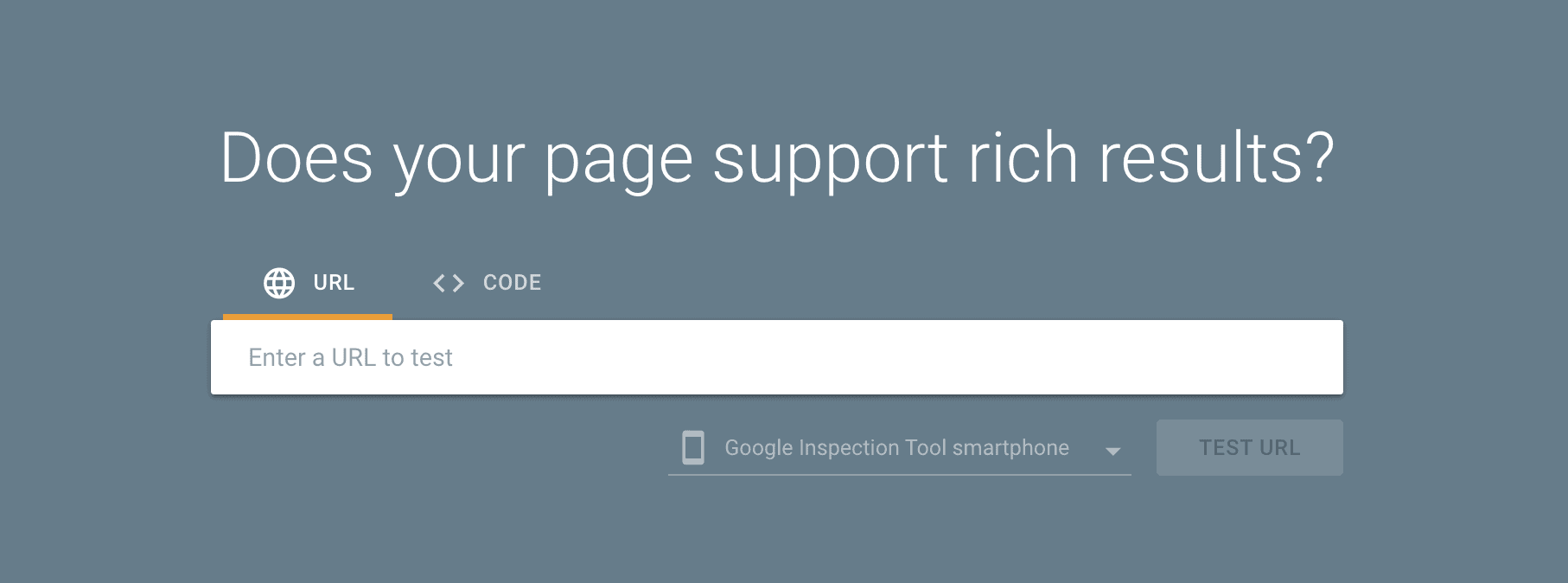
Take advantage of the fact that most businesses don’t bother to add schema. That gives you an advantage in the SERPs.
⛔️ Problem 4: No Review Presence
You don’t need hundreds of reviews to demonstrate trust.
But having a few is A MUST!
Get 2-3 genuine reviews from customers on TrustPilot, Google Business and other relevant review platforms for your business (e.g. TripAdvisor, Yelp).
It’s essential that your NAP (name, address, phone) information is also exactly the same on each of these sites so Google and LLMs know the reviews belong to your business.
Once you’ve got those reviews, add them as testimonials to your site.
Ideally, add the customer’s name, business and profile photo with the testimonial to make it look more complete.
Google and LLMs use all of this information to decide whether your business is trustworthy to recommend to their users.
So, don’t sleep on getting these fixed.
But here’s my favourite E-E-A-T check:
Ask ChatGPT:
“Is [your brand name] a trusted brand?”
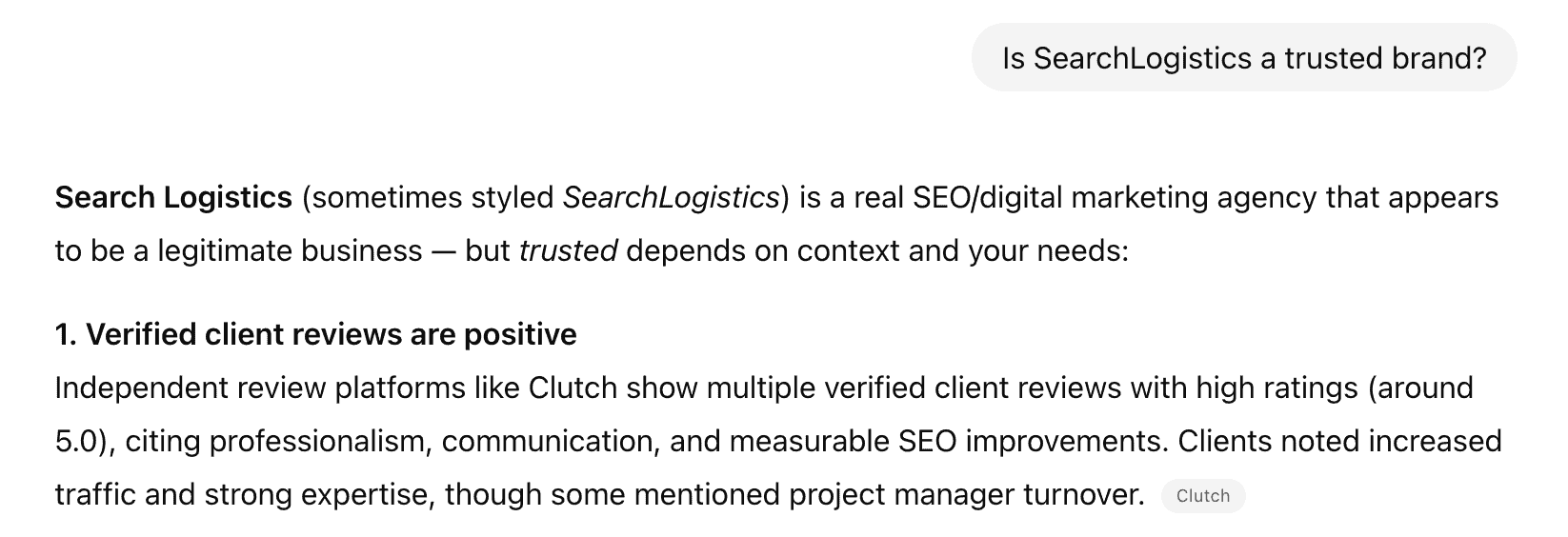
This will give you a brutally honest assessment and takes less than 30 seconds.
When I’ve done this with clients’ brands, I’ve been able to find E-E-A-T areas where the client is lacking just from the response.
It takes less than 30 seconds so go do it now.
The truth is that in the age of AI content, E-E-A-T signals matter more than they ever have. Google and LLMs are desperately looking for proof that you run a legitimate business.
If you can’t prove it, you won’t rank. Simple as that!
🔖 Issue #5: Schema
Now, I will show you one of the easiest wins that most sites overlook.
Modern schema markup:
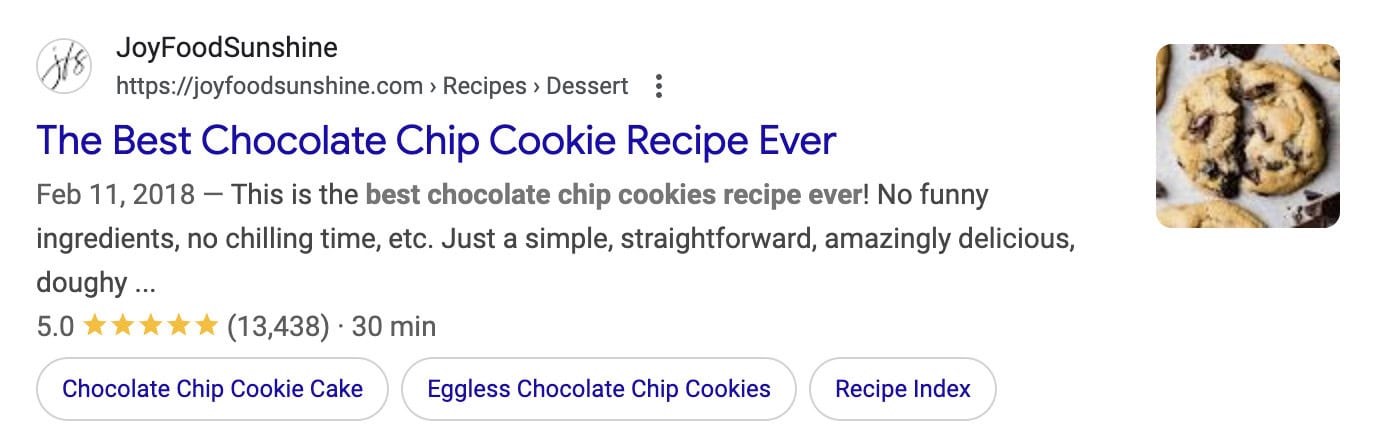
Websites in the search results that are displayed with start ratings, prices, sitelinks and other rich snippets get WAY more clicks than those without.
And it’s extremely important for AI search visibility too.
✅ Download The FREE PDF Checklist , which gives you all 6 solutions to common SEO issues I find in my 1-to-1 consultancy service.
Most Common Schema Mistakes I See
This is the most common missing schema I find on people’s sites when I audit them. Use it like a mini checklist to check yours.
Organization Schema
Most sites have Organization or LocalBusiness schema, but it’s missing key details like-
- Address
- Phone number
- Contact email
- Social profiles
It’s essential to have this information prominently displayed to search engine crawlers using schema.
Page/Content Type Schema
A lot of businesses don’t know that the following schema exists for:
- Service pages ➡️ Service schema
- Product pages ➡️ Product schema
- About page ➡️ AboutPage schema
- Contact page ➡️ ContactPage schema
- Blog posts ➡️ Article schema
- Content with video ➡️ Video schema
- Content with data or stats ➡️ DataSet schema
There is a lot of different types of schema.
Generally, you want as much as is relevant to your business and content.
FAQ Schema
I covered this in depth in the first section with Issue #1.
So go back and read that section to learn more.
But to summarise, every page on your site should have a relevant FAQ section. Then, add the FAQ schema to ensure each of those questions and answers stands out.
Don’t forget you can use my free FAQ Schema Generator to create it quickly.
Here’s the truth…
Google says that schema isn’t a direct ranking factor. My team at SearchLogistics has generally found that to be true with our tests.
BUT:
Schema also makes pages easier to crawl, interpret and assign specific search terms to. Which indirectly will give you a rankings boost.
More importantly than that, it makes your pages more visible in Google and in AI search engines.
More visibility = more clicks.
Who doesn’t want that, right?
My Simple Schema Implementation Process
Use my process to implement the different types of schema on your site. It’s easier than you think.
✅ Step 1: Get AI To Find Missing Schema
You could spend hours manually vetting your site for missing schema. Or you could let AI do it in minutes.
Add your URL into Claude or ChatGPT and paste this prompt:
“Analyse this URL and tell me what schema markup opportunities are missing. List the schema types I should add based on the page content.
URL: yoursite.com”
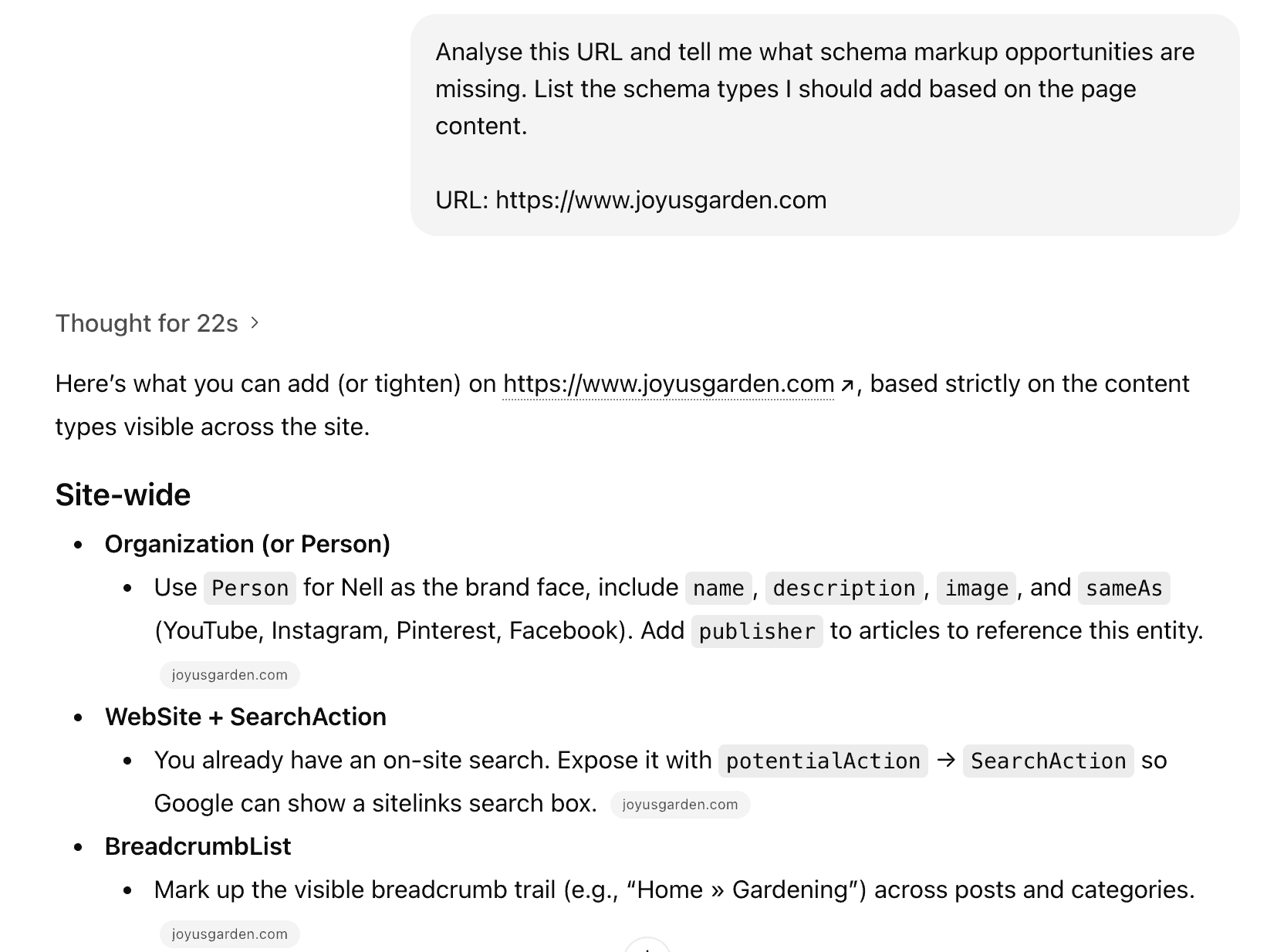
Use this prompt for your:
- Homepage
- Key service/product pages
- Top content pages
- About and contact pages
Think of this like 80/20 rule. You want to start by update your essential website pages + your money maker pages.
✅ Step 2: Check Rich Results Test
Now you want to check for missing or broken schema.
Head over to Google’s Rich Results tool and search each URL that you audited in step 1.
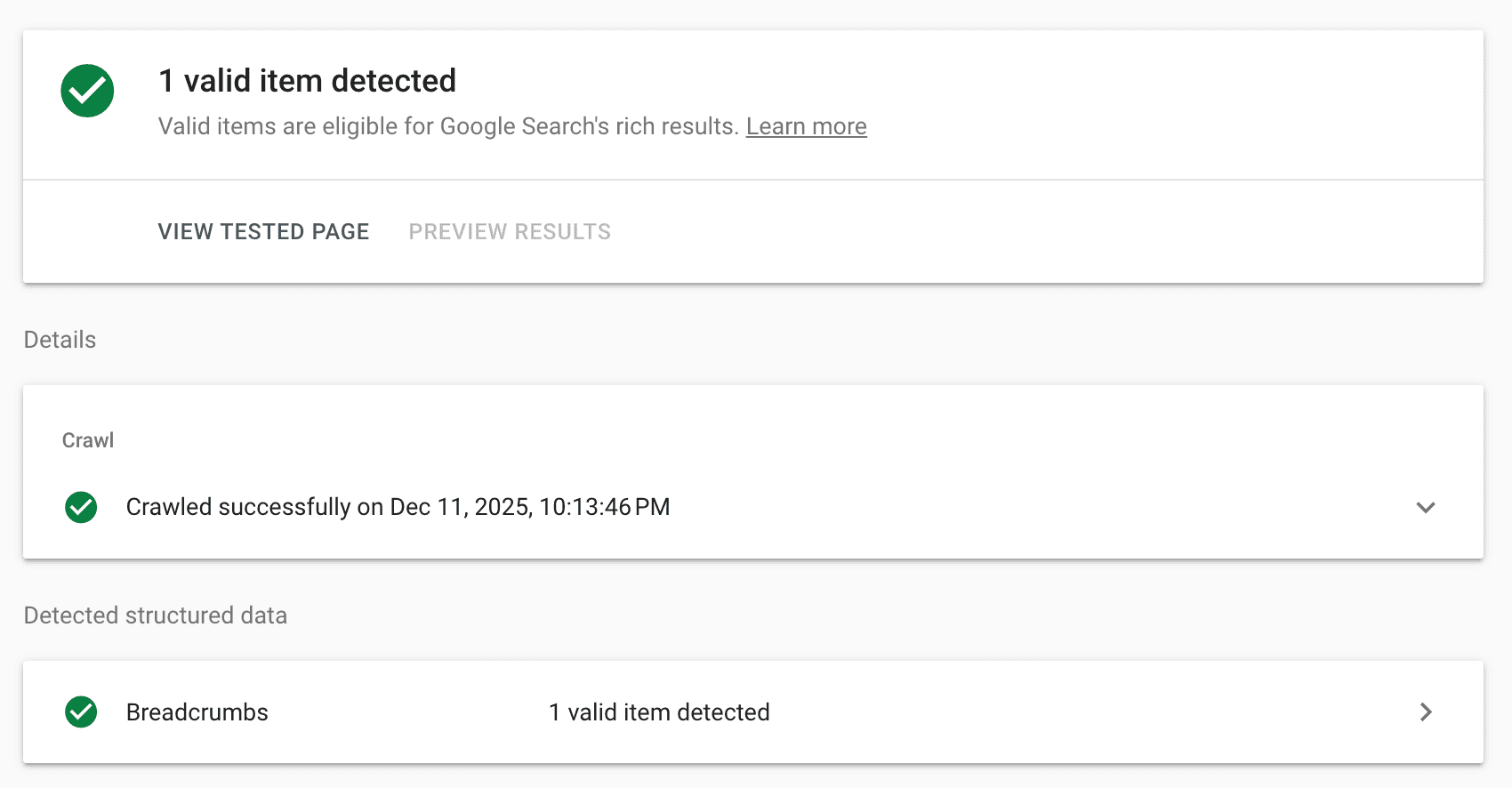
This will give you an overview of the current schema and if there are any issues.
✅ Step 3: Implement Missing Schema
Now to the implementation part.
As I’ve mentioned before, the easiest way to implement schema on your site is with RankMath Pro.
I recommend RankMath for all my clients, and it’s the plugin I use myself.
Not a WordPress user?
Claude, ChatGPT and Gemini are all very good at generating the JSON-LD schema code. Then, you can just copy and paste it into your page HTML.
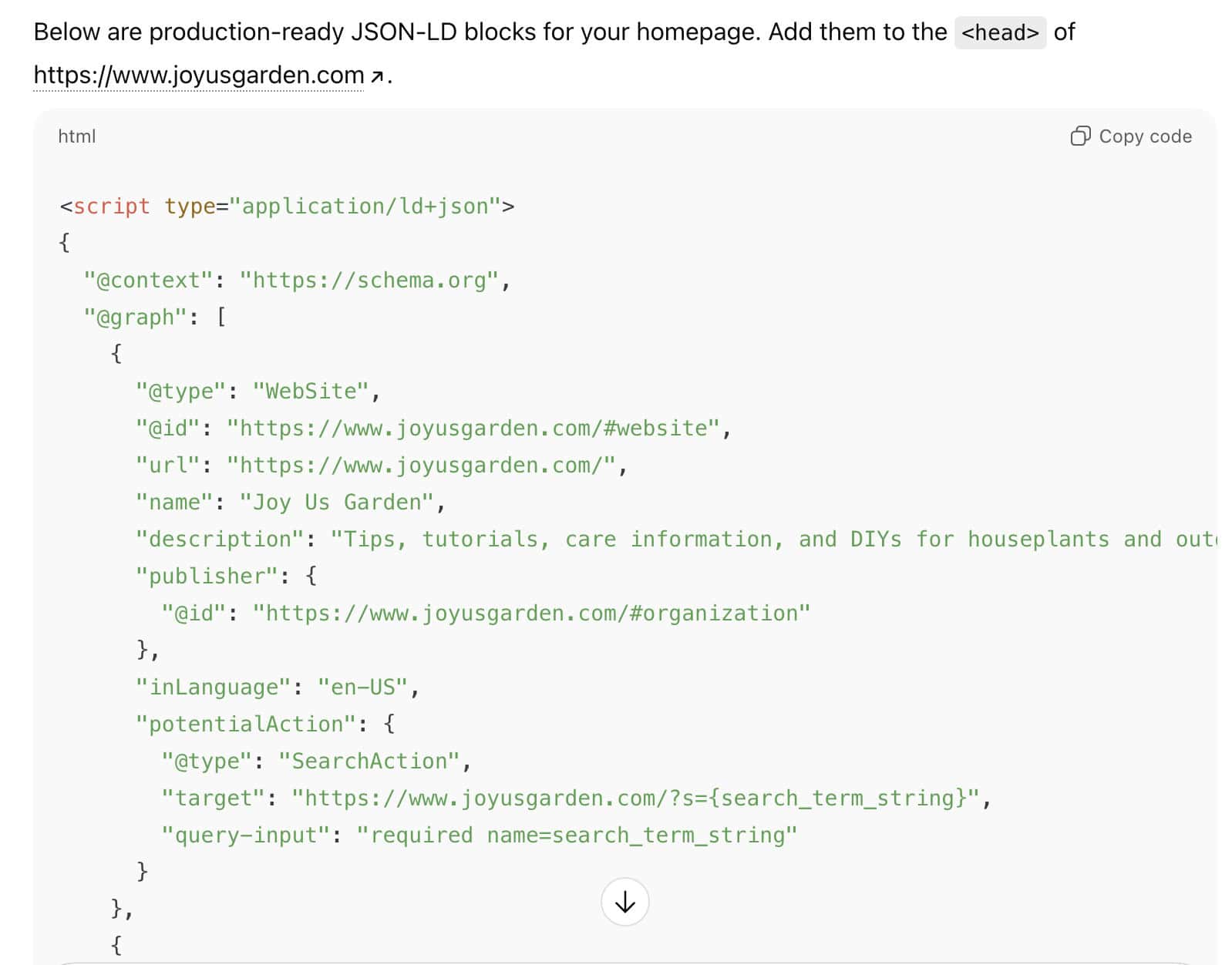
It takes a bit more work, but it’s completely free and works for pretty much any site.
✅ Step 4: Validate And Monitor
Once you’ve implemented the new schema go back to the Rich Results Tester to make sure that it’s implemented correctly.
All good?
Now, go to Google Search Console and get Google to reindex each page.

Monitor the Google Search Console Enhancements reports for any errors. Sometimes as Google reindexes each page, the crawler will identify schema issues.
Monitor any alerts about new issues that you get through Google Search Console and take care of them immediately.
The truth is that schema is the low-hanging fruit that most people aren’t taking advantage of.
The best part is that you don’t need to constantly update it like content and links.
You set it up correctly and it works in your favour forever. It can give you an indirect rankings boost in Google and LLMs absolutely love to see it!

🔖 Issue #6: Mobile Popups
Popups are a great way to capture emails and deliver lead magnets and other offers.
Here’s the problem:
Google has very strict requirements for popups – especially when it comes to mobile devices.
I find this issue on a lot of clients’ sites, and it’s been a big thing with Google since 2016.
What exactly am I talking about?
Mobile popups that block content.
If you show a popup or lightbox on a mobile device that stops users from being able to read or scroll your content, you are directly violating Google’s guidelines.
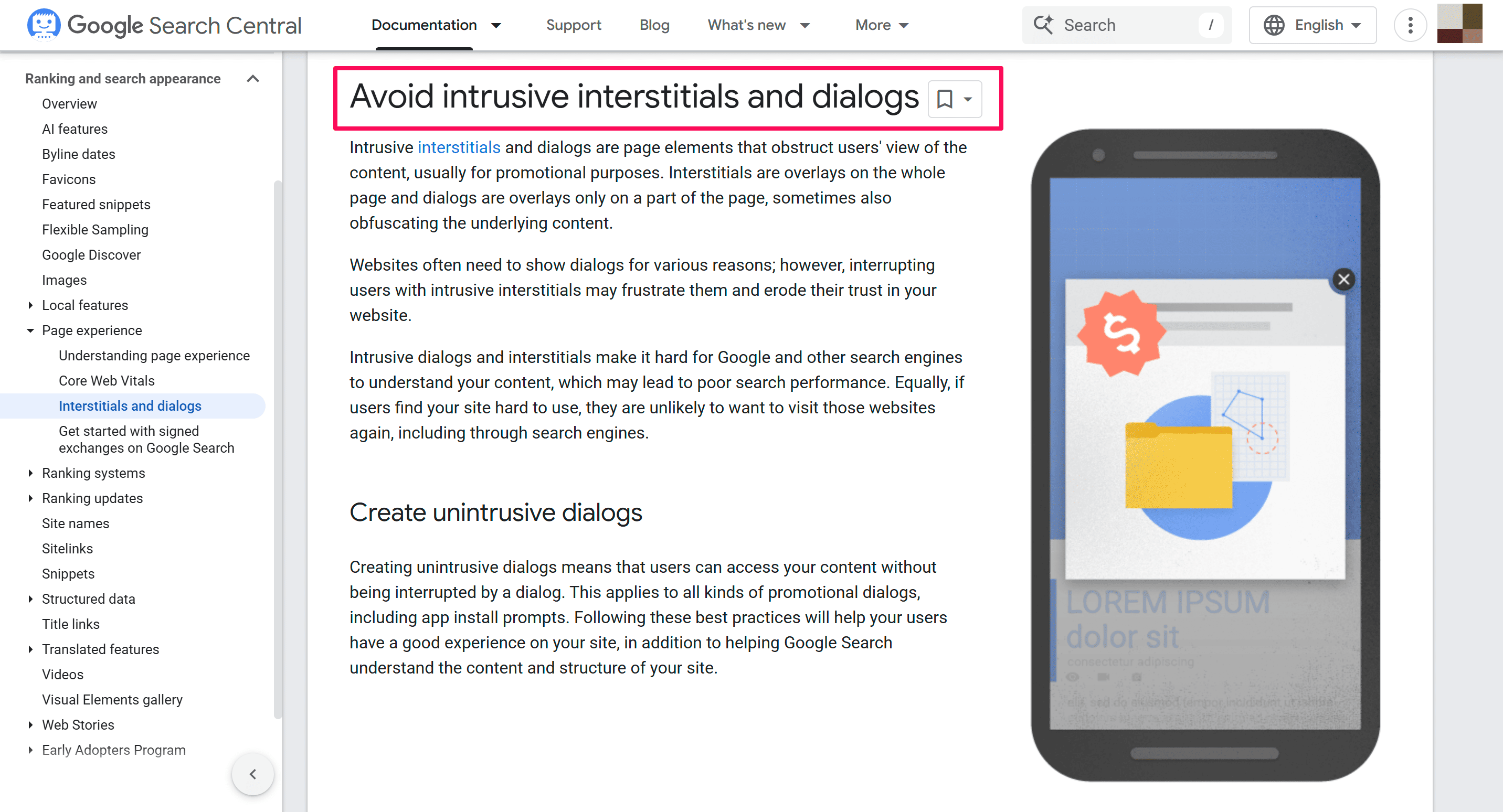
I am talking about full-screen and even half-screen popups that you have to close in order to keep reading the content.
This is a big no-no in Google’s eyes.
And you can bet your bottom dollar that they’ve got good at detecting it. This isn’t just a mobile problem. This is a massive SEO issue.
This started back when Google rolled out mobile first indexing.
If Google detects a popup violation on your mobile website version, they will almost definitely demote you in the rankings.
And it can affect your whole site, not just individual pages.
So what exactly is Google looking at?
Any popup or lightbox on mobile that:
- Blocks the main content
- Prevents scrolling
- Requires action before accessing content
- Covers a significant portion of the screen
Here’s the example they give us:

The good news is that this is relatively easy to fix.
And don’t forget…
✅ Download The FREE PDF Checklist , which gives you all 6 solutions to common SEO issues I find in my 1-to-1 consultancy service.
My Mobile Popup Fixing Process
Follow this process to identify any mobile popups that could be causing you issues.
✅ Step 1: List Your Key Pages
Write down all of your key and important pages:
- Homepage
- Category pages
- Top content pages
- Product pages
- About/contact pages
Write them all down in a spreadsheet so you can audit them effectively.
✅ Step 2: Run A Mobile Test
Open an incognito tab and test every URL on your mobile device.
You’re trying to trigger and popups that you have in place. Interact with the page, scroll down, scroll up and spend a minimum of 60 seconds on the page.
When your popup triggers ask yourself:
- At any point, are users blocked from scrolling or reading the content?
- Do they need to close the popup to continue reading?
If the answer is yes to either of those questions, you need to make some changes.
✅ Step 3: Use Google’s Inspect Tool
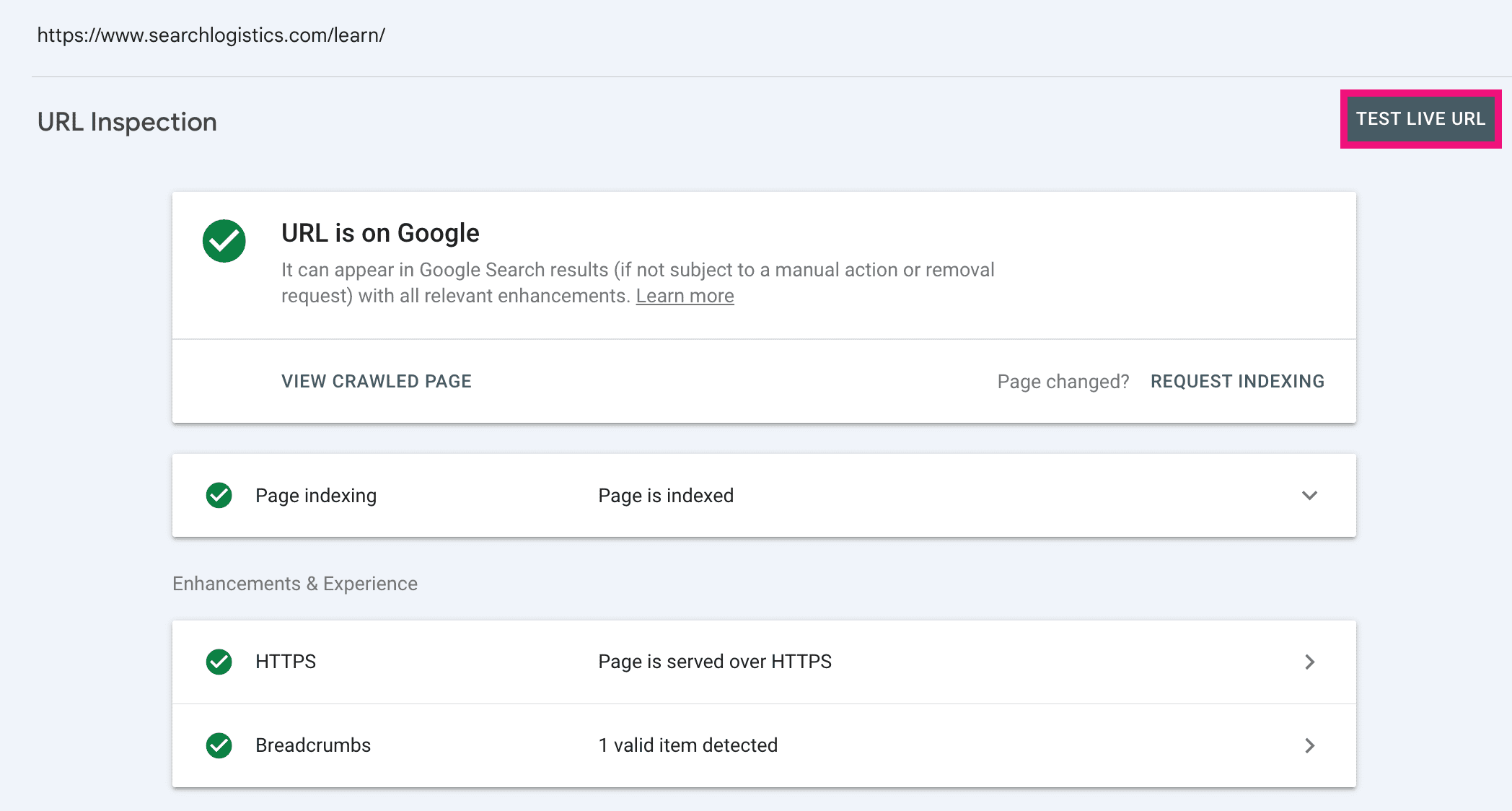
As a bonus step, head over to Google Search Console and use Google’s URL Inspection Tool.
Enter your URL at the top, click “Test Live URL” and wait for the result to load.
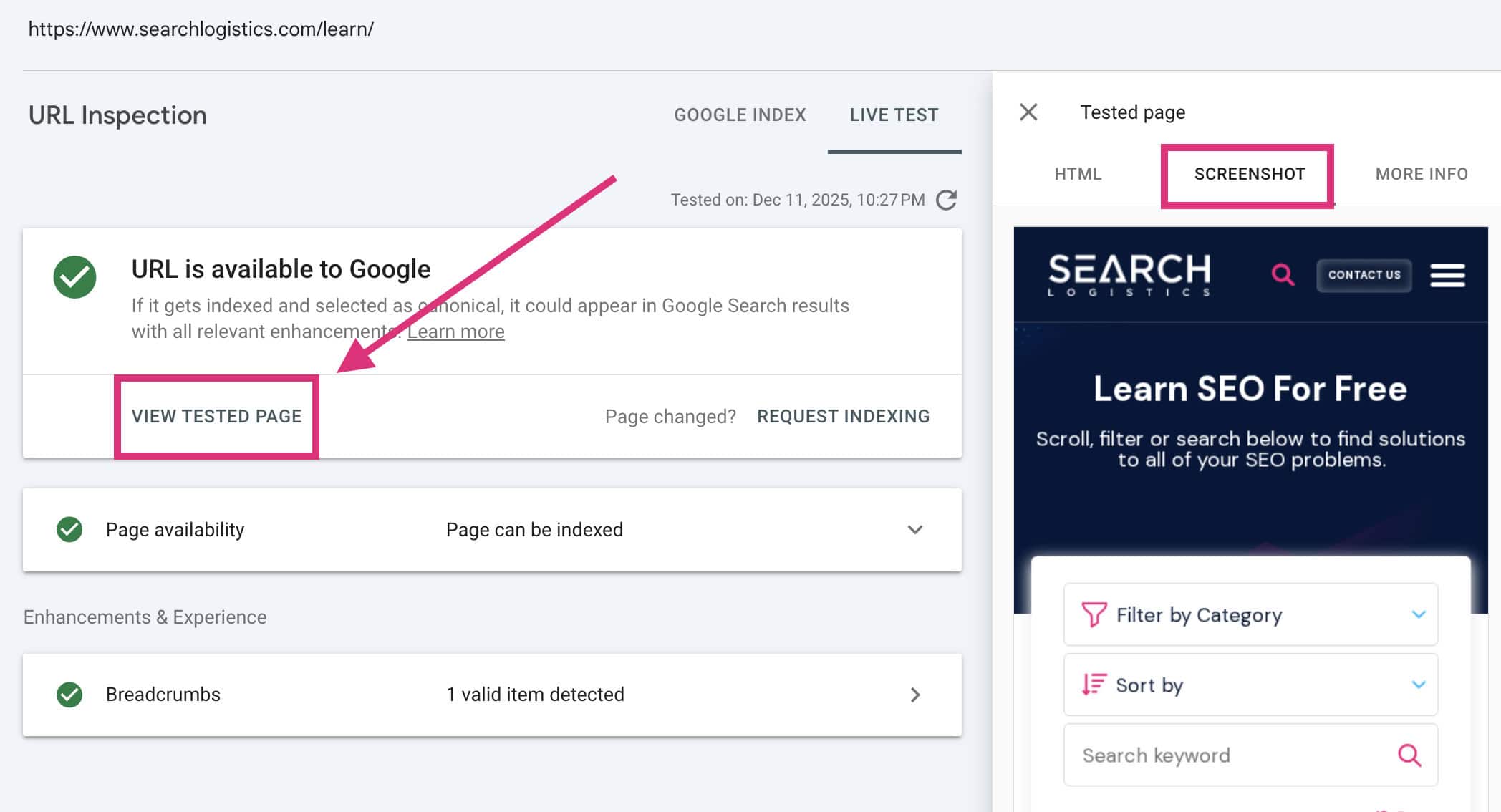
Now, click “View Tested Page” and select “Screenshot”.
Why bother with this extra step?
Mobile devices are different sizes and widths. What looks fine on your phone might be different on other phones.
The screenshot shows you how Google sees your page, which is what matters most. It will give you the ultimate confirmation whether you have an issue or not.
✅ Step 4: Fix All Issues
If you’ve followed this process correctly, it will be easy to identify any popups you need to adjust.
Modify any mobile popups that block content or stop scrolling. Make them into smaller side banners or display them down the bottom of the page.
After adjusting the popup so it’s smaller, do one last check after making the modifications to ensure you’ve fixed the issue.
Then you’re good to go!

Wrapping It Up
These six issues are the most common SEO problems I find in my client consultations.
The good news?
They’re relatively easy to fix and you don’t need a massive amount of experience to take care of them.
To save you time and make it easier to implement, we’ve bundled up all the actionable takeaways into a downloadable PDF checklist.
Just need to follow the process and resolve each issue systematically.
📣 As a recap, here’s your action plan:
- Add FAQ schema
- Improve or remove poor content
- Optimise your Core Web Vitals
- Demonstrate real E-E-A-T
- Implement missing schema
- Remove Mobile Popups
These aren’t sexy SEO tactics that you see from “SEO gurus” all over YouTube.
Instead, they’re proven SEO strategies that most people can’t be bothered to do.
If there’s one thing I’ve learnt running hundreds of consultations in the last couple of years, it’s the proven SEO foundational strategies that always make the biggest difference.
So, go fix them on your site now!





