































 Subscribe to my YouTube
 Join My Facebook Group
 Connect on Linkedin
 Free SEO Tutorials
 SEO Case Studies
 Links That Rank


Wikipedia is one of the biggest, oldest and most authoritative websites on the internet which makes Wikipedia backlinks one of the most powerful links on the planet.

But are Wikipedia backlinks still as effective in 2026 as they used to be?
Short answer – Yes, they are!
The March 2024 Google search algorithm leak confirmed that Google is collecting link signals from sites like Wikipedia with its “pagerankNS” metric.
This means that Google values links from highly trusted sites like Wikipedia when calculating your site’s authority.

By the end of this article, you’ll know:
- Why Wikipedia links are still gold for SEO
- Three proven methods to build Wikipedia links
- How to find great opportunities for your site
- A sneaky technique to turn a dead link into multiple backlinks
- Step-by-step process to build as many Wikipedia links as you want
- Or just Download our free Wikipedia Backlink SOP
So, if you’re ready to build the kind of links that really put your site on the map, read on…

What Will I Learn?
Why Should You Be Building Links With Wikipedia?
Wikipedia shows up in the search results for most terms.
It‘s a seriously authoritative site and building links from them is a strong endorsement for your site.
Google loves links from Wikipedia and they should since real moderators review the links which is why you should build links from them.
Over the last few years I’ve found an easy way to build Wikipedia backlinks that is simple and effective.
Not only that but with my personal twist you’ll also get links and traffic from other authoritative sites as well!
How?
Because the entire site is focused on delivering high quality information on a specific search term to their readers. Whether that’s information about:
The best bit?
If your site is linked from a Wikipedia page it will generate additional links from other websites looking to use your site as a reference!
So Wikipedia isn’t only a backlink, it’s a traffic generating, natural backlink generating machine! And is a worthy place of spending your time.
In the next section I’m going to talk you through the three main types of links we’ll be looking to build in Wikipedia.

How To Get Backlinks From Wikipedia
Building links in Wikipedia isn’t as simple as saying…
“Hey, my article is better than that dudes! I want to be featured there instead.”
The way to build links in Wikipedia, although it’s easy, needs to be done tactically.
That means there are three opportunities to build links that you’re looking for:
- Dead link opportunities
- Broken link opportunities
- Unique link opportunities
3 Ways to Get Wikipedia Backlinks
Let’s take a look at what each of these is in detail, and how you identify them for your own site.
1. The Dead Link Opportunity
By Wikipedia’s definition a “Dead link” is used to describe a link that is no longer active. Meaning that the content that was once on the other side of the link isn’t there anymore.

This provides a perfect opportunity to replace the old link with a new link from your site, as long as the content is relevant.
This indicates to Wikipedia moderators that the link needs to be fixed or updated.
But you don’t just want to add as many links as possible. You need to be strategic…
When evaluating a dead link opportunity, look for:
- Content Relevance – Ensure that your content is highly relevant to the old content on the page you’re replacing.
- Quality Assessment – Your content needs to exceed the quality content assessment benchmarks that Wikipedia has in place.
- Update Requirements – Make sure your content provides more comprehensive coverage, fresher data and better information overall.
Wikipedia is just like any other website. Because there are so many links, hundreds of them are broken and almost impossible to keep on top of in real time.
So your opportunity for building links here comes in the form of providing them with the content they need to fill that link. Simple, eh?
2. The Broken Link Opportunity
One of the more white hat link building tactics is to scour the web looking for broken links.
But that is super time consuming and can often result in a lot of work for not a lot of outcome.
Here’s the thing…
If you’re a savvy SEO, you’ll have realised that if the link is broken on Wikipedia it is broken for all the sites that link to it as well.
Meaning from one broken link you can find anywhere from five to five thousand link building opportunities, depending on the niche and the topic.
To speed up this process, Wiki Grabber to find a relevant Wikipedia page with a broken link.

Then, you can use a tool like SEO Minion to find the broken link on the page.
There’s a good chance that if Wikipedia links to the broken page, other sites on the internet are also.
Not only does this give you an opportunity to earn a powerful Wikipedia backlink, but you can reach out to those other sites to recommend your content as a replacement link.
Simple, right?
Turn one broken link opportunity into potentially hundreds in minutes.
If you don’t have the content for the broken link yet, don’t worry, we’ll explore that later in the article.
3. The Unique Link Opportunity
Everyone is able to create a Wikipedia account in minutes.
And that means you have access to create your own link building opportunities on specific Wikipedia pages.
For example, I could use a search operator like this-

Then, I could easily edit the Wikipedia keyword research page I found using the search operator and add in my own links to my own articles in the relevant sections.
This would be by adding new content that improves the overall structure and information on the Wikipedia page.
Whether it’s a new sentence, paragraph or entirely new section.

But I don’t recommend you just do that. Simply because all links from Wikipedia have to be approved by moderators.
So if a page suddenly has five new links all pointing to one Wikipedia page, there’s a good chance you’re going to get caught out.
Instead you should go in and do your duty as a good Wikipedia citizen and update content, repair broken links and add new findings where possible.
Then if your article happens to be one of the ones included then that’s a good result for everyone involved.
4. The Sweet Spot: Putting All Of These Opportunities Together
If you combine the dead link, broken link and unique link opportunities you have a flexible, easy to manage Wikipedia backlink building strategy.
You can:
- Use dead links to build Wikipedia backlinks
- Use broken links to get links from authority sites
- Include your own unique links in a Wikipedia page
If you can replicate this with four or five pages, the amount of links you’ll be able to build with targeted, relevant pages keeps growing.
This approach makes it really easy to get some serious link juice & relevant traffic!
Want a step-by-step approach for implementing all these strategies to build Wikipedia links?
Download the free Wikipedia Backlink SOP. It is a complete practical guide that shows you the exact process we use to build high-authority links for our clients.
But this leads us to an important question, how do you find all of these link opportunities?
Well there’s a really simple, free, solution for that…
How To Use Google To Get Wikipedia Backlinks
The easiest and cheapest way to find dead Wikipedia links is with Google!
Let me show you how it works:
Just head over to Google and use this advanced query:
site:wikipedia.org “Keyword phrase” “dead link”
If I use this for a similar category to above, search engines, I’m greeted with a lot of pages showing a dead link:

Pro tips when searching in Google:
- Start with broad industry keywords
- Check “related searches” in Google for more ideas
- Look for pages with multiple deadlinks to get more opportunities
By clicking on one I’m able to use the exact same CTRL + F (CMD + F on Mac) method to find the dead link. Like so:
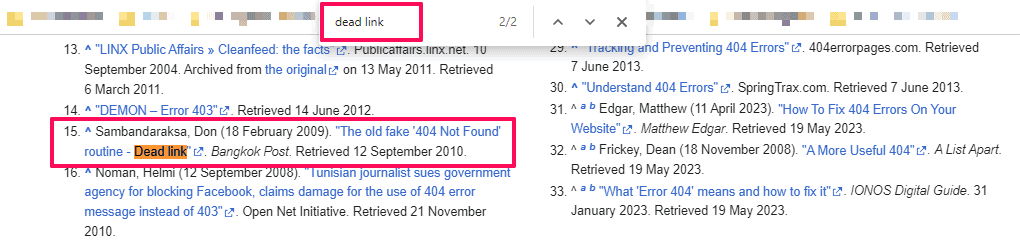
This method is as simple as it gets, but you’ll have to do a little more work on finding the relevant pages.
But it’s there if you need it.
Download my Wikipedia Backlink SOP for a systematic approach to finding opportunities and tracking them properly.
So now you know how to find the broken link opportunities, let’s look at how you can get the actual links for yourself…
Wikipedia Link Building In Action (And How To Do It Yourself)
Now you’re armed with a Wikipedia link building tool – let’s look at a specific example, selected at random – Binoculars.
If I run this through Google you will find a bunch of pages about binoculars that feature broken links:
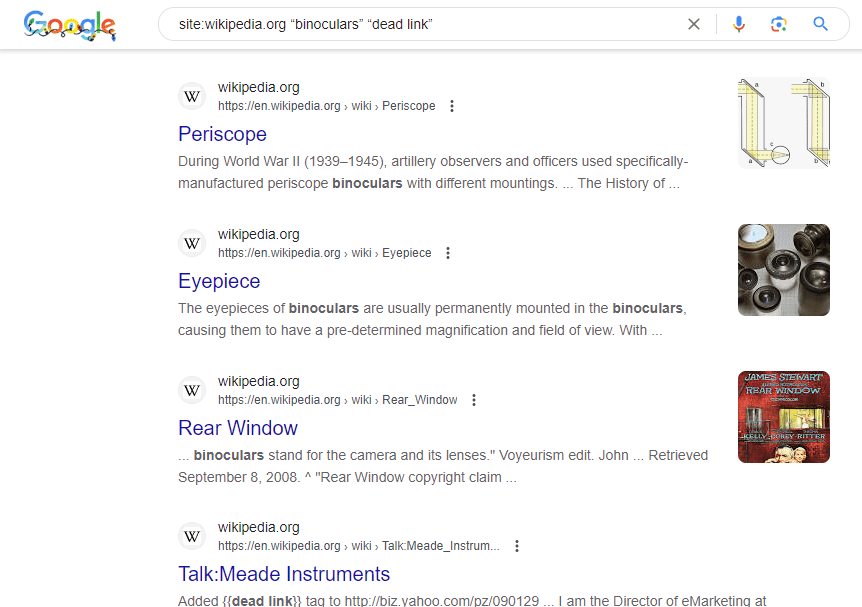
I’m going to choose this option because it’s hyper-relevant to the binoculars niche (based on zero experience with binoculars):

And in the page we can confirm that, yes, it does have a dead link:

Now copy and paste the URL and head over to the Wayback Machine tool.
Copy the link into the search bar and hit “Browse History”:

This will show us what the page used to look like before it was taken down. Have a read of the content to see if it’s related to your website.
When you’re reviewing old content, you need to score each opportunity based on:
- Topical relevance to your site
- Content that matches your expertise
- Traffic potential of the link
Sometimes, you’ll find what looks like a good opportunity, but in the end, it’s not worth the hassle.
Just keep that in mind when evaluating each potential Wikipedia link opportunity.
If it is relevant to your site you either need to:
- Find content that you’ve created which could fill this hole
- Create the content that fits
You can even just rewrite the content that shows up in the Wayback Machine if that really floats your boat.
And if it’s not relevant, keep following these steps until you find something that is relevant.
But let’s say for argument’s sake that it is relevant to your site.
Here comes the really fun part…
Take the dead link and run it through a tool like Ahrefs, Majestic or SERPed to see all of the backlinks pointing to it.
As you can see with this one there are 46 links and 39 domains pointing in its direction:
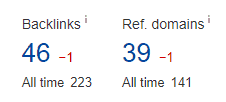
30 or more is a good number of links to have because it means it’s worth the effort. Why?
Because it’s a topic people want or need to link to.
It gives you a lot of options of webmasters to write to (success rates aren’t always high) and it means it’s worth investing your time in creating the content should you need to.
And because this link needs updating, it’s time for you to swoop in and make it happen.
Either create a new page as I mentioned earlier or update your existing content to fit.
Make sure it ticks all of the boxes that a Wikipedia page would need to use this blog post as a reference.
Here’s what to keep in mind:
- Match Wikipedia’s natural tone
- Include current statistics if relevant
- Add real, authoritative citations
- Remove anything that sounds promotional
Remember: Wikipedia is about providing users with accurate, in-depth knowledge – not promoting your site.
Then you want to export the list of websites from Ahrefs that currently link to the dead link and look up all of the contact details. A tool like Hunter can help you with that.
Then you can send an outreach email to each of those to let them know about the broken link and your potential replacement.
If you’re stuck for an email to send to a webmaster you can use my own template below:
Hi [insert webmaster name],
I’m a big fan of your site! I found a broken link the other day and wanted to let you know about it.
The page where the link appears is [insert url] and the anchor text is [insert anchor text].
The broken URL is [insert broken url].
I found a similar page that even has a link from Wikipedia if you want to update the link.
[your website url]
Keep up the excellent work! Thanks!
Keep a record of the Wikipedia link building process. Download the full Wikipedia Link Building SOP here for free.

How To Add Your Own Unique Links To Wikipedia
On your search for dead links you’ll come across some pages that are a real mess. They’ll have been flagged by Wikipedia to be improved but nobody has gotten around to it yet.
These are perfect opportunities for you to add your own unique external links.
For example take a look at this page on language barriers:

The Wikipedia Moderators are just crying out for you to come in and improve that page. And, well…sprinkle it with a few external links for your time.
If you’re running a language learning blog, for example, you could come in and create this page newly. Finding all of the resources you need to turn this page into an encyclopedia page.
You could even rework the content you’ve written afterwards to create a blog post for your own blog, hitting two birds with one stone.
In this section let’s look at how you can capitalize here and generate some wonderful free backlinks for your site.
Creating And Preparing Your Wikipedia Account
Anyone can create a Wikipedia account – it is 100% free.
Just click on Create Account in the top right corner of the site:

There are some prerequisites that are a must at the beginning of any Wikipedia link building campaign.
Once you have created your account, follow this account warmup strategy:
- Day 0 to 4: Don’t do anything to avoid looking like a spammer and getting banned.
- Day 4 to 10: Make at least 10 minor constructive changes to niche-relevant pages
- Day 10+: Start making more major changes to pages.
Your aim is to build a relationship with the platform and gain more advanced privileges.
After day 10?
I recommend going into the Wikipedia article you’ve found and adding citations, cleaning up dead links and using other people’s sites and content.
(Feel free to use my blog to update articles – contact me if you do).
Let’s say you’re aiming for a 70-80% clean up of the page, leaving just enough room to add details from your site in there.
Once those changes are approved, you’re now ready to drop a link to your site on your target Wikipedia article.
Things To Consider Before You Add Your Links
Before we start editing Wikipedia and updating it with our citation/link fix there are a couple of things to think about.
Here’s how to make sure your edits get approved:
- Your content must be 100% factually accurate and verifiable by other sources
- It should be written in a neutral tone, similar to Wikipedia’s style of writing
- Not contain any self-promotion, factual content only
- The content must be VERY relevant to the Wikipedia topic
I cannot overstate how important it is that your links slot naturally into the page!
When you submit the edit, it will need to pass human moderation so you have to take that into consideration.
If you’re just throwing out a link to a site with poor quality content that has nothing to do with the required citation or dead link fix it is not going to get approved.
So if you don’t have relevant content on your site to use as a citation/reference already then put some time and effort into creating it.
Basically just because you have a blog post about learning Chinese, it doesn’t mean you get to drop it anywhere.
Editing An Article To Insert Your Wikipedia Backlink
Editing an article on Wikipedia is super easy, just find what you want to edit and click on the edit link.

Once you have done that you will be taken to the Wikipedia editor.
There are a couple of Wiki markup basics you need to know about editing content:
- For citations (links), use <ref> tags
- Follow proper citation formats with all the required fields
- Always double-check and preview changes before submitting
With that in mind, make sure you are logged into your account then fix the dead link or add your citation as required:

Once you have done that preview the changes and make sure everything is working ok.
If you are happy with it fill out the edit summary with your changes and click on save page:
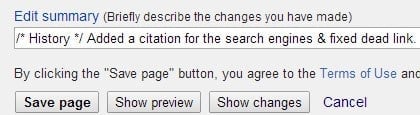
Now just sit back and wait to see if your change is approved! If you spent time creating your account with a bit of history (they log your IP address) you won’t have a problem here.
Simple, right?
For the full Wikipedia link building system, download my free Wikipedia Link Building SOP. It shows you step-by-step how to build as many Wikipedia backlinks as you want.
BONUS: Learn how to build powerful edu backlinks & gov backlinks.

Wrapping It Up
There you have it – The complete unlimited Wikipedia link building playbook!
Not so difficult, right?
The more changes you make, the stronger your relationship with the platform will be. That means you can add more links.
It’s like a compounding link building strategy that works!
Get started now:
I recommend adding a link to your site for every 10-12 citations you add on a page. That will keep everything looking above board for the moderators.
The goal is to get Google to sit up and notice that a trusted website like Wikipedia links to your site.
More trust = higher rankings for you!
Just remember that there are three types of opportunities you should be looking for:
- Dead links: Marked by Wikipedia these links are no longer on the internet
- Broken links: These are the links of third party sites that were also linking to that page
- Unique links: Your chance to place your own links in Wikipedia pages
Ready to implement this strategy right away? Download my complete Wikipedia Link Building SOP – It has everything you need to implement these tactics at scale.
Building links with Wikipedia is effective and comes with lots of benefits outside of just having a link on their site, including relevant traffic and backlink opportunities with other sites.
There best part?
It’s a completely white hat SEO strategy that improves the internet and the Wikipedia platform by fixing broken links. It doesn’t get much better than that!
Let me know how you get on with this strategy in the comments and if you need help with link building in general you should take a look at:
- My link building services post
- My white label link building service post
Next:
I want to show you how to use Gmail for link building.

Frequently Asked Questions
You Might Also Like





What Are Your Thoughts?
1,382 Responses



Very instructive post thank you!
No worries Brice
Thank you for information ..nice article on backlink
Thanks Arvind
Supper good information! Thank you for sharing. I will keep reading your articles.
Great news Sharon, see you again soon.
Pthank you this is very helpful article
Great news!
Great article, but this is still somewhat complex for me. I’m studying to be a great SEO proffessional in the future
Thanks Wilson.
helpful keep posting
Will do, thanks.
Really thanks i have created some backlink from wikipedia and this article help me allot thanks buddy
No problem, glad you put it to good use!
nice and amazing postI will use in my site
Please do!
I knew that it’s very difficult to get backlinks from Wikipedia. But after reading this post I feel I can do it by following your guidelines. I will share with you if I could get a backlink from Wikipedia.
Hey Sunil, yes let me know how you get on!
Nice and very informative.
Thanks, hope its useful.
Thank you.very Informative post Must try for my website
Hey Priya, no problem. Yes you must!
Wow… It really worked for me, Wikipedia has a really power-packed backlink.Thanks for the post, well written and user-friendly.I loved it…
Great news Roshan!
useful information
Thanks Jay
i was need this article, now i can also submit my link on wikipedia , thank you buddy,. nice article
Hey Karan, glad it helped!
Thank you, Matthew! I’ve been looking for all kinds of information on the wikipedia backlinks since it’s such a powerful way to get backlinks. It seems like a lot work to get it done properly, but I will give it a try!
Hey Danava, if you’re gonna do something you might as well do it right!
I have been adding some backlinks for my website and this has been useful, to be frank i have got a lot of learning to do.
Well you are in the right place to do that 🙂
Hello Sir,This topic is too much helpful for new bloggerMany thanks.
No worries, thanks.
Thankyou, very informative post, I will definitely try this for my website
No problem Peter, good luck.
Hunter’s tool is very useful and interesting, but also creating an email addresses data base requires some verification. That’s why I highly recommend and email validation services like https://www.zerobounce.net which is one of the best.
Thanks Maririta.
Thank-You Sir For Information. This is Really Very Helpful and Important For creating Backlinks.
Thanks Nandani, best of luck with your backlinks
Thanks for sharing this. good information for me
No problem, you’re welcome
Thanks for the great article Matt!Its really helpful for me as a new blogger as I was looking for a way to create backlinks on Wikipedia & some other high authority sites & you gave me three. that’s awesome.
Great news, thanks Nayem. Best of luck
very useful information
Thanks Suresh
Very well written post. It will be useful to anybody who usess it, as well as myself. Keep doing what you are doing – looking forward to more posts.
Thanks very much, I hope it proves useful 🙂
Thanks for this post. My site is new & you just told me all I needed to build valuable links into the site. I like the aspect of my close competitor, guest posting hardly work on my niche, I started working hard on some forum in Nigeria, though yet to see the impact.-Shubham
Hey Shubham, no problem and let me know how you get on 🙂
Thanks for the great article Matt!Its really helpful for me as a new blogger as I was looking for a way to create backlinks on Wikipedia & some other high authority sites & you gave me three. that’s awesome.
Great news!!
I have been searching that type of articles ..which teach me how to get backline from wekipediaAnd high authority domain site thanks for it you solve my problem really ….
Glad to have been able to help 🙂
Hivery informative post, will surely try for my website
Good luck!
I really appreciate you taking out time to explain in details how we can get backlinks from Wikipedia. I am not a tech savvy person so I always need a step to step guide to the smallest details and this has been super easy to understand. I am off to give it a try. Thank you
Hey Christiana, no problem, best of luck
Yeah. Its Amazing . I got very Useful Information Through this Article
Fabulous….lots of info to parse through here, but would like to give some of these ideas a try.
Please do
this blog is amazing in teaching great stuff thanks and keep posting
Hey, no problem
Cheers 🙂
No problem 🙂
Great article Matt!I haven’t tried Wikipedia for backlinking yet, but I’m eager to do so now.I used Ahrefs and noticed my competitors getting links from some Wikipedia pages. I want some of that link juice too!
Hey Alvin, sounds like you have a good opportunity there 🙂
Thanks a lot dear sir for guidance.
No problem, thanks for reading
i tried this method and it worked for me but i also applied my own idea to it.
Hi Derek, glad you tried out this method. I’d be interested to hear what your idea was
Thanks Mathew. I have learned something new. I have even bookmarked your site. i found it so interesting and educating.
Awesome, hope to see you again soon
Very useful information. Thanks so much
Hi Pramod, no problem
Very useful information. I will try but it doesn’t sounds like it’s going to be fast and easy 😉
Thanks Marcelle, well only one way to find out…. let me know how you get on
Hey, I’m new to this Backlinking strategies and I love to read your posts.I’ve been finding a way to get backlinks from most of the Authority sites.Wikipedia is one of them.Thanks for this extremely valuable info. Hope it helps me to create good Backlinks for my blog.
Hi Rushikesh, glad you found the info valuable, now it’s down to you to put it to good use
Pretty great post. I simply stumbled upon your blog and wished to say that I’ve really enjoyed browsing your weblog posts.In any case I will be subscribing to your rss feed and I am hoping you write again very soon!
Thanks very much and i guess, watch this space
Read this before.. now time to start doing it.. cheers mate again..
Hi Shaun, no time like the present
Thanks,Really helpful it was truly a article with free tool suggestion, you’ve helped me in getting the links, I truly needed for my first blog post.
Hi Steven, glad it helped and good luck with your first blog post!
I have never done backlinking in wiki sites before but will try sure !
Please do, thanks for reading
Couple of days ago my website lost their positions due to google changed. Now I’m searching for ways to restore them and this article is one of the useful info I’ve found on the subject.
Glad this has been of use to you.
Thanks for sharing such a good thought, paragraph is nice, thats why i have read it fully
Glad you liked it
Hi it’s me, I am also visiting this website on a regular basis, this site is actually fastidious and the visitors are truly sharing good thoughts.
Attention to detail is key! Thanks for coming back again
Hi ankit, thanks for this wonderful article. Fot the last some days, i am looking for perfect link building techniques for my blog and i finally found it here. Keep publishing new tips and tricks!
Glad my tips and tricks have been of use!
Thanks for giving good information on Backlink with Wikipedia
No problem
I used to be suggested this website by my cousin. I’m noot certain whether or not this publish is written via him as nobody else recognize such special about my trouble. You are amazing!Thank you!
Cheers Pearson
It is in reality a nice and helpful piece of information. I’m glad tha you simpl shared this useful information with us.Please keep us up to date like this. Thanks for sharing.
No problem