














































 Cloudways Review

 Subscribe to my YouTube
 Join My Facebook Group
 Connect on Linkedin
 Free SEO Tutorials
 SEO Case Studies
 Links That Rank


Are you tired of hosting headaches?
Slow loading times, complicated server management, and overpaying for features you don’t need or use.
Here’s the good news…
Cloudways offers a simple pay-as-you-go model while providing its users with the best cloud platform technology money can buy.
I ran multiple test sites, checked performance data, and compared it to other providers I’ve used.
Cloudways has fast hosting speeds, easy management, and flexible pricing that could solve every hosting issue you’ve ever faced.
But it’s definitely not for everyone…
Does Cloudways live up to the hype?
In this Cloudways review, I’ve broken down everything I found after testing the platform extensively and comparing it to the other top hosting providers.

What Will I Learn?
What Is Cloudways?
Cloudways is a managed cloud hosting platform that offers premium pay-as-you-go hosting services for less.

You can access premium hosting platforms like:
- Digital Ocean
- AWS
- Google Cloud
…without paying massive fees:
Let me explain:
Standard hosting platforms simply rent you space on a server using their hardware.
But Cloudways is different…
You choose the cloud hosting you want based on:
- Your website performance
- Your budget needs
Cloudways then adds their own technology and management platform on top.
The reason that Cloudways has become popular is because you get access to top hosting performance without needing to be a server expert.
And you only pay for what you need.
While it’s not as simple to set up as other managed hosting platforms, Cloudways offers plenty of tutorials and documentation to help you.
They also provide premium service as an extra add-on if you need it.
This makes it great for agencies, freelancers, and business owners who want premium hosting without all the complexity.

A Closer Look At Cloudways Pricing & Plans
Looking for quality hosting without all the fees?
Many hosting providers overcharge or provide basic shared hosting that’s slow and unreliable. With Cloudways, you only pay for the resources you use.
Here is an overview of Cloudways starting prices for the different cloud providers:
| Cloud Provider | RAM | Processor | Storage | Bandwidth | Starting Price |
|---|---|---|---|---|---|
| DigitalOcean | 1GB | 1 Core | 25GB | 1TB | $11/month |
| Vultr | 1GB | 1 Core | 25GB | 1TB | $14/month |
| Linode | 1GB | 1 Core | 25GB | 1TB | $14/month |
| AWS | 1GB | 2 Core | 20GB | 2GB | $20.56/month |
| Google Cloud | 1.75GB | 1 Core | 20GB | 2GB | $37.45/month |
You can start with a free trial (DigitalOcean, Vultr or Linode only) to test the service.
After that, you’ll be billed hourly for the resources that you use. This lets you scale your server up or down as needed.
There are no contracts, and you can cancel anytime.
Right off the bat, it’s easy to see the flexibility that Cloudways offers users!
It takes about 5 minutes for Cloudways to set up the server.

Then, you’ll get access to the Cloudways hosting management platform.
This gives you basic hosting features like-
- Staging sites
- Backups
- Server optimisation
- SSL certificates
- One free website migration
And more! While the plans are not as simple as traditional hosting, they strike a good balance between performance quality, cost and usability.

Cloudways Best Features
Cloudways offers a range of features that set it apart from other hosting providers.
They focus on making hosting easy while still giving you the powerful tools you need to run your website or app.
Let’s break down some of the top features you can expect from Cloudways.
Ease Of Use
The truth is that a lot of cloud hosting platforms feel like you need a PhD in computer science just to get started…
But Cloudways is different.
Let me show you exactly how easy it is to use:
Launching a server is dead simple. You literally just:
- Pick your cloud provider
- Choose your server size
- Click Launch

That’s it! No complex configuration screens or technical mumbo-jumbo to deal with. It’s a simple and efficient process that anyone can do.
What’s more?
Once you’re in, the dashboard is clean and straightforward.
Everything is exactly where you’d expect it to be.
This makes adding everything you need to launch your site super easy.
- Want to scale your server? One-click.
- Want to add SSL? One-click.
- Need a staging site? One-click.

You get the point!
This is the kind of simplicity that every website owner dreams of.
But there is a catch…
While Cloudways does a great job of simplifying the cloud hosting side, it’s not as simple as traditional cPanel hosting.
You’ll still need to learn their platform and understand basic server concepts.
For beginners, this can be frustrating. The learning curve for users who have never used a hosting platform can feel steep.
The good news is that Cloudways has published tons of tutorials and videos online that cover their platform in-depth.
If you get stuck, you can always refer to them!
Performance
Performance is one area where Cloudways focuses.
I put Cloudways through a series of intense speed and performance tests against other major WordPress hosts.
The results were interesting…
- 1.74-second execution time
- 574 queries per second
- 1582ms average page load (Pingdom)
- 1.85 second load time (GTMetrix)
I’ll be honest – This doesn’t exactly set the world on fire in terms of performance.
In my fastest WordPress testing challenge, Cloudways essentially ended up slightly above the middle of the pack.
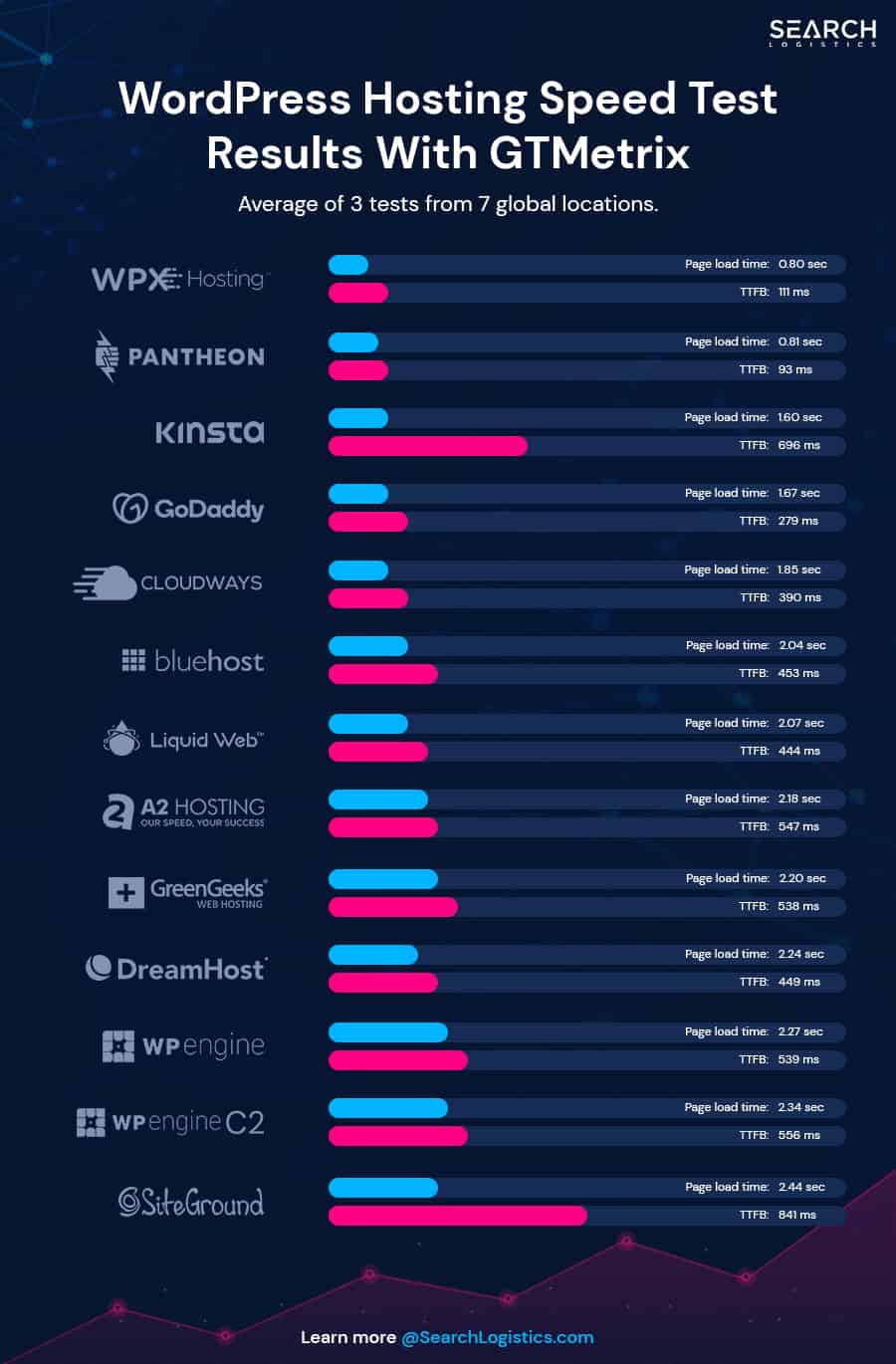
Keep in mind that I was using the DigitalOcean plan, which is the most basic cloud server Cloudways offers.
But at the end of the day, this is their main product and the plan that most users will start with.
The performance wasn’t bad, but it certainly isn’t setting any world records either.
But here’s where it gets interesting…
Cloudways runs their “ThunderStack”, which is a fancy name for speed optimisation technology.
Thunderstruck consists of three main tools:
- Varnish: Saves copies of your pages so they load instantly
- Memcached: Makes your database run faster
- Redis: Handles complex data storage super efficiently
This is the same tech stack that powers some of the biggest sites on the internet, such as Facebook, X, and Amazon.
The difference is that Cloudways gives you all of this without hiring a team of engineers to set it up.
My main point here is that Cloudway’s performance delivers consistency and reliability. You get good performance at a fraction of the price you would pay other premium hosting providers.
And unless you have a large ecommerce site or blog that gets tens of thousands of visitors a month – You’re probably not going to notice the difference.
That means when you compare the hosting performance vs. the cost of Cloudways – the value for money is very good.
Security
Security is one of those things you just can’t compromise on.
Thankfully, Cloudways doesn’t either.
While most hosting companies promise the earth with security, very few actually deliver.
To start with, Cloudways has all the standard security stuff you would expect-
- Regular security patches
- Dedicated firewalls for each account
- 24/7 server monitoring
- Bot protection
- Free SSL certificates

But there is one unique feature Cloudways offers…
It’s called “Auto Healing”.
This is essentially a tool that ensures your server is always running at optimum. If any issues arise on the server, “Auto Healing” kicks in.
It automatically restarts crucial server components like MySQL, Apache, NGINX, or the entire server itself.
Think of it like having a server mechanic on duty 24/7.
The moment something starts to go wrong, it jumps in and fixes it before you notice a problem (or have to contact support).
And if you’re paranoid about security like me, Cloudways has a few other robust security features as well-
- IP whitelisting – Only let specific people access your server
- Two-factor authentication – Must have for extra security in case your password is stolen
- Real-time incident monitoring – Catches some threats as they happen in real-time

There’s only one significant downside to Cloudways security features…
Unlike hosts such as WPX or Kinsta, they don’t include malware cleanup in their standard plans. It’s an extra add-on that you need to pay for.
If your site gets hacked, you either pay extra for cleanup or handle it yourself.
In my opinion, malware cleanup and protection should be a standard feature for host providers.
But if you think about it…
It makes sense based on their “pay for only what you need” model.
Just be aware before you sign up!
Choice
Choice is one of the areas where Cloudways shines.
Pick from 5 different cloud providers depending on your site and needs-
- DigitalOcean
- Vultr
- Linode
- Google Cloud
- AWS
You can customise each provider plan based on the amount of server size, processing power, bandwidth and RAM you need.

Customising your provider and plan is just the beginning.
You also choose-
- Your server location (pick from 65+ global data centres)
- Which version of PHP to run (5.6 to 8.1)
- What apps to install (WordPress, Magento, custom PHP etc)
- Your backup frequency
- Whether to enable server monitoring
- SSL certificate settings
But here’s the part I love most…
With your average website host, you pick a plan, and they will migrate your site over. What happens if the performance isn’t what you expected?
Short answer – You’re stuck.
That’s not the case with Cloudways.
Let’s say you start on a DigitalOcean plan with your server in New York. After setting up your site, you realise the performance isn’t meeting your needs.
You’ve got two options:
- Scale up your current server resources
- Switch to a different cloud provider completely

You’ve got options!
You could move from DigitalOcean to Google Cloud with a different data centre location. This whole process would take just a few clicks.
What’s more?
There’s no contract locking you in. You can switch providers, change server locations, or upgrade your resources whenever you want.
This is perfect for growing websites…
As your traffic increases and you need more power, you can scale up without switching hosts or dealing with migrations.
The bottom line is that Cloudways gives you the flexibility to adapt your hosting as your site grows.
That’s something most traditional hosts simply can’t match.
Collaboration
Managing a team of developers or handling multiple client sites?
Cloudways has a nice set of collaboration tools that lets you:
- Add team members to your account
- Set custom access permissions
- Create different projects
- Handle client billing separately
- Transfer site ownership

Think of it like having a virtual office with multiple rooms. You can give clients, VAs, and developers access based on what they need to do their jobs.
You can even give clients access to their own individual hosting accounts without giving them access to other sites you manage.
Now, the truth is that these features are found in lots of hosting providers.
But I think Cloudways does better than most at allowing access to very specific parts of the hosting dashboard.
It’s also managed through a simple interface where you can easily control who sees what.

If you run an agency or manage multiple sites with a team, the collaboration features will make your life much easier.
Control
There’s nothing worse than the feeling that you aren’t in control…
With hosting, you get that feeling a lot.
Cloudways does a good job of giving you the control you need in a user-experience-focused way.
Let me explain:
To start with, you get complete server access to everything you need-
- Direct database management
- Complete file access through SFTP
- Custom DNS controls
- Full backup management
- Server scaling options
What I love most is the ability to scale up your server resources in a matter of clicks.
For example, let’s say your website is close to exceeding its monthly bandwidth. You can easily add more in minutes (or set it to automatic).
This differs from other providers who will make you go up another plan tier, which can cost way more money (often double).
It again highlights the benefit of only paying for what you need.
And the nice part is the user experience that Cloudways offers. You don’t need a computer science degree to use the platform.
While it might take a minute to get used to, Cloudways has made it as simple as possible to be in control of every aspect of your website and hosting.
You don’t necessarily need a tech expert whenever you want to change something.
Integrations & Addons
Cloudways offers a bunch of optional add-ons to customise your hosting tech stack-
- Enterprise Cloudflare CDN ($4.99/domain/month) – Powerful CDN with Edge Caching and cheaper than getting it directly from Cloudflare
- SafeUpdates ($3/app/month) – Automatically tests WordPress updates before applying them
- Malware Protection ($4/app/month) – Basic malware scanning and removal
- Rackspace Email ($1/mailbox/month) – This is a solid email solution, but most hosts include email for free
- Advanced Support ($100/month) – Support that includes help with things like plugins, themes, troubleshooting, site performance optimisation and more
- DNS Made Easy ($0.50/month/domain) – Essentially a faster way to manage your DNS

The big standout here is the Cloudflare CDN integration. It’s much cheaper to purchase it through Cloudways than Cloudflare.
It gives you enterprise-level caching and smart routing – Which is a no-brainer if you’re serious about speed.
It will definitely improve your website performance and speed load times.
What about the rest of the add-ons?
SafeUpdates is an interesting feature that many hosting platforms don’t offer. Still, you’ve got to use it enough to make it worth it.
The other add-ons are nice to have, but you can find better alternatives elsewhere for less.
We will discuss customer support a bit later on…
Monitoring
Don’t underestimate the importance of website monitoring.
Cloudways provides 24/7 server monitoring in all plans.
Many other hosts also offer monitoring features, but not to the extent and quality that Cloudflare does.
Monitoring includes-
- Server uptime and response times
- CPU and RAM usage in real-time
- Disk space and bandwidth consumption
- Traffic spikes and bot attacks
- Database performance

What I like here is the alert system they have in place if anything goes wrong.
Alerts can be anything from if your server is running low on RAM or if you receive a sudden unnatiural spike in traffic.
Think of it like having a security camera watch your website.
You can spot problems before they become major issues.
While other hosts make you pay extra for basic monitoring, Cloudways includes everything in their standard dashboard.
That’s a nice benefit to have!
Support
Support is an area where Cloudways could improve.
It’s not bad, but there are a lot of limitations.
Let’s start with the customer service speed…
I contacted support through live chat, and the response time was 43 seconds. That is very fast!

You will have to go through the AI bot each time. But, the good news is that support is available 24/7, so you can contact them anytime.
The support team members are friendly and knowledgeable. They are very solution-oriented and seem to care about any issues raised.
Support is available through-
- Live chat
- Support tickets
- Knowledge base
Keep in mind that Cloudways doesn’t offer phone support.
The knowledge base and community forums are extensive, so if you want to problem-solve yourself, you have a wealth of resources about Cloudways at your fingertips.

That’s the good news… Now for the bad.
There are two areas where Cloudways support really falls down:
- Site migrations
- Advanced support
The first site migration is free, but you have to pay $25 for each site after that. Many hosting providers (even cheaper ones) include unlimited site migrations for free!
Do you have a portfolio of sites to bring over to Cloudways?
The fees can add up quickly.
The second issue is the level of support.
If you want any advanced support for things like-
- Plugins
- Themes
- Troubleshooting
- Optimisation tips
Then, you’ll need to buy the Advance Support Add-on for $100/month.

That’s pretty steep!
The included customer support is only for things related to the Cloudways products and hosting. Outside of that, you’re probably on your own.

Cloudways Pros & Cons
Cloudways offers a range of attractive features that make it stand out in the hosting market.
But no platform is without its flaws.
To help you make an informed decision, I’ve listed all the pros and cons I found when using Cloudways:
Pros
- Pay-as-you-go pricing starting at just $11/month with no lock-in contracts
- Cloudways performs great in speed tests compared to other premium WordPress hosts
- Choose from 5 cloud providers and easily switch between them if you’re unhappy
- ThunderStack optimisation (Varnish, Memcached, Redis) comes pre-configured
- Advanced features like staging sites, Git integration, automated backups, and Auto Healing servers are included
- Excellent team/client access controls perfect for agencies, freelancers and site managers
- Customise your plan to balance cost vs performance and only pay for what you need
Cons
- Monthly costs can be unpredictable because of the pay-as-you-go model
- Slight learning curve for the control panel if you are used to using a traditional cPanel
- No phone customer service is available.
- Basic support is more limited compared to other premium hosts.
- Email isn’t included – It costs $1/month per address through Rackspace.
- There’s no built-in malware removal
Cloudways Alternatives
While Cloudways is great, it’s not perfect for everyone.
Here are three other alternatives to Cloudways that I’ve used so you can see how they stack up.
Rocket.net
Rocket.net takes a different approach to hosting.

Their standout feature is the enterprise Cloudflare integration (worth $500/month) included with every plan.
This gives you incredible speed and security features that Cloudways can’t match.
Here’s where Rocket.net differs from Cloudways:
- Full malware removal included
- Everything is fully managed
- Premium support as standard
- True beginner-friendly platform
- Cloudflare enterprise integration
Plans start from $30/month for 1 site, which is much more than Cloudways.
The prices also rise significantly in the higher plan tiers on Rocket.
Cloudways, you pay extra for things like malware protection and advanced support, and Rocket.net includes everything in a straightforward package.
Rocket.net is best for users with a bigger budget and who want premium hosting with everything included – but you’ll also pay the price.
WPX
WPX absolutely crushes it when it comes to speed.

Our test results show they’re one of the fastest WordPress hosts out there:
- 357ms page load time (Pingdom)
- 0.60 second response time (GTMetrix)
- 111ms TTFB (GTMetrix)
Unlike Cloudways, they include everything you need in one package, such as free malware cleanup, unlimited site migrations, and daily backups.
You also get DDoS protection.
WPX plans start at a similar price point to Cloudways, but you don’t have to pay extra for basic features.
While Cloudways gives you more control over your server, WPX focuses on making everything simple.
WPX is better for beginner users who want a no-nonsense WordPress host that works out of the box.
Check out our complete WPX hosting review to learn more.
Kinsta
Kinsta is definitely a premium hosting provider and more of a direct competitor with Rocket.net.

They also scored high in our fastest WordPress hosting test-
- 835ms page load time (Pingdom)
- 1.60 second page speed (GTMetrix)
- 696ms TTFB (GTMetrix)
The big reason for Kinsta is the completely managed WordPress hosting and the best customer support you can get.
Their pricing starts higher than Cloudways, but you get a true premium managed WordPress experience.
While Cloudways gives you more server flexibility, Kinsta focuses on providing a polished platform with everything built in.
Kinsta is a good choice if you’re running an agency or need a more sophisticated development environment.
Want to learn more about Kinsta? Read my complete Kinsta review.

Wrapping It Up
Here are my final thoughts…
Cloudways is a solid choice for good cloud hosting without the premium price tag.
Their flexible pricing and ability to switch between 5 cloud providers give you incredible control over your hosting setup.
The “ThunderStack” optimisation and “Auto Healing” servers mean you get reliable performance without needing to be a tech expert.
If you run an agency, manage multiple sites or only want to pay for what you need, then Cloudways is a great hosting solution.
Get your 3-day free trial here.
But if you’re a beginner looking for a low-cost solution that works with minimal setup required, I think WPX Hosting is better.
Kinsta and Rocket.net are best for users with a bigger budget who want a fully managed hosting experience.

Frequently Asked Questions
 Cloudways Review
 Cloudways Review
- Review Of: Cloudways
- Reviewed By: Matthew Woodward
- Rating:

- Updated On: Feb 11, 2025
Summary:
Cloudways has fast hosting speeds, easy management, and flexible pricing that could solve every hosting issue you’ve ever faced.
View More Details





